An Azure network connection is worth testing when an application requires a customer-managed network path. My separate lab reached a useful failure: the ANC object existed, but its health check did not pass. That result tells us more than a polished creation screenshot would, provided we do not invent the fix.
The test boundary
The test used a Visual Studio Enterprise Azure subscription and rg-w365-anc-lab. An isolated East US VNet, vnet-w365-anc-eastus-lab, contained the private subnet snet-cloudpcs. A temporary NAT gateway and Standard public IP supplied outbound access during the test. The ANC, anc-w365-entra-eastus-lab, used Microsoft Entra join and that subnet. The existing working Enterprise Cloud PC stayed on its Microsoft-hosted network and was not moved.
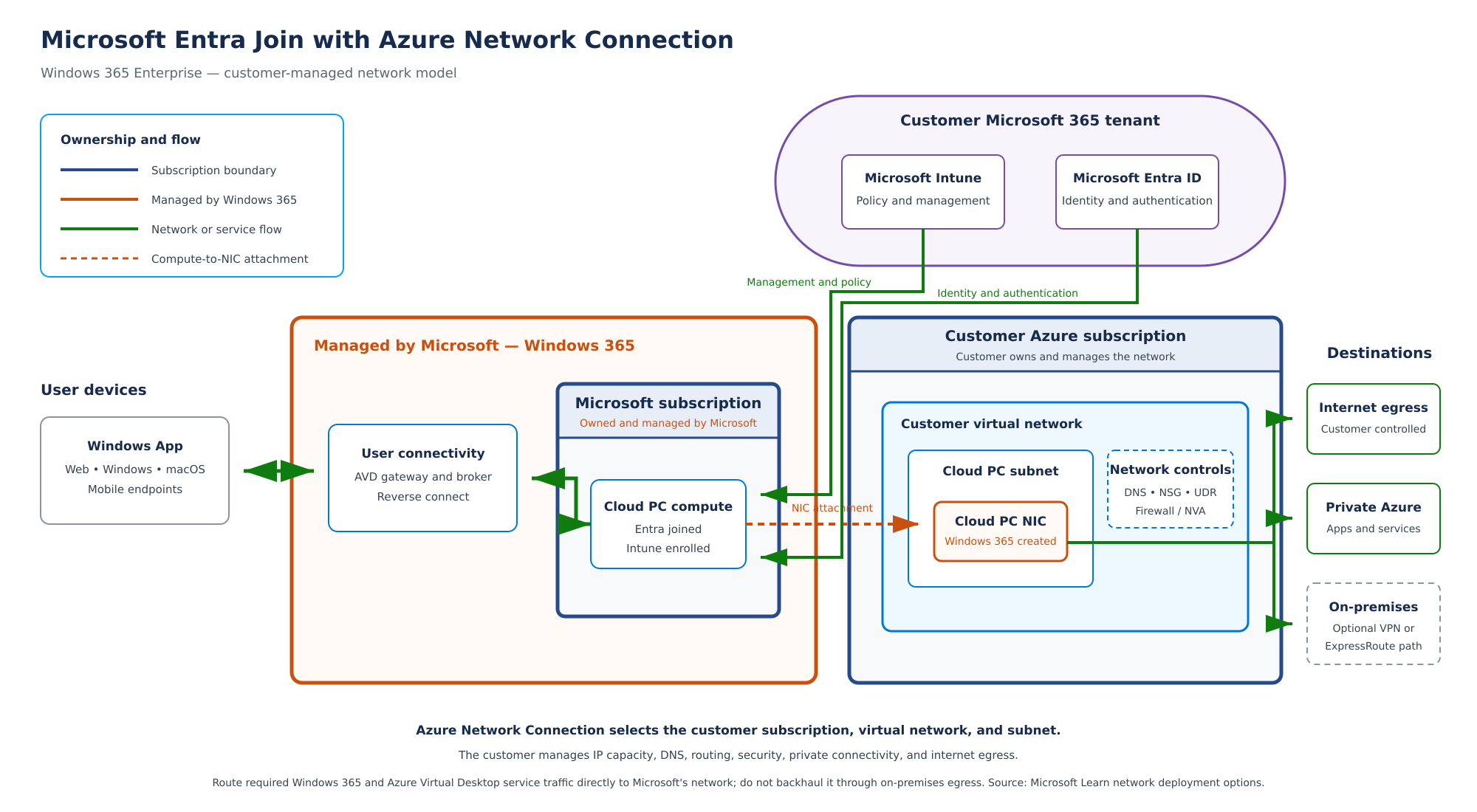
The diagram below shows the intended Entra join ANC path. It is an architecture drawing, not a screenshot of a healthy connection. The draw.io source is editable.
The October 1, 2026 health result failed a check involving *.infra.windows365.microsoft.com:443. That is the endpoint pattern in the observation, not a confirmed diagnosis of DNS, firewall, NAT or routing. A health failure blocks a credible claim of successful ANC provisioning. The detailed lab record keeps the status current.
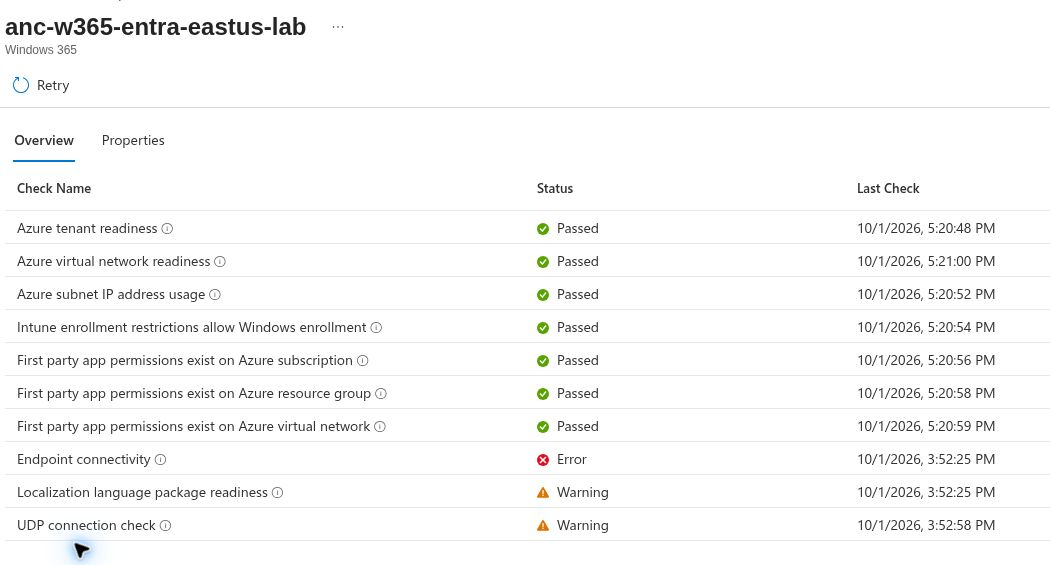
Reading the result: the check did not pass. The screenshot identifies an endpoint pattern and port. It does not tell us whether DNS, a route, firewall, proxy or NAT was the root cause. Preserve that uncertainty in a troubleshooting write-up.
How to investigate this case
- Open the ANC health detail in Intune and copy the exact check name, endpoint and timestamp into a private lab log.
- Compare the VNet/subnet, DNS server setting, effective route and outbound path with Microsoft's ANC overview and network requirements.
- Check whether the required name resolves and TCP 443 traffic can follow the approved egress path. Inspect DNS, network security rules, route tables, firewall or proxy policy and NAT association as applicable. Do not infer which one failed solely from the endpoint pattern.
- Change one suspected cause at a time and run the ANC health Retry action. Save both the old and new result with time and configuration change.
- Only after all relevant checks pass should a separate pilot policy and user test this ANC. Keep a restoration plan before changing a working Cloud PC's assignment.
The investigation steps are a procedure; I did not capture a successful retry. After this attempt, the temporary NAT gateway and public IP were removed, so do not assume paid egress infrastructure remains available. The isolated VNet/subnet and failed ANC record are distinct from the removed resources. Check current Azure resource and billing state before any new test.
| Resource or test | Recorded result |
|---|---|
| Entra join ANC | Created; health checks failed |
| Outbound endpoint check | Error observed for the documented infrastructure pattern on TCP 443 |
| Temporary NAT gateway and public IP | Removed after the lab |
| Existing Microsoft-hosted Cloud PC | Kept in place; no network move performed |
| Fresh Cloud PC using this ANC | Not provisioned or validated |
The October 4 egress retry record gives the precise observations and cleanup. Do not rebuild paid Azure egress just to recreate a screenshot without a test plan and a cleanup time.
What counts as completion
A healthy ANC is the first checkpoint, not the last. The later checkpoints are a policy that uses it, a newly provisioned test Cloud PC, a successful user session, expected private application access and documented cleanup. Until those results exist, label this as a diagnosed boundary and an open lab, not a working customer-network deployment.
Next: turn the pilot into an operating service.