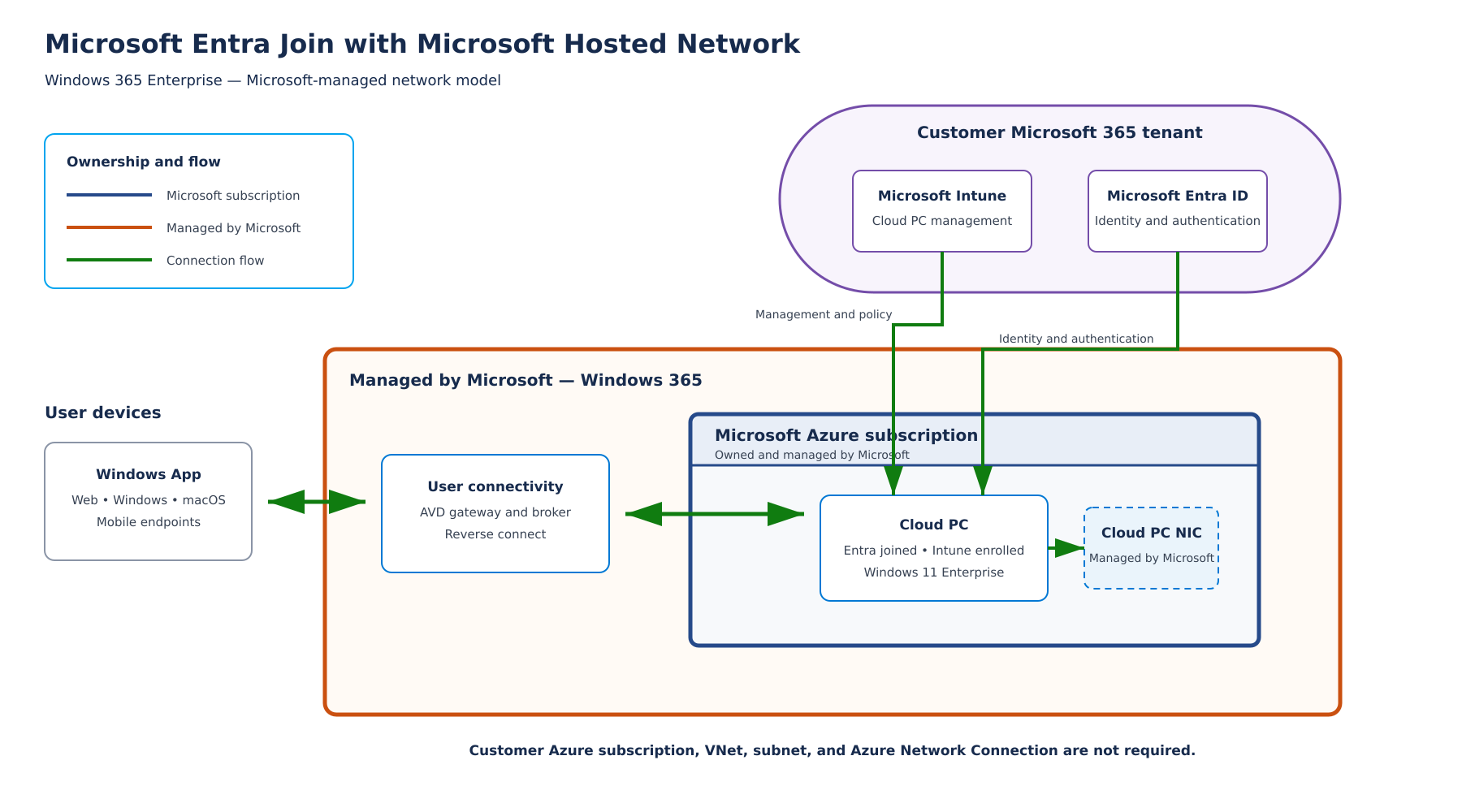
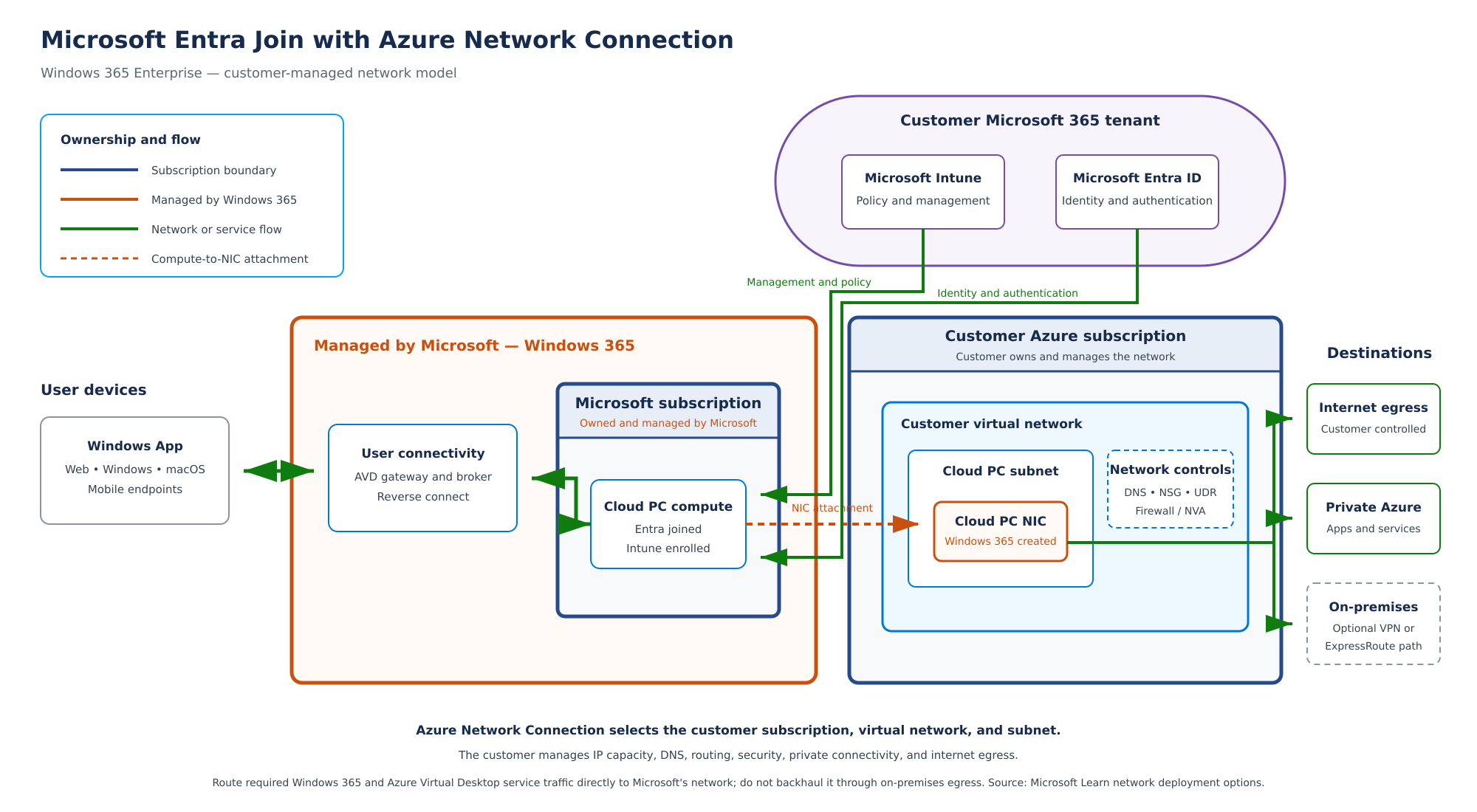
Make the identity and network decision before you create a provisioning policy. It determines which dependencies must work during provisioning and which team owns a failure. An Azure network connection (ANC) attaches the Cloud PC's network interface to your virtual network; Windows 365 still provisions the Cloud PC in a Microsoft-hosted subscription.
Two decisions, not one
| Question | Simple first pilot | Use the other route when |
|---|---|---|
| Device join | Microsoft Entra join | An application or management dependency requires hybrid join and you have healthy AD DS, DNS and line of sight. |
| Network | Microsoft-hosted network | A documented need requires customer VNet routing, private access, custom DNS or network controls. |
These choices are related but distinct. Microsoft Entra join can use an ANC. Hybrid join needs additional directory and network planning. See Microsoft's deployment options and identity guidance for supported combinations and current requirements.
Microsoft-hosted path
For the first exercise, choose Microsoft Entra join and a Microsoft-hosted network where it meets your requirements. Select the geography or region options offered by the current provisioning wizard. Test application reachability from the Cloud PC; do not infer that a private application works because the desktop opens. A working Cloud PC with this path can stay in place while you test an ANC separately.
ANC path
Before creating an ANC, record the subscription, resource group, VNet, dedicated subnet, address capacity, DNS resolvers, routes, outbound connectivity and the people responsible for each. Check ANC requirements and network endpoints. The ANC health checks report whether the connection is ready for provisioning. A created object is not the same as a healthy connection.
My isolated East US Microsoft Entra join ANC lab used a VNet and private subnet. The health check later reported a failure for an outbound Windows 365 infrastructure endpoint pattern on TCP 443. The exact host and root cause remain unproven. I removed the temporary NAT gateway and Standard public IP after the test and did not move the working Microsoft-hosted Cloud PC. The network use case and validation log keep the procedure and observed result separate.
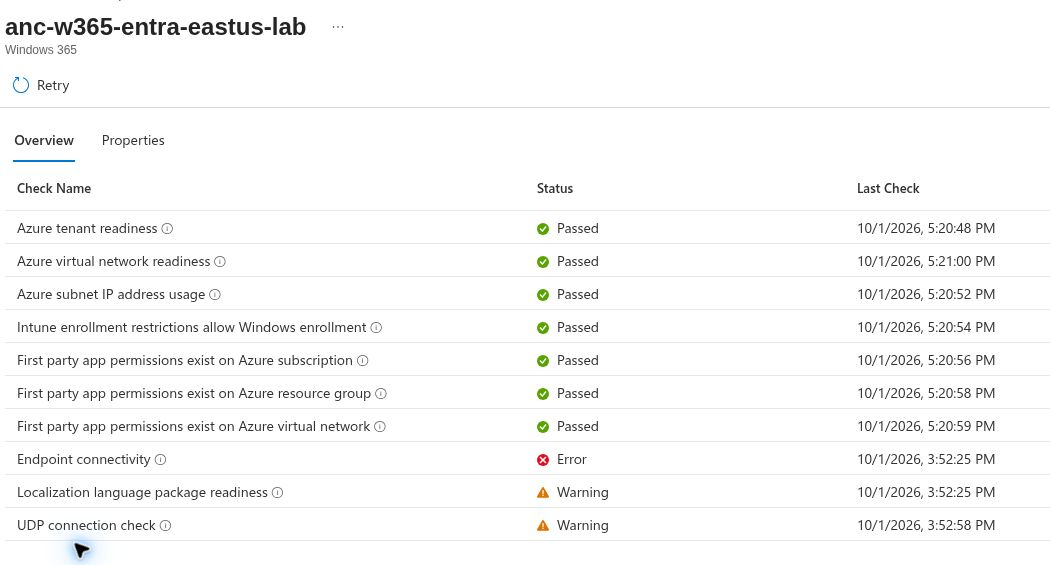
The editable architecture diagrams accompany the Microsoft-hosted and ANC descriptions. Compare their paths with the linked Microsoft documentation before adapting them to your tenant.
Two editable network diagrams
The first diagram depicts the Microsoft-hosted network path. Its draw.io source is editable.
The second diagram depicts Microsoft Entra join with an ANC to a customer VNet. Its draw.io source is editable. The drawing explains the supported topology; it is not a claim that my failed ANC health test provisioned a Cloud PC.
Hybrid join: a separate provisioning exercise
This is the third topic in the ten-topic reading path. It is a procedure, not a completed hybrid lab in my tenant. My existing Enterprise Cloud PC is Microsoft Entra joined on a Microsoft-hosted network. The separate Entra join ANC test failed health. Neither observation proves that AD DS, hybrid registration or a hybrid ANC works here.
1. Prove the directory path first
Microsoft Entra hybrid join starts with a Windows Server Active Directory domain join. The device is then registered in Microsoft Entra ID through the organization's hybrid join configuration. A hybrid Cloud PC needs an Azure subscription and VNet with line of sight to a domain controller. The assigned user must have a hybrid identity. Check the Windows 365 identity matrix and Enterprise requirements before building anything.
In a test domain, document the domain FQDN, target organizational unit (OU), DNS servers, domain controller reachability, hybrid join configuration and the account delegated to join computers in that OU. Check that the intended OU and computer objects are included in Microsoft Entra Connect sync scope. Follow the Microsoft Entra hybrid join configuration guide. Do not publish the join account password, domain controller addresses or tenant identifiers.
Gate: From a test machine on the planned network, resolve the AD domain and reach a domain controller. Confirm that hybrid join and synchronization are configured for the same tenant. A DNS server address in a form does not prove resolution or registration.
2. Build the customer network deliberately
Plan a VNet and a subnet with enough available addresses for Cloud PCs, recovery and reprovisioning. Configure the VNet DNS servers to resolve AD DS records, and a route from the subnet to the domain controller. The domain controller can be in Azure or on-premises over working connectivity. Also allow the required outbound Windows 365, Intune, Microsoft Entra and Azure Virtual Desktop endpoints. Use the current Windows 365 network requirements rather than copying a fixed port list from an old screenshot.
A hybrid ANC asks for the Azure network details and AD domain details, target OU and domain join credentials. The Cloud PC still runs in the Windows 365 service; its network interface is connected to the selected customer VNet. See the ANC overview. An isolated Entra join ANC with no AD DS is not a hybrid ANC.
Gate: Keep the working Microsoft-hosted policy and user assignment untouched. Create a separate hybrid ANC only when directory, DNS, routes, permissions and cost controls are ready. Wait for a Healthy ANC check; inspect every failed check before selecting it in a provisioning policy. My earlier Entra join ANC failed an outbound endpoint check, so it cannot serve as success evidence for this exercise.
3. Create a dedicated policy and assignment
In Intune, go to Devices > Provision Cloud PCs > Provisioning policies > Create policy. On General, select Hybrid Microsoft Entra join and the healthy hybrid ANC. Choose the image, configuration and a dedicated pilot user group, then review the complete policy. Microsoft's current provisioning policy guide requires an ANC for this join type. Use a licensed, eligible test user and avoid overlapping assignments that could affect the existing Cloud PC.
Record the policy name, join type, selected ANC, image and assigned group. Capture sanitized wizard pages from your own tenant. A screenshot of Review + create proves the inputs shown, not that provisioning or sign-in succeeded.
4. Verify each outcome separately
| Checkpoint | Evidence to record |
|---|---|
| ANC ready | Healthy status and date, with no unresolved failed checks |
| Provisioning | New pilot Cloud PC and its policy/status in All Cloud PCs |
| AD DS join | Computer object in the intended domain and OU |
| Hybrid registration | Device join state in Microsoft Entra ID and a device-side registration check |
| Management | Intune enrollment, primary user and last check-in |
| User experience | Successful first sign-in, disconnect/reconnect and required app reachability |
A Provisioned portal row does not by itself demonstrate that the domain, hybrid registration, Intune enrollment and user session all passed. If provisioning stops, record the exact stage and error. Start with DNS, domain controller path, join account permissions, OU and sync scope; then use Microsoft's ANC troubleshooting guide. Do not reprovision the sole working Cloud PC to make this test appear complete. ANC changes do not retroactively update an existing Cloud PC, and reprovisioning is destructive according to the ANC overview.
My lab status, October 12, 2026: Hybrid AD DS, sync, hybrid ANC, policy assignment and a hybrid Cloud PC have not been tested. This chapter gives a reproducible path and explicit evidence gates. It contains no hybrid portal screenshots because I have not produced them.
Decision checkpoint
Write one sentence explaining why the pilot needs an ANC. If you cannot identify an application, security or routing requirement, proceed with the Microsoft-hosted option. For ANC, require a healthy check, a dedicated pilot policy and a recovery plan before changing any production assignment.
Next: choose an image and provision.