Windows 365 gives an assigned user a Cloud PC. The user connects from a supported device or browser, while the organization manages the Cloud PC with Microsoft Intune. This series follows one Enterprise pilot from planning to support. Each chapter tells you what to do in your own tenant, what to check, and which result in my lab is actually documented.
This project has an existing Enterprise Cloud PC observed as provisioned, Microsoft Entra joined, enrolled in Intune and accessible through a web session. It does not yet contain a continuous capture from a fresh license assignment through first sign-in. My separate Azure network connection (ANC) test failed a health check; I removed its temporary NAT gateway and public IP. A procedure below is not a claim that I completed that test.
Words to know
| Term | Meaning |
|---|---|
| Cloud PC | The Windows desktop assigned to a user through Windows 365. |
| Provisioning policy | The Intune configuration that defines the Cloud PC's join type, network, image and assignment. |
| Microsoft-hosted network | The network option managed by Microsoft for the Cloud PC. It does not require your Azure subscription for Cloud PC networking. |
| Azure network connection (ANC) | A connection from the Cloud PC's network interface to your Azure virtual network. It needs subnet, DNS and outbound access planning. |
| Microsoft Entra join | The Cloud PC is joined to Microsoft Entra ID without an on-premises AD DS device join. |
| Intune | The management service used to deploy settings, apps, security policies and updates. |
The route through the series
- Prepare: confirm the Enterprise license, supporting requirements, administrator role, pilot user and a small assignment group. Write success criteria before touching a provisioning policy.
- Choose identity and network: start with Microsoft Entra join and a Microsoft-hosted network for the first exercise. Introduce an ANC when a verified application requirement calls for customer-controlled routing, DNS or private connectivity.
- Choose the image: begin with a gallery image unless the pilot application needs a custom image. Deliver applications through Intune where appropriate.
- Provision: create and assign a Windows 365 Enterprise provisioning policy to the pilot group. Record its join type, network, image, region and group. Check the Cloud PC status and capture an actual error if provisioning fails.
- Connect: ask the assigned user to open windows365.microsoft.com, reach the desktop, disconnect and reconnect. Record the connection method and outcome.
- Verify the device: compare the assigned user, join type, enrollment and last check-in in the Windows 365 and Intune views. A portal object alone is not proof of a working session.
- Manage: test one configuration setting, one app and one update policy at a time. Compare the assignment result with the effective state inside the Cloud PC.
- Secure and support: start Conditional Access in report-only mode, read sign-in logs, and preserve a recovery administrator. Test restart and reconnect before a disruptive lifecycle action.
- Test the ANC variant separately: keep the working Microsoft-hosted Cloud PC in place. Use a dedicated pilot after ANC health is good; clean up temporary Azure resources when the test ends.
- Operate: document support ownership, staged rollout, user changes, license checks, recovery steps and cost review.
The engineering repository's complete learning journey has the full checklist, while its validation status separates observed results from procedures.
My pilot evidence
This is the sanitized Enterprise license inventory I recorded on September 24, 2026. It shows a seat in inventory; it does not show a new assignment-to-provisioning sequence.

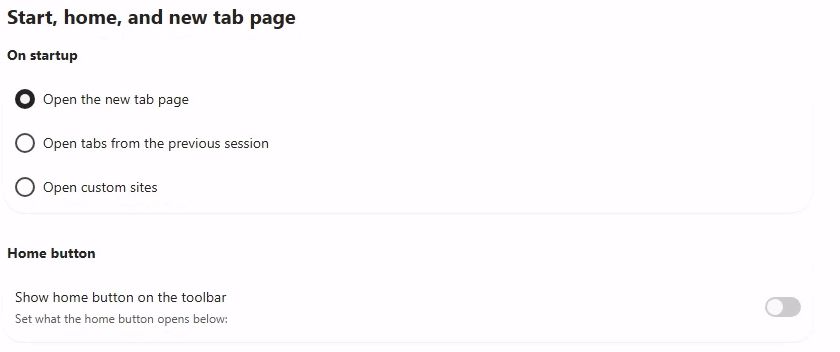
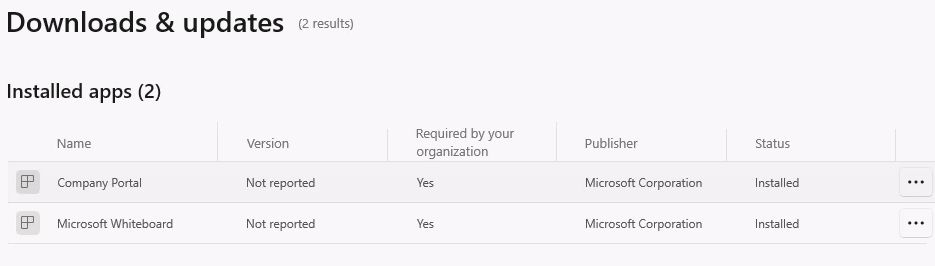
The later management checks include the Edge setting observed on the Cloud PC and Company Portal's installed application view. An installed view does not establish that a new Available app assignment or uninstall test succeeded.
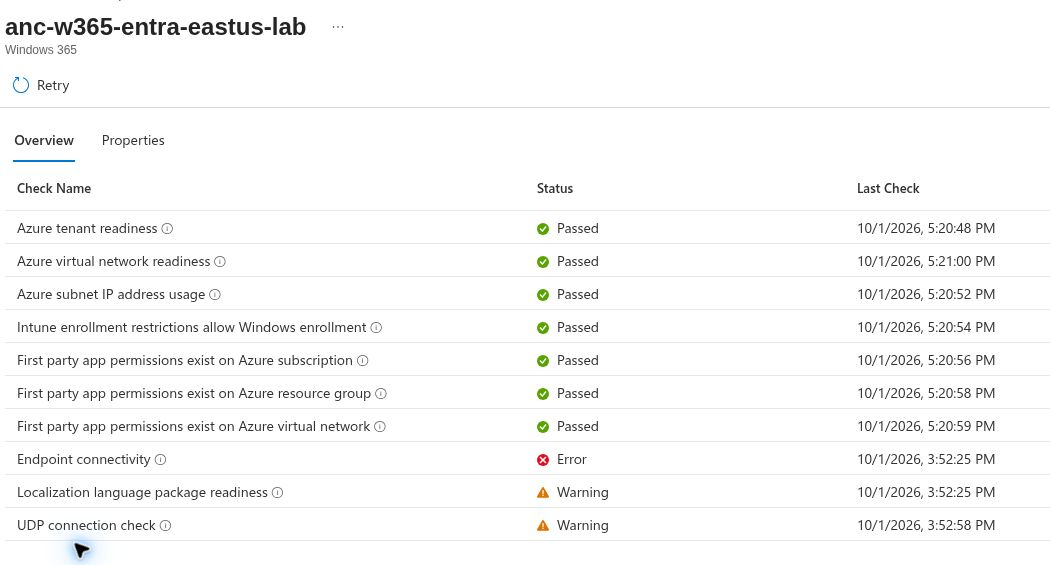
The October 1 ANC health capture records a failed check. The endpoint pattern reported in that lab was *.infra.windows365.microsoft.com:443; the exact host and root cause are not established. This is useful troubleshooting evidence, not a successful customer-network deployment.
Architecture before portal clicks
Use the editable draw.io diagrams and exports to compare the Microsoft-hosted and ANC paths. A Cloud PC with ANC still runs in the Windows 365 service; its virtual network interface connects to the customer VNet. The ANC does not move the Cloud PC virtual machine into your Azure subscription. Hybrid join has additional AD DS and DNS dependencies, so it belongs in a separate lab.
A repeatable evidence worksheet
For each action, record the date, pilot group, intended setting, assignment status, result inside the Cloud PC, and any delay or error. Remove user names, tenant identifiers, device IDs, addresses and secrets before publishing. Label a step verified only after you observe the result; label an untested walkthrough procedure; label a stopped test blocked with its error and cleanup.
For this project, UC-01 covers readiness, UC-03 explains the network choices, UC-02 covers provisioning, and the first Cloud PC lab gives a focused exercise. The use-case IDs are topic identifiers, so read network and image decisions before provisioning even though their numbers are higher.
Read the complete series
The reading path follows the ten topics in the Windows-Noob getting-started series. The lab steps, writing, diagrams and evidence here are my own. The earlier articles were published in 2022 and 2023, so use the current Microsoft Learn links in each chapter for present-day requirements. A linked chapter can cover only part of a topic; the status below states what the pilot proves.
- Introduction and edition choice. Start Here and Plan the Pilot explain licensing, groups, requirements and the first pilot. Enterprise seat inventory is captured; a fresh assignment sequence is pending.
- Provision a Microsoft Entra joined Cloud PC. Identity and Network, Provisioning and ANC Troubleshooting cover the network decision and wizard. Six original unassigned Intune wizard screens illustrate the steps. The existing Cloud PC is provisioned; its original creation was not captured. The separate ANC health test failed.
- Provision a hybrid joined Cloud PC. Dedicated AD DS, DNS, sync, customer network and join lab is pending. The Entra joined pilot does not demonstrate hybrid join.
- Connect to the Cloud PC. Connect and Verify includes the verified Enterprise browser session. Windows, macOS and mobile client walkthroughs still need device tests; a new sanitized public desktop capture is pending.
- Manage the Cloud PC. Manage with Intune covers policy, application and update checks. Some observations have dated evidence; follow each linked record before treating a procedure as a completed lab.
- Point-in-time restore. Security and Recovery explains the decision and precautions. A controlled restore of the only working Enterprise Cloud PC has not been performed.
- Windows Autopatch. The update section introduces servicing. Autopatch registration, deployment and patch result are pending.
- Windows 365 Boot. Operations introduces the feature. A suitable endpoint lab is pending.
- Windows 365 Switch. Operations introduces the feature. A suitable endpoint lab is pending.
- Windows 365 Offline. Operations introduces the feature. Eligibility and a supported endpoint lab are pending.
The engineering series map tracks the same sequence and the exact open checks. These are nine published working chapters across ten topics, not ten completed labs.
References
- Microsoft Learn: Windows 365 Enterprise requirements, network deployment options, create a provisioning policy, Azure network connections.
- Windows 365 Enterprise engineering repository: original lab records, procedures, evidence and editable diagrams.