In the earlier posts you made many decisions: management groups, identity, networks, security, monitoring and policy. Someone has to turn those decisions into real Azure resources. And the landing zone does not stand still. Policies are updated, subscriptions are added, and fixes are needed.
If a person does all of this by hand in the portal, no one can see what was changed, who approved it, or why two environments look different.
The Platform automation and DevOps design area asks how to deploy and manage the landing zone with code, review and automation. In the list of design areas, it comes last (letter I). Its goal is to line up your DevOps ways of working with the landing zone's whole life: creating it (provisioning), managing it, changing it over time (evolution) and running it (operations). This uses "extreme automation" and Infrastructure as Code.
This post covers the overview, automation, using infrastructure as code to update, the implementation options, DevOps principles, team topologies, the development lifecycle, environments, the testing approach, test-driven development, and the two security pages. They fall into four parts: Platform automation, DevOps, Development strategy and Security. I cover the implementation options and the infrastructure as code page early, because they explain the tools.
Key terms
Earlier posts defined these words: landing zone, design area, platform team, workload, subscription, subscription vending, Azure Policy, Azure RBAC, Microsoft Entra ID, Microsoft Entra tenant, multifactor authentication (MFA), Active Directory, Privileged Identity Management (PIM), service principal, managed identity, Azure Key Vault, Microsoft Defender for Cloud, Microsoft Sentinel, SIEM, Log Analytics workspace, Conditional Access, least privilege, configuration drift, Terraform, Sandbox, DeployIfNotExists (DINE), and Canary environment.
The words below are new, or are explained more fully here. Each is in plain words. Other new words are explained where they first appear.
| Word | What it means |
|---|---|
| Infrastructure as code (IaC) | Describing Azure resources in code files, so they can be deployed the same way every time. |
| Everything as Code (EaC) | Keeping all of it in code, not only the resources. It covers Infrastructure as Code, Policy as Code (PaC: deploying and managing Azure Policy through IaC), Configuration as Code, Deployment as Code and Documentation as Code. |
| Version control, Git and repository | Version control keeps every change to your code with its history. Git is the version control system to use. A repository (repo) is the place where one project's code and history live. |
Branch, merge and main |
A branch is a separate line of changes. Merging joins a branch's changes into another branch. main is the name of the main branch. |
| Pull request and branch policy | A pull request asks the team to review a branch before it is merged. A branch policy is a rule that protects an important branch, for example a minimum number of reviewers. |
| CI/CD and pipeline | Continuous integration (CI) means every code change automatically triggers checks and test deployments. Continuous delivery (CD) means the tested change is deployed to an environment. A pipeline is the automatic process that runs these steps. |
| Extreme automation and self-healing | Extreme automation means automating everything: provisioning, configuration, platform management and the creation of landing zone subscriptions for workload teams. Self-healing means a platform that fixes itself, for example by redeploying from code. |
| DevOps | The union of people, processes and technology that provides continuous value to development and operations. |
| Environment | A separate place to build, test or release. Common ones are Development, Test, Staging, UAT (user acceptance test, where end users check the system) and Production. |
| Test-driven development (TDD) and refactor | A process where you write the test first and then the code. The cycle is called red/green: a failing test is red, a passing test is green. To refactor means to clean up the code without changing what it does. |
What the design area covers
The table shows the parts of this design area and the question each one answers. The implementation options part is about accelerators. An accelerator is a ready-made tool that deploys the reference architecture.
| Part | The question it answers |
|---|---|
| Platform automation | How do you deploy and run the landing zone through code and pipelines? |
| Implementation options | Which accelerator or tool do you start with? |
| Using IaC to update | Why use IaC to keep the landing zone up to date? |
| DevOps | How do you organize the teams and measure success? |
| Development strategy | How do you handle repositories, branches, builds, environments, rollback and tests? |
| Security | How do you protect the DevOps tools and pipelines themselves? |
Platform automation
The ability to make changes at scale through a set, automated process helps the organization go beyond the baseline that security, governance and management create. Its automation considerations are:
- Everything as Code. Teams can then see which resources are deployed, track changes and control which ones reach production. The code is the single source of truth: the code system that shows what is running in each environment.
- The 4-eyes principle. Code changes are never made alone: a second person sees each change, which is peer review (also called peer programming). Use Git repositories and branch policies to enforce peer review, for example a minimum number of approvals before a merge into a protected branch.
- CI/CD. Every code change should start checks such as static code analysis (reading your code to flag mistakes without running it), validation and test deployments. Testing early is called "fail fast" or "shift-left testing".
- Deploy after review. After changes are approved and merged into
main, the CD process deploys them to production. - Extreme automation. The aim is a platform that is self-healing and gives self-service to workload teams. This frees the platform team from deploying and managing the platform by hand, so it has more time to build more automation.
- Emergency fixes. Teams can use PIM eligible permissions (permissions you must ask for first) to get access for a fix, and later bring the fix back to code to limit drift. Or they can use code for a quick fix. Always put quick fixes in the backlog (the list of work the team plans to do) and rework them later.
- Azure Policy as code. Policies can automate things such as log collection. Many Policy as Code frameworks have an exemption process (a way for a workload team to ask to skip one policy rule, after approval), so plan for workload teams to ask for exemptions.
A note on the governance post. Deny and Modify affect a workload team's code differently. Deny blocks a deployment that breaks a security control, so the code and the deployed resource stay the same. Modify changes a setting during deployment, so the deployed resource no longer matches the team's code. For that reason, tell workload teams they broke a control with Deny, not Modify. The governance post covers DINE and Modify for platform settings.
My reading: the DINE and Modify policies in the landing zone reference implementation are a different case, because they deploy or configure supporting settings, never the workload resources themselves.
Platform automation recommendations:
- Follow Everything as Code, and keep all the code types in version control.
- Use the 4-eyes principle with peer review.
- Adopt a branching strategy and set branch policies, so changes are merged through pull requests.
- Use CI/CD to test and deploy to different environments.
- Automate everything, including the creation of landing zone subscriptions for workload teams.
- Use the accelerator that matches your team's skills.
- Use a layered approach to add what the accelerator does not cover.
- Use code for quick fixes, and register them in the backlog.
- Manage Azure Policy as code, and set up an exemption process. Be ready to unblock teams when needed.
- Use policy-driven governance to block deployments that do not meet a security control.
Implementation options
The platform landing zone can be deployed in two main ways:
- IaC approach (recommended). Use the platform landing zone accelerator with Azure Verified Modules for Terraform or Bicep. Bicep is Microsoft's language for describing Azure resources as code. Azure Verified Modules (AVM) are reusable, customizable building blocks for Bicep or Terraform. You can use the modules alone or inside the accelerator.
- Portal approach. The platform landing zone accelerator in the Azure portal works best for organizations without IaC skills, or those who prefer a visual way.
The IaC accelerator sets up a continuous delivery environment, and supports Azure DevOps and GitHub (two services that host Git repositories and run pipelines) for version control, pipelines and agents. A DevOps agent is the machine that runs a pipeline job, and GitHub calls it a runner. Microsoft-hosted agents are kept up to date by Microsoft, and you set up and manage self-hosted agents yourself. It works in four phases:
| Phase | What you do |
|---|---|
| 0. Planning | Choose the IaC language and the version control system. |
| 1. Prerequisites | Set up the credentials and subscriptions for the deployment. |
| 2. Bootstrap | Run the PowerShell module (PowerShell is a command-line tool for Azure and Windows) to bootstrap the Azure environment and the version control system. |
| 3. Run | Customize the code to your needs, then start the CI/CD pipelines to deploy the platform landing zone. |
The portal accelerator. It gives less flexibility and scalability than the IaC options, and updates and version control are hard to manage without IaC. Move to IaC when possible.
Which team starts where. New teams that are used to the portal can start with the portal accelerator (a ClickOps approach: creating and managing resources by clicking in portals, consoles and wizards), and later add Azure CLI (also a command-line tool), PowerShell or IaC as skills grow. Teams with established skills should rely heavily on IaC, and run all operations through the pipeline instead of using personal accounts.
Layers. IaC-based accelerators have a limited management scope. If you use one, start with the accelerator, then add a layer of automation for what your workload teams need, for example domain controller deployment for legacy applications.
Why use IaC to update a landing zone
Plan to deploy your landing zone with IaC. IaC is declarative: you describe the end result, and the tool brings the real state in line with it. Scripts, for example in Azure CLI or Azure PowerShell, are imperative: you list the steps to run, and the result depends on the state before. If you already built resources by hand, you must first describe them in code, because you need to map the existing resources to the desired state. The benefits:
- Less effort. The tool can show what would change before you deploy (what-if or plan: Bicep what-if and Terraform plan show what a deployment would create, change or delete, before it runs), so you can see how resources are set today and how an update will change them.
- Fewer errors. Programmatic deployments change only what is defined and have preview options, which reduces outages from failed or incomplete changes.
- Version control and history. Changes go through branches, and the history shows what was deployed and when. You can deploy to a test environment until you are ready to merge.
- Testing environments. The same definition can deploy a second environment. For example, you can try the Premium Azure Firewall tier in a test environment before changing production.
- Catching drift. The next IaC run shows where the real state differs from the code. IaC tools detect and repair drift, but they might not address all issues.
Repository structure. A commit is a set of changes saved in Git. In trunk-based development, developers commit to a single branch, which helps continuous integration. A feature branch is a short branch for one change, merged back to main. Do this:
- use trunk-based development with feature branches, so all changes merge back to
mainbefore deploying to any environment; - use the same code for all environments, with variables to tell them apart;
- never copy and paste code between folders or branches, because this leads to drift between environments;
- run Terraform plan or Bicep what-if against all environments, including production, in a pull request. Separate read-only identities make this safe.
Hardening IaC deployments. Do this:
- always deploy through continuous delivery pipelines, and avoid running deployments from local developer machines or unmanaged devices;
- use separate identities for plan or what-if (read access) and for apply or deploy (write access);
- use human approval gates for the production deploy stage, and check the plan or what-if output;
- use governed pipelines: a template stored and managed in a central place, so all deployments follow the same guardrails.
Changes outside the code. Make them only in an emergency, and take care with accounts that can make them, such as PIM. The next IaC run will flag the difference. Changes made in the portal are cumbersome to bring back into code.
DevOps: framework, metrics, tools and teams
In a landing zone, DevOps is the framework that guides the team that owns the landing zone's whole life.
Framework and metrics.
- Define a DevOps framework, or line it up with your organization's DevOps and cloud adoption strategy, and connect it to your business strategy.
- Set metrics to improve DevOps performance, and make key metrics visible to everyone. For software delivery, there are four: Lead Time for Change (the time from idea to production), Deployment Frequency (deployments per day to production), Mean Time to Restore (the time to restore service after an incident) and Change Fail Percentage (the share of changes to production that lead to a failure). There are also quality metrics and business outcome metrics.
- Decide which practices to start with, based on current skills, and make a roadmap. Using a DevOps model everywhere at once does not instantly create capable teams, so make a plan to grow skills.
Tools.
- Choose a set of DevOps tools that fits the framework. Avoid many different tools, because they add complexity. These are only examples, by stage: for planning, Azure Boards and GitHub; for CI and testing, Azure Repos and GitHub Repos; for CD, Azure Pipelines and GitHub Actions, with Bicep, Pulumi and Terraform listed as IaC tools under CD; for operations, Azure Automation and Azure Monitor. There are more examples for each stage.
Teams. There are three team roles. Platform and workload teams were defined earlier. An enabling team helps other teams close skill gaps, for example in DevOps.
| Team type | What it means |
|---|---|
| Platform team | Build a team with people from IT, security, compliance and the business. Give it company-wide functions that need to be done the same way, such as policy management, subscription provisioning, identity policies, network management and platform monitoring. Build the platform to reduce the load on workload teams, with self-service and clear guardrails. |
| Workload teams | Give them ownership of the application lifecycle. Control them with policy and Azure RBAC, not with paperwork. Do not force them to use centralized artifacts or provisioning pipelines. Set clear boundaries between the platform team and workload teams. |
| Enabling teams | Use them to close skill gaps, for example in DevOps, with time-bound support and coaching. Build reusable templates and libraries, and encourage InnerSourcing (teams contribute improvements back to shared assets), such as Azure Verified Modules. |
Development strategy
The development lifecycle has five topics: repository, branches, automated builds, deployment and rollback. These are recommendations, with a few considerations where noted.
Repository
- Use Git as the version control system.
- Use private repositories to build the landing zone. Use public repositories only for non-confidential material such as automation examples, public documentation and open-source collaboration material.
- Use an IaC approach to deploy, manage and govern cloud resources.
- Considerations: understand mono-repo (all code in one repository) versus multirepo (one repository per project), and set repository permissions.
Branches
- Adopt trunk-based development.
- Use consistent branch names, and set permissions on who can read and update a branch.
- Set branch policies: pull requests for merges into
main, a minimum number of reviewers, a reset of approval votes when the source branch changes (votes to reject or wait stay), automatic reviewers, and a check that comments are resolved. - Use squash as the merge strategy. A squash merge joins all the small saves of a branch into one commit on the default branch.
Automated builds
- Use CI to build and test code every time someone commits changes.
- Include unit tests (small automatic checks of one part) for IaC (for example the Bicep linter, a tool that flags mistakes in code without running it, or the ARM template test toolkit, which checks Azure's older template format) and for application code.
- Use Microsoft-hosted agents if possible. They give isolation and a clean virtual machine for each run.
- When you connect Azure DevOps or GitHub to Azure, define the scope so the connection reaches only the resources it needs.
- Use Key Vault secrets so credentials are not hard-coded.
Deployment
- Use CD so code is always ready to deploy to production-like environments.
- Use environments. They give deployment history, traceability of commits and work items (the tasks linked to each change), resource health and security.
- Add IaC pre-deployment checks (Bicep what-if, ARM what-if or Terraform plan) to preview what a resource would create, modify or delete.
Terraform state
If you use Terraform, decide early where its state lives. State is how Terraform matches your configuration to the resources that exist. By default it is stored locally, which suits teams badly: shared work is hard, the state can hold sensitive information, and local files are easy to delete by accident (Store Terraform state in Azure Storage, checked October 2026).
- Where. Use a blob container in an Azure Storage account as the backend. State is stored in plain text and may contain secrets, so treat the storage account as sensitive.
- Locking. Azure Storage blobs are locked automatically before any operation that writes state, which stops two runs writing at once. The lock is a lease on the state blob.
- Authentication. The Microsoft example uses a storage access key, and says that in production you should evaluate the other authentication options of the
azurermbackend and use the most secure one for your case. My suggestion: prefer Microsoft Entra ID authentication with the pipeline's identity over account keys, after checking the backend documentation for your Terraform version. If you must use a key, keep it in Key Vault and not in code. - Network. In production, restrict the storage account with the storage firewall, a service endpoint or a private endpoint. My reading: your pipeline agents then need a network path to it.
- Encryption. Blob data is encrypted at rest, and Terraform reads state into memory instead of writing it to local disk.
- My suggestion: keep a separate state file per environment, so a problem in one cannot block or damage another.
If a run says the state blob is already locked. There are two usual causes: a Terraform command is still running against that state, or a connection was interrupted and left the lock behind (Troubleshoot Terraform on Azure). First check that nothing is running against the state, in terminals and in pipelines. Only if nothing is, the troubleshooting page says you can find the state file in the storage container and use Break lease. Breaking a lease while a run is still writing can let two runs write state at the same time and damage it, so be sure the earlier run has really ended. My suggestion: make sure you can restore the state first, for example with blob versioning or soft delete turned on, and prefer fixing the cause over repeating the break. A broken lease also cannot be taken again straight away (blob leases), so a retry may need a short wait. The error message itself says that turning locking off with -lock=false is not recommended.
Rollback
- Have a rollback plan, which means going back to a known good state. This is a consideration. The recommendation is to use Git's undo features to revert changes to committed files, discard uncommitted changes or reset a branch.
Environments
There are four common tiers: Development, Test, Staging and Production, with an optional UAT environment. Points for a landing zone:
- Test environments let platform developers try changes before production. Keep environments as similar as possible, because differences cause configuration drift, which can cause data loss, slower deployments and failures.
- Use IaC to reduce drift between environments.
- Use checks on test results to control the move from development to production, and let failing tests stop the change.
- Always have at least one test environment, use separate service principals for test and production, and use automated checks and approvals before any change to an environment.
- There are two ways to test platform changes: copy the management group hierarchy into a Canary and a Production environment, or use Sandbox subscriptions. This guidance is for platform-level changes only, such as management groups, policies and role assignments. It is not a common pattern for most customers and is not mandatory. If you deploy by portal, the canary and production environments may drift out of sync, so move to IaC.
Test-driven development
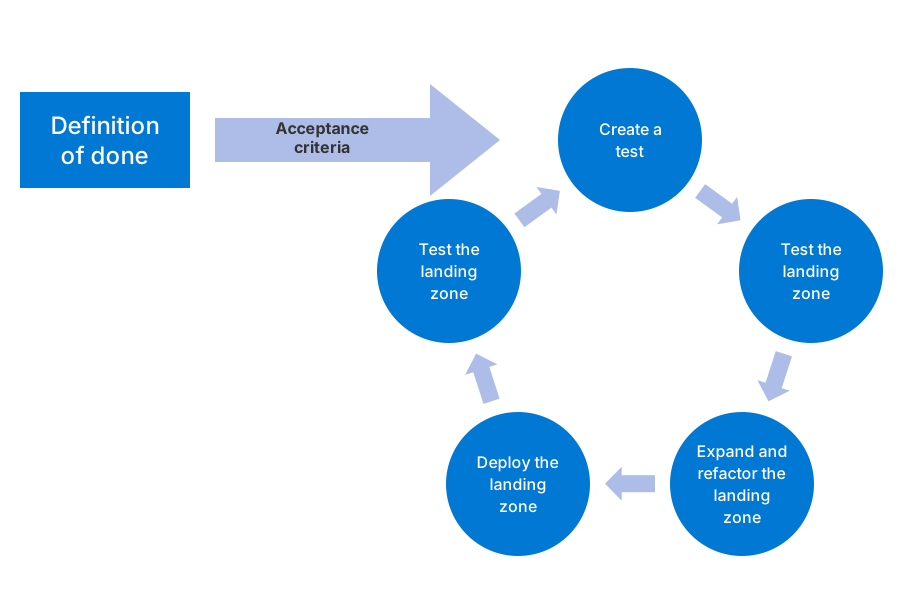
TDD means writing the tests before the code. Each feature has acceptance criteria, which are the checks that show it is done. The definition of done (DoD) is a simple agreement between the platform team and other teams on what the landing zone must include. The cycle (Figure 1) has five steps:
- Create a test. Define a test that checks the acceptance criteria for a feature.
- Test the landing zone. Run the new test and the existing ones. If the feature does not exist yet, the new test should fail.
- Expand and refactor the landing zone. Add the code for the feature, and clean it up.
- Deploy the landing zone to a controlled test or sandbox environment.
- Test the landing zone again. When all tests pass, the feature is done.
You repeat the cycle until the full definition of done is met. Azure Policy is the main mechanism for testing the acceptance criteria in the DoD, and built-in policy initiatives can test and enforce the whole DoD. Azure Resource Graph (a service to query the resources you have deployed) can run data-driven tests on what is deployed.
Security for DevOps platforms
Microsoft keeps the underlying cloud infrastructure secure, but you must configure security for your own Azure DevOps organizations and GitHub. The points fall into three groups.
Who can get in
- Restrict access to the tools. Use least privilege through Microsoft Entra ID. Use entitlement management (a Microsoft Entra feature that gives people time-limited sets of access, called access packages) and PIM for just-in-time promotion to administrator roles. Consider turning off permission inheritance in Azure DevOps. For most platform team members, the Basic access level and the Contributor group at project level are enough in Azure DevOps, and a team with write access to the landing zone repository is enough in GitHub. Check that branch policies stop the Contributor group from skipping them in pull requests.
- Restrict repository, branch and pipeline access. This protects against unwanted or harmful changes, and stops a compromised pipeline from reaching other projects, pipelines and repositories. Secure YAML pipelines (pipelines written as text files) step by step.
- Choose the agent for your security needs. Microsoft-hosted agents need no upgrades or maintenance. Self-hosted agents give more room for guardrails and can reach private networks.
- Protect admin accounts. For highly privileged accounts in Active Directory, do not synchronize credentials to Microsoft Entra ID, and the reverse, to reduce lateral movement (an attacker moving from one account or machine to another). Use Conditional Access policies that require multifactor authentication for Azure DevOps.
How pipelines sign in to Azure
- Use secure, scoped identities. Use a user-assigned managed identity (a managed identity you create as its own Azure resource) or an application registration (how a service principal is created in Microsoft Entra ID), never a user account. Use OpenID Connect (also called workload identity federation) for deployment identities. It lets a pipeline sign in to Azure without a stored password or secret, so never use client secrets or certificates. Make a separate identity for each application and environment, and a separate read-only identity for plan and what-if. Scope each identity to the subscriptions or resource groups it needs. Deploy the identities through IaC in a secure subscription vending process.
- In Azure DevOps: always use a service connection (a wrapper for the identity in Azure that a pipeline uses to deploy) with OpenID Connect. Create approvals on the service connection, not on environments, because environment approvals can be bypassed in code (someone who can edit the pipeline file could skip them). Use required templates (governed pipelines) on the service connection.
- In GitHub Actions: use OpenID Connect and create approvals on a GitHub Actions environment. Also add the
environmentclaim (a claim is a piece of information about who or what is signing in; GitHub's claims include the environment and the workflow) and thejob_workflow_refclaim to the identity's federated credential. Also userepository_owner_idandrepository_idinstead ofrepository. This limits the identity to one environment, one workflow and one repository, even if the repository is renamed. - Use a secret store. Avoid secrets where you can. If you cannot, never hard-code them in code or documents. Keep them in a store such as Azure Key Vault.
A note on secrets: my suggestion is to sign in with OpenID Connect and a federated credential. Keep a secret in Key Vault only when you cannot avoid one.
Checks and watching
- Use hardened workstations. Use secure admin workstations (SAWs: hardened, or locked down, machines) to deploy changes to high-risk and production environments.
- Scan and test. Use static code analysis, unit tests, secret scanning (looks for passwords in code) and dependency scanning (checks the libraries your code uses for known problems) in your pipelines. Microsoft Defender for Cloud and GitHub Advanced Security can help.
- Watch audit events. For Azure DevOps, review the audit events and stream them to a Log Analytics workspace or a SIEM such as Microsoft Sentinel. Add Sentinel rules that alert on improper use of permissions.
Platform automation at a glance
I redrew the picture of the test-driven development cycle for a landing zone from the official documentation, with the same layout.
Figure 1. The test-driven development cycle.
The official pages have other pictures: a map of Azure tools for test-driven development, and two example DevOps toolchain pictures. I did not redraw those. The toolchain examples are in the text above.
Common mistakes
These are checks, one line each.
Deployments
- Staying on portal clicks. The portal accelerator is less flexible and scalable, and updates and version control are hard without IaC.
- Deploying from a laptop. Always deploy through continuous delivery pipelines.
- Copying code between folders for each environment. This causes drift between environments. Use the same code with variables.
- No test environment. Have at least one.
Identities
- Using a user account, or a secret, for deployments. Use scoped managed identities or service principals with OpenID Connect.
- One identity for plan and apply, or for all environments. Use separate identities per application and environment, and a read-only one for plan and what-if.
- Approvals only on the environment in Azure DevOps. Put them on the service connection, because environment approvals can be bypassed in code.
Process
- Changes made outside the code. Do this only in an emergency. The next IaC run will flag the difference, and bringing portal changes back into code is hard work.
- Quick fixes that never reach the backlog. Register them, to limit technical debt (work you owe later, such as a quick fix that was not reviewed; too much of it slows the team down).
- No policy exemption process. Plan for workload teams to ask for exemptions.
From my own projects
From the list above, these came up in my own work: staying on portal clicks, deploying from a laptop, no test environment, one identity for plan and apply or for all environments, approvals only on the environment in Azure DevOps, changes made outside the code, and no policy exemption process. I did not mark the other three items from the list. I leave out project details.
The files in my repo
- Platform automation and DevOps: the decisions to make, the repository's delivery flow, the key controls, and its recommended practice: platform-automation-devops.md
Sources
Microsoft Learn, checked October 2026: Design area: Platform automation and DevOps · Platform automation · Use infrastructure as code to update an Azure landing zone