The earlier posts covered all eight design areas. Each one has many decisions. A new team can read all of that and think: "We must finish everything before we start."
This is a known risk. A possible failure mode (a way the project can go wrong) is spending months or years designing, engineering and refining the landing zone without meaningfully moving any workloads. It is better to start with modular pieces (small separate parts). With them you assemble a minimal landing zone that is secure, accessible and correctly governed. You add more pieces only when workloads require them.
This post is written for teams that move workloads from on-premises (their own datacenter or office network) to Azure. In this post, "migration" means that move, and "first workload" means the first workload to move.
The minimum viable platform landing zone is the smallest shared foundation that lets you run your first workload safely. It has seven capabilities. After them come ten checks to run before the first workload moves.
Key terms
Earlier posts defined these words: landing zone, platform team, workload, subscription, management group, Azure Policy, Azure RBAC, Microsoft Entra ID, subscription vending, hub-and-spoke network, hybrid connectivity, VPN Gateway, ExpressRoute, ExpressRoute circuit, Azure Firewall, Azure Virtual WAN, virtual network, subnet, network security group (NSG), private DNS zone, overlapping address spaces, route and user-defined route (UDR), BGP, shadow IT, managed identity, service principal, Log Analytics workspace, diagnostic settings, emergency access, domain controller, Terraform, Bicep, infrastructure as code (IaC), availability zone, DDoS, zero trust, least privilege, allowed locations, data residency, Azure region, tag, Active Directory Domain Services (AD DS), and Microsoft Entra tenant.
The words below are the central ones for this post. Each is in plain words. Other new words are explained where they first appear.
| Word | What it means |
|---|---|
| Platform landing zone | The shared foundation for the whole organization. It covers the whole organization, the platform team or central IT (the organization's main IT group) owns it, and you build the first version before any workload moves. |
| Workload landing zone | The place for one workload. It is per workload, the workload team owns it, and it is prepared per workload during the execution phase of the migration. The execution phase is the part of a migration project where workloads are actually moved. |
| Minimum viable platform landing zone | The foundation needed to land and operate the first workload. |
| Capability | One thing the platform must be able to do, such as connect to your on-premises network. |
| Composable building blocks | The foundation is made of separate pieces. You start with the core ones and add others when a workload needs them. |
| Guardrail | A shared rule or control, such as a policy, that every workload team has to stay inside. The shared guardrails here are identity, network access, policy, logging and cost controls. Landing zone introduction also explains guardrails. |
| Readiness check | Tests that show the foundation works before the first workload moves. The documentation calls this "Validate platform readiness". |
| Cutover | The moment a workload switches over from on-premises to Azure. |
| Hub network | The shared network that workload virtual networks connect to (earlier posts). Have a working hub network in the connectivity subscription. |
Three situations
How much foundation work you need depends on where you start. There are three situations:
- New platform. The organization is new to Azure and may be new to cloud operations. There is no meaningful Azure footprint, management group structure, hub network or identity baseline (the basic identity setup for the people who run the platform). The platform team builds the foundation from scratch.
- Partial platform. Azure infrastructure exists, but nobody assembled it as one coherent platform. This often comes from shadow IT, where teams created their own Azure environments outside central IT. Common problems are fragmented subscriptions, overlapping address spaces, partial policy coverage, misdirected connectivity and mixed identity patterns. The job is remediation: fixing what is there, not rebuilding it and not only checking it.
- Mature platform. Azure is already running, with clear subscription boundaries, working connectivity, policy assignments and an access model that can receive workloads. The job is to validate that the controls match the workloads that are about to arrive.
For a new platform, work in order through the article, from the minimum viable section to the shared services section. For a partial or mature platform, start with the readiness checks (further down in this post) and then fill any gaps. In all cases, make replaceable infrastructure the default: use templates, standard images and repeatable deployment patterns, and do not hand-build individual virtual machines.
The seven capabilities
The seven capabilities below make up the minimum viable platform landing zone defined at the start of this post.
| # | Capability | Why it is in the minimum | Earlier posts |
|---|---|---|---|
| 1 | A management group hierarchy | The hierarchy controls Azure Policy, RBAC and cost reporting. Subscription boundaries must be settled before workloads migrate. | Resource organization |
| 2 | Baseline policy | It prevents risk when workloads are migrated and deployed. | Governance |
| 3 | A working hub network with hybrid connectivity to your on-premises network | Hybrid connectivity is one of the few platform prerequisites that can block all workloads at once. | Network topology |
| 4 | A DNS (Domain Name System: translates, or resolves, a service name to an IP address) that reaches on-premises name servers (DNS servers in your own network) | DNS forwarding (a DNS forwarder is a DNS server that passes name lookups on to another DNS server) and private DNS ownership are among the items that often cause later outages, or that "surface late". | Platform scope and Network topology (private DNS zones) |
| 5 | Identities that match the workload mix (the kinds of workloads you plan to move, for example some that need Active Directory sign-in and some that do not) | The platform needs a working administrative identity baseline (the basic identity setup for the people who run the platform) and a defined workload identity pattern before the first move. | Identity and access and Privileged access |
| 6 | Central logging | Confirm that platform logs are flowing and visible before cutover. | Management and monitoring |
| 7 | A firewall or equivalent network security control | The decisions are how to prevent unmanaged public exposure, how to request approved ingress (traffic coming in; egress is traffic going out), and how to keep exceptions visible. Segmentation splits a network into separate parts, so one part can be kept apart from another. Firewall inspection checks traffic before it reaches the workload. | Network topology (Azure Firewall in the hub) and Security (segmentation and firewall inspection) |
The design area pages have the detail of each capability. The sections below go in this order: capabilities 1 and 2, then 3 and 4, then 7, then 5, then 6.
The seven capabilities are written for a first migration from on-premises. If you have no on-premises network, the source does not say what to leave out. Check each capability against your own workloads and decide which ones apply.
Two more points about how to build it:
- Build it from code. Use repeatable definitions in Bicep, Terraform or another approved deployment method, not manual changes in the Azure portal. This keeps landing zone changes reviewable.
- Do not block the workload teams. Design the landing zone so workload teams can pick the right service model without bypassing the shared guardrails. A service model is how much of the technology stack you manage yourself and how much Azure manages, and the options are called levels of operational handoff. With Azure Virtual Machines, an infrastructure as a service (IaaS) option, you still manage the operating system inside the machine and the application.
What is left for later
- Workload pieces. Specific workload migration procedures cover spoke virtual networks (the virtual network of a workload, connected to the hub), workload-specific network security groups and per-workload role assignments. I read this as meaning they sit outside the seven-item list.
- After the first workload. These can follow after the first workload arrives, if ownership is clear: deeper backup tool standardization, advanced dashboards, and the longer-term plan to retire legacy tools.
- A perfect tagging or chargeback system. Chargeback is billing each team for the Azure cost it uses. Do not let designing one delay building the management group.
Management groups and baseline policy (capabilities 1 and 2)
The management group and subscription hierarchy control Azure Policy, RBAC and cost reporting. They are the places where you apply them. The decision that matters for migration is to settle the subscription boundaries before the workloads move. Confirm that the hierarchy can keep shared platform services (connectivity, identity and management) apart from workloads. Also make the shared responsibility boundary (the line between what the platform team runs and what each workload team runs) clear before workloads deploy.
Baseline policy. Apply only the baseline assignments that prevent risk when workloads are migrated and deployed:
- Deny unmanaged public internet exposure.
- Require the diagnostic settings that feed central logging.
- Steer deployments to the Azure regions where the platform network and operational model are ready.
If any workload has data residency, sovereignty (control of data by a country's laws) or regulatory requirements, region restriction becomes a compliance control, not only a readiness control. Build those requirements into the baseline policy set from the start, for example with allowed locations policies, and do not add them later. If an organization has conflicting regional requirements, they may also need to show up in the management group structure. The documentation has a page on multiple locations for that case.
Cost governance (a related decision, not one of the seven). Set budgets (planned spending amounts that send alerts but do not stop spending) and alerts (messages that tell someone when spending gets near or over a budget) at the management group or subscription level before migration, and give someone the job of reviewing them. Cost allocation (working out which part of the bill belongs to which workload) is easier when each workload has its own subscription, but not every organization works that way.
Subscription vending (a related decision, not one of the seven). This is a platform decision: how workload subscriptions are requested, created with the right first settings, and attached to the right management group before the first migration. After you create the platform landing zone and your governance strategy, set up a consistent way to create subscriptions for workload owners. There are two infrastructure as code module options for subscription vending, one for Bicep and one for Terraform. They are most effective as part of an automated process.
Hub network, hybrid connectivity and DNS (capabilities 3 and 4)
Hybrid connectivity is one of the few platform prerequisites that can block all workloads at once. You can adjust the management group structure and policy after workloads start moving. But if you move a workload before connectivity is stable, you might not be able to reach it.
What you need is narrow: a working hub network in the connectivity subscription, with an approved and consistent connectivity pattern for workload virtual networks. For the choice between hub-and-spoke and Azure Virtual WAN, the network topology post and the design area page have the detail.
VPN Gateway or ExpressRoute. Choose based on throughput needs (throughput is how much data can pass in a given time), latency sensitivity (latency is the delay before data arrives), compliance requirements, lead time tolerance (how long you can wait for delivery), and routing complexity. Do not choose based on whether your organization is new to Azure.
| Option | What to know |
|---|---|
| VPN Gateway | Often the fastest way to get working connectivity. It can stay the right long-term answer for lower-bandwidth or less latency-sensitive workloads. For smaller organizations it may be enough for the whole migration. Pick the gateway SKU by expected migration throughput before you deploy. A SKU (stock-keeping unit) is a size or tier of a product, so the gateway SKU is the size you pick for the VPN gateway. The Basic SKU caps at around 100 Mbps in total. Mbps means megabits per second, a measure of network speed. The Basic SKU does not support active-active mode, which is a VPN gateway with two active instances for resilience. It also does not support BGP. This rules it out for most production migration workloads. For a new gateway, choose a zone SKU (the name ends in AZ, for example VpnGw1AZ). You can no longer create new non-zone VpnGw1 to VpnGw5 gateways, and Microsoft's pages word the retirement of those SKUs differently ("after September, 2026" on the consolidation page, 30 September 2026 in an announcement), so check the state of any such gateway you own; existing non-zone gateways no longer allow configuration changes until they are migrated (VPN Gateway SKU consolidation, checked October 2026; timelines can change). The Basic SKU is not retiring. |
| ExpressRoute | Can be the day-one path when dedicated private connectivity, predictable routing or regulatory requirements matter more than speed of setup. Delivery depends on the provider and on buying it, so treat it as planning work, not a fixed promise. Plan for weeks or months, not days. Run a VPN Gateway in parallel if migration dates cannot wait. |
| Both | After ExpressRoute is live, many teams keep a route-based VPN Gateway as a failover path (a backup path to switch to when the main path fails). The ExpressRoute circuit is the primary path, and the VPN carries traffic only if the circuit fails. |
Hub routing, DNS and the inspection path. Settle these items before workloads arrive, because they often cause later outages:
- Confirm that the address space you plan to use does not overlap any on-premises or existing Azure virtual network.
- Give someone ownership of BGP advertisements and route summarization (announcing one large address range instead of many small ones).
- If you inspect traffic at the hub or run more than one connectivity path, decide how you will detect and avoid asymmetric routing (traffic goes to a place by one path and comes back by a different path).
- Confirm where the DNS forwarders or Azure DNS Private Resolver (a fully managed, highly available service that gives DNS resolution between Azure virtual networks and on-premises environments, without deploying, managing or patching your own DNS servers) are, and give someone ownership of the private DNS zones and forwarding rules.
- Decide which north-south and east-west paths (north-south is traffic that goes in or out of the network, east-west is traffic between resources inside it) need inspection before traffic reaches the workload.
- Decide whether internet-bound traffic leaves locally through Azure or goes back on-premises through forced tunneling (sending internet-bound traffic back through your on-premises network).
Forced tunneling is generally an antipattern (a common approach that looks sensible but causes problems) for migrated workloads. The reason: it adds delay and makes every outbound connection depend on the on-premises path. Keep it for workloads with a clear compliance or inspection need that cannot be met another way.
Settle all of these early, because virtual networks, subnets, network security groups, route tables and private endpoints are software-defined controls, not physical networks you can rebuild. A private endpoint uses Azure Private Link to reach a service privately, so traffic does not go over public networks.
Network security at platform level (capability 7)
Plan inbound and outbound security so it is consistent across workloads. Find out early how each tier (a layer of an application, such as the web layer, the application layer and the database layer) should be protected: whether database tiers must be separate from application tiers, whether application tiers must be separate from web tiers, and how strict the traffic between resources inside the network has to be. Avoid the common pattern of one virtual network with one subnet and everything dropped into it, because contention (resources competing for the same limited space or capacity) and weak segmentation show up quickly.
The platform landing zone replaces the old perimeter model (protecting only the edge of the company network and trusting what is inside) with a zero trust approach, with explicit controls at every layer, because network location alone does not make a request trusted. The decisions at this stage are:
- How to prevent unmanaged public exposure.
- How to request approved ingress.
- How to keep exceptions visible.
The "firewall or equivalent" in the capability list is one way to do this. The approved patterns include Azure Firewall. For ingress, the pattern is destination network address translation (DNAT). DNAT passes traffic that arrives at the firewall on to an internal address. For egress, the pattern is application and network rules for outbound filtering. Other Azure services also fit each direction. I do not list them here. They are in the article.
Also document the exceptions and emergency workflows, so that every public endpoint (a service address that can be reached from the public internet) has an owner, an inspection path and a review point. Every public IP address also needs an explicit DDoS protection decision. For cross-service communication where you do not want public exposure, use Azure Private Link and private endpoints.
Identity (capability 5)
Hybrid identity (using your on-premises identities together with Microsoft Entra ID) matters only when a workload depends on it. There are four decisions to make before the first workload arrives:
- Human administrative access. Platform administrators need Microsoft Entra ID groups and an emergency access path before they can run the environment. A tenant access baseline (the basic rules for who may sign in to your tenant) belongs here too.
- Workload or machine identity. Managed identities, service principals and similar patterns can often be planned apart from user synchronization (keeping the user accounts in on-premises Active Directory and in Microsoft Entra ID in step). They still need an owner and a least-privilege design.
- Legacy Active Directory workloads. If a workload still needs LDAP (a way to look things up in a directory), Kerberos (a sign-in method) or Group Policy (a way to apply settings centrally to Windows computers), decide early whether domain controllers, Azure sites and services definitions (Active Directory settings that describe network locations, so sign-in requests can go to a nearby domain controller), or other parts must exist in Azure before cutover. Active Directory is explained in the identity and access post, including AD DS and domain controllers.
- Cloud-native or non-Active Directory workloads. They may not need identity synchronization (the same as user synchronization above) as a gate, but they still need a clear workload identity and administrative access model.
If the first workload depends on synchronized users or legacy Active Directory sign-in, prove that path before the move. If not, the platform still needs a working administrative identity baseline and a defined workload identity pattern before the first move.
Shared services and central logging (capability 6)
Central logging sits inside the topic of shared services and operational tooling. Before the first workload moves, decide which operational tools belong to the platform and which belong to the workload. The platform should centrally provide or own:
- Central logging.
- Baseline monitoring and alert routing (sending an alert to the right person or system).
- The ownership model for patching (installing fixes to software) and vulnerability scanning (looking for known weak points).
- The platform DNS design.
- The same operational add-ons for every workload from day one.
Three related decisions often surface late, so name them early:
- DNS forwarding and private DNS ownership. Decide who owns the forwarding rules, private DNS zones and resolver placement, then check the design from a representative spoke. A representative is a typical example used for a test, such as one typical on-premises virtual machine or one typical workload network.
- The RBAC model. Decide which Microsoft Entra ID groups get access to workload subscriptions, and how privileged access is raised and reviewed.
- Secrets and key management. Decide where certificates (digital files that prove an identity), connection strings and secrets live, who can get them, and how they are rotated (changed on a regular basis), before workloads depend on them. Choose managed identities over secrets wherever the workload supports them.
Every on-premises tool that keeps running next to its Azure equivalent adds operational overhead. Make a short list: what stays during the migration, what Azure-native services replace, and when each tool retires.
Validation is outcome-based: confirm that platform logs are flowing and visible before cutover. That includes the logs from the policy-based diagnostic settings on resources, not only the activity logs (the record of events at subscription level, such as who created or deleted something).
Check that it works: the readiness checks
Before the workload migration teams begin planning, the platform team must check that the foundation works. It does not need to be complete or polished, but it must meet minimum requirements. There are ten areas. The table gives no pass or fail score.
| Area | What to check |
|---|---|
| Connectivity | VPN Gateway or ExpressRoute is live, the routing matches the documented target design, and a representative on-premises virtual machine can reach an Azure private IP (an address that works only inside a private network, not on the public internet) over the approved path. |
| DNS and routing | On-premises names, Azure private DNS zones and any needed private endpoints resolve correctly from a representative spoke virtual network. The inspection path, the forced-tunneling choice and the internet breakout path (where internet-bound traffic leaves to the internet: locally through Azure, or back through your on-premises network) are confirmed. |
| Ingress and segmentation | At least one approved ingress pattern is tested end to end, the required segmentation controls are in place, and any public-exposure exception has an owner and a review path. |
| Policy and governance | The required Azure Policy assignments are attached, compliance state (the Azure Policy report of which resources follow a policy and which do not) is reviewed, region restrictions and exceptions are documented, and budgets or cost alerts are active at the intended scope. |
| Administrative access | RBAC through Microsoft Entra ID groups is checked on the relevant scopes, and the privileged access process for platform administrators is documented and tested. |
| Monitoring and operations | The policy that sends diagnostic settings to the central workspace works, at least one expected alert reaches the right destination, and someone owns patching and vulnerability scanning. |
| Capacity and scale | Capacity is how much a platform can handle, and scale is adding or removing that capacity. The platform is sized for measured demand and Azure scaling, not for on-premises peak hardware. Gateway SKU, region placement (which Azure region each part goes in), subscription limits (the maximum amount of something that Azure allows in one subscription) and budget alerts reflect that demand. |
| Resiliency and SLA | SLA means service level agreement, the availability a service promises. Regions, availability zone support, gateway redundancy, backup standards (agreed rules for what is backed up and how often) and alerts are chosen from the SLA and recovery needs of the workloads that will land, not from duplicated physical hardware. |
| Subscription handoff | The subscription vending path can create or set up the first workload subscription, and the expected logging, policy and access baseline is there when the workload team receives it. |
| Workload-like dependency test | A representative test proves the first workload's real dependency path: sign-in method, DNS, network reachability, getting a needed secret, and monitoring visibility. |
These checks are the minimum. They are not a full landing zone design review, and not a promise that later problems will be small. DNS edge cases, policy exceptions, segmentation gaps and identity dependencies can still show up after the checks pass, especially during the early real migrations. For a deeper check of management groups, hub networking and security baselines, use the Azure Landing Zone Review assessment.
I read it this way: checks 1 and 2 test capabilities 3 and 4, check 3 tests capability 7, check 4 tests capability 2, check 5 tests capability 5, and check 6 tests capability 6. Check 9 tests the subscription vending decision. Checks 7, 8 and 10 look at the platform as a whole.
Ways to deploy it
The Deploy Azure landing zones page lists the standard platform deployment options: the Azure portal, Bicep and Terraform. All three are supported in Azure public clouds. For other Azure clouds (also called sovereign clouds), such as Azure Infrastructure Services for US Government Clouds and Azure operated by 21Vianet, all three deployment options are marked as not supported. The landing zone architecture itself is valid and supported in all Azure clouds, but the automated deployment is not provided for them. The platform team has to make manual configuration changes to the deployment assets, and only the Bicep and Terraform options can be modified for that. There is also a sovereign landing zone variant. It is a specialized implementation of the Azure landing zone reference architecture, for organizations with strict regulatory, compliance and data residency requirements that focus on sovereignty. Partner programs (for example Azure Accelerate) also help you design and implement a platform landing zone. Enterprise policy as code (EPAC) is another option, an alternative method to deploy, manage and operate Azure Policy across your organization's Azure estate, which you can use instead of the standard options to manage the policies in an Azure landing zone environment. The platform automation post covers the accelerator and Azure Verified Modules, so I do not repeat them here.
After you deploy the platform landing zone, see the page on keeping the landing zone up to date.
What comes after: the workload landing zone
The next step is this. The platform team generally deploys an empty subscription (a subscription with no workload resources in it yet) that is enrolled with all required governance. Then a workload architect designs a solution that works inside the limits of that workload landing zone and uses shared platform features, such as firewalls and cross-premises routing, where practical. Workload teams give their requirements through a formal process that the platform team sets up.
In short
Seven capabilities make the first version of the platform landing zone. Ten checks show that it works. Then the first workload lands in its own workload landing zone. Everything else can wait until a workload needs it.
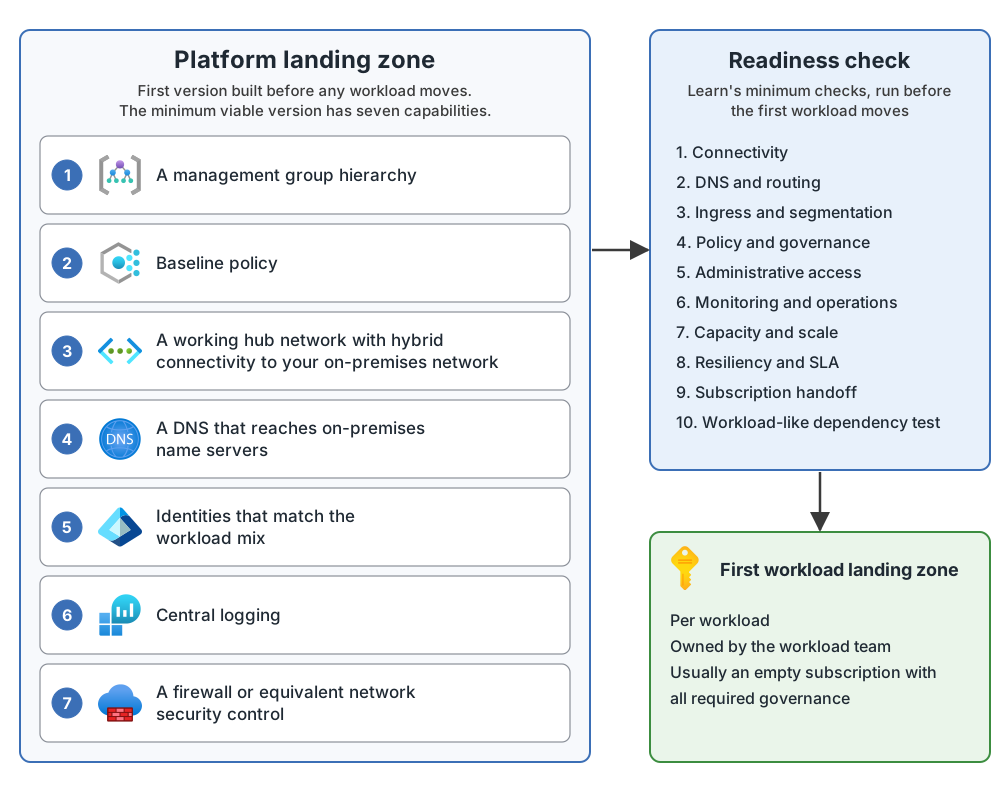
The minimum platform at a glance
The seven capabilities are a list in the documentation, with no picture. So this diagram uses my own layout. Every box comes from the list of seven capabilities and the readiness table.
Figure 1. The minimum viable platform landing zone and the readiness check.
Common mistakes
Planning and cost
- Designing for months without moving a workload. This is a possible failure mode. Start with a minimal landing zone and add pieces when workloads need them.
- Building the foundation by hand in the portal. Use repeatable definitions, so changes are reviewable.
- No readiness check before the first workload. The platform team must check that the foundation works before the migration teams begin planning.
- Budgets and alerts added late. Set them at management group or subscription level before migration, with an owner.
- Region rules added late. Build data residency and regulatory needs into the baseline policy, and do not add them later.
Network
- Moving a workload before connectivity is stable. You might not be able to reach it.
- Overlapping IP address spaces. Confirm there is no overlap with on-premises or existing Azure virtual networks.
- Waiting on ExpressRoute with no backup plan. Plan on weeks or months, and run a VPN Gateway in parallel if dates cannot wait.
- Using the Basic VPN SKU. It caps at around 100 Mbps and has no active-active mode or BGP, which rules it out for most production migration workloads.
- Forced tunneling by default. It is generally an antipattern for migrated workloads.
- One virtual network, one subnet, everything inside. Contention and weak segmentation show up quickly.
Ownership
- No owner for DNS. Give someone ownership of the private DNS zones and forwarding rules.
- Public endpoints with no owner. Every public endpoint needs an owner, an inspection path and a review point.
From my own projects
From the list above, these came up in my own work: building the foundation by hand in the portal, no readiness check before the first workload, budgets and alerts added late, one virtual network with one subnet and everything inside, region rules added late, and public endpoints with no owner. I did not mark the other items from the list. I leave out project details.
The files in my repo
- Minimum viable platform landing zone: the seven capabilities, the readiness checks, what my repo's Terraform deploys for each capability today, and the gaps (my notes): minimum-viable-platform-landing-zone.md
Sources
Microsoft Learn, checked October 2026: Azure landing zones for on-premises experts · Deploy Azure landing zones · Azure landing zone design areas and conceptual architecture