In the business requirements post you met connectivity as one of the five business requirements, and saw VPN Gateway, ExpressRoute, hub-and-spoke and Virtual WAN in short. In the platform scope post and the resource organization post you saw where the Connectivity, Corp and Online management groups sit. This post answers the next question: how should the networks themselves be laid out?
It matters early because network topology and connectivity are fundamental when you plan a landing zone design, and networking is central to almost everything inside one. It enables connectivity to other Azure services, to external users and to on-premises systems. Your topology defines how workloads communicate with one another. Your design should also include any hybrid or multicloud connections you plan (multicloud means using more than one cloud provider), and the traffic you expect on them. The business requirements post covers choosing between VPN Gateway and ExpressRoute. This post covers the layout around them.
Key terms
Earlier posts covered landing zone, workload, platform team, management group, subscription, resource group, virtual network, subnet, hub-and-spoke network, hybrid connectivity, VPN Gateway, ExpressRoute, Azure Firewall, private DNS zone, the Connectivity subscription, Corp, Online, tenant, Azure Policy and subscription vending. The business requirements post also briefly covered Azure Virtual WAN, overlapping address ranges, and the ideas of branch, IPsec, tunnel and native IPsec termination. The words below are the ones this post depends on most. Other new words are explained where they first appear.
| Word | What it means |
|---|---|
| Virtual network peering | A connection between two or more virtual networks in Azure that makes them appear as one for connectivity. Their traffic stays on Microsoft's private backbone (Microsoft's own network), not the public internet. Global virtual network peering does the same between virtual networks in different Azure regions. |
| Route and user-defined route (UDR) | Azure uses routes to decide where to send traffic. Each route has an address range and a next hop type, which says where traffic for that range goes next. Azure adds default routes to every subnet. You can override some of them with your own routes, called user-defined routes (UDRs), in a route table that you attach to subnets. |
| Network virtual appliance (NVA) | A virtual machine that typically runs a network application, such as a firewall. A partner or non-Microsoft NVA comes from another vendor. |
| Transitive | Traffic can pass through a middle network to reach a third one. Virtual network peering and global virtual network peering are not transitive. To build a transit network you need UDRs and NVAs (in the hub, Azure Firewall or a partner NVA can do this job). |
| Gateway | Short for virtual network gateway, the Azure component that connects a virtual network to a VPN device (a device at your site that ends the VPN link) or to ExpressRoute. A VPN gateway handles VPN links and an ExpressRoute gateway handles ExpressRoute links. In Virtual WAN, the hub has its own gateways instead (this is called a hub gateway). |
| Azure Virtual WAN | A Microsoft-managed networking service that brings many networking, security and routing features together to provide a single operational interface. It builds a hub-and-spoke network that can reach several Azure regions and on-premises locations. |
| Virtual WAN hub | A Microsoft-managed virtual network that is the core of your network in a region. Hubs in a Standard Virtual WAN are connected to each other. |
| Address space and CIDR | The address space of a virtual network is the range or ranges of IP addresses it uses. CIDR notation writes a range as an address, a slash and a number, for example 10.0.0.0/16. A bigger number after the slash means a smaller range. Example sizes are /24 for 256 addresses, /22 for 1,024 and /20 for 4,096. |
| Overlapping address spaces | Two networks that use the same addresses. This creates major contention challenges across on-premises sites and Azure regions. |
What this design area covers
The goal of network design is to line up your cloud network with your cloud adoption plans. This is one of the eight design areas from the landing zone introduction post, in the environment group. It sets the foundation for networking. It leaves out compliance topics such as advanced network security and automated enforcement guardrails, which are covered in the security and governance design areas (see the security post and the governance post).
The three management groups and the network
Here is how each of these groups relates to the network:
| Management group | Its job for the network |
|---|---|
| Connectivity | Holds dedicated subscriptions for connectivity, commonly a single one. They host the networking resources the platform needs, such as Azure Virtual WAN, virtual network gateways, Azure Firewall and Azure private DNS zones. Hybrid connectivity to on-premises, for example through ExpressRoute, is set up here. |
| Corp | For workloads that need connectivity, or hybrid connectivity, with the corporate network, through the hub in the connectivity subscription. They are in the same routing domain (a group of networks that can send traffic to each other, as in the resource organization post). Internal systems are not exposed directly to the internet, though they may be exposed through reverse proxies (servers that sit in front of an application and pass traffic on). |
| Online | For public-facing resources such as websites, online shops (e-commerce applications) and customer-facing services. Keeping them apart from the rest of Azure reduces the attack surface, which means the ways an attacker could get in. |
A simple way to remember it: Corp is internal-facing (private) and Online is public-facing (public, internet). In the conceptual landing zone architecture, the virtual network in Online can optionally be peered with virtual networks in Corp, directly or through the hub with an Azure Firewall or an NVA in the path, so public-facing resources can communicate with internal ones in a secure and controlled way. Also review the Azure Policy assignments that each management group has or inherits, because they shape and protect what is deployed there (the governance post).
Two topologies, and how to choose
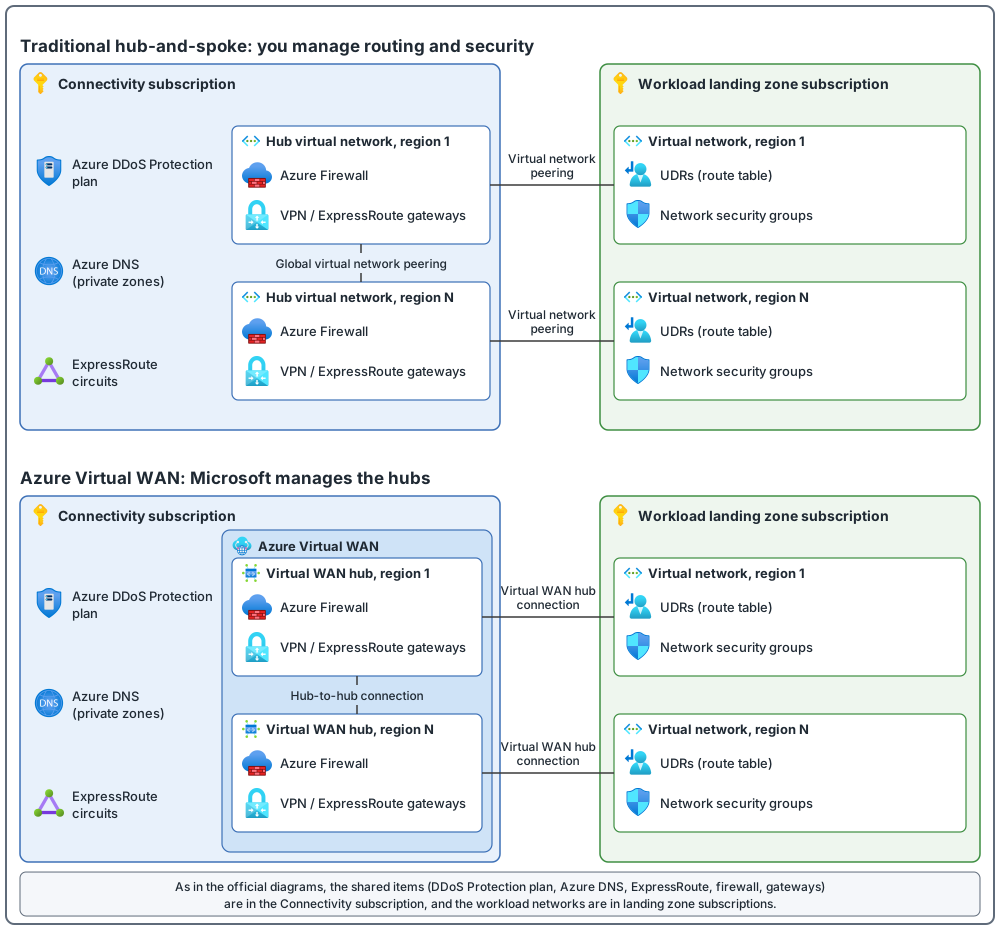
There are two approaches: one based on Azure Virtual WAN, and a traditional hub-and-spoke. In the traditional one, you manage the routing and security. Virtual WAN is a service that Microsoft manages. A spoke is a workload virtual network that connects to the hub, which is the central virtual network (the platform scope post).
Two terms for the table. A site-to-site VPN connects an on-premises network, such as a branch (a remote office, see the business requirements post), to Azure over an encrypted IPsec tunnel, through a VPN device. SD-WAN (software-defined WAN) is a partner technology that Virtual WAN works with to connect branch locations to Azure.
| Comparison | Traditional hub-and-spoke | Azure Virtual WAN |
|---|---|---|
| Use it if any of these apply | You deploy in one or several regions, expect some traffic between regions but do not need every region connected to every other. You have few branches per region, with fewer than 30 site-to-site IPsec tunnels. You want full control and detail to configure routing by hand. | You deploy in several regions and need global connectivity between virtual networks and several on-premises locations. You want to connect a large branch network with SD-WAN, or need more than 30 branch sites for native IPsec termination. You need transit between a VPN and ExpressRoute. |
Two more points:
- Hub-and-spoke also fits when the main hybrid connection is ExpressRoute and you have fewer than 100 VPN connections per VPN gateway, when you do not need transit between VPN and ExpressRoute (or accept adding Route Server for it), and when you depend on central NVAs and detailed routing. I read these numbers as measuring different things from the 30 above (tunnels and branch sites against connections per gateway), so check your own counts against each. The tunnel limit also depends on the gateway SKU: up to 30 tunnels on VpnGw1AZ to VpnGw3AZ and up to 100 on VpnGw4AZ and VpnGw5AZ, so a hub with 30 to 100 tunnels needs one of the larger SKUs. The business requirements post gave the 30-branch and 30-tunnel figures too.
- Use Virtual WAN if you need hub-and-spoke across more than two Azure regions, global transit between landing zone virtual networks, and you want to minimize network management overhead.
Traditional hub-and-spoke: how it is built and when it fits
How the pieces connect:
- A virtual network cannot cross a subscription boundary. To connect virtual networks in different subscriptions you can use peering, an ExpressRoute circuit (the ExpressRoute connection between your network and Microsoft, see the business requirements post) or VPN gateways. Peering is the preferred way, and it works in the same region, across regions and across Microsoft Entra tenants. You pay a nominal fee for traffic over a peering.
- Peering alone does not let one spoke reach another: both are peered with the hub, but traffic does not pass through the hub by itself. For spoke-to-spoke traffic, use NVAs and UDRs, which send the traffic to the firewall or NVA in the hub.
- You can apply NSGs (network security groups: sets of security rules that allow or deny network traffic to or from several types of Azure resources, so you can filter traffic in a virtual network) in either peered virtual network to block access to other virtual networks or subnets.
- BGP (Border Gateway Protocol) lets an on-premises gateway and an Azure gateway exchange routes. VPN gateways that use BGP are transitive within Azure and on-premises networks. By default they do not give transitive access to networks connected through ExpressRoute.
- If you need transit between ExpressRoute and VPN in a hub-and-spoke network, you can use Azure Route Server. It is a managed service that exchanges routes by BGP between the virtual network's gateways, any NVA that supports BGP, and the virtual network, so you do not maintain those routes by hand. It does not carry the traffic itself. Transit between the two gateway types works only after you turn on route exchange (the branch-to-branch setting). The VPN gateway must be in active-active mode with ASN 65515, and the gateways must be in the same virtual network as Route Server. Route Server gives transit between ExpressRoute and site-to-site VPN only: it does not give ExpressRoute-circuit-to-circuit transit (use Global Reach for that) or transit with point-to-site VPN. With route exchange on, no more than 1,000 routes may be advertised toward ExpressRoute. Creating Route Server in a virtual network that already has a gateway causes downtime, so plan a maintenance window. That is why the table above lists VPN-to-ExpressRoute transit under Virtual WAN: in a traditional hub you add Route Server and accept these conditions, and in Virtual WAN the transit is built in.
- Route propagation means routes learned through BGP are added to the route tables of subnets automatically. A route table can switch that off. Never switch it off on the gateway subnet, or the gateway stops working.
What goes in the hub:
- A minimal set of shared services, including ExpressRoute gateways, VPN gateways (as required), and Azure Firewall or partner NVAs (as required) to protect and filter traffic. If necessary, also Active Directory domain controllers and DNS servers. Azure private DNS zones sit in the Connectivity subscription.
- Use a single DDoS Protection plan in the connectivity subscription for all landing zone and platform virtual networks. A DDoS (distributed denial of service) attack tries to use up an application's resources so real users cannot reach it. Azure DDoS Protection helps protect resources in a virtual network at the network and transport layers (layers 3 and 4); attacks on web applications at layer 7 need a web application firewall. It has two tiers: DDoS Network Protection, a plan shared across virtual networks that covers up to 100 public IP addresses, and DDoS IP Protection, priced per protected public IP address with no plan. Both cover only resources that have public IP addresses (addresses reachable from the internet). In my reading, a small estate with few public IP addresses should compare the two tiers on cost. One plan can be shared across the virtual networks in a tenant.
- For regional deployments, a hub in each region with the spokes of that region peered to it. Put each region's hub resources in their own resource groups.
Name resolution for private endpoints. A private endpoint (a private IP address in your virtual network for an Azure service) works by name only if DNS returns that private address. The pattern in Private Link and DNS integration at scale (checked October 2026) is:
- Host the private DNS zones, for example
privatelink.blob.core.windows.net, centrally in the connectivity subscription, and link the hub virtual network to them. Other virtual networks either link to the zones too or use the hub resolver as their DNS server. - Put an Azure DNS Private Resolver (a managed service that forwards DNS queries between Azure and your own network) in the hub. Your on-premises DNS servers send queries for the private zones to its inbound endpoint, using conditional forwarders (rules that send queries for one zone to a named server). Add outbound forwarding rules to the resolver for your own domains, for example Active Directory, pointing at the on-premises or Azure DNS servers that are authoritative for them. The resolver only forwards; it does not hold your corporate zones.
- Workload teams usually cannot write records in the central zones. The guidance uses Azure Policy with
DeployIfNotExiststo add the DNS zone group, and so the record, when a private endpoint is created, and to remove it when the endpoint is deleted. If you use that approach, do not also create the DNS records in your own code. - Regions: for PaaS services that have their own disaster recovery (the guidance names geo-redundant storage and SQL database failover groups), the guidance says to have private endpoints in more than one region, each with its private DNS zone setup. It also says the DNS records for these must be kept up to date by hand, because there is no automated lifecycle for them. For other services, one endpoint in one region can serve clients in all regions through routing.
- If you use FQDNs in Azure Firewall network rules, enable the firewall DNS proxy and point the spoke virtual networks at it. Machines in a network need a reboot after its DNS setting changes.
This is the documented pattern, not the only one. If another team runs DNS, agree who owns the zones and the forwarding rules before you build.
Azure Firewall and VPN Gateway: points to check before you deploy (checked October 2026, and the dates can move):
- Azure Firewall has three SKUs: Basic (up to 250 Mbps), Standard (up to 30 Gbps, with threat intelligence, DNS proxy and FQDN filtering in network rules) and Premium (up to 100 Gbps, adding TLS inspection and a managed intrusion detection and prevention system). See Choose the right Azure Firewall SKU. The Azure Firewall FAQ recommends one firewall per region and says global peering is supported but not recommended for firewall traffic.
- The firewall subnet needs a /26. The Azure Firewall FAQ says subnet-level network security groups aren't required on the firewall subnet and are disabled to prevent service interruptions. Spokes must send their traffic to the firewall with a user-defined route; the firewall does not do BGP peering itself.
- Without forced tunneling, the firewall needs direct internet connectivity. If its subnet learns a default route from on-premises over BGP, override it with a
0.0.0.0/0route with next hop type Internet. Forced tunneling needs a Management network interface, which has its own public IP address that only the platform uses. The forced tunneling page says to enable it when you create a new firewall, and the FAQ says you can also add a management network interface to an existing firewall. DNAT is not supported with forced tunneling because of asymmetric routing, although a firewall with a Management network interface still supports DNAT. The Azure subscription and service limits page words this differently: it says that by default Azure Firewall does not support forced tunneling to an on-premises network, and that Microsoft supports it case by case through Support. I could not tell from the pages which wording is current, so if your design depends on forced tunneling, read all three pages and confirm with Microsoft support. - VPN Gateway: you can no longer create new non-zone VpnGw1 to VpnGw5 gateways (since 1 November 2025). The pages word the retirement date differently. The consolidation page says the old SKUs are "currently scheduled for deprecation after September, 2026" and are supported until they are migrated. The What's new page lists "Sep 2026" for non-AZ SKU retirement and links an announcement that gives 30 September 2026. I could not tell from the pages whether a given existing gateway has already been changed, so do not assume either way: check the SKU and state of each gateway you own. The consolidation page says that, after the rollout, existing non-zone gateways no longer allow configuration changes, and that you must migrate to the matching zone SKU (names ending in AZ) to change them. The Basic SKU is not being retired. A zone SKU is zone redundant only in regions that have availability zones. See VPN Gateway SKU consolidation and What's new in VPN Gateway, which says timelines can change.
If you have several regions, pick by how many landing zones need cross-region traffic:
- To connect a few landing zones across regions, use global virtual network peering directly between them. That traffic skips the hub NVAs, and global peering has traffic fees.
- To connect most landing zones across regions, use hub NVAs to join the hubs and route traffic across regions. You can also use this if direct peering would break your security needs. Global peering or ExpressRoute can join the hubs. ExpressRoute can add latency (delay, the business requirements post), and the gateway size limits throughput (how much data can pass, the business requirements post).
- To join two regions, global peering between the hubs works. Beyond two regions, use Virtual WAN, or connect the hubs to the same ExpressRoute circuits.
- If you use ExpressRoute between regions, spokes in different regions can communicate directly and bypass the firewall, because they learn through BGP the routes to the remote spokes. To keep the firewall in the path, add more specific routes to the spoke UDRs that point to the firewall in the local hub, or turn off BGP route propagation on the spoke route tables.
Limits and tools: check two limits when you connect spokes to the hub: the maximum number of peerings per virtual network, and the maximum number of address ranges (prefixes) that ExpressRoute private peering advertises from Azure to on-premises. Private peering is the ExpressRoute connection to your private virtual networks. Also use Azure Virtual Network Manager (an extra tool recommended alongside the topologies, not a topology itself) to manage connectivity and security configuration across subscriptions.
Virtual WAN: how it is built and when it fits
Virtual WAN is a hub-and-spoke network in which Microsoft runs the hubs. It reduces overall network complexity. Transit works in a region and across regions between any two connected parts: virtual network to virtual network, virtual network to branch, branch to virtual network, and branch to branch.
- Use one or more Virtual WAN hubs per Azure region. If one hub's limits are not enough, you can add more hubs in the same region.
- Size the hub address space before you create the hub, because it cannot be changed afterwards. The minimum is /24. The Virtual WAN FAQ recommends /23 or larger, and at least /22 if you use Azure Firewall in the hub. The FAQ also gives, per hub, up to 1,000 branch connections and 20 Gbps of aggregate VPN throughput, and says the hub router supports up to 50 Gbps for virtual-network-to-virtual-network traffic, on the assumption of 2,000 VM workloads across the connected networks. Treat 50 Gbps as a maximum, not the starting capacity. The Virtual WAN design guide says a default hub deployment has two routing infrastructure units (3 Gbps) and that you scale throughput by adding routing infrastructure units in the hub settings, up to 50 units (50 Gbps), which adds cost. These figures are as checked in October 2026. Limits change, so recheck them before you plan.
- Put all Virtual WAN resources, Azure Firewall and the DDoS plan in the connectivity subscription, and keep all Virtual WAN resources in one resource group. The portal needs them deployed together.
- Each spoke virtual network connects to a hub through a hub virtual network connection (the official diagram labels it "VWAN Hub Connection"). One virtual network can connect to only one hub.
- Hubs hold only Microsoft-managed resources: gateways (point-to-site VPN, which connects individual users through a VPN client on their computer, for secure remote access from many locations, site-to-site VPN and ExpressRoute), Azure Firewall through Azure Firewall Manager (the tool that configures security and routing policies in a hub), route tables and some NVAs for partner SD-WAN features. Your own shared services, such as DNS servers, go in a dedicated spoke virtual network, not inside the hub.
- Connect ExpressRoute to the hub, branches to the nearest hub with site-to-site VPN or an SD-WAN partner, and individual users with point-to-site VPN.
- Use virtual hub routing (route tables in the hub that you can customize) to control and segment traffic between virtual networks and branches. Keep Azure traffic on the Microsoft backbone, and filter internet-bound traffic with Azure Firewall.
- A secured virtual hub is a hub with security and routing policies added. Secured virtual hubs do not support Azure DDoS standard protection plans. The plan is for your landing zone and platform virtual networks, so I read this as: it protects those, not the hub.
IP addressing: plan it before you build
Plan IP addressing in advance so that address space does not overlap across on-premises locations and Azure regions. Guidance:
- Use RFC 1918 private addresses (the ranges set aside for private networks: 10.0.0.0/8, 172.16.0.0/12 and 192.168.0.0/16). Do not use these special ranges: 224.0.0.0/4 (multicast), 255.255.255.255/32 (broadcast), 127.0.0.0/8 (loopback), 169.254.0.0/16 (link-local) or 168.63.129.16/32 (internal DNS).
- Do not use public IP addresses for virtual networks, especially ones your organization does not own.
- Do not create virtual networks without planning the space you need, and do not create large ones such as /16, so address space is not wasted.
- Azure reserves five addresses in each subnet, so count them when you size subnets. Some services, such as Azure Firewall and VPN Gateway, need their own dedicated subnet.
- You can add address space to a virtual network later. If it is peered, each peer needs a resync afterwards (a sync step that you run in the Azure portal or with Azure PowerShell), and this needs no outage.
- If private addresses are scarce, consider IPv6 (a newer kind of IP address, much longer than the older IPv4 kind, so there are far more of them). A virtual network can be IPv4-only or dual stack, which means both IPv4 and IPv6.
- Consider an IPAM tool (an IP address management tool, which gives central management and visibility of IP address use and helps prevent overlaps) that has an API for reserving non-overlapping address space, so it can plug into subscription vending (the resource organization post). An example is simple sizes that workload teams can ask for: small /24, medium /22 and large /20.
- When a workload is decommissioned, release its address space so it can be reused.
The two network topologies at a glance
Common mistakes
- Overlapping IP address spaces. This creates major contention challenges, so plan non-overlapping space across Azure regions and on-premises in advance.
- Treating peering as transitive. Peering is not transitive, so spoke-to-spoke traffic needs UDRs and an NVA or firewall in the hub.
- Spokes that skip the firewall. With ExpressRoute between regions, spokes learn routes to remote spokes through BGP and can bypass the firewall. Add more specific UDRs or turn off BGP propagation on spoke route tables.
- Too much in the hub. Keep a minimal set of shared services there. In Virtual WAN, your own shared services, such as DNS servers, cannot go inside the hub; only Microsoft-managed resources and certain partner appliances can.
- A DDoS plan per network. Use a single DDoS Protection plan in the connectivity subscription for all landing zone and platform virtual networks.
- Address space guessed at the start. Do not create virtual networks without planning the space, and do not create large ones such as /16.
- Forgetting limits. Check the peering and route limits before you add spokes, and Virtual WAN limits before you plan hubs.
- Choosing the topology without checking the numbers. Choose from your requirements. Some numbers (30 branch sites, 30 tunnels, more than two regions) tip the choice.
From my own projects
These situations came up in my own work: a firewall deployed while traffic still did not go through it, peering treated as if it were transitive, overlapping IP ranges, private DNS and name resolution problems, address space created by guess, and workload servers placed in the hub. Typical results of problems like these are long troubleshooting, security gaps and redesign work.
Agreeing the topology, the address plan, the internet exit path and the DNS path before the first workload arrives helps avoid them.
The files in my repo
- Network topology and connectivity, with hub and spoke responsibilities and the decisions to make before deployment: networking.md
- Hub-spoke, Virtual WAN, VPN and ExpressRoute, with the questions to ask before choosing: connectivity-options.md
Sources
Microsoft Learn, checked October 2026: Network topology and connectivity · Traditional Azure networking topology · Virtual WAN network topology