A landing zone is the prepared Azure environment where teams run what they build (the landing zone basics post explains it). Its platform part is the shared foundation. A workload is an application or service, with its Azure resources, that runs on that foundation.
The first step is simple: before you build the platform landing zone, define your organization's requirements across the design areas (topics such as networking, identity and governance that the design covers). Those decisions determine how you design the landing zone.
Gaps in these requirements can show up late. Three examples:
- Region rules added late. Build data residency and region requirements into the baseline policy (the starting set of policies) from the start, rather than adding them later.
- Connectivity not planned. Hybrid connectivity (a link between your own network and Azure) must be ready before workloads move, or they may not be reachable.
- No guardrails for compliance. Without guardrails from Azure Policy (explained in Key terms below), keeping environments compliant takes more operational and management effort.
This post covers five requirements and shows which part of the landing zone each one changes. The official documentation does not list these five together. I group them because each one is an input to the landing zone design.
Key terms
These are the main words this post depends on. Other terms are explained where they first appear.
| Word | What it means |
|---|---|
| Subscription | A unit of management, billing and scale in Azure. Your resources live inside it, and it is a boundary for cost, governance and access controls. |
| Management group | A level above subscriptions where you apply rules. Every subscription under it inherits those rules. |
| Azure Policy | An Azure service that enforces your organization's standards on resources and checks whether resources follow them. |
| Azure region | One or more datacenters connected by a fast network. |
| Data residency | A rule about which part of the world your data must stay in. In Azure, each geography (a group of regions, such as the United States or Europe) is a data residency boundary. |
| Baseline policy | The starting set of Azure Policy rules that prevent risk before workloads arrive. |
| RTO (recovery time objective) | The longest downtime you can accept for a workload after a disaster. |
| RPO (recovery point objective) | The longest period of data loss you can accept after a disaster, such as "30 minutes of data". |
| Disaster recovery | Planning how you respond to a disaster. A disaster is a rare, major event with a bigger and longer impact than the application can handle with its normal resilience. |
| Hybrid connectivity | A connection that links your on-premises network (the network in your own buildings) to Azure. |
Ask five questions
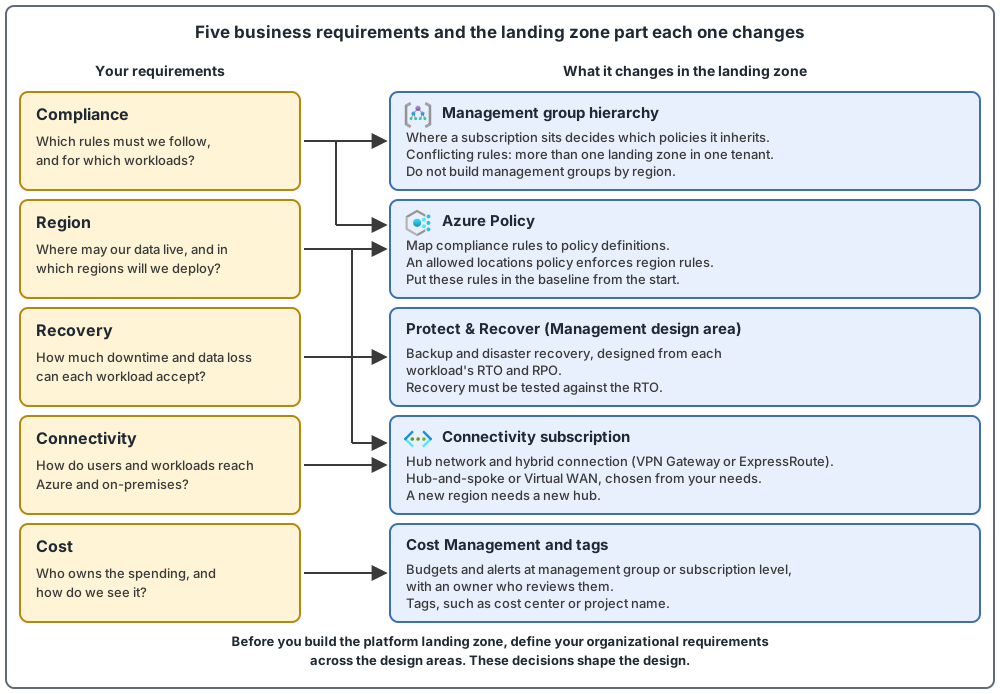
For each requirement, ask one question, and know which part of the landing zone it changes.
| Requirement | The question to ask | What it changes in the landing zone |
|---|---|---|
| Compliance | Which rules must we follow, and for which workloads? | Azure Policy assignments (a policy definition applied to a management group or subscription, which everything below inherits), and where subscriptions sit in the management group hierarchy |
| Region | Where may our data live, and in which regions will we deploy? | An allowed locations policy (an Azure Policy that blocks deployments to every region not on your allowed list), and a hub in each region you use (a virtual network is a private network inside Azure, and the hub is the central one that other networks connect to) |
| Recovery | How much downtime and data loss can each workload accept? | Backup and disaster recovery design, in the Protect & Recover part of the Management design area (the part that covers keeping workloads running and recoverable) |
| Connectivity | How do users and workloads reach Azure and on-premises? | The hub network, the hybrid connection and the topology, in the Connectivity subscription (the platform subscription that holds the shared networking) |
| Cost | Who owns the spending, and how do we see it? | Budgets and alerts at management group or subscription level (a budget is a spending target in Azure Cost Management, the Azure tool for tracking and managing costs), and tags on resources (labels with a name and a value, such as Environment = Production) |
Compliance: which rules apply, and where
Regulatory requirements (rules that come from laws or standards) typically cover data protection, data residency, data transfers, isolation or personnel clearance. The steps are:
- Decide which Azure policies you need, based on your business controls or compliance regulations.
- Map the regulatory and compliance requirements to Azure Policy definitions (business rules that Azure Policy uses to check resources) and Azure role assignments (how someone is given access to Azure resources. This is part of Azure RBAC, role-based access control).
- Keep checking compliance with reporting and auditing.
Scope matters. If a rule applies to only some workloads, it should not apply to all workloads. For example, with PCI DSS (Payment Card Industry Data Security Standard, a global security standard to prevent fraud by controlling credit card data more tightly): create a management group called PCI under the Landing zones management group, assign the extra policies there, and place the subscriptions that need them in that group. They inherit the policies. The resource organization post covers the hierarchy in detail.
Some organizations must meet conflicting rules in several countries. You do not need to change the landing zone when the rules need identical policy assignments, when one rule's controls are a superset of the other's, when the assignments do not overlap, or when you can choose the implementation that suits you. If the rules produce conflicting policy controls, you must adjust the landing zone architecture and the policy assignments. The more conditions a regulation has, the more the landing zone needs to change.
Use one Microsoft Entra tenant (one instance of Microsoft Entra ID, Microsoft's cloud service for identities and access, for one organization, holding its users, groups and devices) for most scenarios, including multinational ones. If you do not need separate tenants for strict isolation, consider deploying more than one landing zone in the same tenant and adjusting the management group hierarchy. This is the exception: the usual pattern is one platform landing zone per tenant. Whatever you choose, keep policy assignments, exceptions and exemptions (ways to leave a resource out of a policy's checks) as few as possible.
Region: where data lives, and where you deploy
The landing zone architecture is region-agnostic, but you must choose the regions to deploy to. Three points:
- Put region rules in the baseline. If data residency rules apply, region restriction is a compliance control, so build it into the baseline policy, for example with an allowed locations policy, instead of adding it later.
- Design the platform for more than one region. Even if your workloads use one region today, design the platform to support several, especially connectivity, identity and management, so you can enable multi-region workloads quickly.
- Do not build management groups by region. Do not create a management group structure based on regions. Subscriptions are not tied to a region either.
- Know whether a region is paired. Azure pairs some regions (for example East US with West US), and a small number of services use the pair for geo-replication. Many newer regions are not paired and use availability zones as their main redundancy. Deploying to a paired region does not by itself give you high availability, disaster recovery or failover, so you still need your own plan (region pairs and nonpaired regions).
- Residency limits the choice of a secondary region. If data may not leave a country or a geography, choose a secondary region inside the same boundary. Almost all pairs are inside one geography, with documented exceptions (for example Brazil South is paired with South Central US, which is outside Brazil), so check the pair for your region. You are not limited to the pair: many services can replicate to a region you choose, and nonpaired regions can be part of a resilient design.
- Deploy each region the same way, then check the result. Using the same infrastructure as code (IaC, a way of describing the setup in code files) in each region reduces recovery time and errors compared with manual setup (business continuity, high availability and disaster recovery). My suggestion: do not assume it guarantees identical state. Manual changes, failed or partial runs and later edits can still cause configuration drift, which is a difference between what the code says and what is deployed. Run the same pipeline against every region, compare what is deployed with the code regularly, and test the secondary region.
When you add a region later, two of the changes are: update the allowed locations policy to allow the new region, and add a network hub in the new region, in your existing Connectivity subscription.
Recovery: how much downtime and data loss
Capture platform disaster recovery requirements first, and then design business continuity and disaster recovery. The inputs are the RTO and RPO of each workload. Data residency matters here too, because it affects where you can replicate data across regions.
How do you get an RTO and an RPO? Start by sorting each workload into a criticality tier (a level based on how important the workload is to the business). Each tier has different availability needs. Then the business and the technical teams agree on the RTO and RPO for each workload. Aiming for no downtime and no data loss is tempting, but in practice it is difficult and costly, so agree on realistic values. The rules after that:
- Failover and restore take time. Make sure your RTO covers the time that failover or a backup restore needs.
- Test your failover (moving traffic to a second deployment in another location when the main one is hit by a disaster) and failback (restoring operations in the main region after it has recovered) regularly, to confirm you meet your RTO and RPO.
- Make sure backups fit each workload. Backups are usually taken at intervals, so restoring from one usually loses some data. Align the RPO with the backup interval.
For tools, use Azure Backup (a service that protects your data and lets you restore it when you need to), Azure Site Recovery (a service that keeps copying virtual machines to a second location, so you can fail over to the copy during an outage and fail back later) for virtual machine recovery between Azure regions, and the native disaster recovery features of platform services.
Connectivity: how people and workloads reach Azure
If your plans include hybrid dependencies, your network design should include those connection options and the traffic patterns you expect. In the landing zone, the hub network and its hybrid connection are built in the Connectivity subscription, which sits under the Connectivity management group (the platform management group for shared networking). Two common ways to link your network to Azure are VPN Gateway (sends encrypted traffic between an Azure virtual network and your on-premises locations over the public internet) and ExpressRoute (a private connection from your on-premises networks to the Microsoft cloud, set up with a connectivity provider, that does not use the public internet).
Four points:
- Do not leave it late. Hybrid connectivity is one of the few platform prerequisites that can block all workloads at once. If you migrate a workload before connectivity is stable, you might not be able to reach it.
- Choose VPN Gateway or ExpressRoute from your needs. Decide based on throughput (how much data can pass), latency sensitivity (how much delay you can accept), compliance requirements, lead time tolerance and routing complexity. Do not choose based on whether your organization is new to Azure. ExpressRoute can take weeks or months, so run a VPN Gateway in parallel if your migration dates cannot wait.
- Choose the topology from your needs too. Consider Virtual WAN (a Microsoft-managed networking service that brings many networking, security and routing functions together in one place) if you need global connectivity between virtual networks in several Azure regions and multiple on-premises locations. Also consider it if you need more than 30 branch sites (remote offices) for native IPsec termination. IPsec is a standard way to encrypt VPN traffic, and "native" means the encrypted links end directly in Azure.
- Hub-and-spoke is the other topology. The hub is the central network, and the spokes are the networks connected to it. The spokes can keep workloads apart. Consider it if you have fewer than 30 IPsec site-to-site tunnels, do not need every region connected to every other region, or want full control of your network routing. A tunnel is an encrypted link between your site and Azure.
Cost: who owns the spending
Set budgets and alerts at the management group or subscription level before migration, and assign an owner to review them. A budget only notifies. It does not stop your resources. Also, do not let the design of a perfect tagging system delay building the management groups.
Other points:
- The management group and subscription hierarchy controls Azure Policy, role-based access control and cost reporting. Cost allocation is easier with one subscription per workload, but not every organization does that.
- Choose tags that fit how your organization tracks cost, for example cost center or project name.
- You can use Azure Policy to allow only specific regions and resource types.
Use the design principles as a guide
Five design principles guide decisions when requirements change:
- Subscription democratization. Workload teams get and manage their own subscriptions, inside the platform's guardrails.
- Policy-driven governance. Use Azure Policy to provide the guardrails.
- Single control and management plane. Use Azure's one built-in management layer (Azure Resource Manager) for all Azure resources, and avoid extra layers such as custom-built portals.
- Application-centric service model. Focus on applications, rather than only moving virtual machines as they are.
- Alignment with Azure-native design and roadmaps. Use Azure-native services where you can.
You can deviate from them for valid reasons, but you should understand the impact on the design and on future operations, and be ready to balance requirements and functionality. Requirements also change over time. For new technologies, update the governance and security policies in the platform landing zone, and they then apply across the workload landing zones.
One more warning: do not spend months or years designing the landing zone without moving any workload. The minimum viable platform post covers what to build first.
The five requirement areas at a glance
Common mistakes
- Region rules added late. Build the allowed locations policy into the baseline from the start.
- Management groups built by region. Do not build the hierarchy by region. Management groups and subscriptions are not tied to a region.
- Too many policy assignments and exceptions. When rules conflict, keep assignments, exceptions and exemptions as few as possible.
- No recovery targets, or recovery never tested. Capture the RTO and RPO of each workload, and test failover and failback.
- Overlapping IP address ranges (two networks that use the same addresses). Do not overlap IP ranges between production and disaster recovery networks, and confirm that your on-premises and Azure address spaces do not overlap.
- Hybrid connection chosen by habit, with no lead time planned. Choose VPN Gateway or ExpressRoute from your needs, and plan for ExpressRoute lead time.
- Budgets with no owner. Set budgets and alerts before migration, and name someone to review them.
From my own projects
These situations came up in my own work: requirements not collected first, region or data residency rules decided late, recovery targets (RTO and RPO) never defined, and hybrid connectivity that delayed workloads. Typical results are rework or redesign, compliance or audit findings, and unexpected cost.
The files in my repo
- This post: design-principles.md
- Compliance and policy: governance.md
- Region: multi-region.md
- Recovery: business-continuity.md
- Connectivity: connectivity-options.md
- Cost: naming-tagging-cost.md
Sources
Microsoft Learn, checked October 2026: Design principles · Multiple locations · Platform landing zone for on-premises experts