Four words are easy to mix up when you start with Azure: tenant, billing offer (the type of Azure offer your subscriptions are bought under, such as an Enterprise Agreement), subscription and management group. They sound close, but each one answers a different question.
When they get mixed up, design decisions can go wrong. One mistake is adding extra tenants, which you should avoid without a specific business requirement. Another is treating a subscription as only a bill, and missing that it is also a boundary for cost, quotas (the number of resources a subscription is assigned), policy and access.
This post gives you the four words in plain language and shows how they fit together. Later posts go deep: the billing and tenant post covers billing and tenant, and the resource organization post covers resource organization.
Key terms
Terms from the landing zone introduction post (resource, Microsoft Entra tenant, subscription, management group, inheritance, Azure Policy, workload) and the platform scope post (tenant root group, resource group, Azure RBAC, role assignment, Azure region, data residency) keep the same meaning here. The new terms are below, in short, plain words.
| Word | What it means |
|---|---|
| Authentication | Proving that you are who you say you are. |
| Authorization | Giving a person or app that has proved who they are permission to do something. It sets what they can access and what they can do. |
| Scope | A level at which you can apply a setting. Azure has four: management groups, subscriptions, resource groups and resources. |
| Quota | The number of resources your Azure subscription is assigned. Quotas used to be called limits. |
| Scale | How far your workloads can grow before they reach the limits Azure sets for one subscription. |
| Billing offer | The type of Azure offer a subscription is bought under, for example an Enterprise Agreement, a Microsoft Customer Agreement or a Cloud Solution Provider agreement. |
| Enterprise Agreement (EA) | The commercial agreement between Microsoft and your organization about how you use Azure. It provides the billing foundation for your subscriptions. |
| Microsoft Customer Agreement (MCA) | A recent, modern agreement between Microsoft and your organization about how you use Azure. It is a streamlined electronic agreement that does not expire. |
| Cloud Solution Provider (CSP) | A service where a Microsoft partner (a company that works with Microsoft) sets the price and terms, bills you directly, and provisions and manages your subscriptions. |
| Data sovereignty | Data residency, plus rules about who controls customer data stored in the cloud. |
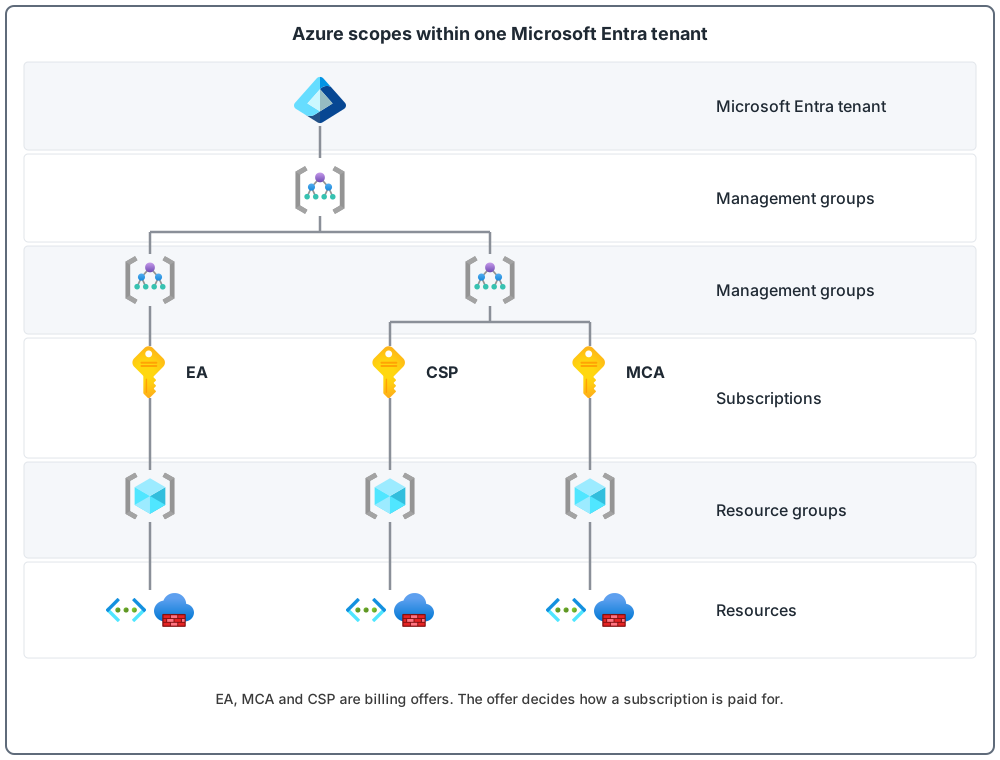
Picture one tenant at the top. Below it are management groups, and below those are subscriptions. Inside each subscription are resource groups, and inside those are the resources you actually run. Each subscription is bought under a billing offer (the picture shows EA, CSP and MCA), and the offer decides how that subscription is paid for.
Microsoft Entra tenant: who can sign in
A Microsoft Entra tenant provides identity and access management, which means it keeps track of who users are and what they are allowed to reach. It makes sure that only authenticated and authorized users reach the resources they have permission for (authentication and authorization are defined above). Three facts matter most here:
- An Azure subscription can trust only one tenant at a time. One tenant can have many subscriptions.
- Avoid several tenants for the same organization unless there is a specific business requirement. More tenants mean more management work and more security risk.
- The Azure landing zone reference architecture is deployed to one tenant.
Billing offer: how you pay
A billing offer is the type of Azure offer a subscription is bought under. Common examples are an Enterprise Agreement, a Microsoft Customer Agreement and a cloud solution provider agreement. You can use more than one at the same time, and an Azure landing zone supports subscriptions from any offer.
Billing can reach further than one tenant. For example, an Enterprise Agreement can cover subscriptions in different tenants, even though the landing zone itself is built in one tenant.
Subscription: where resources live
A subscription is a unit of management, billing and scale (scale is defined above). It is a boundary for scale, quota, cost, governance, security and identity controls. It is also the boundary for Azure Policy assignments. For example, a workload that needs stricter rules can sit in its own subscription, and the stricter rules do not get in the way of other workloads.
Management group: rules for many subscriptions
Management groups sit above subscriptions, as a level for governance. Rules you apply to a management group flow down to every subscription under it. For example, apply a policy to a management group that allows virtual machines (computers you run in Azure) only in approved regions, and it applies to every nested group, subscription and resource. One Azure RBAC role assignment (a permission given to a person or app at a chosen level) on a management group can give a person access to all the subscriptions below it.
Every tenant has one top-level management group, called the tenant root group by default. By default, new subscriptions land there automatically. Anything assigned at the root applies to the whole tenant, so keep root assignments to "must have" items only. The platform scope post showed how the landing zone arranges the groups below the root.
Below the subscription: resource groups and resources
A resource group holds related resources that share the same lifecycle, which means you deploy, update and delete them together.
Azure has four levels of management scope: management groups, subscriptions, resource groups and resources. Lower levels inherit settings from higher levels.
The four building blocks side by side
| Building block | Plain meaning | The question it answers |
|---|---|---|
| Microsoft Entra tenant | The identity home | Who can sign in? |
| Billing offer | The agreement you pay under | How is Azure paid for? |
| Subscription | A unit of management, billing and scale | Where do resources live, and what is the boundary for cost and policy? |
| Management group | A level above subscriptions where you apply rules | Which rules apply to which subscriptions? |
Three common mix-ups
- Tenant and subscription. A tenant is the identity home. A subscription is a container for resources. One tenant holds many subscriptions, and each subscription trusts one tenant.
- Subscription and region. A subscription is not tied to a region. One subscription can hold resources from different regions, so you do not need one subscription per region. Add extra subscriptions per region only for region-specific governance needs, such as data sovereignty, or to get past quota limits.
- Management group and resource group. A management group sits above subscriptions and groups subscriptions (and other management groups). A resource group sits below a subscription and groups resources. A management group is the top of the four levels. A resource group is the third level, just above the resources.
Tenant, billing, subscriptions and management groups at a glance
Common mistakes
- More tenants than you need. Avoid several tenants for one organization without a specific business requirement.
- Subscriptions can move in and out of your tenant. A user with the required permissions can change which tenant a subscription is linked to. Set both the "subscription leaving" and "subscription entering" directory options (the settings call the tenant a directory) to Permit no one, with a short list of exempted users, for example members of the platform operations team.
- Too much assigned at the root. Whatever you assign at the tenant root group reaches everything in the tenant.
- Big workloads share a subscription with everything else. Large specialized workloads should use their own subscriptions so they do not run into subscription limits. Examples are high-performance computing (very demanding calculation jobs), Internet of Things (IoT) device systems and large business-software systems.
From my own projects
These situations came up in my own work: more than one tenant, a large workload that ran into subscription limits, and subscriptions where nobody was clear who owned the cost. Typical results are extra admin work, security and access gaps, slower delivery, and confusion about billing.
The files in my repo
- Billing and tenant: billing-and-tenant.md
- Subscriptions: subscription-design.md
- Management groups: resource-organization.md
Sources
Microsoft Learn, checked October 2026: Defining tenants · Subscriptions · Management groups