When the line between platform and workload is not written down, two things can happen.
First, platform and workload mix. A workload team changes a shared network because it is "just one rule". Or the platform team ends up fixing an application because the application's resources sit in a platform subscription. Each change looks small. Together they make the shared foundation hard to trust.
Second, learners mix up a lab and a real landing zone. A lab is a good way to learn the steps. It is not the same as a production environment. If a post, a repo or a CV presents a lab as production, anyone who knows the topic will notice.
This post sets the boundary, and then shows where the lab in my repo stops short of an enterprise design.
Key terms
Terms from the landing zone introduction post (subscription, management group, Azure Policy, inheritance, virtual network, Log Analytics workspace, Microsoft Sentinel and Microsoft Entra Domain Services) keep the same meaning here. The new terms are below, in short, plain words.
| Word | What it means |
|---|---|
| Tenant root group | Every tenant has one management group at the very top. By default it is called Tenant root group. |
| Resource group | A container that holds related resources for an Azure solution. It sits inside a subscription. |
| Azure RBAC | Role-based access control. A system that manages who has access to Azure resources, what they can do with them, and where. |
| Role assignment | How access is given. It gives a user, group or app a role (a set of permissions) at a chosen level, such as a management group or a subscription. |
| Azure region | One or more Azure datacenters, connected by a high-capacity, low-latency network. The datacenters of a region are typically in one large metropolitan area. |
| Data residency | Keeping data inside specific geographic or jurisdictional boundaries. |
| Azure Firewall | A managed network firewall service in Azure. It inspects network traffic to protect your workloads. |
| DNS and private DNS zone | DNS (Domain Name System) turns a service name into a network address. A private DNS zone manages and resolves names inside a virtual network. Its records cannot be looked up from the internet, only from virtual networks linked to the zone. |
| Hub-and-spoke network | A network layout where a central hub virtual network connects to many spoke virtual networks. The spokes connect to the hub and can isolate workloads. |
| Hybrid connectivity | A link between your own networks (on-premises, for example in your datacenter) and your Azure resources, so that systems in both places work together as one network. |
| Azure Local | Microsoft's solution that extends Azure capabilities to environments you own, such as your own datacenter. The Azure Local systems themselves are called clusters. |
| Terraform and Terraform state | Terraform is an open-source tool that builds cloud infrastructure from configuration files. Terraform state is what Terraform uses to match the deployed resources to those files, so it knows what to add, update or delete. |
In the landing zone introduction post we said an Azure landing zone has two parts: the platform landing zone and the workload landing zones. Now we look at where each one lives.
Where the platform lives
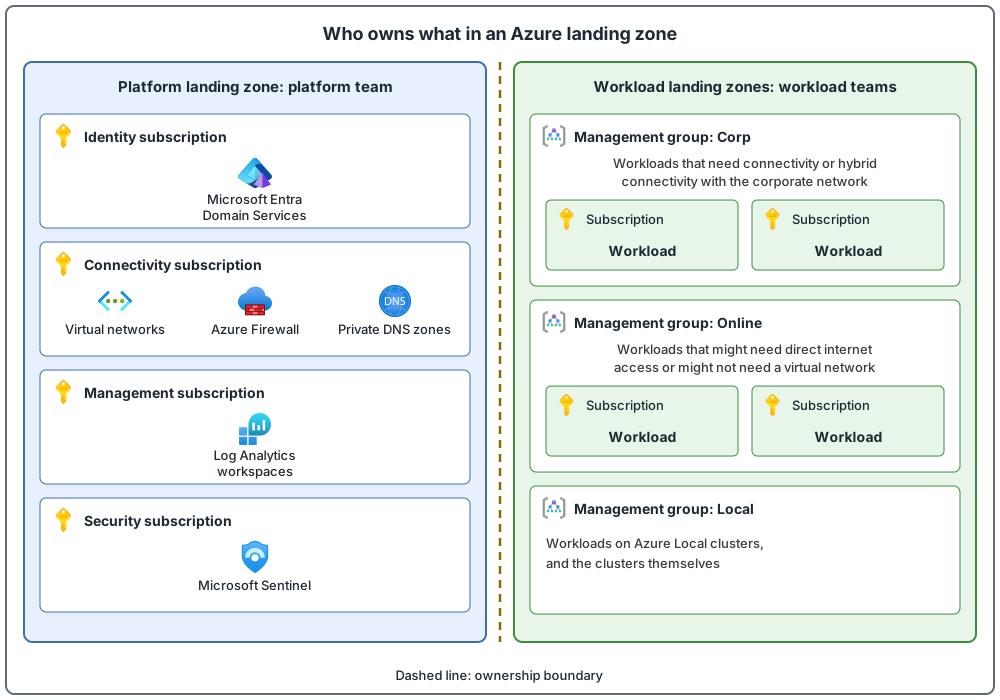
Use a platform management group that holds the common platform policies and role assignments. In the baseline hierarchy, each shared job has its own management group, with a dedicated subscription when that job is needed:
| Management group | What its subscription hosts |
|---|---|
| Identity | Identity services, for example Microsoft Entra Domain Services |
| Connectivity | Shared networking resources, for example a firewall and private DNS zones |
| Management | Monitoring, for example a Log Analytics workspace |
| Security | Security tooling, for example Microsoft Sentinel |
The idea is simple: each shared job gets its own subscription, instead of one big pile of shared resources. Do not combine platform responsibilities in a single subscription. That way you can apply different policies and role assignments to each area, and keep billing separate for each.
Where workloads live
Workload landing zones are kept apart from the platform, under a separate "Landing zones" management group (the landing zone introduction post showed the other spelling, "(Application) Landing zones"). Three management groups sit under it:
- Corp (also called Internal): for workloads that need connectivity, or hybrid connectivity, with the corporate network. That connection goes through the hub in the connectivity subscription.
- Online: for workloads that might need direct internet access, or that might not need a virtual network.
- Local: for workloads that run on Azure Local (see Key terms) clusters, and for the clusters themselves. These have different policy requirements from the other groups.
Workload subscriptions inherit the Azure Policy rules applied above them, so workloads get consistent guardrails.
Two rules that keep the boundary clean
- Keep workload resources apart from platform resources. The hierarchy separates platform resources and workload resources. Workload teams manage the workload landing zones, which stay separate from the platform landing zone that platform teams manage.
- Keep the hierarchy shallow. Azure allows six levels of management groups (not counting the root level or the subscription level). Ideally use no more than three to four levels, which reduces management overhead and complexity. Also limit the number of Azure Policy assignments at the root, which keeps down the work of debugging inherited policies in the groups below.
The lab in my repo, and where it stops
My repo's lab is for learning the deployment steps. The "core lab" is the basic, hands-on version of that lab, and the repo says plainly not to present it as a complete production landing zone. In the table, "Enterprise target" means what a real organization's design would add. Here is how the lab compares with an enterprise target. This table is from my repo, so it is my own design choice, not a Microsoft statement. Later posts cover identity, network and governance in detail.
| Area | Core lab | Enterprise target |
|---|---|---|
| Subscriptions | One existing subscription | Separate platform and workload subscriptions |
| Management groups | Explained; optional controlled exercise | The standard hierarchy, with subscriptions placed in it under control |
| Connectivity | Hub and one spoke | A dedicated connectivity subscription and many workload spokes |
| Firewall | Disabled by default | Enabled only when the approved network design requires it |
| DNS | Azure-provided DNS by default | One central set of private DNS zones, plus name lookup between Azure and your own networks where needed |
| Identity | The signed-in person or an app identity | A dedicated identity for automated deployments, extra approval for admin access, regular checks of who has access, and a plan for emergency accounts |
| Monitoring | One workspace | A central workspace plan, rules that switch logging on, alerts, how long logs are kept, and named owners |
| Policy | Safe example rules that only report problems | Groups of rules, switched on in stages, with approved exceptions, automatic fixes for resources that break the rules, and evidence |
| State | A dedicated storage account | The Terraform state kept in a protected subscription or resource group, with controlled access for automation |
The lab teaches the workflow. The enterprise column shows what a real design adds.
Platform and workload boundary at a glance
Common mistakes
- New subscriptions land at the root. By default, new subscriptions go under the tenant root management group. Set a default management group for new subscriptions, so none sit at the root.
- Anyone can create management groups. By default, any user or app identity in the tenant can. Turn on Azure RBAC authorization for management group operations, so only privileged users can.
- Workload teams get access at management group level. Avoid this because it gives people more access than they need and adds risk through inheritance. Give workload teams access at the subscription or resource group instead. Platform teams may need wider access, but only when they need it.
- Management groups copy the org chart, the environments or the regions. Do not copy your organization chart into a deeply nested hierarchy. Do not create groups for production, test and development, or groups made only to model Azure regions. If you need separate environments, use separate subscriptions in the same management group. The exception is a location-based rule such as data residency, which can justify a structure based on location.
From my own projects
These situations came up in my own work: platform and workload resources in the same subscription, and broad access given high up in the hierarchy. Typical results are slower delivery, security and audit issues, and confusion about cost.
The files in my repo
- This post: lab-vs-enterprise.md
Sources
Microsoft Learn, checked October 2026: Management groups · Landing zone overview · Subscriptions