As an illustration, not a real case, imagine an Azure environment where every project team made its own subscription (a container for a team's Azure resources, explained below). One team built its own network. Another chose its own logging, which means its own records of what happens in a system. A third decided its own access rules.
A year later, simple questions are hard to answer. Who can see what? Which networks connect to which? Where do the logs go? Who pays for this?
An Azure landing zone helps avoid this by preparing the environment first. Its platform part sets up governance, security and shared resources for everything your teams run in Azure. In my framing, teams then start from a known place with shared rules, instead of from nothing.
The five-minute version
- A landing zone is an architecture for governing, securing and scaling an Azure environment with many subscriptions (containers for a team's Azure resources).
- It has two parts: a platform landing zone (the shared foundation) and workload landing zones (where teams run workloads, meaning sets of Azure resources, code and data that deliver one business result).
- The platform has two components, a management group hierarchy (a tree that groups subscriptions) and centralized resources (as needed), plus an important function: a repeatable way to hand out workload landing zones (subscription vending).
- Azure Policy rules set high on the tree are inherited, meaning they also apply to everything below, so every workload gets the same guardrails (rules for what is acceptable).
- Before you build, define your requirements across eight design areas (topics such as identity, network and security); five design principles guide the decisions.
- Accelerators (Microsoft-provided tools that use infrastructure as code, meaning machine-readable definition files, to deploy based on recommended practices) are the fastest path for most organizations; the alternative is a custom build.
Do this today
Each action only looks at your environment, so you can do all three without changing any of your resources.
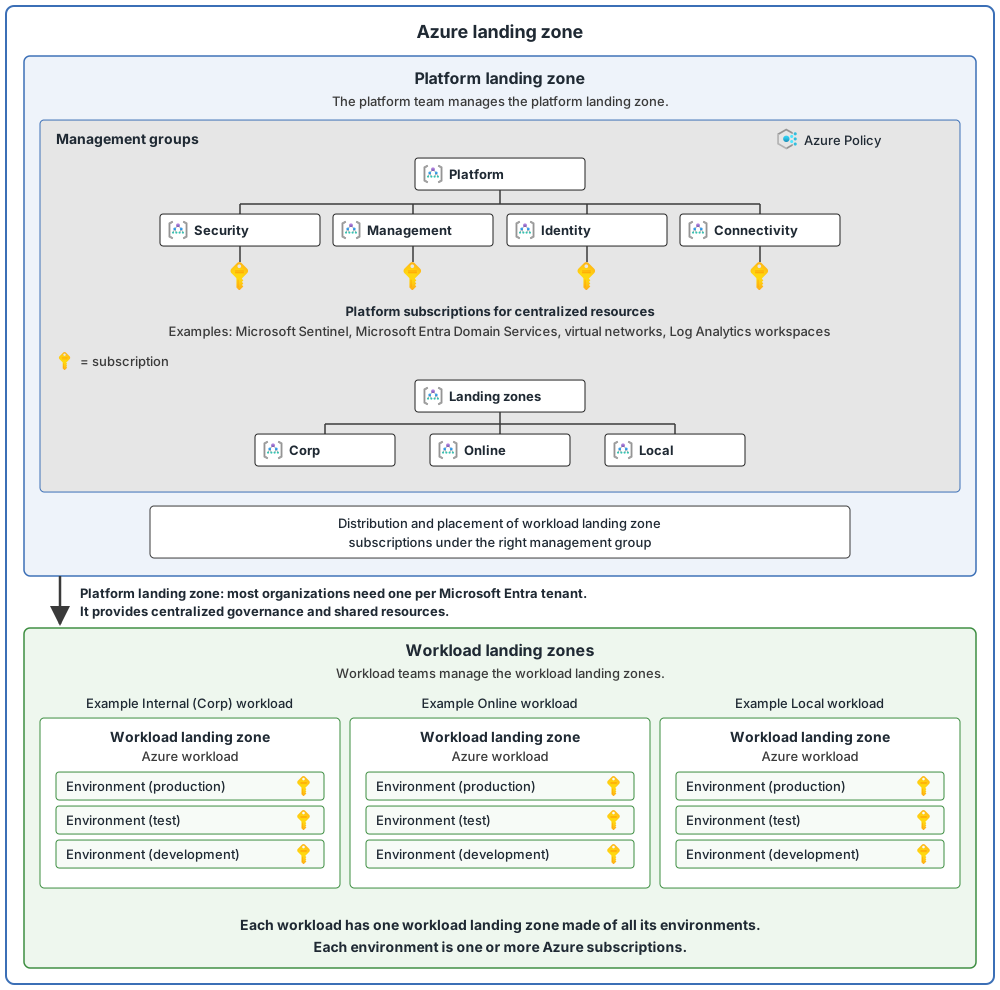
- See how your subscriptions are organized. Sign in to the Azure portal, select All services, type "Management groups" in the filter box and open it. You see the management groups and subscriptions you have access to, and selecting a group name takes you one level down, like a file explorer. If you see only the "Tenant root group", that is the built-in top group of your tenant (your organization's own Microsoft Entra instance, which holds its users and groups). Compare what you see with the diagram below.
- Find your area on the design areas page. It names all eight areas, which this series follows. Read the one-line objective of the area you work in, such as network or identity.
- Learn the platform and workload split, the main idea of everything that follows. Open the landing zone overview, look at the tab "Platform vs. workload landing zones", then read the sections "Platform landing zone" and "Workload landing zone". Then pick one subscription you know and ask whether it is platform or workload.
Key terms
This post uses a few terms that may be new. Here they are in short, plain words.
| Word | What it means |
|---|---|
| Resource | Something you can manage in Azure. Examples are virtual machines (computers that run in Azure), storage accounts (places to keep files and data), web apps (websites and apps that Azure runs for you), databases and virtual networks. |
| Microsoft Entra ID | Microsoft's cloud service that manages who users are and what they are allowed to access. |
| Microsoft Entra tenant | A dedicated instance of Microsoft Entra ID, usually for one organization (or a group within a larger company). It holds that organization's users, groups, devices and apps. |
| Azure subscription | A container for resources that Azure uses for billing and management. Each subscription trusts one Microsoft Entra tenant to check who people are. |
| Management group | A level above subscriptions where you group subscriptions together. Rules you set on a management group apply to every subscription under it. |
| Inheritance | A setting applied at a higher level also applies to everything below it. Lower levels inherit settings from higher levels. |
| Azure Policy | A service that sets rules for what is allowed in Azure and checks whether your resources follow them. |
| Governance and guardrails | Governance is how an organization controls its use of cloud services. It does this with guardrails: policies, procedures and tools that say which cloud activities are acceptable and which are not. |
| Workload | A group of Azure resources, code, data and other parts that work together to deliver one business result. AI models can be part of a workload too. |
| Platform team and workload team | In this series, the platform team manages the shared foundation, and a workload team manages its own workload. |
| DevOps | A way of working where the people who build software and the people who run it work together, using repeatable processes and tools. |
| Infrastructure as code (IaC) | Managing infrastructure resources, from creation through later changes, by using definition files that a machine can read. |
| Subscription vending | A way for the platform to hand out new subscriptions to workload teams by using automation. |
| Virtual network | The building block of a private network in Azure. It lets resources such as virtual machines talk safely to each other, to the internet, and to your own networks outside Azure. |
| Log Analytics workspace | A place where you collect log data (records of what happens) from your Azure and non-Azure resources and apps. |
| Microsoft Sentinel | A Microsoft cloud service that helps security teams find, investigate and respond to threats. |
| Microsoft Entra Domain Services | A managed service that lets Azure workloads sign in with older (legacy) methods, without you building and running your own domain servers. |
The last four rows (virtual network, Log Analytics workspace, Microsoft Sentinel and Microsoft Entra Domain Services) appear as example icons in the diagram below. In the diagram, the Platform management group has four child groups: Security, Management, Identity and Connectivity. They match the kinds of centralized resources listed later in this post: security monitoring, management services, identity services, and connectivity and networking. The platform scope post explains them.
The two parts of a landing zone
An Azure landing zone has two parts:
- The platform landing zone. The shared foundation.
- Workload landing zones. The places where teams run their workloads.
My own way to picture it: an apartment building has shared things, such as water, power and fire rules. Each apartment is a workload. Residents live their own lives, but inside the building's rules.
The platform landing zone
The platform landing zone is the central foundation. It sets up governance, security and shared resources for all your Azure workloads. Most organizations should have only one platform landing zone per Microsoft Entra tenant.
It consists of two components, plus an important function:
- A management group hierarchy. This organizes your subscriptions and applies governance standards to them. It keeps platform resources and workload resources apart.
- Centralized resources, only as needed. Common examples are connectivity and networking, security monitoring, identity services and management services. Centralize something only when it gives a clear benefit across several workloads.
- A way to hand out workload landing zones. You need a repeatable process to request, create and give workload landing zones to teams. You can do this by hand or automate it. As requests grow, automation matters more. This is called subscription vending.
Workload landing zones
Each workload has one workload landing zone. It holds all the environments the workload needs, such as development, test and production (the live version that real users use). Each environment is one or more Azure subscriptions.
Based on what the workload needs, the platform team places each workload subscription in one of three management groups. These sit under the "(Application) Landing zones" management group:
- Online: for workloads that might need direct inbound or outbound internet connectivity, or that might not need a virtual network.
- Internal (also called "Corp"): for workloads that need connectivity, or hybrid connectivity, with the organization's own network.
- Local: for workloads that run on Azure Local clusters, and for the clusters themselves. Azure Local is Microsoft's solution that extends Azure to environments you own, running on validated hardware in your own facilities.
The platform scope post explains what each one is for. The subscriptions inherit the Azure Policy rules applied higher in the hierarchy. That is how workloads get consistent guardrails, while still having room for their own needs.
(In my repo's example, Corp and Online are the main groups, and Local is optional. This is my repo's choice.)
Who owns what
Here is a simple way to split the work. This table is my own summary, not a table from the documentation.
| Platform team | Workload team |
|---|---|
| Management groups | Application resources |
| Policy rules that apply to everyone | Workload network and data |
| Shared connectivity | Workload monitoring |
| Central monitoring | Application updates |
| Platform security | Recovery plans for the application |
The platform team does not own every application resource. The workload team does not redesign the enterprise platform for each application.
Two ways to build it
There are two ways to implement each part:
- Accelerators. Microsoft-provided accelerators use infrastructure as code to deploy an environment based on recommended practices.
- Custom build. You design and build it yourself, or with help from Microsoft or a partner.
For most organizations, accelerators are the fastest route. We cover the options in more detail later in this series.
Eight design areas
Define your requirements across the design areas before you build a platform landing zone. There are eight:
- Azure billing and Active Directory tenant (the name on the design areas page; the area's own page is now titled "Azure billing offers and Microsoft Entra tenants", and the tenant is a Microsoft Entra tenant)
- Identity and access management
- Resource organization
- Network topology and connectivity
- Security
- Management
- Governance
- Platform automation and DevOps
Area 8 has "DevOps" in its name (defined above). That area is about aligning the best tools and templates to deploy your landing zones and supporting resources.
Five design principles guide these decisions: subscription democratization, policy-driven governance, a single control and management plane, an application-centric service model, and alignment with Azure-native design and roadmaps. This series covers them, and each design area, in later posts.
What a landing zone is not
In my words: it is not one resource, one subscription or one script. It is the combination of the design areas above, working together.
The landing zone at a glance
Common mistakes
- Teams create their own subscriptions. If getting a subscription is slow or complicated, teams may create their own, paid for in another way and sometimes in Microsoft Entra tenants that nobody manages. This situation is called "shadow IT". A simple, repeatable way to request subscriptions (subscription vending) helps avoid it.
- The structure does not match how you operate. Your operating model may change as your organization grows, and moving resources into separate subscriptions later can lead to complicated technical migrations. Check that the structure fits how you operate before you commit to it.
- Everything is centralized. Centralize a capability only when it gives a clear benefit across several workloads.
- No policy guardrails. Without Azure Policy guardrails, the work of keeping to your rules grows (more operational and management overhead).
From my own projects
These situations came up in my own work: teams creating their own subscriptions, with each project having its own network, logging and access rules, and nobody able to say clearly what things cost. I also saw the other side: where a landing zone was in place, new projects started in an environment that was already prepared, instead of building the basics themselves. Typical results of the first situation are slower delivery, security and audit issues, and confusion about who pays.
The files in my repo
My repo is a learning and reference lab. It is not production-ready and it is not the official accelerator.
- This post: what-is-an-azure-landing-zone.md
- Suggested reading order for the whole repo: learning-path.md
Sources
Microsoft Learn, checked October 2026: Landing zone overview · Design areas · Design principles