"Brownfield" means an environment that already exists, with subscriptions, resources and running workloads; its opposite, "greenfield", is a new one where nothing is built yet. If you have nothing yet, read the greenfield rollout post.
No documentation page is named "brownfield rollout". The page "Journey toward the target architecture" names three starting points, Start (new), Align (existing, needs changes) and Enhance (already in line), and uses the word for Align. It links to a transition page, three scenario pages, an approach page and a page on refactoring a landing zone. This post turns those, plus the moving, policy and Azure CLI pages, into a playbook. Where the order or reading is mine, I say so.
How to read this post. The top of each section is the short version. Commands, runbooks and tables sit in boxes you can open. If you only have five minutes, read the manager summary and the company case.
For managers: the summary
For the people who approve the work. Items marked "my suggestion" are mine. Words used here: a policy is a rule Azure checks resources against; audit-only means a policy only reports and blocks nothing; Decommissioned is the group where retired subscriptions wait; a tenant is your organization's one Microsoft Entra directory; a subscription is a billing and access container for Azure resources; a management group is a folder that holds subscriptions and passes policy and access down to them.
- What changes. A new group structure and policy set is built beside the current environment in the same tenant. Then existing subscriptions move in, one wave (a small batch) at a time. Moving workloads into new subscriptions is optional.
- What does not change. A subscription move does not change resource IDs or touch running resources. The subscription does inherit the group's access and policy, which apply to new changes. Existing resources that break a policy are only reported; new deployments are denied only by a policy with the Deny effect.
- Main risk. A new deployment can be denied by policy. Control: run the policies in audit-only mode first.
- Second risk. Moving individual resources changes their IDs and locks resource groups for up to four hours. Control: move subscriptions, not resources, where you can.
- Cost (my reading). The audit-only copies add no resources of their own. The new platform resources do.
- Approve (my suggestion): a named owner and a rollback owner per subscription, a change window per wave, and the right to stop a wave at the first policy denial.
- Done means: every subscription is in its planned group, every non-compliant resource has an owner, and retired subscriptions sit in Decommissioned.
Key terms
Earlier posts defined landing zone and guardrail, subscription and management group, Corp, Online, Sandboxes and Decommissioned, hub network and peering, and, in the governance post, policy effects, DeployIfNotExists (DINE), Modify and non-compliant.
| Word | What it means |
|---|---|
| Intermediate root | The management group directly under the tenant root that holds your whole landing zone design. |
| Global Administrator | A Microsoft Entra admin role. It gives no Azure access by itself; the person must first turn on elevation, described in the company case. |
| Deny, DINE, Modify | Policy effects. Deny rejects a change. DeployIfNotExists (DINE) adds a missing setting. Modify changes a resource's settings. |
| Wave | A small batch of subscriptions moved together. The pilot wave is the first one, on a low-risk subscription, to prove the steps. |
| Duplicate landing zone group | The recommended approach for an existing environment: copy the Landing zones group, its children Corp and Online and their policy assignments, and set the copies to audit only. |
| Audit-only mode | A policy assignment whose enforcement mode is DoNotEnforce (called Disabled in the portal). It reports compliance but does not enforce its effect. |
| Enterprise Agreement (EA) | A type of Microsoft contract. Under it, billing roles (enterprise administrator, department administrator, account owner) are separate from Azure access roles. |
| Account owner | An EA billing role. It can create and manage subscriptions. Each account has one account owner. |
| Subscription Owner | The Azure access role Owner on a subscription. It controls access and resources inside it, not the contract. |
| Azure Resource Graph | An Azure service that queries resources across many subscriptions at once, in a language based on Kusto Query Language (KQL). |
Your starting point at a glance
Pick the line that matches you. The steps after it are the same for every line.
Pick your situation
Nothing exists yet, so read the greenfield rollout post linked at the top.
One subscription, no management groups: platform and workload resources share it. Read "Take stock of what you have", then "Build beside the old environment".
Management groups already exist, following your organization or geography, with a hub network. Use the shared steps, plus the FAQ on development, test and production. Read "Plan the target" first.
Regional organization: groups by environment, then by region. Use the shared steps, the same FAQ, the sandbox guidance and the policy-driven guardrails guidance. Read the policy roll-out row in "Plan the target" first.
Take the default, which the transition page marks as recommended: duplicate the landing zone group. Read "Take stock of what you have", then "Build beside the old environment".
The three scenarios share the same steps: deploy in parallel in the same tenant, optionally migrate workloads into new subscriptions under Corp or Online, and create new subscriptions for new landing zones.
The brownfield path at a glance
Seven stages; the two stages "See the effect" and "Move in" repeat for each wave.
Figure 1. The brownfield path, from today's environment to governed workloads.
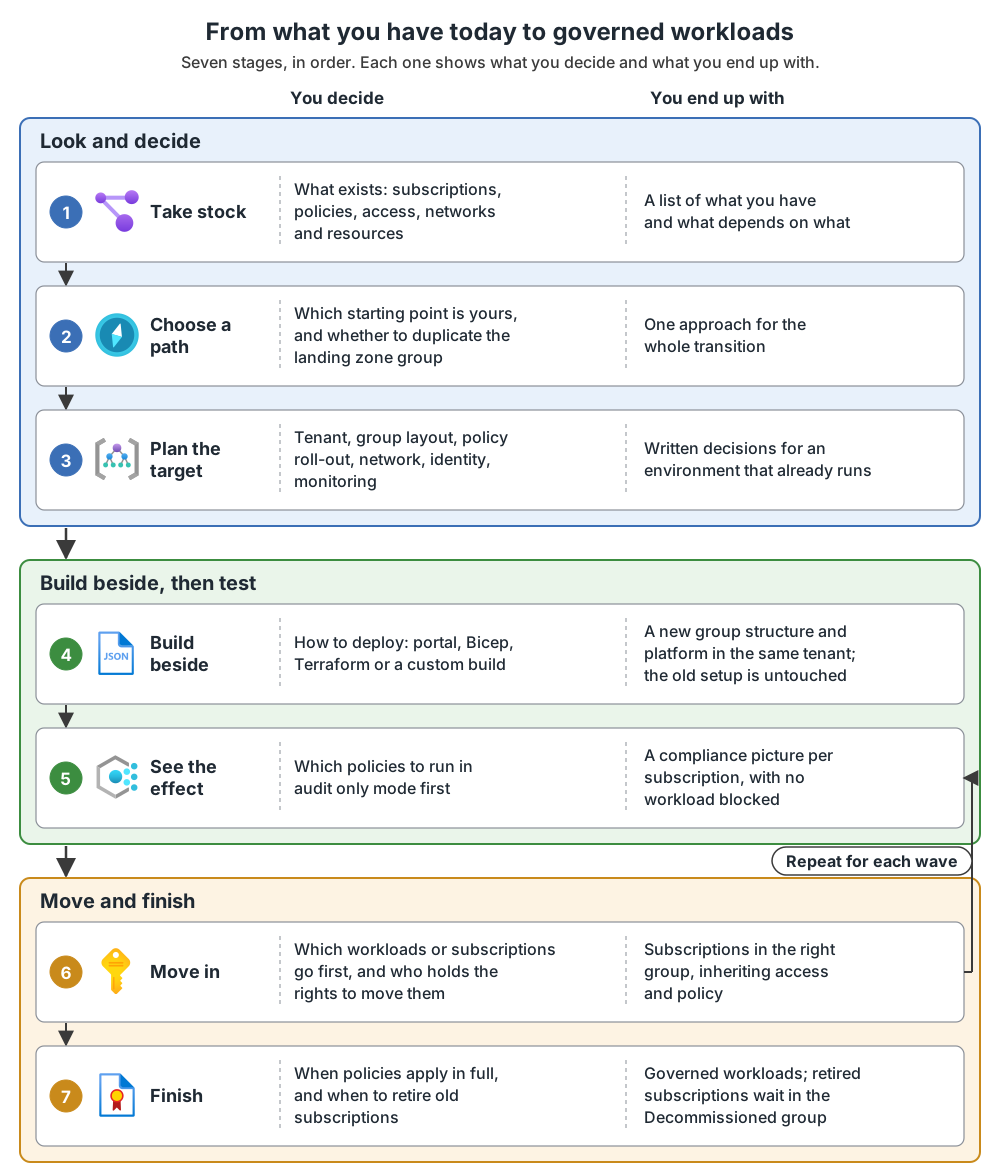
The end state is the architecture in the greenfield rollout, built beside your old environment. The old environment keeps running, and old subscriptions can retire into Decommissioned.
A company case: one tenant, many subscriptions
This is a made-up manufacturer with made-up numbers, but the situation is a typical one.
- One Microsoft Entra tenant and an Enterprise Agreement.
- 38 subscriptions, all directly under the tenant root group.
- Four departments, each with its own Enterprise Agreement account and an account owner who creates subscriptions when a team asks.
- Owner rights were given to individual people, one subscription at a time. Nobody can name the owner of 9 subscriptions.
- No policy at group level. Approval for a new subscription is an email to the account owner.
My reading: the problem is not technical. Billing and access are two separate systems, and nobody owns the whole picture.
Who controls what
An account owner creates subscriptions. That role is a billing role, set in the Enterprise Agreement. It can also manage role assignments on the subscriptions it owns. In my reading, it does not control policy or the management group tree; those come from Azure roles and management groups. The two systems meet at the subscription.
Figure 2. Billing and access meet at the subscription.
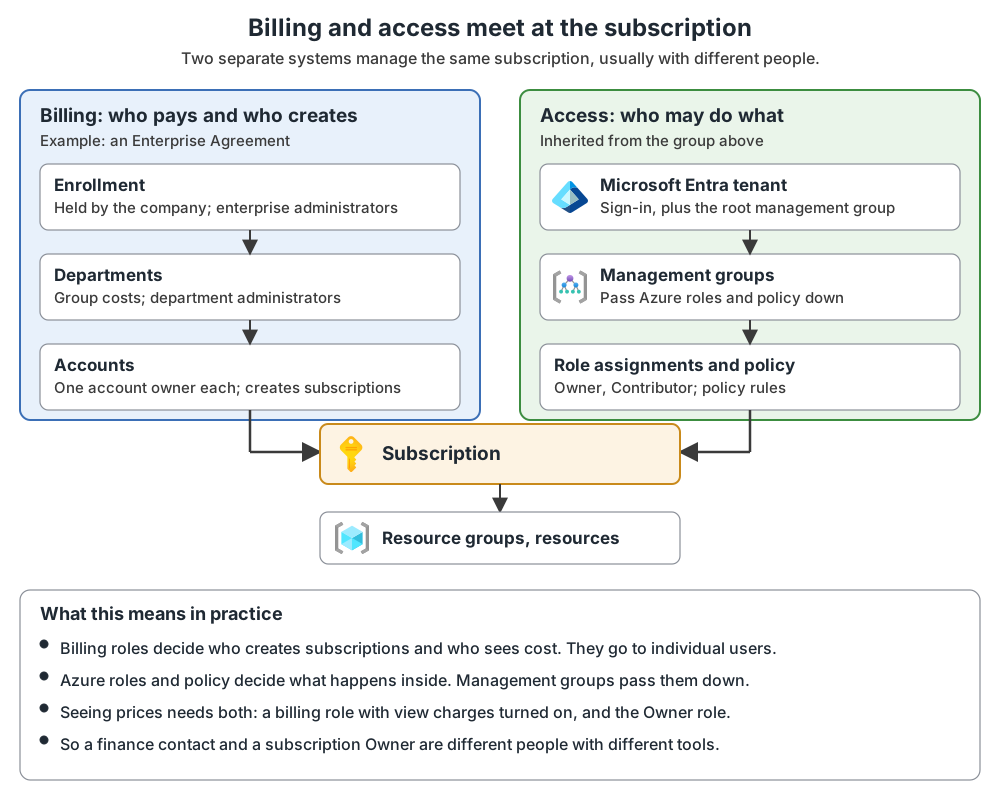
What matters here:
- An enterprise administrator or an account owner can create subscriptions. A department administrator can add accounts in their own department, but cannot create subscriptions.
- There is one account owner per account. Billing roles go to individual users, not to groups. From 16 November 2026, new billing role assignments must use work or school accounts.
- For an account owner or department administrator, seeing EA prices needs the view-charges policy turned on and the Azure Owner role. An enterprise administrator always sees them.
If your contract is a Microsoft Customer Agreement or a partner (CSP) agreement, the billing roles differ. I did not cover them here.
Who does what in the rollout
All roles below are my suggestion; the documentation gives roles only for new subscriptions.
| Who | What they do in the rollout |
|---|---|
| Global Administrator | Turns on "Access management for Azure resources" for themselves (sign out and in afterwards). That gives User Access Administrator at the root. Then grants the builder Owner at the top and removes the elevation afterwards. |
| Platform team | Builds the groups and policies, runs the waves, answers for the result. |
| Account owner or enterprise administrator | Told before each wave (my suggestion). Keeps creating subscriptions only until the request flow below is live. |
| Workload owner (the person who holds the Owner role) | Approves the move of their subscription, owns non-compliant resources and the budget. |
| Security or governance | Decides policy roll-out, exemptions and the stop rules. |
| Rollback owner (one named per wave) | May stop a wave at any time. |
| Workload owner and platform team together | Agree the change window, and approve any exemption that lets a move pass a Deny policy. |
Subscription owners should be told their duties: take full ownership of budget and resources, keep the subscription policy-compliant, and have their privileged access reviewed every quarter or year. The designated owner of a new subscription must be a user or service principal in the same directory, not a guest.
The 38 subscriptions as waves
My illustration of how the made-up manufacturer could sort them:
| Wave | What goes in | Why this order |
|---|---|---|
| 1 (pilot, explained in "Move in") | 1 platform-team lab subscription, to Sandboxes | Known owner, no production users, no hub peering |
| 2 | About 12 development and test subscriptions | Low risk; teaches the team the waits |
| 3 | Production subscriptions of one department | One owner group, one change window |
| 4 | Remaining production subscriptions, by department | Use what waves 2 and 3 taught |
| Last | Unowned and unused subscriptions: find the owner, or cancel into Decommissioned | Nothing moves without an owner (the repository's approach) |
| Not now | The shared hub network | The documentation gives no steps for merging a hub, so decide it separately and test the decision |
Do this: list your subscriptions by department, add the owner and where each subscription's Owner role comes from, and mark the ones nobody can name. The enterprise agreement shows which account created each subscription, which is a good first lead for finding the unowned ones (my suggestion).
What else a company must decide (my suggestion):
- Which subscriptions are the platform. The identity, connectivity and management subscriptions come from the platform build, not from the 38. Decide whether the hub stays in an existing subscription (my reading of the documented checks) or gets replaced.
- Corp or Online, per workload. Corp is for workloads that need private access to the hub; Online is for workloads that do not. The platform team and the workload owner decide each one, not the department.
- Departments stay in billing, not in the tree. Do not mirror the four departments as management groups. Keep cost by department in the Enterprise Agreement and in tags.
- Elevation with Privileged Identity Management. If the Global Administrator role is activated through it, activate first, turn the toggle on, and set the toggle back to No before you deactivate the role.
Take stock of what you have
You cannot judge what a policy or a move will do without knowing what runs. Fill one sheet with a row per subscription: owner, where the Owner role comes from, policy assignments, peering, identity needs, and "dependency unknown" where you do not know.
Commands for taking stock
Replace the values in angle brackets with your own.
1. Subscriptions.
az login
az account list --output table
Write down each name and ID. In my reading, a subscription missing from the list is one you cannot access, so ask its owner.
2. Management groups.
az account management-group list
az account management-group show --name '<groupId>' -e -r
The second shows one group and every level under it. When management groups are first set up, all existing subscriptions become children of the root group.
3. Access.
az role assignment list --scope "/subscriptions/<subscriptionId>" --include-inherited --output json --query '[].{principalName:principalName, roleDefinitionName:roleDefinitionName, scope:scope}'--include-inherited adds assignments from parent scopes. Note who has Owner, and whether the role comes from a management group, which limits where you can move the subscription.
4. Policy.
az policy assignment list --scope "/subscriptions/<subscriptionId>" --query "[].{Name:name, DisplayName:displayName, Id:id}" -o tableCompare these with the policies at the destination.
5. Resources. Azure Resource Graph needs Azure CLI 2.22.0 or higher and an extension:
az extension add --name resource-graph
az graph query --graph-query 'Resources | project name, type | limit 5'
This proves the tool works. Add --subscriptions or --management-groups to narrow the scope. The portal's Resource Graph Explorer has a schema browser and Download as CSV (up to 55,000 records).
6. What the commands cannot show. What to look for:
- Tenant. A subscription trusts one tenant. Moving one to a new tenant is mainly a billing transfer.
- Dependencies. Not every resource type supports a move.
- Networks. Nothing may overlap the address range you plan to use. Note VPN Gateway and ExpressRoute links.
- Identity. Note your Active Directory domains and whether Microsoft Entra Connect is in place. Workloads that need legacy sign-in (LDAP, Kerberos, Group Policy) need an early decision.
- Owners. The repository's approach: every subscription has a named owner, and no production subscription stays ownerless before its first move.
For a partial or mature existing platform, start with the readiness checks in the minimum viable platform post.
Plan the target and the owners
Plan the same design areas as for a new environment, in the same tenant. Four decisions matter most for an existing one.
| Decision | How to decide |
|---|---|
| Group layout | Do not copy a structure that follows departments, regions or environments. Keep to three or four levels; six is the limit (management groups design area). No groups only for environments or regions, unless a regulation ties data to a location. |
| Environments | Ideally one subscription per environment, in the same Corp or Online group. |
| Policy roll-out | Most customers can and should use DINE and Modify. A three-phase approach (audit only, a reduced scope, then everywhere) is for those who cannot yet, for reasons such as regulation. |
| Identity | Most workloads migrating from on premises already join an Active Directory domain, so you typically deploy domain controllers into the identity area. |
What I could not find. The documentation gives no steps for merging an existing hub network into the new connectivity subscription, only checks (overlap, peering, routing). Treat the hub as a decision you test.
Who may call a stop: the rollback owner named for the wave may stop it at any time. Restarting needs the platform team and the workload owner to agree. The wave operator does the work, the platform team lead answers for the result, and security and finance are told.
A small example to follow
A second made-up company, small enough to follow every move: one tenant, six subscriptions, all under the root group.
| Subscription | What is in it | Target |
|---|---|---|
| net-shared | A hub virtual network with a VPN Gateway, peered to the spokes (network team) | Stays; no steps exist for merging a hub |
| app1-prod | Production workload of team 1, peered to the hub | Corp |
| app2-mixed | Production and test resources of team 2 in one subscription | Corp, as it is; team 2 creates new test resources in dev-test, and the old ones retire |
| dev-test | Development and test for team 1 | Corp |
| lab | Experiments by the platform team | Sandboxes |
| old-pilot | An unused proof of concept, no known owner | Decommissioned |
app2-mixed moves as it is, with its test resources inside it, because moving individual test resources would mean moving its peered virtual network and every dependent resource together. Team 2 creates new test resources in dev-test instead, and the old ones retire later.
Build beside the old environment
Before you start. The builder needs the Owner role on the intermediate root, because the build creates groups and assigns access and policy (my reading). By default no one has access to the root group. A Global Administrator can grant it, as shown in before you start. Portal, Bicep and Terraform work in Azure public clouds; sovereign clouds need manual changes to Bicep or Terraform (Deploy Azure landing zones; choose how to implement it). The build creates the same billable platform resources as a new environment (cost note); the audit-only copies add none.
- Deploy the landing zone in parallel, in the same tenant, by following the greenfield rollout post. This does not affect the existing environment. Check: the new groups appear in
az account management-group list, and no existing subscription has moved. - Protect the top of the hierarchy. By default any user in the tenant can create a management group, and new subscriptions land under the root. Set a default group for new subscriptions, because the setting exists to give new subscriptions a more restrictive set of controls. The management groups design area page names a sandbox group as a good candidate for this default. My reading: a dedicated holding group with restrictive policy is also reasonable, because new subscriptions then start with strict controls until someone places them. Then turn on require authorization (in the portal, "Permissions for creating new management groups"). You need the Hierarchy Settings Administrator role or the same permissions. Use the portal (Management groups, root group, Settings) or the REST API; the documentation gives no
azcommand: protect your resource hierarchy. Check: open the root group's Settings in the portal and confirm both. - Create the duplicate groups. Check:
az account management-group show --name 'lz-brownfield' -e -rshows both children. - Assign the same policies to the copies in audit-only mode. Check:
az policy assignment showprints"enforcementMode": "DoNotEnforce". If it printsDefault, the policy will enforce.
Commands for steps 3 and 4
The first group in a directory can take up to 15 minutes. A group's name is its ID and cannot change later. The IDs below are mine. In my reading, the Landing zones copy sits under your intermediate root; the documentation does not say.
az account management-group create --name 'lz-brownfield' --display-name 'Landing zones (duplicate)' --parent '<intermediateRootId>'
az account management-group create --name 'corp-brownfield' --display-name 'Corp (duplicate)' --parent 'lz-brownfield'
az account management-group create --name 'online-brownfield' --display-name 'Online (duplicate)' --parent 'lz-brownfield'
List what the real Landing zones group has assigned, then repeat the create for each policy or initiative:
az policy assignment list --management-group '<landingZonesId>' --filter atScope()
az policy assignment create --name '<assignmentName>' --scope "/providers/Microsoft.Management/managementGroups/corp-brownfield" --policy <policyNameOrId> --enforcement-mode DoNotEnforce
--policy takes a name or a full resource ID. In the portal, open Policy, Assignments, Assign policy; on the Basics tab set Policy enforcement to Disabled, the portal name for DoNotEnforce. Add --params for parameters. With code, in my reading, you redeploy the same assignments at the new scope with that one property changed.
Check one assignment, and fix it if it shows Default:
az policy assignment show --name '<assignmentName>' --scope "/providers/Microsoft.Management/managementGroups/corp-brownfield"
az policy assignment update --name '<assignmentName>' --scope <scope> --enforcement-mode DoNotEnforce
For DeployIfNotExists and Modify policies the assignment needs a managed identity. The portal creates it and grants the roles in the definition's roleDefinitionIds. With the command line you grant them yourself: add --mi-system-assigned --location <region> --role <roleName> --identity-scope <scope>, taking the roles from az policy definition show --name '<policyName>', as narrow as the definition allows.
Figure 3. How existing subscriptions meet the new groups.
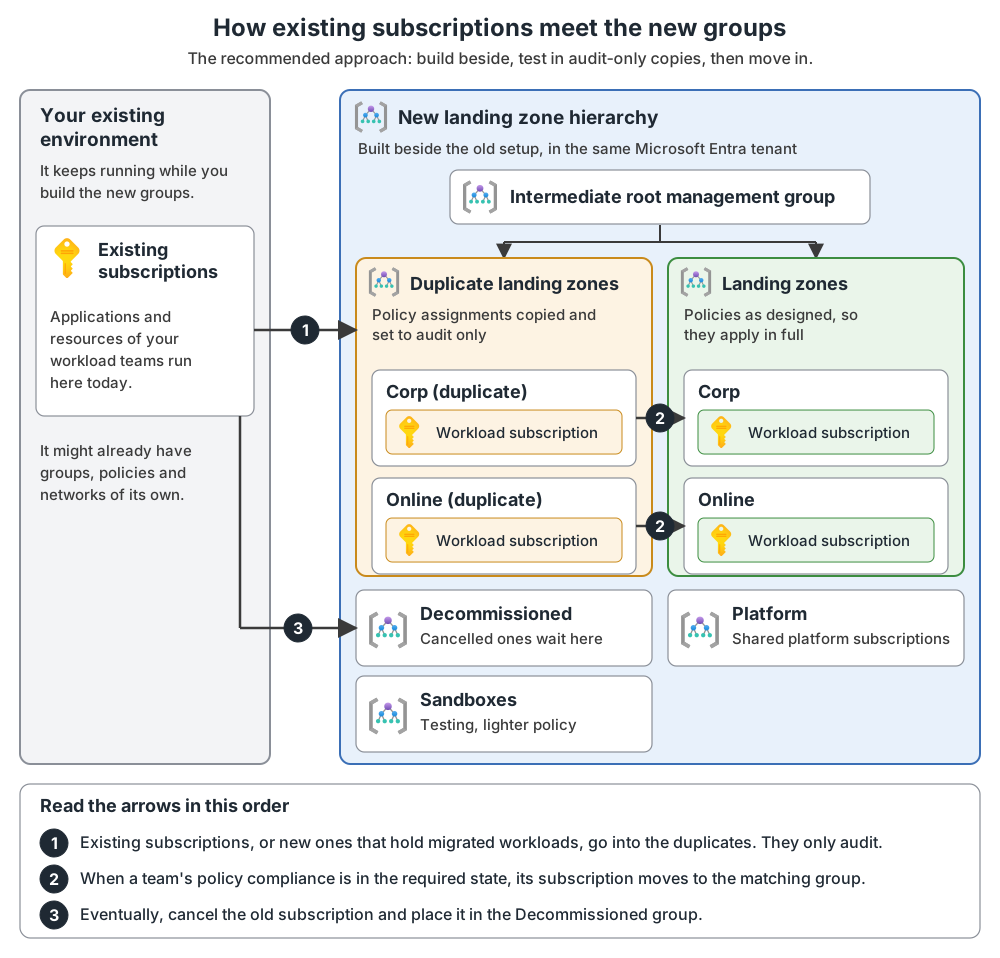
See the effect in audit-only mode
A new assignment takes about five minutes to apply, and then evaluation begins. The result is a list of existing resources that meet a policy's condition, each non-compliant. Give each one an owner and a plan.
Commands to read the effect
az policy state summarize -m 'corp-brownfield'
az policy state list -m 'corp-brownfield' --filter "(isCompliant eq false)"
Combining -m with --filter is my reading. In the portal, open Policy, Compliance.
Audit-only mode writes no Activity log entries, so the log will not tell you when a non-compliant resource appears. An optional canary hierarchy, a full copy of the production group structure, tests platform changes first (testing approach).
Move in: pilot, then waves
The documentation gives no wave order and does not describe a pilot. In my suggestion, wave 1 is a pilot on one low-risk subscription, so the first mistake costs little. After it, the order is: development and test, then production, then subscriptions with complex network, regulatory or vendor dependencies.
Pick for the pilot: a subscription with a known owner, no production users, no hub peering and no resource move. In the small example, that is lab, going to Sandboxes. The duplicate groups cover only Corp and Online, so Sandboxes has no audit-only copy, and its policy set is less restrictive, not empty. List its assignments first (az policy assignment list --management-group '<sandboxesId>' --filter atScope()) and run the pilot only if none has a Deny effect that could block the owner's pipeline; otherwise set those to DoNotEnforce or pick another subscription.
What the pilot must prove (my suggestion):
- The placement command works and the portal shows the subscription under the right group.
- After the 30-minute wait, access works and the owner's pipeline runs.
- The compliance commands return data, and every non-compliant record has an owner.
- If a Deny policy applies, one test deployment that should be denied is denied.
- You can put the subscription back in its previous group (my reading; the documentation shows no rollback).
Exit criteria before wave 2 (my suggestion): every item above is proven and written down, no stop rule fired, you recorded how long the waits really took, and the rollback owner and the workload owner agree.
Place a subscription
A subscription that moves to a management group inherits all access and policy from its new parent. Its resource IDs do not change, so the move itself leaves the resources inside untouched.
az account management-group subscription add --name 'corp-brownfield' --subscription '<subscriptionId>'Confirm in the portal (All services, Management groups) that it sits under the group. Changes can take up to 30 minutes to show; signing out and in is faster. Existing resources that break a policy show as non-compliant, and a person must fix them. New writes are judged in real time, so in my reading a redeploying pipeline can fail right after a move into a group that enforces. That is why the first stop is the audit-only copy.
Rights you need to move a subscription
On the subscription you need Microsoft.management/managementgroups/write, .../managementgroups/subscriptions/write, Microsoft.Authorization/roleAssignments/write and /delete, and Microsoft.Management/register/action. On the target and the current parent group you need Microsoft.management/managementgroups/write. To see which permissions you hold, select the group in the portal and then select Access control (IAM). The simple case is Owner assigned directly on the subscription plus write on both the target group and the current parent group. The root group needs none of these.
Only if you move resources: validate, move, check
The small example moves no resources. If you do, validate first; the portal does it for you. In the command line:
az resource invoke-action --action validateMoveResources \
  --ids "/subscriptions/{subscription-id}/resourceGroups/{source-rg}" \
  --request-body "{  \"resources\": [\"<resourceId1>\", \"<resourceId2>\"],\"targetResourceGroup\":\"/subscriptions/{subscription-id}/resourceGroups/{destination-rg}\" }"
If validation passes you see {} Finished ..; if it fails, the error says why. Then move, adding --destination-subscription-id to cross subscriptions:
az resource move --destination-group <destination-rg> --ids <resourceId1> <resourceId2>Check before the move (each failure is in the known issues table):
-
The type supports a move (check the list of resource types that support a move), and both subscriptions are active and in the same Microsoft Entra tenant. The two commands must print the same tenant ID:
az account show --subscription <source-subscription> --query tenantId az account show --subscription <destination-subscription> --query tenantId -
Across subscriptions, a resource and its dependent resources are in one resource group and move together. A peered virtual network needs its peering disabled first and re-enabled after.
-
The destination has quota and the resource provider registered (
az provider register --namespace <provider>), and no read-only lock exists. -
You hold
Microsoft.Resources/subscriptions/resourceGroups/moveResources/actionon the source group and.../resourceGroups/writeon the destination, and you name only top-level resources. -
Role assignments are listed (
az role assignment list --resource-group <source-rg>), and no more than 800 resources are in one operation (more than 800 returns an error, and a smaller move can still time out, so split large moves). A resource group cannot move to another subscription.
The resource ID changes, so update dashboards, scripts and templates. Both resource groups are locked for up to four hours.
The runbook for each wave
Runbook checklist: before, during, after
Tick each item as you go.
Before
- [ ] Owner and rollback owner named (the repository's approach).
- [ ] Inventory row complete.
- [ ] Destination policies listed:
az policy assignment list --management-group <groupId> --filter atScope(). - [ ] Audit-only results read, every non-compliant resource owned.
- [ ] For a resource move, validation passed.
During
- [ ] One command at a time.
- [ ] No second move involving the same resource groups.
After
- [ ] Waited out the cache and evaluation times (see the waits table).
- [ ] The portal shows the subscription under the right group, and access works.
- [ ] The pipeline runs, and alerts and dashboards use the new resource IDs after a resource move.
- [ ]
az policy state listshows compliance. - [ ] The repository's approach: one test deployment that should succeed does, one that should be denied is denied, and you observe for an agreed time before the next wave.
Stop rules and ways back
The stop rules are mine. The documentation describes no rollback for a subscription move; ways back it does not state are marked as my reading.
| Risky step | What can break | Stop rule | Way back |
|---|---|---|---|
| Subscription move into a group that enforces | A redeploy is denied by policy. | Stop the wave on the first policy denial. | az policy assignment update --name '<assignmentName>' --scope <scope> --enforcement-mode DoNotEnforce. In my reading, moving the subscription back to its previous group also works. |
| Subscription move | Access looks missing (cache). | Change no roles until the cache wait has passed. | Sign out and in, or request a new token. |
For a resource move, the stop rule is mine: edit nothing, start no second move, and do not weaken a production policy without its owner. The ways back are in the known issues table.
When to stop and ask
Stop and ask the owner or platform team when:
- Your Owner role comes through the current group and the target group does not give you Owner.
- A subscription is in another tenant, a resource type is unsupported, or validation fails and you do not understand why.
- You need to merge an existing hub network. The documentation gives no steps.
- Address ranges overlap, or a workload needs legacy Active Directory sign-in.
- A Deny policy blocks a move and the fix would be an exemption or exclusion.
- A production subscription has no known owner, or a resource group stays locked past four hours.
- A subscription appears under the root group that nobody placed there.
The small example as a plan
| Wave | Subscription | Goes to | Check |
|---|---|---|---|
| 1 (pilot) | lab | Sandboxes | Access works; the platform team's pipeline runs. |
| 2 | dev-test | Corp (duplicate), then Corp | az policy state list -m 'corp-brownfield' --filter "(isCompliant eq false)" shows no record without an owner. |
| 3 | app2-mixed | New test resources in dev-test; the old ones stay | Team 2's test pipeline deploys to dev-test; the old test resources are on a retire list. |
| 4 | app1-prod | Corp (duplicate), then Corp | Team 1's pipeline deploys a test change to production; one expected alert arrives. |
| 5 | app2-mixed | Corp (duplicate), then Corp | Team 2's pipeline deploys a test change; one expected alert arrives; every non-compliant record has an owner. |
| Last | old-pilot | Cancel it and place it in Decommissioned | Owner confirms it is unused; final approval. |
| Not now | net-shared | Stays | A written, tested hub decision. |
In my reading, moving an existing subscription into a duplicate group (waves 2, 4 and 5) shows its compliance in audit-only mode; the approach page describes new subscriptions there, so confirm with your platform team.
How long the waits are
No page gives an overall schedule. These are the waits it gives (plus four hours if you move resources, and 30 to 60 days before a cancelled subscription is deleted):
| What | Wait |
|---|---|
| A new or updated policy assignment | About five minutes to apply, then evaluation with no set end |
| A subscription moved, for policy that targets the subscription | Around 30 minutes |
| Management group cache and access tokens | Up to 30 minutes |
| Re-evaluation of all assignments | Every 24 hours; az policy state trigger-scan starts one by hand |
Finish and retire
When the workload team and platform team bring compliance into the required state, move the subscription to the matching real group:
az account management-group subscription add --name '<corpGroupId>' --subscription '<subscriptionId>'A subscription has one parent, so this replaces the duplicate group, and the full policies now cover it. For DINE and Modify, the policy-driven guardrails page enables them in stages: a reduced scope such as Sandbox first, then everywhere. Cancel subscriptions you no longer need and place them in Decommissioned; the repository's approach adds a holding period and a final approval.
Before its wave starts, tell each team its group, the policies that apply, its non-compliant resources and who fixes them. New subscriptions follow the subscription vending steps.
How new subscriptions get approved afterwards
Today, approval is an email. In the target state, a central group (the documentation calls it the Cloud Center of Excellence) builds the approval process, and new subscriptions come through a request flow. The documentation calls this subscription vending.
Figure 4. A new subscription, from request to workload.
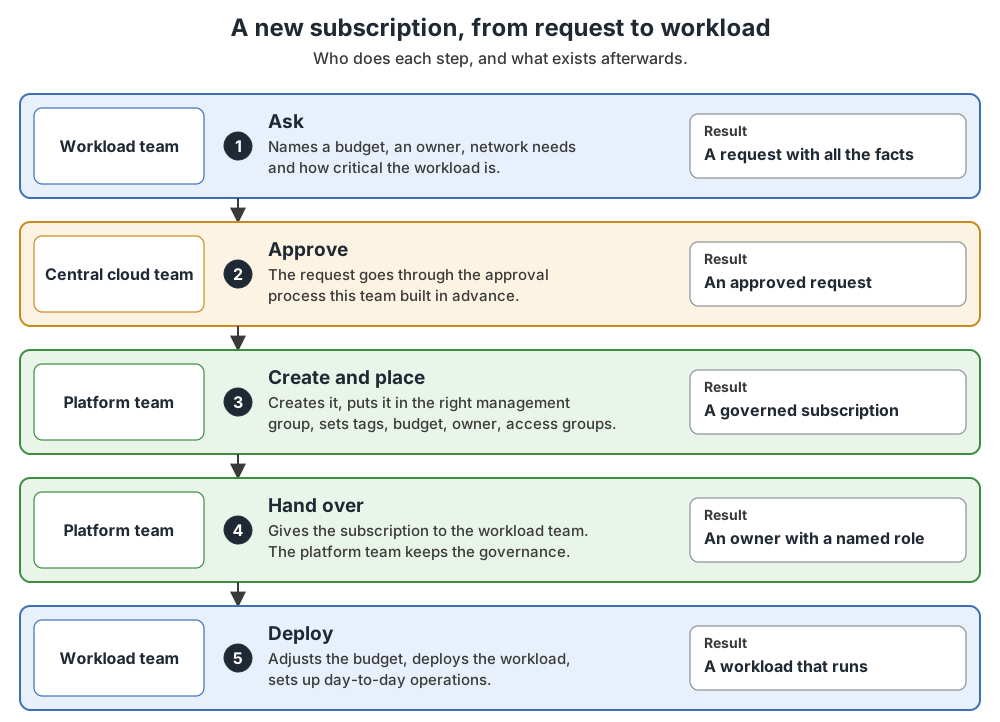
Two settings protect the root: a default management group for new subscriptions, so one an account owner creates does not land under the root, and require authorization, so people cannot create management groups freely. Both are in "Build beside the old environment". They do not stop an account owner from creating a subscription outside this flow. That is a billing-role decision (my suggestion: keep the account owner role with the platform team's automation, and ask other account owners to use the request).
Known issues and fixes (9 rows)
Every row is stated in the documentation; error names are quoted as printed. The first five rows apply only if you move resources.
| Issue | Cause | Fix |
|---|---|---|
RequestDisallowedByPolicy or ResourceMovePolicyValidationFailed on a resource move |
A Deny policy at the destination, for example a missing required tag. | Make the resources comply; or a temporary exemption (Mitigated) or exclusion, removed afterward; or another destination. |
MissingMoveDependentResources |
A dependent resource is neither in the destination nor in the request. | Add it to the request. A virtual network gateway must sit in its network's resource group. |
| Nothing can be changed in two resource groups | The move lock, up to four hours. | Wait. Existing resources keep running. |
| Move refused | A read-only lock on source, destination or subscription. | Remove the lock first (my reading). |
| Role assignments gone after a resource move | They do not move and become orphaned. | List them before, create them again after. |
| Group placement or access does not show | Tokens and the management group cache last 30 minutes. | Sign out and in, or request a new token. |
| A subscription cannot move to the group you chose | Your Owner role is inherited from the current group, so you can move only to a group where you also hold Owner. | Get Owner on the target, or ask someone who has it. |
| Many resources non-compliant after a move; nothing fixed | Existing resources are only audited; nothing is remediated or rejected. | The owner mitigates; start remediation tasks for DeployIfNotExists and Modify. |
| Remediation fails | The assignment's identity lacks roles. Only the portal grants them automatically, and roles added later need a manual grant. | Grant the roles in roleDefinitionIds, as narrow as possible. |
Validation checklist: proof that it worked
Each item is an end state you can verify. The runbook is the order of work; this is the proof.
Before the wave
- [ ] Every audit-only assignment shows
"enforcementMode": "DoNotEnforce"inaz policy assignment show. - [ ] Every record in
az policy state list -m 'corp-brownfield' --filter "(isCompliant eq false)"has an owner. - [ ] The Owner role source is known:
az role assignment list --scope "/subscriptions/<subscriptionId>" --include-inherited. - [ ] For a resource move, both tenant ID commands print the same ID and validation printed
{} Finished ...
After the wave
- [ ] After the wait,
az account management-group show --name 'corp-brownfield' -e -rlists the subscription. - [ ] After a resource move, both groups accept changes again, role assignments exist again, peering is enabled, and dashboards use the new IDs.
Before enforcing policy
- [ ] Each non-compliant resource is fixed or has an owner and a plan.
- [ ] Every DeployIfNotExists and Modify assignment has an identity with the roles from
az policy definition show --name '<policyName>'. - [ ] You switched to
Defaultfirst on a reduced scope such as Sandboxes, and tested deployment, code deployment, day-two operations and decommissioning there. - [ ] You decided how you will hear about new non-compliant resources, because DoNotEnforce writes no Activity log entries.
Before decommissioning
- [ ] The owner confirmed that the subscription is unused, the holding period passed, and the final approval is recorded (the repository's approach).
What comes next
A landing zone is not finished when the last subscription is in place. The next post covers keeping it up to date; the Enhance starting point is where you add controls.
Common mistakes
- Copying today's structure into management groups. Departments, regions and environments belong in subscriptions and tags.
- Leaving billing and access with different people and no shared list. The account owner who creates a subscription and the Owner who runs it can be different people. Keep one sheet that names both.
- Starting the next wave before the checks pass. The documentation gives no order; the pilot exit criteria and the checklist are the repository's guard against this.
From my own projects
I have not marked any item in the list above as something I saw in my own projects. I leave out project details.
The files in my repo
My repo is a learning implementation, and its own order and habits are the repository's approach, not the documentation's.
- Govern an existing Azure environment: a fictional company with 45 subscriptions, thirteen phases with evidence and an exit condition each. The repository's habits: inventory first, audit mode before enforcement, a low-risk pilot wave, a rollback path per wave: brownfield.md
- Ten short use cases: use-cases.md
- A template for recording a time-limited policy exception: policy-exemptions.md
- A ten-step decommissioning process, cancelling last: decommissioning.md
- Which services charge while idle: cost-and-safety.md
Sources
Microsoft Learn, checked October 2026: Transition an existing Azure environment to the Azure landing zone reference architecture · Scenario: Transition an environment by duplicating a landing zone management group · Manage Azure Enterprise Agreement roles