In the tenant and subscriptions post you met the four levels Azure uses to organize things: management groups, subscriptions, resource groups and resources. The business requirements post covered the business requirements (compliance, region, recovery, connectivity and cost) that come first. This post answers the next question: where does everything go?
The answer matters early. Think through your management group structure when you plan Azure adoption at scale. My reading: reorganizing later is costly, because moving a subscription between management groups changes the Azure RBAC and Azure Policy it inherits. Do not copy your organization chart into a deeply nested hierarchy.
Key terms
Earlier posts defined landing zone, workload landing zone, management group, subscription, resource group, tenant root group, scope, Azure Policy, Azure RBAC, inheritance, quota, tag, subscription vending, sandbox subscription, shadow IT, guardrails and platform team. The words below are new. The management groups themselves (intermediate root, Platform, Landing zones, Sandboxes and Decommissioned) are explained in the table in "Management groups: the baseline hierarchy". Each word is in plain words.
| Word | What it means |
|---|---|
| Corp, Online and Local | The three child groups of Landing zones. Corp is for workloads that need connectivity, or hybrid connectivity, with the corporate network through the hub (the central point that other networks connect to, Business requirements) in the connectivity subscription. Online is for workloads that might need direct internet connectivity, or might not need a virtual network. Local is for workloads that run on Azure Local clusters, and for those clusters themselves. Azure Local is a solution that brings Azure to hardware in your own facilities, such as your own datacenter (the platform scope post). A cluster is a group of machines that work together. |
| Landing zone archetype | A description of what needs to be true so that a landing zone (here, an Azure subscription) meets the expected environment and compliance requirements at a specific scope. Examples are Azure Policy assignments, Azure RBAC assignments, and centrally managed resources such as networking. It is the set of policies and access rules a subscription ends up with because of where you place it in the hierarchy. A management group alone is not an archetype. It is part of how you build one. |
| Subscription democratization | Workload teams can get and manage Azure subscriptions on their own, while staying inside the platform's governance and guardrails. |
| Cloud Center of Excellence (CCoE) | In the subscription vending process, the team that sets the business rules and the approval process for subscription requests. |
| Product line | A type or style of subscription that the platform team can hand out to workload teams through a self-service system. |
| Naming convention | A standard format for naming Azure resources. |
The four levels, in one paragraph
Azure has four levels of scope: management groups, subscriptions, resource groups and resources. Settings applied at a higher level pass down to the levels below. A subscription is a unit of management, billing and scale. With subscription democratization, subscriptions (not resource groups) are the main unit of workload management and scale. A resource group is a container for related resources that share the same lifecycle: you deploy, update and delete them together. Each resource sits in only one resource group.
Management groups: the baseline hierarchy
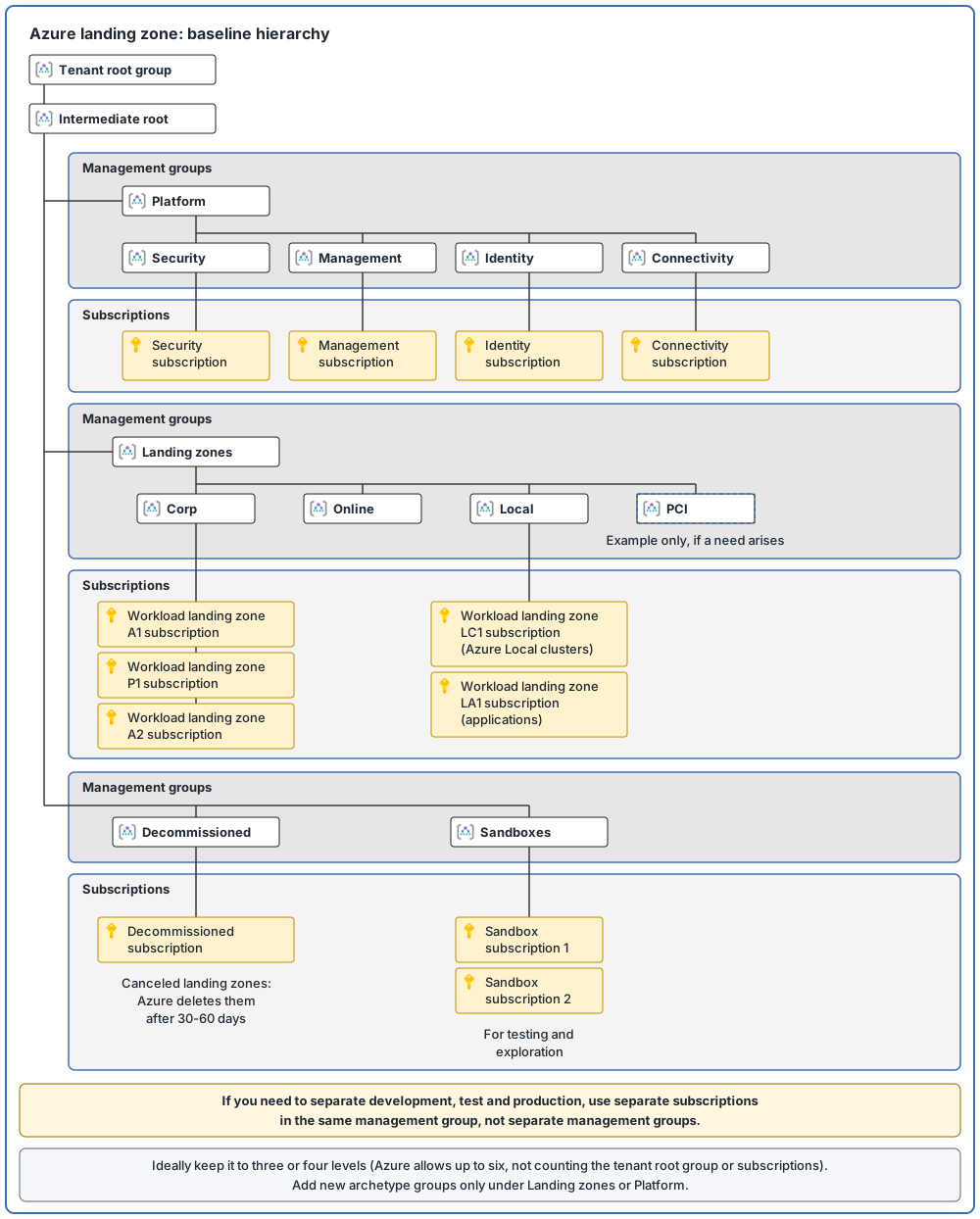
The Azure landing zone architecture gives you a starting hierarchy. The diagram below shows it. Here is what each group is for.
| Management group | What it is for |
|---|---|
| Intermediate root | Sits directly under the tenant root group. Your organization gives it its own name prefix, so you do not have to build the landing zone structure on the tenant root group itself. It is the parent of all the other management groups |
| Platform | Holds the platform child groups: Security, Management, Connectivity and Identity |
| Security | A dedicated subscription for the security team's tooling, such as Microsoft Sentinel |
| Management | A dedicated subscription for management and monitoring, for example Log Analytics workspaces |
| Connectivity | A dedicated subscription for the shared networking that the platform needs, such as Azure Virtual WAN, Azure Firewall and private DNS zones (see the platform scope and business requirements posts) |
| Identity | A dedicated subscription for the virtual machines that run Active Directory Domain Services (AD DS, Identity and access) or for Microsoft Entra Domain Services |
| Landing zones | Parent of the workload groups Corp, Online and Local (defined above). It has Azure Policy rules that apply to every workload, to keep workloads secure and compliant |
| Sandboxes | For subscriptions used for testing and exploration. They are securely isolated from the Corp and Online landing zones, and have a less restrictive set of policies |
| Decommissioned | Canceled landing zones, deleted by Azure after 30-60 days |
For many organizations, the default Corp, Online and Local groups are an ideal starting point. Some organizations need to add more.
Rules for management groups
Do:
- Keep the hierarchy reasonably flat, ideally no more than three to four levels. Azure allows up to six levels of management groups, not counting the tenant root level and the subscription level, but a flat tree means less overhead and complexity.
- Use management groups to apply Azure Policy to subscriptions that need the same security and compliance settings.
- Group workloads by type, for example Online, Corp, Local or sandbox, so that policies and roles can be specific to the type.
- Create a Sandboxes group, so people can experiment away from development, test and production.
- Limit the number of Azure Policy assignments at the root management group, so inherited policies are easier to debug.
- Use resource tags to search and navigate across the hierarchy, instead of building a complex hierarchy.
Don't:
- Do not copy your organization chart into a deeply nested hierarchy. Use management groups for policy assignment rather than for billing and Azure RBAC purposes.
- Do not give workload teams Azure RBAC permissions at management group scope. This risks over-permissioning, because permissions inherit downward. Assign permissions at the specific subscription or resource group they need access to. This is normally done during subscription vending.
- Do not create management groups for production, test and development. If you need to separate them, use different subscriptions in the same management group.
- Do not create management groups only to model Azure regions. There is one exception: if you have location-based regulatory requirements such as data residency, data security or data sovereignty, create a structure based on location.
Platform teams can get Azure RBAC at management group scope to do daily tasks across all subscriptions. Control this with Privileged Identity Management (PIM, the privileged access post), so the permissions are granted only when needed.
These are the limits: a single directory (your tenant) supports up to 10,000 management groups, each management group or subscription has only one parent, and a management group can have many children.
Protect the top of the hierarchy
New subscriptions go to the tenant root group by default. Anything assigned there applies to every resource in the tenant, so define only "must have" items on that scope. Two settings help protect it:
- A default management group for new subscriptions. Set a dedicated one, so no subscription lands directly under the root. A sandbox group is a good candidate.
- Require authorization to create management groups. By default, any user can create management groups. Turning this setting on means only users with the right permission can.
Nobody has access to the root management group by default. Only Microsoft Entra Global Administrators can give themselves access.
Subscriptions: when to create a new one
Four principles help you decide:
| Principle | What it means | Example |
|---|---|---|
| Scale limits | A subscription is a scale unit. Workloads should scale within its limits | Large specialized workloads should use separate subscriptions, to avoid running up against these limits |
| Management boundary | A subscription separates concerns for governance and isolation | Development, test and production are often managed differently |
| Policy boundary | A subscription is a boundary for Azure Policy assignments | Secure workloads, such as those that handle payment card data (PCI DSS, Business requirements), usually need other policies. Development environments need more relaxed ones than production |
| Target network topology | You cannot share virtual networks across subscriptions, but you can connect them | Consider which workloads need to talk to each other |
More guidance:
- Platform: use separate subscriptions for management, security, connectivity and identity when you need them. Do not combine them. This lets you apply different policies and role assignments to each, and keeps their billing separate.
- Environments: use subscriptions, not management groups, to separate development, test and production.
- Avoid a rigid model. Use flexible criteria. Some applications can share a landing zone subscription, while others need their own.
- Regions: subscriptions are not tied to a region, so you do not need one per region. Create extra subscriptions per region only for region-specific governance or management needs, such as data sovereignty, or to scale beyond quota limits.
- Resource groups: keep a resource group and its resources in the same region, and do not put resources from different regions in one resource group.
- Quotas: a subscription quota is not a capacity guarantee, and it applies per region. Ask for quota increases before your workloads exceed the default limits, and set alerts for when you approach them.
- Owners: tell subscription owners what they are responsible for. Their duties include taking full ownership of budget spending and resources, ensuring policy compliance, and doing a regular access review for Privileged Identity Management (PIM) so privileges do not pile up when people move.
Tailoring: when the default is not enough
Tailoring is not required. The default archetypes and hierarchy are suitable for most scenarios. There are no fixed numbered steps for tailoring. I put the points together, and a sensible order for a new requirement is:
- Try to build on what exists. Add the policy to an existing archetype or management group.
- If the requirement must apply to all workloads, assign it at the intermediate root management group. The reference architecture does this for settings that must apply to all workloads.
- If only some workloads need it, and the options above do not fit, create a new management group under Landing zones. This is the most common and safest place. An example is compliance with PCI DSS (the payment card security standard from the business requirements post), needed for a set of workloads but not for everything. Create a PCI group under Landing zones, assign the extra policies to it, then place the relevant subscriptions in it. That forms a new archetype.
The other place to add a group is under Platform. Another example is a dedicated security operations team that needs different policy and role assignments from the Management child group of Platform. That scenario is now part of the default hierarchy as the Security group.
Cautions: do not re-create your organization chart, teams or departments as archetypes. Do not create archetypes for development, test and production. Create new archetypes only when truly needed, and only in those two places. Avoid going beyond a depth of four layers, and grow sideways instead of deeper. Moving a subscription between management groups changes the Azure RBAC and Azure Policy it inherits, so check the effect first.
Subscription vending and product lines
Subscription vending is a platform mechanism for issuing subscriptions to workload teams using automation. Three teams are involved: the CCoE sets the rules and approval process, workload teams make requests, and the platform team creates and configures the subscription, then hands it over. The benefits are a streamlined process (one official place to ask), faster access for workload teams, and efficient governance with little overhead.
The steps are:
- Set up the approval process, and automate it. Collect requirements when the request arrives, including budgets, owners and networking needs.
- The workload team makes a request.
- Configure networking. For example, never use overlapping IP addresses (two networks that use the same addresses, the business requirements post) in a single routing domain (a group of networks that can send traffic to each other).
- Place the subscription in the right management group.
- Create and configure it in a repeatable way, for example with infrastructure as code (describing the setup in code files so it can be repeated), with tags for cost reporting. The request must say whether the workload is Production or DevTest. DevTest environments result in lower resource charges but have other terms.
- The deployment creates a subscription budget from the request, and the workload team updates it. Set budget alerts, because budgets are not hard limits.
- The workload team deploys and operates the workload. The platform team stays responsible for governance, and moves the subscription if its governance needs change.
One subscription type cannot fit every team, so platform teams offer product lines. A product line is a type of subscription, not a management group. The platform team still places each subscription it hands out in a management group (step 4). These are common ones:
| Product line | For |
|---|---|
| Corp connected | Workloads that need connectivity to other applications and to on-premises environments through the Connectivity subscription. Use it only when you need to |
| Online | Workloads that connect to other applications through modern connectivity services and architectures, such as APIs (ways for one program to talk to another) or endpoints that each application exposes |
| Tech platform | Teams that build a platform other applications run on. Azure Virtual Desktop (AVD) is an example. AVD is a Microsoft service that provides virtual desktops or applications to an organization |
| Shared application portfolio | Closely coupled applications owned by the same team |
| Sandbox | Experiments and proofs of concept, with fewer controls. Often limited by time or budget |
Customers typically start with Sandbox, Corp connected and Online. Each product line has an implementation and a maintenance cost. Also, do not create one sandbox subscription and share it among teams through resource groups. Create more sandbox subscriptions instead.
The reason it matters: without a vending process, or when getting a subscription is slow, teams may create their own through other billing accounts, or in tenants you do not govern. That is shadow IT.
Naming and tagging
Naming. A naming convention gives every resource a name in a standard format. Follow these points:
- Most Azure resource names cannot be changed after creation. Put only information that stays constant in the name, and use tags for the rest.
- Names must be unique within a scope. Some are unique across all of Azure (global), some inside a resource group, and some inside the parent resource.
- Common name parts are the resource type, the workload, the environment, the Azure region and an instance number. Decide the order of the parts, and whether to use a hyphen between them. An example is
vnet-prod-westus-001(a virtual network, "prod", the West US region, instance 001). - Use abbreviations to stay within length limits. The Azure Naming Tool can generate names from your convention.
- Do not put personal, sensitive or confidential information in names or tags.
Tagging. Define your naming convention first, then your tagging strategy. Follow these points:
- Use the same core tags on all resources, and use Azure Policy to enforce them.
- Tag names are case-insensitive, but tag values are case-sensitive. Use lowercase tag names and consistent values.
- Tags can go on resources, resource groups and subscriptions, but not on management groups. Resources do not inherit tags from their resource group or subscription. One resource, resource group or subscription can have up to 50 tags (a few resource types support only 15).
- Tags are stored as plain text. Do not store passwords or other sensitive values in them.
Useful tags fall into five categories:
| Category | Used for | Examples |
|---|---|---|
| Functional | Technical role and environment | application name, tier, environment, region |
| Classification | Sensitivity and compliance | confidentiality, criticality, service level agreement (SLA, the level of service a provider commits to) |
| Accounting | Cost tracking | department, program, cost center |
| Purpose | Business alignment | business process, business impact |
| Ownership | Who is responsible | business unit, operations team |
The resource hierarchy at a glance
Common mistakes
- Management groups for development, test and production. Use separate subscriptions in the same management group instead.
- Copying the organization chart. Do not duplicate your organizational structure into a deeply nested management group hierarchy, or re-create teams or departments in archetypes.
- A hierarchy that is too deep. Keep it ideally to no more than three to four levels.
- Workload teams with Azure RBAC at management group scope. This risks over-permissioning. Assign access at subscription or resource group scope instead.
- New subscriptions left in the root group. Set a dedicated default management group, so nothing lands directly under the root.
- A rigid subscription model. Use flexible criteria, because one size does not fit all.
- No fast way to get a subscription. This can lead to shadow IT.
- Assuming tags are inherited. Resources do not inherit tags from a resource group or subscription.
- Names you cannot change. Most resource names cannot be changed after creation. Put only information that stays constant in a name.
From my own projects
These situations came up in my own work: management groups created for each environment, more subscriptions than the design needed, no naming standard, and tags missing or inconsistent. Typical results are policy exceptions, hard cost reporting, and rework to reorganize later.
The files in my repo
- Resource organization, with the recommended hierarchy and archetypes: resource-organization.md
- Subscription design, with platform subscriptions, placement questions and anti-patterns: subscription-design.md
- Naming, tagging and cost: naming-tagging-cost.md
Sources
Microsoft Learn, checked October 2026: Management groups · Subscription considerations · Tailor to requirements