You have read how to build a landing zone from nothing (the greenfield rollout) and how to bring an existing environment in (the brownfield rollout). This post covers the situations that come up after that. Each one is a short card: the situation, what to do, and what to watch for. Find yours and read only that card.
Where the documentation gives a clear answer, I state it. Where a line is my reading or my suggestion, I say so. I list only situations the documentation covers; where a page has since been marked for removal, I say that too.
Key terms
Earlier posts defined landing zone and guardrail, tenant, subscription and management group, and Corp, Online, Sandboxes and Decommissioned.
| Word | What it means |
|---|---|
| Workload | A set of Azure resources, code, data and other parts that work together for one business purpose, such as one application. |
| Workload landing zone | The place where one workload's environments live: development, test and production, each one or more subscriptions. |
| Archetype | The set of policies, access rules and shared resources a subscription ends up with because of the group it sits in. A management group is only part of how you build one. Corp and Online are examples. |
| Local | A group under Landing zones for workloads that run on Azure Local clusters, and for the clusters themselves. Azure Local is Microsoft's way of running Azure on hardware in your own facilities. |
| Hub | The central network that the other networks connect to, and through which they reach the corporate network. |
| Peering | A direct private link between two virtual networks. |
| Sovereign | Sovereignty means control over where data lives and who can reach it. |
| SaaS | Software as a service: software that customers use online, hosted by the vendor. |
| Azure Arc | A service that shows servers outside Azure inside Azure, so Azure Policy and monitoring can cover them. |
| Azure Lighthouse | A service that lets one tenant manage resources in another tenant. |
| Data residency | A rule that data stays in a named country or region. A law that requires this is a data residency rule. |
| ISV | Independent software vendor: a company that sells software. |
Find your use case at a glance
Figure 1. Which situation are you in?
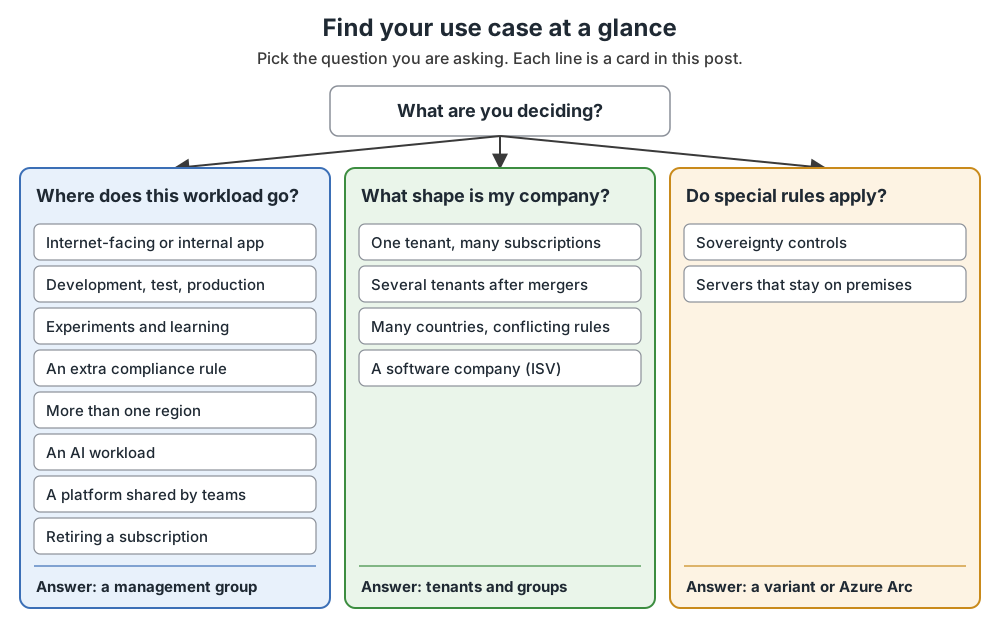
I am deciding about
Read the first group of cards: the internet-facing or internal app, the three environments, experiments, an extra compliance rule, more than one region, an AI workload, a shared platform, and retiring a subscription.
Read the second group of cards: one tenant with many subscriptions, several tenants, many countries, and a software company.
Read the third group of cards: sovereignty controls, and servers that stay on premises.
Start with the first card. Most questions are a workload question: where does this subscription go?
Where each kind of workload goes
The groups under Landing zones exist for kinds of workload. Understand this picture once, and the first group of cards follows from it.
Figure 2. Where each kind of workload goes.
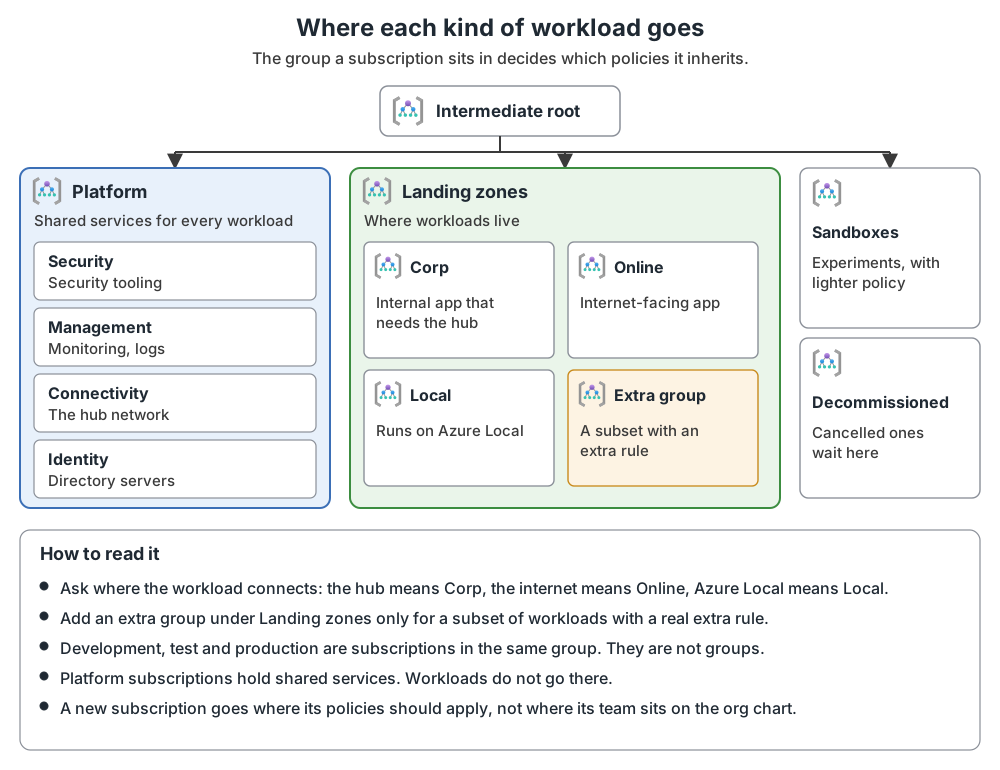
An internet-facing app, or an internal one
Situation. A team asks for a subscription for a new application.
What to do. Ask where the app connects. If it needs connectivity, or hybrid connectivity, to the corporate network through the hub (the central network the others connect to), place its subscription in Corp. If it may need direct internet traffic in or out, or needs no virtual network at all, place it in Online. If it runs on Azure Local clusters, place it in Local.
Watch for. Corp and Online carry different policies, so this choice decides which rules the team gets. A workload's department is not a reason to pick a group.
One application in development, test and production
Situation. A team wants separate environments.
What to do. Ideally give each environment its own subscription and place all of them in the same Corp or Online group. Different groups per environment are not recommended. If an environment needs a different rule, assign it at subscription level. A single subscription for several environments is acceptable only if they cannot be isolated, the same teams hold the same roles, and the same policies suit them. App Service deployment slots are an example, because the slots must sit in one subscription.
Watch for. If development has weaker policies than production, a deployment can pass in development and fail later in production. A storage setting that differs between environments is a common example. Policies and tags set at subscription level can be changed by people with high rights on that subscription, so do not use tags inside security policies.
Experiments and learning
Situation. An engineer wants to try a service, or the platform team wants to test a new policy.
What to do. Give the person a sandbox subscription in the Sandboxes group. A safe sandbox has these:
- Its own subscription, with no network peering outside the sandbox. Policies can deny cross-subscription peering and the creation of VPN, ExpressRoute and Virtual WAN resources (the ways to connect Azure to the corporate network).
- Audit logging turned on, sent to a central workspace.
- A budget with alerts. An alert is only a warning, so cancel the sandbox if the budget is passed.
- An expiry date, kept as a tag, with automation that cancels the subscription when the date comes.
- Owner access for the sandbox user, removed when the sandbox is cancelled.
Watch for. Keep sensitive data out. After a sandbox expires, move it to Decommissioned.
A workload with an extra compliance rule
Situation. A few workloads must meet a standard that most do not, such as the card-payment standard PCI.
What to do. Create a new group under Landing zones, for example PCI, and assign the extra policy set there. Then place new subscriptions in it, or move existing ones. This is the most common and safest place to add a group.
Watch for. Only add a group when the rule applies to a subset of workloads. Build on the existing groups first, and avoid going deeper than four levels. Do not copy departments or teams into groups.
A workload in more than one region
Situation. An application runs in two regions for resilience or for users in different places.
What to do. Keep the standard hierarchy. A subscription is not tied to a region, and one subscription can hold resources from several regions. For recovery between a primary and a secondary region, one subscription is fine if scaling is not a concern. If both regions run at the same time (active-active) and are managed independently or have different life cycles, use separate subscriptions.
Watch for. Do not create groups just to model regions. Add a subscription per region only if a region has its own governance needs, such as data sovereignty, or to get past quota limits (the cap Azure puts on how much of a service one subscription can use). If a regulation ties data to a location, see the card on many countries.
An AI workload
Situation. A team wants to run an AI application.
What to do. Deploy it into a workload landing zone, like any other workload. You do not need a separate AI landing zone. Place it in Corp, Online or Local by the same test as any other workload (the first card explains the test).
Watch for. As new requirements appear, update the policies in the platform; they then apply to every workload of that type.
A platform that several teams share
Situation. One team runs a hosting service, such as AKS (Azure Kubernetes Service, a way of running containers), and many application teams run on top of it.
What to do. Use a shared management model: a central IT team runs the underlying service (for example AKS), and each workload team is responsible for its own application. The controls and access rights differ from those for a landing zone the central team runs entirely.
Watch for. My suggestion: agree who owns what before the first team onboards.
Retiring a subscription
Situation. A workload is switched off.
What to do. Cancel the subscription and move it to Decommissioned. Azure deletes cancelled subscriptions after 30 to 60 days.
Watch for. Some organizations reuse a cleaned subscription instead of creating a new one: if they plan more than 5,000 subscriptions on one Enterprise Agreement billing account (deleted ones count) or more than 5,000 active ones on a Microsoft Customer Agreement or Microsoft Partner Agreement, if they use pay-as-you-go or sponsorship accounts, or if they often create short-lived labs, demos or training environments. Clean it first: resources, role assignments and custom roles, policy definitions, assignments and exemptions, deployments, tags, locks, budgets, Lighthouse delegations, log forwarding, and any hidden resources. Then reassign it.
What shape is my company
One tenant, many subscriptions
Situation. An enterprise has one Microsoft Entra tenant, dozens of subscriptions, and several departments creating them.
What to do. Place each subscription by the kind of workload (Corp, Online and so on) and let the policies of that group apply. The brownfield rollout has a company case showing who controls billing, who controls access, and how new subscriptions get approved.
Watch for. My reading: billing and access are two systems, and the person who creates a subscription is often not the person who runs it.
Several tenants after mergers
Situation. Acquired companies brought their own tenants.
What to do. Start from one tenant, which is usually the corporate one, and add more only for needs it cannot meet. If you keep several, a landing zone is deployed in each tenant separately. One Enterprise Agreement (the company's contract for buying Azure) can supply subscriptions to several tenants. Azure Lighthouse helps manage across tenants.
Watch for.
- Moving a subscription between tenants is complex. It is easier to rebuild the workload in a new subscription in the destination tenant.
- Licenses such as Microsoft Entra ID P1 or P2 do not span tenants, so cost rises.
- Some Azure services work best with identities from one home tenant, which can limit workload teams.
Many countries, conflicting rules
Situation. Rules in two places conflict, for example one requires data to stay in one country and another requires it to stay in a different one.
What to do. First check whether you need any change. None is needed if the rules require the same policies, if one is a superset of the other, or if they do not overlap. If they do conflict, there are four options in one tenant. The first needs the least customization and reuses your automation. The other three share the platform to different degrees:
- A full landing zone for each set of rules. Nothing is shared, but you reuse your existing automation.
- A shared Platform group, if the rules allow it, with a separate group under Landing zones for each set of rules. This is the simplest and cheapest way to isolate applications.
- Separate identity and security groups for each set, if the rules stop you sharing identity and key management.
- Separate connectivity groups as well, if connectivity rules conflict too.
Use separate tenants only if the rules need complete isolation, such as clearance or nationality limits.
Watch for. Name tenants after places, not rules. Keep policy assignments and exemptions as few as possible. Who governs IT (local, central or mixed) decides who is responsible for compliance and who tests.
A software company (ISV)
Situation. You sell software, and parts of it run on Azure.
What to do. Find your deployment model:
- Pure SaaS: the software (SaaS: hosted by you, used online by customers) runs only in your subscriptions. You are responsible for compliance. Plan how many subscriptions you need and whether each customer gets its own.
- Customer deployed: the customer deploys your software into their own subscription. For their landing zone it is a normal workload, so check that your templates do not break their policies.
- Dual deployment: a hosted service that also uses resources in the customer's subscription. Both sets of considerations apply.
Watch for. Start with one tenant; a second adds licence cost and management work. Two tenants can make sense if, for example, your corporate IT team may not manage the SaaS resources. Do not use separate tenants for pre-production and production. Starting with one subscription for platform and workloads is possible, but moving resources out later is hard because not every type can move.
When special rules apply
Sovereignty controls
Situation. A public-sector organization needs advanced control over where data lives and who can reach it.
What to do. The Sovereign Landing Zone is a variant of the platform landing zone. It adds Public, Confidential Corp and Confidential Online groups under Landing zones and adds extra policies depending on your sovereignty needs. It lines up Azure capabilities such as service residency (the service itself runs in your chosen location), customer-managed keys (encryption keys you control), Azure Private Link (reaching Azure services over a private network) and confidential computing (protecting data while it is processed). Decide first whether you need these controls at all.
Watch for. Only adopt it if you need these controls.
Servers that stay on premises
Situation. Some servers cannot move to Azure yet.
What to do. Azure Arc projects them into Azure, so Azure Policy and monitoring can cover them. Treat each datacenter as a landing zone, with one per geopolitical region (my reading: a country or area) in large estates. My reading: place these subscriptions by the same Corp or Online test. For an app that spans Azure and other locations, put the Arc resources in the same workload subscription as its Azure resources.
Watch for. The page behind this card was marked deprecated and is scheduled for removal on 30 October 2026 (checked 14 October 2026). Check the current Azure Arc, Azure Local and hybrid architecture documentation for guidance.
What comes next
My suggestion: write down which cards fit your company, and take that list to your platform team before you design any group.
A landing zone is not finished when the groups are in place. The next post covers keeping it up to date.
Common mistakes
- Making a group for every team, region or environment. Groups are for workload kinds that need different policies. Teams, regions and environments are handled with subscriptions, resource groups and tags, not management groups.
- Choosing a group by who asked, not by what the workload needs. Choose by where the workload connects: the corporate hub means Corp; direct internet traffic, or no virtual network, means Online.
- Adding a tenant to solve a people problem. One tenant is the starting point, and every extra one adds cost and work.
From my own projects
This post has no items from my own projects.
The files in my repo
The repository is a learning implementation, and its structure and conventions are intended as an educational approach, not as official Microsoft guidance.
- Ten short use cases in my own words: use-cases.md
- How I would hand a new subscription to a workload team: subscription-vending.md
- A ten-step decommissioning process, cancelling only after final approval: decommissioning.md
- Where an Azure Virtual Desktop workload fits: avd-workload-integration.md
Sources
Microsoft Learn, checked October 2026: Tailor the Azure landing zone architecture to meet requirements · Management groups · Modify an Azure landing zone architecture to meet requirements across multiple locations