In the earlier posts you saw identity, networks, security and management. Each of them has rules: who may do what, which settings are required, which logs must exist. If those rules live only in a document, they depend on people remembering them. In a large environment, people forget, and teams copy each other's mistakes.
The Governance design area asks how to turn those rules into automatic guardrails and audits. It says to look at the choices you made in identity, network, security and management. Then compare them with the automated governance in the landing zone reference architecture (Microsoft's example design). That helps you decide what to audit, what to enforce, and which policies to deploy automatically.
This post covers the Governance design area, the guidance on adopting policy-driven guardrails (the DeployIfNotExists guidance), and the guidance on keeping the landing zone's custom policies up to date.
This design area focuses on design decisions for your landing zone. Governance processes and tools in more depth are in the Govern methodology of the Cloud Adoption Framework (CAF, Microsoft's guidance for adopting the cloud).
Key terms
Earlier posts defined these words: landing zone, platform team, workload, subscription, resource group, scope, inheritance, management group, root and intermediate root management group, Corp, Sandbox, Azure Policy, guardrails, Azure RBAC, Microsoft Entra ID, Microsoft Defender for Cloud, Log Analytics workspace, Azure Monitor Logs, activity log, initiative, DeployIfNotExists, deny policy, tag, and brownfield.
The words below are new, or are explained more fully here. Each is in plain words.
| Word | What it means |
|---|---|
| Governance | The goal of the design area: the tooling you need to support cloud governance, compliance auditing and automated guardrails. |
| Policy definition and policy assignment | A policy definition is the rule. A policy assignment applies that rule to a scope (a management group, subscription or resource group). Definitions can be reused at several inherited assignment scopes. |
| Policy effect | What a policy does when a resource matches the rule's condition. The main ones: Deny blocks the request. Append adds settings to a resource as it is created or updated. Modify adds, updates or removes settings or tags. DeployIfNotExists (DINE) deploys a missing supporting setting. Audit and AuditIfNotExists (AINE) only record that a resource is not compliant. Disabled switches the rule off. |
| Compliant and non-compliant | A resource that follows the rule is compliant. One that does not is non-compliant. |
| DINE and Modify policies | DINE and Modify policies are part of the landing zone reference implementation (Microsoft's ready-made deployment of the reference architecture). They help make sure landing zones (subscriptions) and the resources in them follow the rules, and they remove work from the platform and landing zone teams. |
| Enforcement mode | A setting on a policy assignment. The two values are called Enabled and Disabled in the portal, and Default and DoNotEnforce in templates and APIs. Enabled and Default mean the same thing: the effect is enforced when a resource is created or updated. Azure Policy now also has a third value, Enroll, which this post does not cover. With DoNotEnforce, the assignment effectively becomes audit-only without changing the policy definition. |
| Remediation task | A task that brings non-compliant resources into compliance. You can start one by hand even when the enforcement mode is DoNotEnforce. |
| Built-in policy and custom policy | A built-in policy is one that Azure already provides. A custom policy is one you or the landing zone reference implementation define yourself. The landing zone custom policies sit in the intermediate root management group, and some may later be replaced by built-in policies. |
| Diagnostic settings | The setting on a resource that sends its logs and metrics to a place such as a Log Analytics workspace. |
| Infrastructure as code | Describing Azure resources in code files, so they can be deployed the same way every time. Bicep and Terraform are two languages for this. |
| Canary environment | A full copy of the production management group hierarchy, in the same tenant, used to test platform changes such as policy, role assignments and management groups before production. A sandbox subscription is the lighter option. |
| Change advisory review board | A group that reviews changes before they happen. |
| Regulatory compliance policies | Policies that match a regulation or standard. Examples are HIPAA, PCI-DSS and SOC 2 Trust Services Criteria. |
| Resource provider registration | Switching on an Azure service type for a subscription so that its resources can be created. |
| SKU | The size or pricing level of an Azure resource, for example the size of a virtual machine. |
What the design area covers
The Governance design area has these parts. This post follows the same order and then adds the policy guidance from the other two pages.
| Part | The question it answers |
|---|---|
| Deployment considerations | Which policies do you need, and how do you assign and keep them compliant? |
| Cost management considerations | How do you see, control and lower cloud spend? |
| Resource management, security and identity considerations | What shared baseline do resources, security tools and identity logs need? |
| Recommendations | What should you do first? |
| Adopting policy-driven guardrails | Can you turn on automatic remediation step by step? |
| Keeping custom policies up to date | How do you update or retire landing zone policies over time? |
Deployment considerations
Change advisory review boards can hinder innovation and business agility. Azure Policy replaces such reviews with automated guardrails and checks that people follow the rules. The deployment considerations are:
- Decide which Azure policies you need, based on your business controls or compliance rules. Use the policies in the landing zone reference architecture as a starting point.
- Use the policies in the landing zone reference implementation to look for other policies that fit your requirements.
- Enforce automated networking, identity, management and security conventions.
- Create policy assignments from policy definitions that you can reuse at several inherited scopes. You can have central baseline assignments (the same assignments for everyone) at the management group, subscription and resource group scope.
- Keep compliance continuous with compliance reporting and auditing.
- Know that Azure Policy has limits on how much you can define and assign. Check the current limits before you design.
- Understand regulatory compliance policies, such as HIPAA, PCI-DSS or SOC 2.
Cost management considerations
Microsoft Cost Management (its tool for cost oversight, with billing scopes, budgets and alerts) can help support ongoing governance of cost and spending in Azure or in other clouds. The considerations are:
- Think about how your organization splits cost between teams and charges them for what they use, and decide which data points show your cloud spend.
- Choose a tag structure that fits how you split and charge cost.
- Use the Azure pricing calculator to estimate monthly costs.
- Use Azure Hybrid Benefit, Azure reservations and the Azure savings plan for compute. Reservations and the savings plan are commitments of one or three years. Hybrid Benefit lets you use on-premises Windows Server and SQL Server licenses that have Software Assurance. Reservations can cut resource costs by up to 72 percent compared with pay-as-you-go prices, and the savings plan by up to 65 percent. You can combine a savings plan with reservations.
- Use Azure policies to allow only specific regions, resource types and SKUs.
- Use the rule-based policy of Azure Storage lifecycle management (a Storage feature, not an Azure Policy) to move stored data to a cheaper access tier, or delete it at the end of its life.
- Use Azure dev/test subscriptions for a discount on selected services for nonproduction workloads.
- Use automatic scaling to add and remove resources to match performance needs.
- Use Azure Spot Virtual Machines (low-price machines that Azure can take back) for workloads that can handle interruptions, such as batch jobs and dev/test.
- Choose the right Azure services and the right compute service for your application.
Resource management, security and identity considerations
Resource management. Decide whether groups of resources can share required configuration, a common lifecycle or common access limits such as RBAC. For example, resources that are created and deleted together can sit in one resource group. Choose a subscription design for each application or workload that suits your operations. Use standard resource configurations for a consistent baseline.
Security. Enforce tools and guardrails across the environment as part of a security baseline, and notify the right people when you find deviations. Use Azure Policy to enforce tools such as Microsoft Defender for Cloud, or guardrails such as the Microsoft cloud security benchmark (Microsoft's set of security recommendations).
Identity management. Decide who can access audit logs for identity and access management, and notify the right people about suspicious sign-in events. Consider Microsoft Entra reports to govern activity, and sending Microsoft Entra ID logs to the platform's central Azure Monitor Logs workspace. Explore Microsoft Entra ID Governance features such as access reviews (regular checks that people still need their access) and entitlement management (Microsoft Entra's way to automate access requests, assignments, reviews and expiration).
Non-Microsoft tooling. Two tools are listed under "Non-Microsoft tooling": AzAdvertizer, for governance updates such as policy definitions, initiatives and role definitions, and Azure Governance Visualizer, to keep track of your technical governance setup. The visualizer's policy version checker can keep your environment up to date with the latest landing zone policy release.
Recommendations
For deployment:
- Identify the tags you need and enforce them with Azure Policy. My suggestion: use the Modify effect for tags. It has more operation types and can fix existing resources. Use Append for tags only if you cannot create a managed identity, or Modify does not support the property.
- Map regulatory and compliance requirements to Azure Policy definitions and Azure role assignments.
- Create Azure Policy definitions at a management group above every scope that may get an assignment, because they might be assigned at inherited scopes. My suggestion: use the intermediate root management group, the top of your landing zone hierarchy below the tenant root. The resource organization post explains the levels.
- Manage policy assignments at the highest appropriate level, with exclusions (places where the assignment does not apply) at lower levels if needed.
- Use Azure Policy to control resource provider registrations at the subscription or management group level.
- Use built-in policies to reduce day-to-day work.
- Assign the built-in Resource Policy Contributor role (an Azure RBAC role) at a specific scope to allow application-level governance.
- Limit the number of Azure Policy assignments at the root management group scope, so you do not have to manage exclusions at inherited scopes.
For cost:
- Use Cost Management for financial oversight of resources.
- Use tags, such as a cost center or project name, to add metadata to resources and allow detailed cost analysis.
Governance in the reference architecture
The reference architecture gives organizations well-developed governance controls. For example, a management group hierarchy groups resources by function or workload type, and a rich set of Azure policies enables governance controls at the management group level, which helps verify that all resources are in scope (the resource organization post).
Adopting policy-driven guardrails: the DINE guidance
Here is where DINE and Modify policies are used and why. The example is a new landing zone subscription that is created and placed in the Corp management group (the group for workloads that connect to the company network, the resource organization post). DINE and Modify policies then act on that subscription:
- Enable Microsoft Defender for Cloud, and configure Defender for Cloud exports (Defender data sent on to another place) to the central Log Analytics workspace in the management subscription (the subscription for platform management tools, the management and monitoring post).
- Enable Defender for Cloud for the supported offerings, based on the policy parameters in the assignment.
- Send Azure activity logs to the central workspace.
- Set diagnostic settings on all resources so their logs go to the central workspace.
- Deploy the required Azure Monitor agents (small programs that collect logs) on virtual machines and virtual machine scale sets, including servers connected through Azure Arc (a service that lets you manage servers outside Azure, such as on-premises, with Azure tools), and connect them to the central workspace.
You can disable these options at any time or during deployment. There is one limit. DINE and Modify policies do not deploy workload resources, and using policy for that is not recommended. They only deploy or configure supporting resources and settings.
Some organizations cannot, or are not ready to, use DINE or Modify policies. There are four reasons: regulatory compliance rules or law, strict change control that needs human approval for every action, lack of experience with DINE policies, and a requirement that workload teams define all resource configuration, including supporting resources, in infrastructure as code. The three phases below are not intended for the majority of customers. Most customers can and should use DINE and Modify policies from the start.
For those organizations, there are three phases:
| Phase | What you do |
|---|---|
| 1. Disable the automatic actions | Set the enforcement mode to DoNotEnforce on policy assignments. Leave the policy definition and its effect as they are. The assignment becomes audit-only, and you can still start remediation tasks by hand. |
| 2. Enable on a reduced scope | Set the enforcement mode to Default on a specific policy or a reduced scope, such as the Sandbox management group or a nonproduction workload subscription. Test a workload from start to finish: first deployment, code deployment, day 2 operations (running it day to day) and decommissioning (shutting it down). |
| 3. Enable everywhere | Remove the assignments used only for testing, set the enforcement mode to Default on all DINE and Modify assignments across the environment, and create remediation tasks for existing non-compliant resources. New resources are remediated automatically if they match the policy rules. |
Some customers cannot move past phase 1 because of regulatory restrictions, and that is supported. Even in phase 3, enabling every policy is optional. You can choose per policy.
Two details are worth knowing. When the enforcement mode is DoNotEnforce, no Azure activity log entries are generated, so you are not notified when a non-compliant resource is created. If you plan to stay in phase 1 for a long time, it may be better to change the effect to AuditIfNotExists and set the enforcement mode back to Default.
You then get the activity log entries back. But you lose manual remediation tasks, because AuditIfNotExists never deploys anything.
This table summarizes the combinations. "Enabled or Default" means the effect runs. "Disabled or DoNotEnforce" means it does not.
| Policy effect | Enforcement mode | Activity log entry | Remediation |
|---|---|---|---|
| DINE | Enabled or Default | Yes | Done by the platform after a resource is created or updated. You need to start a remediation task by hand if a related resource is changed, or if the resource existed before the assignment. |
| DINE | Disabled or DoNotEnforce | No | A remediation task by hand. |
| Modify | Enabled or Default | Yes | Automatic during creation or update. |
| Modify | Disabled or DoNotEnforce | No | A remediation task by hand. |
| Deny | Enabled or Default | Yes | Creation or update is denied. |
| Deny | Disabled or DoNotEnforce | No | Creation or update is allowed. Manual remediation is needed. |
| Audit or AINE | Enabled or Default | Yes | Manual remediation. |
| Audit or AINE | Disabled or DoNotEnforce | No | Manual remediation. |
Resource selectors also help. They let you roll out a policy assignment step by step, based on resource location, resource type, or whether the resource has a location.
Evaluation, exemptions and policy as code
When policy is evaluated. Azure Policy does not check everything at once. It evaluates when a resource is created or updated, when an assignment is created or changed, when an exemption changes, on a standard cycle that repeats daily, and on demand (Get compliance data of Azure resources). Results are therefore not instant, so wait before you judge a new policy. The brownfield rollout post has the timings and the on-demand scan.
Exclusion and exemption are different. An exclusion (notScopes on an assignment) removes a scope from the assignment: those resources are not evaluated or counted. An exemption keeps the resource tracked and shows it as Exempt in compliance reports (exemption structure, checked October 2026).
- An exemption has a category: waiver (non-compliance is accepted for now) or mitigated (the policy's aim is met another way).
- It can have an expiry date. After that date it is no longer honored, and the object stays for record keeping.
- To create one you need write permission on the exemptions and the
exempt/Actionpermission on the assignment, so exemptions are not open to everyone. - The exemption has a
metadatafield. The documentation's example uses it to record who asked, who approved and a ticket reference. - Exemptions are meant for time-bound or specific cases. Review them regularly and remove the ones that no longer qualify.
Policy as code. The policy-as-code workflow treats policy definitions, initiatives and exemptions as files in source control. My suggestion: deploy them through the same pipeline as your other infrastructure as code, test a new assignment with enforcement mode disabled first, and then enable it, which is the same order as the three phases in the section above. The platform automation post covers the pipeline side.
Keeping the landing zone policies up to date
The landing zone custom policies and initiatives are updated to newer versions over time, and some may be replaced by built-in Azure policies. The manual, high-level steps are below. Separate update guides exist for Microsoft's ready-made Terraform and Bicep modules.
Detect updates. Two options: read the "What's New" page of the Enterprise-Scale wiki on GitHub (Enterprise-Scale is the earlier name for the landing zone reference implementation), or use the Azure Governance Visualizer, which marks policies as outdated or obsolete.
Apply updates. Check three things: whether any outdated custom policies are assigned at any scope, whether they are part of a landing zone custom policy initiative, and whether that initiative is assigned. Then follow the case that fits:
- Not assigned and not in an initiative: replace the definition (or the initiative) at the intermediate root management group.
- Assigned, parameters unchanged: replace the contents of the definition at the intermediate root management group. If it is in an initiative, nothing else changes.
- Assigned, parameters changed: record the assignments, scopes and parameter values. Delete the assignments, delete the outdated policy, import the updated one, and reassign. Then check the compliance section (in Azure Policy) for resources that fail. If an assignment holds more than one policy definition, remove only the outdated policy from it, and delete the whole assignment only if it holds just that policy. For an initiative, you cannot delete parameters from a custom initiative, so reuse them instead.
- A whole initiative updated: record the assignments, delete them, delete the old initiative, import the new one with your management group name in the policy IDs, reassign, and check compliance.
After you delete assignments, your environment is not protected until you reassign.
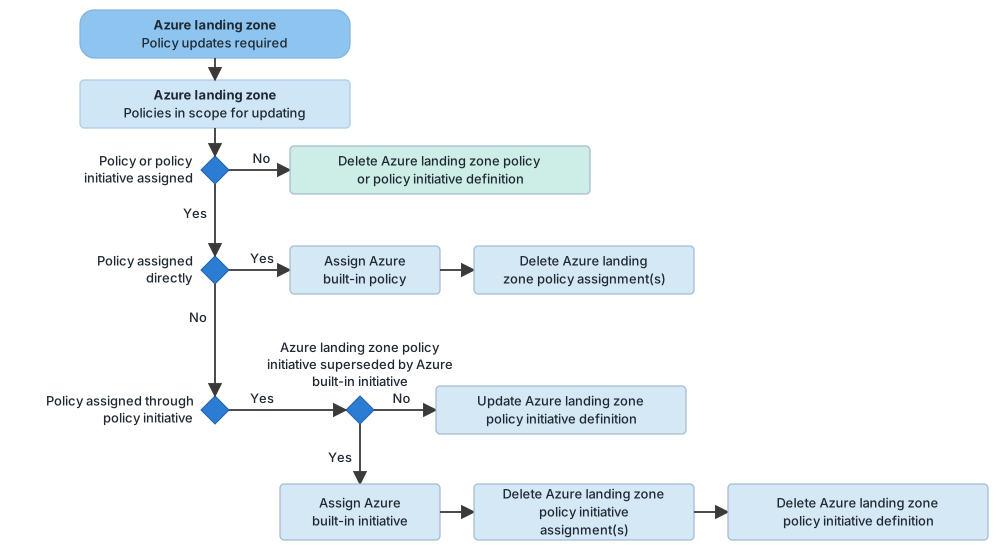
Migrate to built-in policies. If a built-in policy replaces a landing zone custom policy: if it is not assigned, delete the custom definition. If it is assigned, create new assignments at the same scopes with matching settings using the built-in policy, delete the old assignments, then delete the custom definition. If it is assigned through an initiative, update the initiative's policy references. If the whole initiative is replaced, create new assignments of the built-in initiative at the same scopes, delete the old assignments, and then delete the custom initiative.
New and existing environments
For a new (greenfield) environment, start by creating a small set of subscriptions and deploy with the platform landing zone accelerator, using Azure Verified Modules for Bicep or Terraform. Older guidance still points to the first-generation ALZ-Bicep templates; those are being retired, so I would not start a new deployment on them. For an existing (brownfield) environment, do five things:
- Set up a management baseline (the management and monitoring post).
- Use Microsoft Cost Management features, such as billing scopes, budgets and alerts, so you do not exceed your expense limit.
- Use Azure Policy to enforce guardrails on deployments and to start remediation tasks that bring existing resources into compliance.
- Consider Microsoft Entra entitlement management for access requests, assignments, reviews and expiration.
- Use Azure Advisor (a Microsoft service that gives recommendations) for cost optimization and operational excellence.
The Bicep templates can speed up both greenfield and brownfield deployments and have integrated governance guidance. Also consider the Azure landing zone default policy assignments Bicep module as a head start on policy.
Governance at a glance
I redrew four pictures from the official documentation with the same layout. They follow the same order as the text above.
Figure 1. The landing zone governance design.
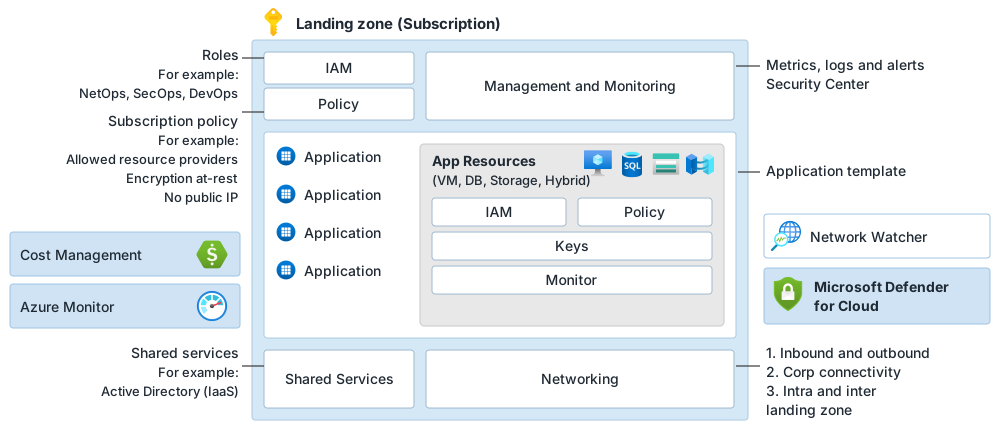
Figure 2. The three DINE phases.
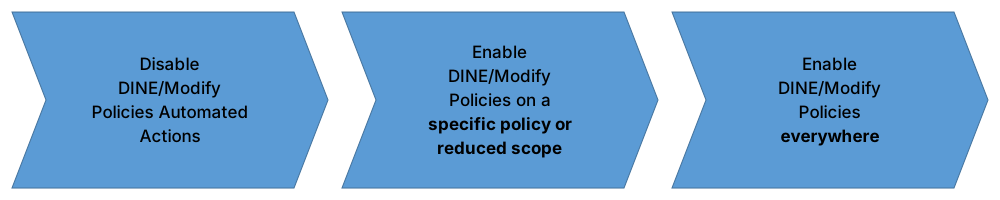
Figure 3. Updating landing zone custom policies.
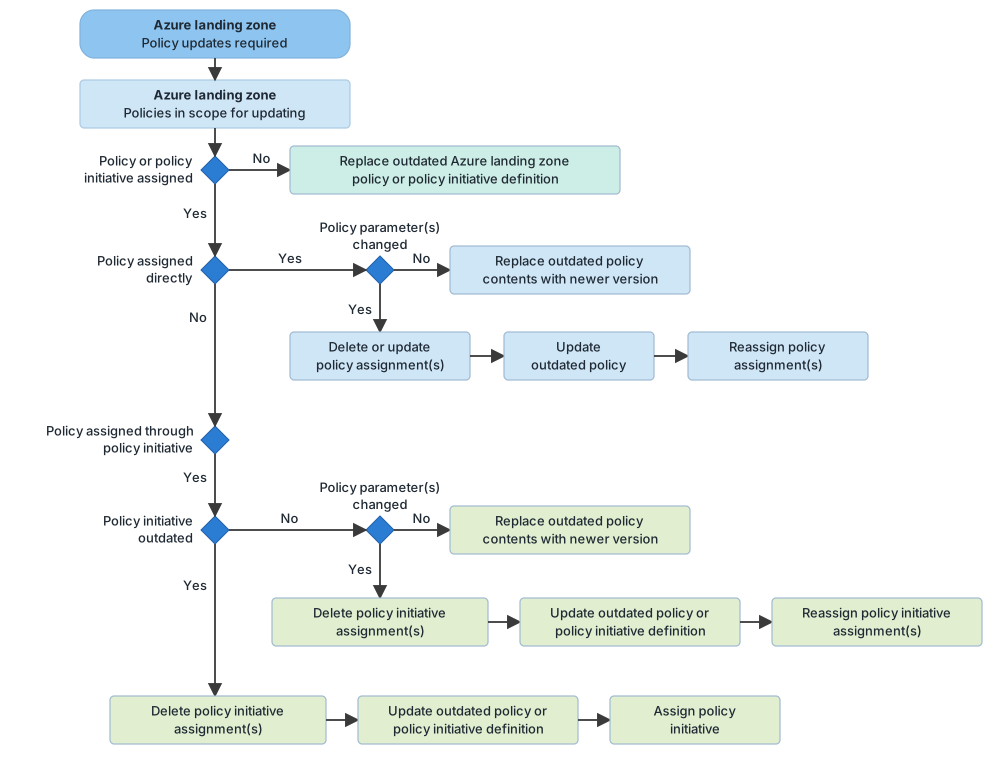
Figure 4. Moving landing zone custom policies to built-in policies.
Common mistakes
- Rules only in a document. Azure Policy replaces review boards with automated guardrails and checks.
- Policies defined too low. Create definitions at the top-level root management group, because they may be assigned at inherited scopes.
- Too many assignments at the root. Limit them, to avoid managing exclusions at inherited scopes.
- Custom policies when a built-in one exists. Use built-in policies to reduce day-to-day work.
- Skipping the safe path when you are not ready for DINE. For teams that cannot or are not ready to use DINE, there are three phases: audit only, then a small scope, then everywhere. Most customers can use DINE from the start.
- Setting DoNotEnforce and expecting activity log entries. No activity log entries are generated in that mode.
- Never updating landing zone policies. Detect outdated policies and update or migrate them. Deleting assignments leaves the environment unprotected until you reassign.
- No tags for cost. Choose a tag structure that fits your cost model and enforce it.
- Treating cost as someone else's job. Cost Management is part of the governance design area.
From my own projects
From the list above, these came up in my own work: rules only in a document, policies defined too low, too many assignments at the root, custom policies when a built-in one exists, landing zone policies never updated, no tags for cost, and treating cost as someone else's job. I did not mark the other two items from the list. I leave out project details.
The files in my repo
- Governance and Azure Policy: guardrails, assignments and the questions to ask: governance.md
Sources
Microsoft Learn, checked October 2026: Design area: Azure governance · Adopt policy-driven guardrails · Update Azure landing zone custom policies