A landing zone covers areas such as management groups, subscriptions, networking and policy (the landing zone introduction post). Tools do not decide who approves a new subscription, who owns the network, or who gets the call when something breaks. People decide that.
A cloud operating model is how your organization manages cloud resources, team responsibilities and collaboration. A well-designed model helps align cloud work with business goals, speed up workload delivery, clarify accountability and reduce operational overhead.
The Cloud Adoption Framework (defined in the first row of the table below) describes three models. This topic comes from the Cloud Adoption Framework, not from the eight Azure landing zone design areas in the landing zone introduction post. Think of them as three answers to one question: how much does one central team own?
Key terms
The terms workload, platform team, workload team, platform landing zone and workload landing zone mean the same as in the landing zone introduction post, and resource group means the same as in the platform scope post. The other terms that may be new are below, in plain words.
| Word | What it means |
|---|---|
| Cloud Adoption Framework | Microsoft's guidance that helps decision makers make better decisions, faster, about adopting Azure. It aims to reduce risk, speed up adoption, and build a foundation that supports current and future workloads. |
| Governance and guardrails | Governance is how an organization controls its use of cloud services. It does this with guardrails: policies, procedures and tools that say which cloud activities are acceptable and which are not. |
| Subscription vending | A standard, automated way for the platform team to hand out subscriptions to workload teams. |
| Hybrid cloud | On-premises systems (the ones you run in your own datacenters) and a public cloud, connected so they work together as one environment. |
| Azure Policy | An Azure service that enforces your organization's standards on resources and checks whether resources follow them. |
| Microsoft Entra ID | Microsoft's cloud service that manages identities (who someone is) and access (what they can reach). |
| Microsoft Defender for Cloud | A security service that combines several cloud security tools into one, to protect applications across their whole lifecycle. |
| Quota | The number of a resource type that your Azure subscription is allowed to use. Quotas used to be called limits. |
| Tags | Labels you add to resources, each with a name and a value, such as Environment = Production. They help you find resources and track cost. |
| Budget | A spending amount you set in Azure Cost Management (Microsoft's tools for analyzing, monitoring and optimizing cloud costs). When spending passes the thresholds you choose, it sends alerts. On its own it does not stop your resources or your spending. |
Centralized: one team owns everything
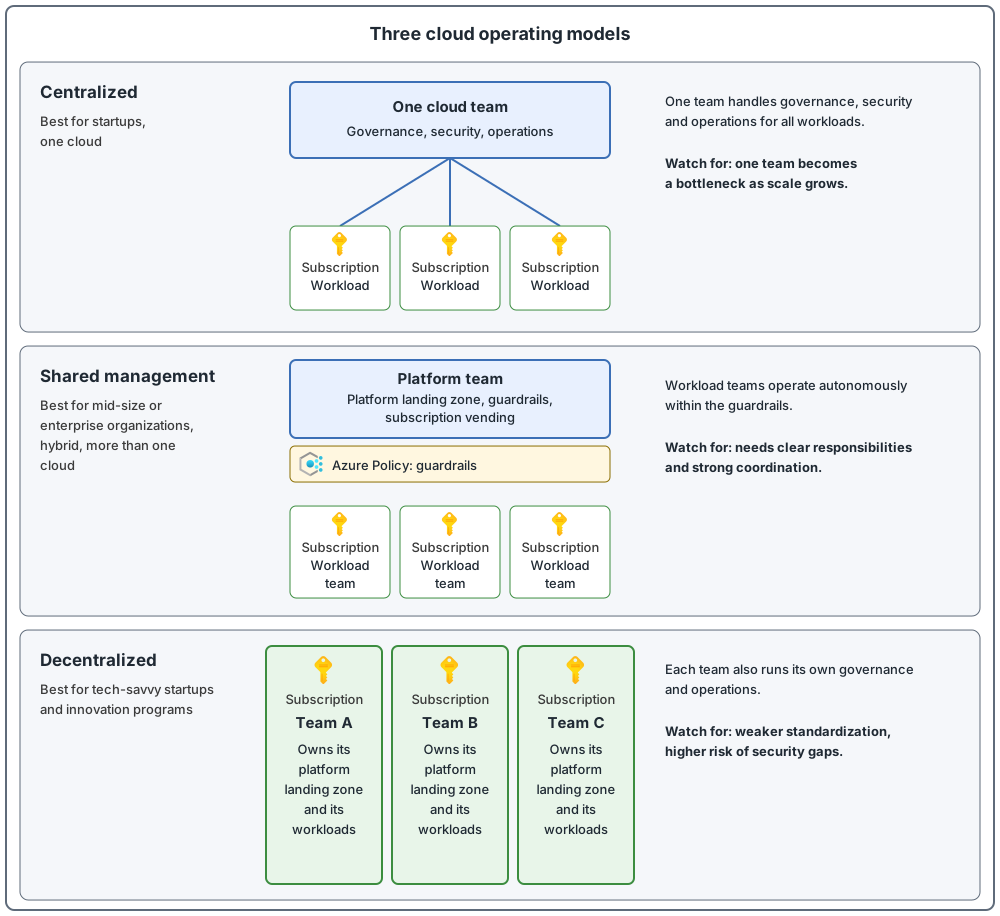
A single team is responsible for governance, security and operations across the whole cloud environment and all workloads. Policies are applied consistently. This is ideal for small organizations, startups or highly regulated industries. The warning: it can become a bottleneck as cloud adoption grows, so responsibilities need regular review.
Shared management: platform team and workload teams
Responsibilities are divided between platform teams and workload teams. Platform teams provide a standard set of platform "products" (shared services) that the whole organization uses. They enforce baseline governance policies and maintain the platform landing zone for shared services such as connectivity, identity, management and security. They can also offer services like subscription vending. Workload teams operate autonomously within those guardrails.
This suits mid-size and enterprise organizations, and is especially effective in hybrid environments and in environments that use more than one cloud provider. It needs clear responsibilities and strong coordination.
This model uses the two parts you met in the first two posts: a platform landing zone run by the platform team, and workload landing zones used by workload teams.
Decentralized: each team owns its own platform
Each team owns its platform landing zone and manages its workloads independently, including governance and operations. This suits highly skilled teams in startups or innovation programs. To reduce security and compliance risk, assess team capabilities, provide training and run regular audits.
A hybrid operating model, and changing over time
Here "hybrid operating model" means a mix of the three models, not on-premises plus cloud (that is hybrid cloud). Many organizations mix models. Core systems might follow a centralized or shared model, while innovation teams work more independently. And as the organization grows, you should regularly check whether the current model still fits.
The three models side by side
| Model | Best for | Main strength | Main risk |
|---|---|---|---|
| Centralized | Startups, organizations that use one cloud | Simpler control, uniform standards | One team becomes a bottleneck as scale grows |
| Shared management | Mid-size or enterprise organizations, hybrid setups, organizations that use more than one cloud | Balances standards with team agility | Requires clear responsibilities and strong coordination |
| Decentralized | Tech-savvy startups, innovation programs | High speed and autonomy | Weaker standardization, higher risk of security gaps |
Table shortened and reworded by me from the official comparison.
Who does what in the shared management model
Each management area has central (platform) responsibilities and workload responsibilities. Here are four of them, shortened and reworded:
| Area | Platform team | Workload team |
|---|---|---|
| Security | Manages identities in Microsoft Entra ID, grants access to Azure subscriptions, keeps security standards in place with Azure Policy and Microsoft Defender for Cloud | Designs the workload securely, responds to workload-specific security alerts |
| Resource management | Defines and maintains the resource hierarchy (how management groups, subscriptions and resource groups are arranged), creates workload subscriptions as requested, configures shared networking, handles quota increase requests | Manages resource groups and resources, follows naming and tagging standards, stays within subscription quotas |
| Monitoring | Plans the monitoring strategy, alerts on central responsibilities | Monitors the workload, extends central alerts for workload needs |
| Cost | Allocates budgets for the whole organization or for a subscription, monitors spending across the organization, assigns costs to business units or products, applies the tagging strategy | Optimizes the workload design, respects budget constraints |
The full table also covers compliance, deployment, development, reliability and performance. The link is in Sources.
The three operating models at a glance
Common mistakes
- Nobody is named as the owner. Name specific owners for all cloud management responsibilities, with both primary and backup owners so work continues during absences.
- No responsibility matrix. In the shared model, use a matrix that records who owns which services, operations and support functions across platform, workload and traditional IT teams (the teams that run on-premises systems).
- No governance team before workloads arrive. Put a governance team in place before you deploy workloads.
- The model is chosen once and never reviewed. Reassess regularly whether the current model still supports your goals and needs. In a centralized model, one team can become a bottleneck as adoption scales.
- Platform services are hard to find or use. Platform services should be easy to find, and ready for workload teams to use on their own, which reduces dependency on the platform team.
From my own projects
These situations came up in my own work: a central team that became a bottleneck for everyone else, and, in other cases, platform and workload teams that worked well together. Typical results of the bottleneck are slow delivery and confusion during incidents about who should act.
The files in my repo
- Operating model, with a responsibility table and a list of decisions to record: operating-model.md
Sources
Microsoft Learn, checked October 2026: Choose a cloud operating model · Shared management operations · Ready your cloud operations