The tenant and subscriptions post gave you the four building blocks. This post goes one level deeper, because two things surprise people. (A landing zone is the prepared Azure environment where teams run what they build.)
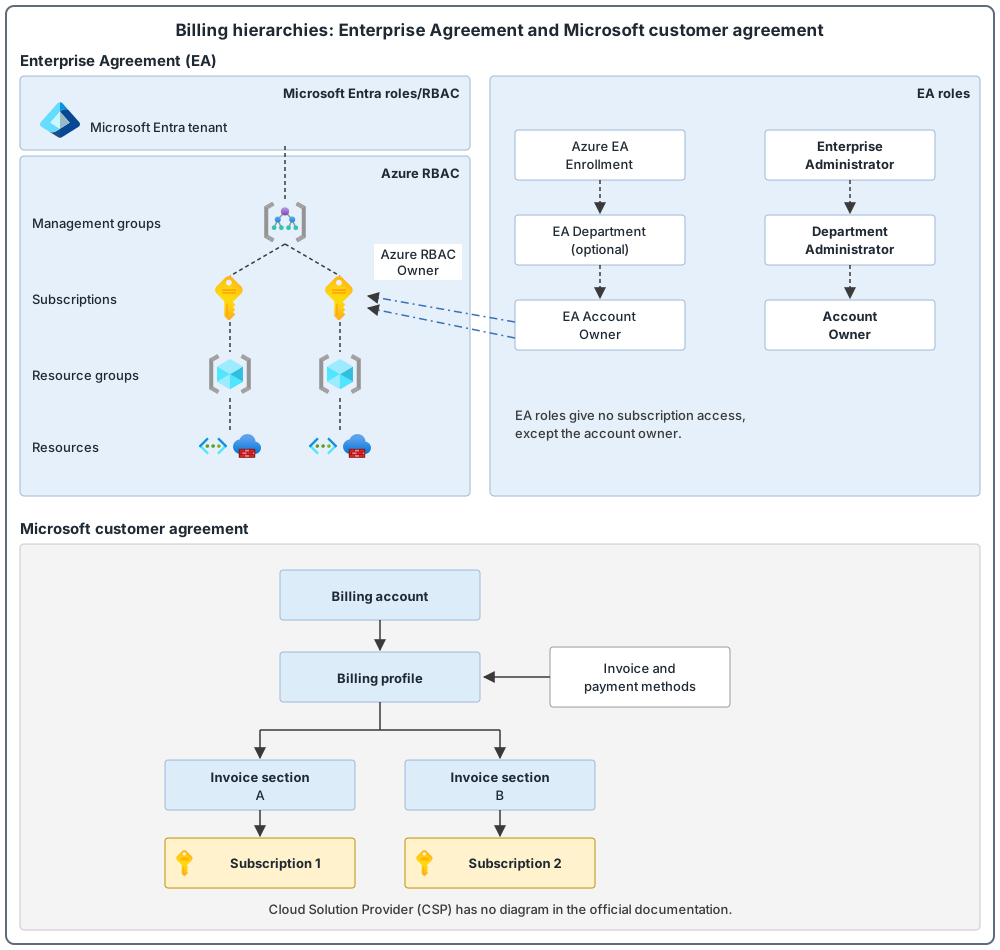
First, billing access is not Azure access. For example, a finance user is made Enterprise Administrator (the enrollment role with the highest level of access to the enrollment) on the Enterprise Agreement (EA, a billing agreement that sets how your organization buys Azure) enrollment (the top-level container of an EA). That user can do the enrollment tasks, but cannot open the Azure subscriptions on it, because the enrollment roles do not give that access. Only the account owner (the owner of the account that the subscriptions sit under) has it. An account is an organizational unit used to manage subscriptions and see reports.
Second, billing can depend on one person's account. If the user principal name (UPN, the user's sign-in name) tied to an enrollment account is deleted from Microsoft Entra ID, you cannot create new subscriptions or transfer existing ones from that account.
Both surprises come from not knowing how billing and identity connect. This post shows the connection.
Key terms
These are the main words you need first. Other terms are explained where they first appear.
| Word | What it means |
|---|---|
| Microsoft Entra ID | Microsoft's cloud service that manages identities (who someone is) and access (what they can reach). It was called Azure Active Directory (Azure AD) until Microsoft renamed it. It is not the same product as Windows Server Active Directory (the directory service you run in your own datacenters). |
| Microsoft Entra tenant | One instance of Microsoft Entra ID for one organization. It holds the organization's users, groups and devices. An Azure subscription trusts only one tenant at a time. |
| Subscription | A container for Azure resources (items you run in Azure, such as a storage account or a virtual network). It is also a boundary for cost, quota, governance, security and identity controls. |
| Management group | A level above subscriptions. Rules you apply to it pass down to all the subscriptions below it. |
| Azure Policy | An Azure service that enforces your organization's standards on resources and checks whether resources follow them. |
| Azure RBAC | Azure role-based access control. It manages who can access Azure resources and what they can do with them. |
| User principal name (UPN) | A user's sign-in name, written like an email address, for example someone@example.com. |
| Enrollment | The top-level container of an Enterprise Agreement. It often reflects your organization's hierarchy of departments (which group costs), accounts (units used to manage subscriptions and see reports) and subscriptions. |
| Enterprise Administrator | An enrollment role. Users with it have the highest level of access to the enrollment. They can, for example, manage accounts and other administrators and create new subscriptions under active enrollment accounts. |
| Account owner | The person who owns an Enterprise Agreement account. This is the only enrollment role that can reach the Azure subscriptions under that account. |
Three billing agreements
The landing zone supports subscriptions from any Azure offer, and you can use several offers at the same time. These are the three covered in detail here.
| Agreement | Hierarchy | Good to know |
|---|---|---|
| Enterprise Agreement (EA) | Enrollment, departments (they group costs), accounts, subscriptions | The account owner is the subscription owner for subscriptions under that account. A subscription belongs to one account at a time. Manage enrollments in the Cost Management area of the Azure portal (the area for viewing and managing costs and billing), because the old EA portal retired on February 15, 2024. |
| Microsoft customer agreement (MCA) | Billing account (the top level of a Microsoft customer agreement, with billing profiles and invoice sections under it), billing profiles (each represents an invoice and its payment methods and billing address), invoice sections (groups of costs on an invoice), subscriptions | A billing account is managed by one Microsoft Entra tenant, but one agreement can include subscriptions in other tenants. New subscriptions are linked to the tenant where the billing account is. A subscription belongs to one invoice section and can move only within the same billing profile. |
| Cloud Solution Provider (CSP, a program where a Microsoft partner sells and runs Azure for you) | The partner's Microsoft Partner Agreement (MPA, the agreement that a CSP partner holds and runs completely), an Azure plan (the plan under which the partner provides Azure, which holds the customer's subscriptions and is hosted in the partner's agreement), subscriptions | The partner runs the MPA, and only the partner can create CSP subscriptions. A reseller relationship must exist between the partner and each tenant. |
Billing roles are not Azure roles
For an Enterprise Agreement, apart from the account owner, enrollment roles do not give access to Microsoft Entra ID or to the Azure subscriptions. Enrollment roles include Enterprise Administrator and Department Administrator (a role that can create new account owners and view usage details for the departments they manage). For a Microsoft customer agreement, billing roles sit outside standard Azure role-based access control (Azure RBAC) and cannot be assigned at a management group or resource group. A resource group sits below a subscription and groups resources.
The person who can see or pay the bill is not automatically the person who can change the resources, and the reverse is also true. The Owner role is an Azure RBAC role that grants full access to manage all resources, including the ability to assign roles in Azure RBAC. Microsoft Entra roles are used to manage Microsoft Entra resources in a directory, for example to create or edit users, assign administrative roles to others and manage domains.
What to do for EA and MCA, and what carries over to CSP
- Plan subscription vending. Subscription vending is a standard, automated way for the platform team to hand out subscriptions to workload teams. Automate subscription creation as a self-service function, from the start of the landing zone journey.
- Protect subscription creators. Anyone who can create subscriptions must use multifactor authentication (MFA), like any privileged account. With MFA, the user is asked at sign-in for an extra form of identification, such as a code on a phone or a fingerprint scan. Privileged access covers it in full.
- Set budgets and alerts. For EA, per department and account. For MCA, per invoice section or billing profile.
- Set a notification contact that goes to a group mailbox, and do not ignore what Microsoft sends there. This applies to EA and MCA.
- Use the dev/test offers (discounted offers for development and testing) where available, and follow their terms.
- Audit who has billing access from time to time.
Agreement-specific points:
- EA: use the Work or school account type (a sign-in managed by an organization), not a personal Microsoft account. From November 16, 2026, new EA billing role assignments cannot use personal Microsoft accounts (existing ones are not affected yet). Do not move, rename or delete the Microsoft Entra user tied to the enrollment account.
- CSP: the partner should create subscriptions in your own Microsoft Entra tenant, not in a partner-managed one. Also use Azure Lighthouse for most support access. Azure Lighthouse lets one tenant manage resources that belong to another tenant. The owner delegates subscriptions or resource groups to chosen users in the managing tenant, and can remove that access at any time.
The tenant: one is the default
Avoid creating multiple Microsoft Entra tenants for the same organization unless there is a specific business requirement. The landing zone deploys to one tenant, and management groups and Azure Policy operate only inside a single tenant.
Extra tenants cost you:
- more than one set of identities for users and administrators, unless Microsoft Entra B2B is used (it lets you invite people from other organizations into your tenant as guests, who sign in with the credentials from their own organization);
- some Azure services only support identities from the tenant they are bound to;
- no central configuration or management across tenants;
- possible duplicate Microsoft Entra ID P1 or P2 licensing (P1 and P2 are paid plans of Microsoft Entra ID with more features).
Use your existing corporate tenant, and create another one only when a requirement cannot be met there.
Tenant checklist
- Add a custom domain (a domain name that you add to your tenant, such as contoso.com, next to the
*.onmicrosoft.comname that each tenant gets when it is created). The*.onmicrosoft.comname must be globally unique and cannot be changed once created. - Plan emergency access (break-glass) accounts (accounts kept only for emergencies, to sign in and recover access if all other administrators are locked out), to prevent a tenant-wide lockout.
- Use multifactor authentication, and add Conditional Access policies for privileged accounts. Conditional Access is a Microsoft Entra feature that looks at details of a sign-in, such as the user, device and location, and then applies your access rules. For example: if a user wants to open Microsoft 365 (a Microsoft cloud service that includes Exchange Online, SharePoint, OneDrive and Teams, which uses Microsoft Entra ID for sign-in), then they must use MFA.
- Use Microsoft Entra Privileged Identity Management (PIM) to manage privileged access. PIM is a Microsoft Entra service to manage, control and monitor access to important resources. For example, it can give an administrator access only for a limited time. Using it needs a Microsoft Entra license that includes it.
- Send Microsoft Entra diagnostic logs to a central Log Analytics workspace (a data store that collects log data from your Azure and non-Azure resources and applications).
- Use Azure Lighthouse to give partners access to resources in your tenant.
Many subscriptions in one tenant: environments, applications and billing
A subscription is where cost, quotas, policy and access are separated. It is a boundary for scale, quota, cost, governance, security and identity controls. So having many subscriptions inside one tenant is normal.
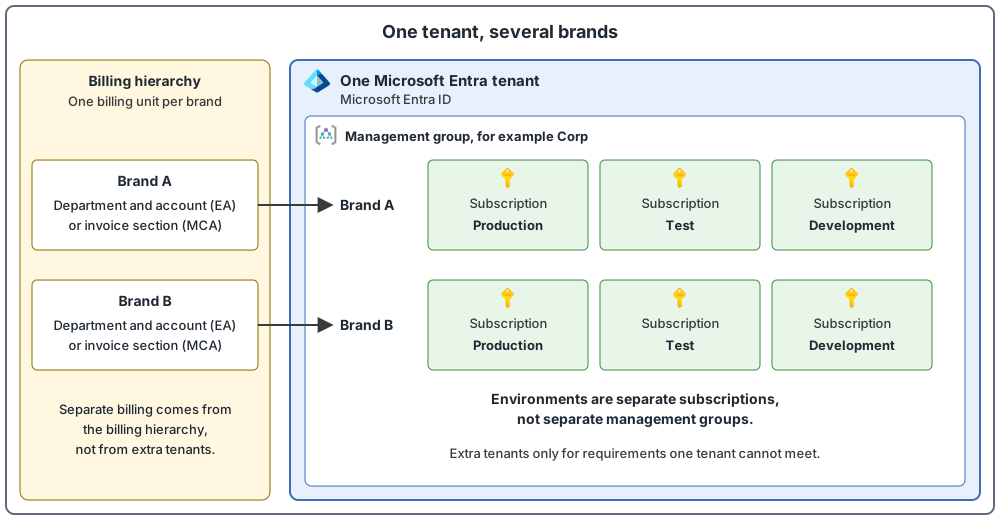
- Environments. Ideally, each application environment (development, test, production) has its own subscription. This keeps the environments isolated and contains problems to one environment. A single subscription for several environments can make sense if they cannot be isolated, the same teams hold the functional roles, and they can use the same policies. Workload owners should decide this together with the platform team. Do not create separate management groups for development, test and production. The reason is that a workload can pass in an environment with weaker policies and then fail when it is promoted to one with stricter policies, so use one consistent set of policies for these environments (sandbox subscriptions, which are for quick experiments and prototypes that are not meant for production, are the exception). If one environment needs something different, set policies at the subscription level, or use audit policies at the management group level. The resource organization post covers management groups in detail.
- Applications. Avoid a rigid model. Some applications can share a landing zone subscription, while others need their own. Reasons for their own include scale limits for large specialized workloads, a different policy boundary (for example PCI, a payment-card security standard), and a separate management boundary.
- Billing. A subscription is a cost boundary, so separate subscriptions are the base for separate cost reporting. On top of that, map your organization to the billing hierarchy: departments and accounts for an Enterprise Agreement, invoice sections for a Microsoft customer agreement. Cost Management reports and views can also use tags. For the platform, keep management, security, connectivity and identity in separate subscriptions, which also separates their billing.
Several brands or business units: tenant or subscription?
If your organization has several brands, the question is whether each brand needs its own tenant or just its own subscriptions. The default is one tenant. A business unit gets its own subscriptions (treat a subscription as a unit of management that matches business needs), and its own billing unit if you want separate billing. Use more tenants for isolation or autonomy only when the tools for isolating resources inside a single tenant cannot give the level of isolation you need.
Three cautions about brand-level tenants:
- Separate brand tenants are often handed over in full to the business unit, and the central team loses its view. Whatever you choose, the Azure team and the identity team need a clear RACI (who is responsible, accountable, consulted and informed).
- Do not use more tenants to escape friction between the cloud team and the identity team. Fix the operating problem instead.
- Microsoft Entra ID P1 and P2 licenses do not span tenants, so costs can grow.
These are common reasons for multiple tenants, and what to do about each:
| Scenario | Guidance |
|---|---|
| Business unit or brand isolation | Use more tenants only when single-tenant isolation tools are not enough |
| Mergers and acquisitions | Tenants are typically consolidated into one, because that lowers management work and lets all identities use a single custom domain name (a custom domain name can belong to only one tenant at a time). Sometimes tenants stay separate for a long time, because consolidating is complex or because a company might be sold later |
| Regulatory or country/region rules | Most organizations can comply inside one tenant, using Privileged Identity Management and administrative units (containers in Microsoft Entra ID that hold users, groups or devices, so that an administrator's permissions can be limited to one part of the organization). Azure Government (US) and Azure operated by 21Vianet (China) are national clouds, which are separate Azure cloud instances for certain governments or regions, and they need their own tenants |
| Independent software vendor (ISV, a software company) delivering software as a service (SaaS) from Azure | A separate tenant for the SaaS subscriptions is common and sensible |
| Tenant-level testing | A separate tenant is for testing features such as Microsoft 365 or Microsoft Entra Connect Sync (a tool that copies identity data from on-premises directories to Microsoft Entra ID), not for hosting workloads. Even dev/test workloads stay in the main tenant |
| Shadow IT (teams that set up their own Azure environment, often a tenant, outside the central team's process) and start-ups | Give teams an easy way to get a sandbox subscription in the main tenant |
Do you need more than one tenant? Ask these questions first
This checklist summarizes the scenarios above. If you answer "no" to all of them, stay with one tenant.
- Do you need Azure Government or Azure operated by 21Vianet? These national clouds need their own tenants.
- After an acquisition, do you want to keep the acquired company's tenant separate, for example because parts of the group might be sold later? Consolidating into one tenant is the typical choice, so keeping it separate needs a reason.
- Do you deliver a SaaS product to customers from Azure (an ISV)? A separate tenant for the SaaS subscriptions is common and sensible.
- Do you need extreme isolation or autonomy that single-tenant tools cannot give? Try the single-tenant tools first, such as administrative units and Privileged Identity Management.
- Do you only need to test Microsoft 365 or Microsoft Entra features? A test tenant is fine for that, but not for Azure workloads, not even dev/test.
Everything else (a new brand, a new team, a dev/test environment, friction between teams) stays in one tenant. Brands get subscriptions, and teams that want to experiment get a sandbox subscription.
Regulatory rules and tenants you already inherited from an acquisition can also lead to more than one tenant. Most regulatory needs can still be met in one tenant with Privileged Identity Management and administrative units.
Several brands, each with its own Active Directory: two common shapes
On-premises Active Directory is arranged in a hierarchy. The top-level container is the forest. A forest holds one or more domains (a domain is a partition of a forest that holds user identities and handles sign-in for them).
Here is an example setup for a group with several brands. One parent organization runs a main tenant. Other brands are separate businesses, connected to the parent and managed from it. Each brand has its own on-premises Active Directory and its own domain name. The question is: does a separate directory and domain per brand mean a separate Microsoft Entra tenant? The official documentation does not answer this exact question, but the Microsoft Entra Connect topologies page shows that several on-premises forests can sync to one tenant. So a separate directory per brand does not by itself force a separate tenant. This is my reading of that page. This is a generic example to explain the choice, not a description of any customer.
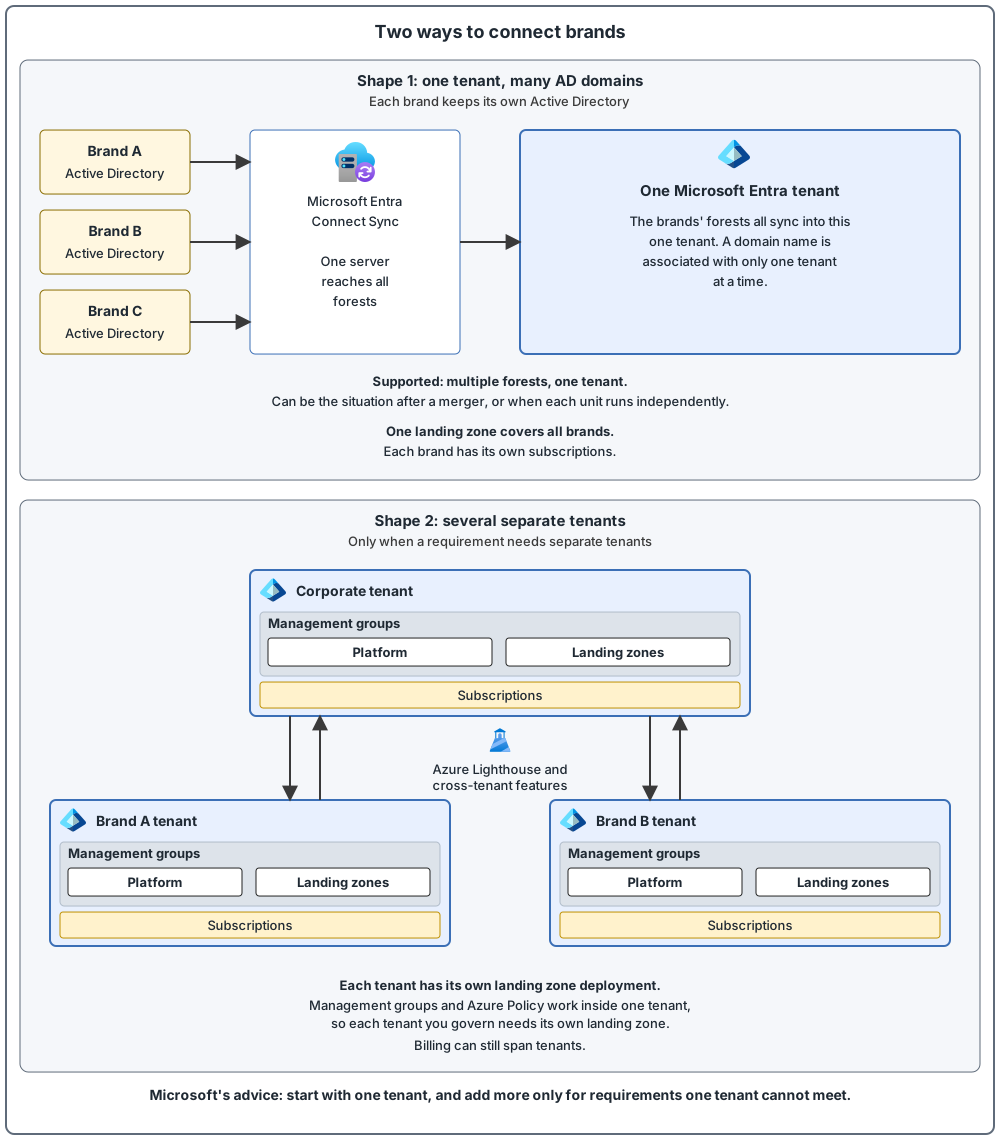
Shape 1: one tenant, many Active Directory domains. Microsoft Entra Connect Sync supports multiple on-premises forests that sync to a single Microsoft Entra tenant. This can be the situation after a merger or acquisition, or in an organization where each business unit operates independently. Three things to know:
- All forests must be reachable by one Microsoft Entra Connect Sync server. Several sync servers (other than a staging server, a standby copy that reads the data but writes nothing) connected to the same tenant are not supported.
- A custom domain name can be associated with only one tenant at a time, so each brand's domain name belongs to one tenant.
- One landing zone in that tenant covers all brands (because a landing zone is deployed within a single tenant). Each brand gets its own subscriptions (and billing unit, if you want separate billing), as in the second diagram below.
Shape 2: several separate tenants. An example is a corporate tenant plus tenants of acquired companies that are kept separate because parts of the group might be sold in the future. Consolidating acquired tenants is the typical choice, so keep them separate only for a reason like this. Use this only when a requirement cannot be met in one tenant. Then:
- Management groups and Azure Policy work only inside one tenant. So, to govern and monitor a tenant with Azure landing zones, you deploy the landing zone in that tenant. Each tenant you govern gets its own deployment.
- Use Azure Lighthouse for cross-tenant management. It can be used in both directions between tenants, and it delegates subscriptions or resource groups, not whole tenants. Microsoft Entra B2B collaboration, cross-tenant access settings, cross-tenant synchronization and the multitenant organization feature also make the multitenant experience easier.
- One Enterprise Agreement enrollment or Microsoft customer agreement can provide subscriptions to several tenants, so billing can stay central.
- Microsoft Entra ID P1 and P2 licenses do not span tenants.
- Azure services that have built-in Microsoft Entra sign-in, such as Azure Virtual Desktop, Azure Files and Azure SQL, are typically supported against the home tenant, normally your corporate Microsoft Entra tenant where your users' identities are. Azure Virtual Desktop is a virtual desktop service, Azure Files a file-share service and Azure SQL a database service. Check which tenant your identities live in before you choose.
- Moving a subscription to another tenant is complex. It is easier to rebuild the workload in a new subscription in the destination tenant.
My own rule of thumb, based on the default of one tenant: start with Shape 1. Move to Shape 2 only for a clear requirement, such as a brand that may be sold, or a regulatory need.
Billing agreements and tenant shapes at a glance
Common mistakes
- Treating a billing role as Azure access. Enrollment and billing roles do not give access to subscriptions, so plan billing access and Azure access separately.
- Tying billing to one person. Do not move, rename or delete the Microsoft Entra user tied to an EA enrollment account. If that user is deleted, you cannot create new subscriptions or transfer existing ones from that account.
- Subscription creators without multifactor authentication. They are privileged accounts.
- No emergency access accounts. Plan them to prevent a tenant-wide lockout.
- Subscriptions created in a partner-managed tenant. A CSP partner should create them in the customer's own tenant.
- A separate tenant just because a brand has its own Active Directory domain. Several forests can sync to one tenant, so create more tenants only for requirements one tenant cannot meet.
- An extra tenant as a workaround. A separate tenant is not the place to host dev/test workloads, and it is not the fix for friction between teams.
From my own projects
These situations came up in my own work: no emergency (break-glass) access plan, and a partner (CSP) managing subscriptions or access. Typical results are billing confusion, slow subscription creation, and access or security gaps.
The files in my repo
- Billing and tenant, with a list of decisions to make: billing-and-tenant.md
Sources
Microsoft Learn, checked October 2026: Billing offers and tenants · Multitenant considerations · Entra Connect topologies