In the identity and access post you saw who can sign in and what they can change. In the privileged access post you saw how to protect privileged access. In the network topology post you saw how networks are laid out. Each of those posts touched security, but none of them asked the wider question: what does the platform team put in place so that security works the same way for every workload?
Security is a core consideration for all customers, in every environment, and it should be considered throughout the process of designing and implementing a landing zone. An organization must have visibility into what is happening inside everything it runs in the cloud, and security monitoring and audit logging of Azure platform services is a key part of a scalable framework.
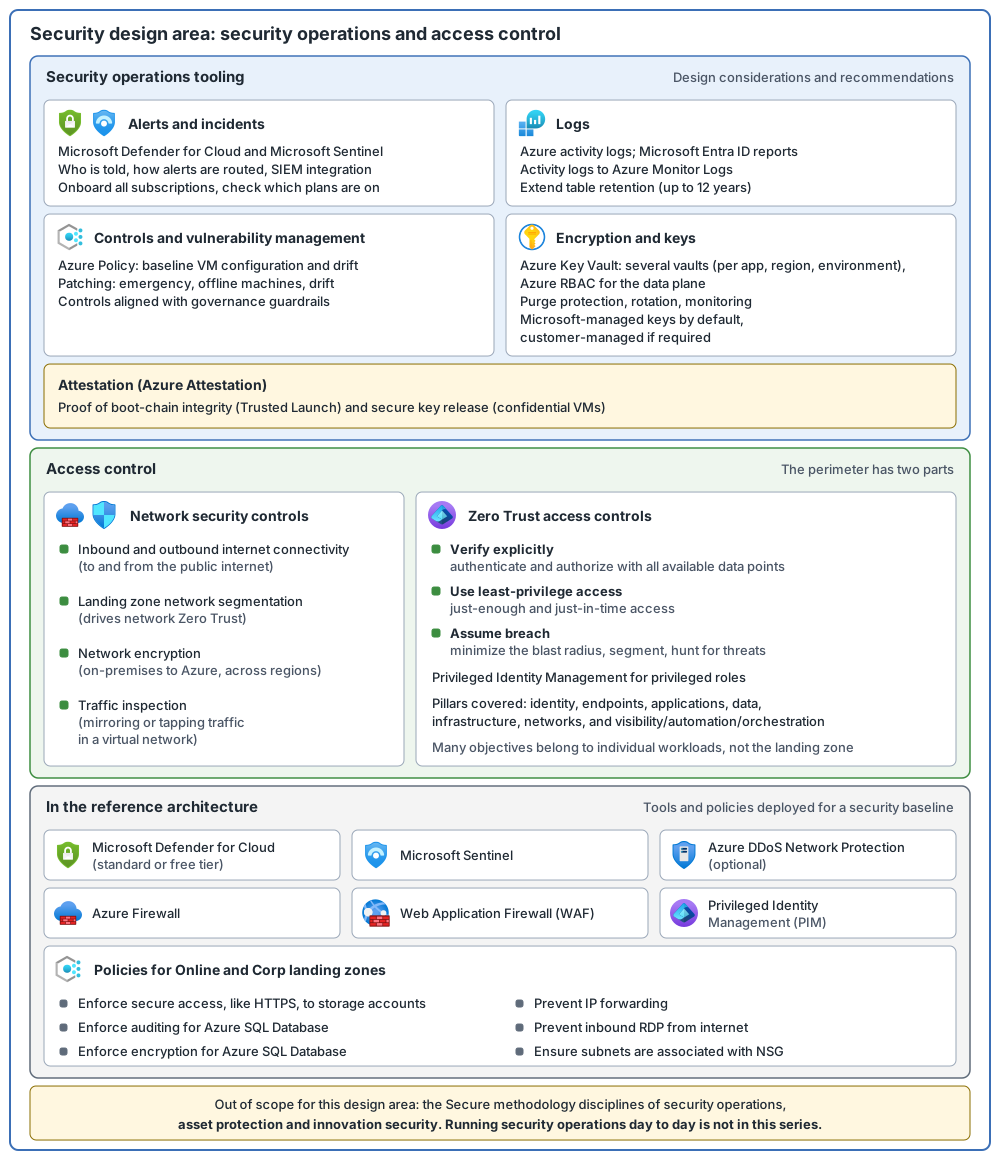
This post follows Microsoft's Security design area. Its stated goal is to understand security requirements and implement them consistently across all workloads in your cloud platform. The primary scope is security operations tooling and access control, and this scope includes Zero Trust and advanced network security. The Cloud Adoption Framework (CAF) is Microsoft's guidance for adopting the cloud. To streamline the conversation, this design area does not address some disciplines of CAF's Secure methodology: security operations, asset protection and innovation security. Those build on your landing zone deployment. So here only the tools for security operations (alerts, logs, controls) are in scope. This series does not cover running security operations day to day, asset protection or innovation security.
Key terms
The earlier posts defined these words: landing zone, workload, platform team, subscription, management group, Azure Policy, hub-and-spoke, Azure RBAC, service principal, managed identity, Microsoft Entra ID, multifactor authentication (MFA), Conditional Access, Privileged Identity Management (PIM), least privilege, just-in-time access (for roles), Zero Trust and its three principles, network security group (NSG), Azure Firewall, DDoS Protection, Log Analytics workspace, Microsoft Sentinel and Microsoft Defender for Cloud.
The words below are the main new terms. Each is in plain words. Other new terms are explained where they first appear.
| Word | What it means |
|---|---|
| Cloud Adoption Framework (CAF) and Secure methodology | CAF is Microsoft's guidance for adopting the cloud. Its Secure methodology gives in-depth guidance on security processes and tools. |
| Security operations | Watching for security problems and responding to them. In this design area only the tools for it are in scope. Running it day to day is not covered in this series. |
| SIEM and SOAR | SIEM means security information and event management: a tool that collects security data and finds threats. Microsoft Sentinel is a cloud-native SIEM solution. SOAR means security orchestration, automation and response: a tool that reacts to threats automatically. Sentinel offers the two as one combined solution for hybrid and multicloud environments (hybrid means on-premises plus cloud; multicloud means more than one cloud). In Sentinel, a playbook is a collection of remediation actions that can run on demand or automatically, when an automation rule triggers it. |
| Security alert | A real-time notice of an event that threatens your environment. In Microsoft Defender for Cloud, alerts are categorized and given severity levels, so you can plan the right response. |
| Attestation | A way to prove that software started correctly on a trusted computer. Azure Attestation is Microsoft's service for checking, from a distance, the security and integrity of a platform and of the binaries (programs) running inside it. |
| Microsoft cloud security benchmark | A set of high-impact security recommendations to help secure most of the Azure services you use. Its recommendations are general and are customized for each service in service recommendation articles. They are grouped into security controls, which are high-level requirements such as network security and data protection. |
| Perimeter | The edge of what you protect. The perimeter has two parts: network security controls and Zero Trust access controls. The section below covers them under the headings "Advanced network security" and "Zero Trust access controls". |
| Azure Key Vault | A service that stores and controls access to secrets (such as passwords and API keys), manages the encryption keys used to encrypt your data, and manages TLS/SSL certificates (files that prove a website is genuine and secure its traffic). |
| Microsoft-managed and customer-managed keys | With Microsoft-managed keys, Azure looks after the encryption key. With customer-managed keys, you control the key. |
What the design area covers
The Security design area has two parts: security operations and access control. It then adds a reference architecture and two linked pages, Zero Trust and encryption and keys. The table lists all five. This post follows that order, then adds the benchmark and Azure Attestation, and notes for new and existing environments.
| Part | The question it answers |
|---|---|
| Security operations | Who is told about problems, where are the logs, and how do you manage vulnerabilities and shared responsibility? |
| Access control | How do you protect the edge of your cloud, with network security and Zero Trust? |
| Zero Trust in the landing zone | Which Zero Trust area belongs to which landing zone design area? |
| Encryption and keys | Who manages keys, and how are they kept safe? |
| The reference architecture | What does Microsoft's landing zone deploy for security as examples? |
Security operations tooling: what to decide
These are design considerations, some of them phrased as questions. Only the tooling is in scope here.
| Topic | What to decide |
|---|---|
| Security alerts | Which teams need alerts, and whether groups of services need alerts routed to different teams. What your business needs for real-time monitoring and alerting. How alerts connect to a SIEM through Microsoft Defender for Cloud and Microsoft Sentinel. |
| Security logs | How long to keep audit data. Microsoft Entra ID P1 or P2 reports keep data for 30 days. Also how to archive logs for the long term, such as Azure activity logs (records of operations on Azure resources), virtual machine (VM: a computer that runs in Azure) logs and platform as a service (PaaS) logs. |
| Security controls | A baseline security setup for virtual machines through Azure in-guest VM policy, and how your security controls line up with governance guardrails. |
| Vulnerability management | Emergency patching for critical vulnerabilities, patching for virtual machines that are offline for long periods, and vulnerability assessment of virtual machines. |
| Shared responsibility | Where one team hands off to another when monitoring or responding to security events. See the Secure methodology for security operations. |
| Encryption and keys | Who needs access to keys, and who manages them. The encryption and keys section below covers this. |
| Attestation | Whether you will use Trusted Launch (a setting for Azure VMs that helps prevent bootkit and rootkit infections) for your virtual machines and need proof of the integrity of the whole boot chain. Whether you want confidential disk encryption for confidential VMs. Whether your workloads need proof that they run inside a trusted environment. |
A few words in the Attestation row need a gloss. Bootkit and rootkit infections are malware that loads before the operating system. The boot chain is the steps a VM goes through to start up. A confidential VM is an Azure VM that offers OS disk encryption, with the keys bound to the VM's Trusted Platform Module (TPM), a security chip.
Recommendations for security operations:
- Use Microsoft Entra ID reporting to produce access control audit reports.
- Export Azure activity logs to Azure Monitor Logs (the part of Azure Monitor that stores log data in a Log Analytics workspace, where you can query it) for long-term retention. Azure keeps activity log events for 90 days. In a Log Analytics workspace you can extend a table's total retention up to 12 years. Use Azure Storage (which holds data such as files and blobs) when you want a separate archive, for example immutable storage. My suggestion: check the current retention limits when you plan.
- Onboard every subscription to Defender for Cloud and use Azure Policy to check coverage. (In Azure Policy definitions, a subscription with a Defender plan enabled is "standard" and one with plans off is "free". The supplied onboarding policy turns on only the basic functionality unless you change its
pricingTierparameter, and it counts both settings as compliant. My suggestion: decide which plans you need and verify that they are on. Defender for Servers, for example, has paid plans.) - Watch the patching of the base operating system for drift, using Azure Monitor Logs and Defender for Cloud. Drift means a machine moving away from the baseline you set.
- Use Azure policies to deploy software settings through virtual machine extensions and to enforce a compliant baseline virtual machine configuration, and watch for security configuration drift with Azure Policy.
- Connect default resource settings to one central Azure Monitor Log Analytics workspace.
- Use a solution based on Azure Event Grid (a fully managed publish-subscribe service that sends a short notice, an event, to other programs when something happens) for real-time alerts that are driven by logs.
- Use Azure Attestation to prove the integrity of the whole boot chain of a virtual machine, the secure release of confidential disk encryption keys for a confidential VM, and the state of different workload trusted execution environments.
Access control: the two parts of the perimeter
Modern security boundaries are more complex than those of a traditional datacenter, and keeping users out of the protected network is no longer enough to control access. The perimeter has two parts.
Advanced network security. Four linked pages each have a one-line purpose:
| Topic | What the page covers |
|---|---|
| Inbound and outbound internet connectivity | Recommended models for traffic to and from the public internet. |
| Landing zone network segmentation | Recommendations for secure internal segmentation (splitting a network into separated parts) within a landing zone. These drive network Zero Trust implementation. |
| Network encryption | Recommendations for encryption between on-premises and Azure, and across Azure regions. |
| Traffic inspection | Considerations and approaches for mirroring or tapping traffic within an Azure virtual network. |
Zero Trust access controls. For identity, ask four questions. Which teams or people need access to services in the landing zone, and in what roles? Who authorizes the access requests? Who gets notified when privileged roles are activated? Who can see the audit history? Use Privileged Identity Management for this (the privileged access post). Zero Trust can also go beyond identity and access management, across pillars such as infrastructure, data and networking (a pillar is an area of Zero Trust).
Recommendations for access control:
- Review each service you need against your requirements. If you want to bring your own keys, not every service may support it, so put a mitigation in place. Choose region pairs and disaster recovery regions that keep latency low.
- Make a security allowlist plan to assess services such as security configuration, monitoring and alerts, and then a plan to connect them to existing systems.
- Decide the incident response plan for Azure services before they move to production. (Running incident response day to day is not covered in this series.)
- Align your security requirements with the Azure platform roadmaps, to stay current with new security controls.
- Use a Zero Trust approach for access to the Azure platform where it is appropriate.
Zero Trust in the landing zone
Zero Trust is a security strategy built on three principles: verify explicitly (always authenticate and authorize based on all available data points), use least-privilege access (just-enough and just-in-time access, with adaptive risk-based policies) and assume breach (minimize the blast radius, which is how much can be damaged if one thing is compromised, segment access, look for threats and keep improving defenses). The simple idea behind it is: never trust, always verify.
Your landing zone is the foundation for your workloads, so it should be ready for Zero Trust. Each Zero Trust pillar has deployment objectives. These are specific goals that help an organization follow the Zero Trust principles, and they go beyond technical configurations. Not all Zero Trust objectives belong to a landing zone: many are for designing and releasing individual workloads. Some pillars refer to endpoints. An endpoint is a laptop, a desktop computer or a mobile device that a person uses. This table maps each landing zone design area to the Zero Trust pillars:
| Landing zone design area | Zero Trust pillar |
|---|---|
| Azure billing and Microsoft Entra tenant | Identity |
| Identity and access management | Identity, applications, data |
| Resource organization | Identity |
| Governance | Visibility, automation and orchestration |
| Management | Endpoints, applications, data, infrastructure |
| Network topology and connectivity | Networks |
| Security | All pillars |
| Platform automation and DevOps | Visibility, automation and orchestration |
For each pillar, the next table gives what the objectives are, what to consider and what to do:
| Pillar | What you can do, and what to note about it | Considerations and recommendations |
|---|---|---|
| Identity | Identity federation, Conditional Access, identity governance and real-time data operations. Many of the controls are set in your Microsoft Entra tenant, and you must plan configuration requirements beyond the landing zone. | Plan how to manage identities in Microsoft Entra ID beyond Azure resources, for example federation, Conditional Access, and user, device, location or behavior information. Use separate subscriptions for identity resources such as domain controllers. Use managed identities where possible. |
| Endpoints | Register endpoints with cloud identity providers, enforce DLP (data loss prevention) and access control on corporate and BYOD (bring your own device: a personal device used for work) devices, and monitor device risk. These apply to end-user devices, so you need solutions in Azure and outside it. | Plan endpoint management with Zero Trust practices in addition to the landing zone. If you have endpoints in Azure, such as Azure Virtual Desktop (an Azure service that delivers Windows desktops to users), you can enroll the client experience in Microsoft Intune (a Microsoft tool for managing devices; it is one way, with other device management solutions, to meet endpoint goals) and apply Azure policies and controls to restrict access to the infrastructure. |
| Applications | Visibility into applications through APIs, policies to protect sensitive information, adaptive access controls and limiting shadow IT (apps used without the organization's approval). These cover using applications, not securing their infrastructure. Landing zone practices do not give detailed controls for this, so it is set in each application's configuration. | Use Microsoft Defender for Cloud Apps (a Microsoft tool for managing access to applications) and its standardized policies. Plan how to onboard applications. Do not trust applications your organization hosts any more than third-party applications. |
| Data | Classify and label data (sort data by how sensitive it is, mark it with that label, and control who can access it), enable access control and implement data loss protection. These need controls beyond Azure resources. | Use Microsoft Purview (Microsoft's tools for data governance, which means rules for how data is handled, plus protection and risk management). Under subscription democratization, you can create access and network isolation for data resources and set up logging. The reference implementations include policies for logging and managing data resources. |
| Infrastructure | Monitor abnormal behavior in workloads, manage infrastructure identities, limit human access and segment resources. | Use the standard landing zone policies to block noncompliant deployments and enforce logging. Use PIM for just-in-time access to highly privileged roles. Use just-in-time VM access (a Defender for Cloud feature that locks down inbound traffic to a VM) to restrict access to virtual machines. It is different from just-in-time role activation in PIM; see the privileged access post. Plan how to monitor and manage each workload. |
| Networks | Network segmentation, cloud-native filtering and least-access privilege. | Deploy firewalls capable of HTTPS inspection (looking inside encrypted web traffic; HTTPS is the secure form of web traffic), and isolate identity and management network resources from the central hub. Plan micro-segmentation (splitting the network into small parts around each workload) of each workload in its spoke virtual network. One example is to define traffic patterns and create fine-grained network security groups. Three Zero Trust deployment guides (one for the Azure portal, one for Bicep and one for Terraform) and two further pages are linked. Bicep and Terraform are tools for deploying Azure resources from code. Terraform was defined in Platform scope. |
| Visibility, automation and orchestration | Establish visibility, enable automation and keep improving. The reference implementations give policies for Azure logging, but other services need more integration. | Deploy Microsoft Sentinel as part of the landing zone. Plan to bring signals from Microsoft Entra ID and Microsoft 365 tools into your Sentinel workspace. Plan threat-hunting exercises and continual security improvement. |
One detail is worth keeping in mind. Just-in-time VM access in Defender for Cloud, which is a Defender for Servers Plan 2 feature, protects machines from attackers who look for open management ports such as RDP or SSH (remote sign-in ports for VMs: RDP for Windows, SSH for Linux). It locks down inbound traffic to the VM. When a request is approved, Defender for Cloud configures the network security groups and Azure Firewall to allow inbound traffic to the selected ports from the relevant IP address or range for the specified amount of time.
Encryption and keys
Encryption is a vital step toward data privacy, compliance and data residency in Azure. Design considerations for Azure Key Vault include:
- Set subscription and scale limits as they apply to Key Vault. Key Vault has transaction limits for keys and secrets.
- A key vault is a security boundary, because permissions for keys, secrets and certificates are set at the vault level. Access policy assignments grant permissions to keys, secrets or certificates separately, but they do not support object-level permissions for a specific key, secret or certificate.
- Keep application-specific and workload-specific secrets apart from shared secrets where needed, to control access.
- Use the Premium tier where keys need to be protected by a hardware security module (HSM), a dedicated hardware device that protects encryption keys.
- Manage key rotation (replacing a key or certificate with a new one on a routine) and secret expiration, and use Key Vault certificates to handle certificate procurement and signing, with alerts, notifications and automatic renewal.
- Set disaster recovery needs and replication and failover settings for keys, certificates and secrets.
- Monitor how keys, certificates and secrets are used, to detect unauthorized access.
- Delegate Key Vault creation and privileged access.
- Set your requirements for customer-managed keys, for example for Azure Storage encryption, whole-disk encryption for virtual machines, and encryption of data in transit and at rest.
Recommendations:
- Use a federated Key Vault model to avoid the transaction limits. That means several vaults, one per application or workload, not one central vault.
- Plan for regional behavior (Reliability in Azure Key Vault, checked October 2026). A vault lives in one region. Microsoft-managed replication and failover to the paired region is asynchronous, is started by Microsoft, and does not cover every region; after a failover the vault is read-only. Recovery at application level is your design: vaults in more than one region, backup and restore, and application logic to switch vaults. Service replication keeps your data durable. It does not make your application fail over.
- With a private endpoint, a connection can take up to 20 minutes to re-establish after a regional failover. My reading: a private endpoint is an address in one virtual network, so check that your recovery design still reaches the vault by name from the secondary network.
- Use Azure RBAC to authorize the data plane of Key Vault. The data plane is working with the keys and secrets inside a vault (the identity and access post defined control plane and data plane).
- Turn on purge protection for the vaults that matter. Soft delete is on by default for new vaults and cannot be turned off; it keeps a deleted key or secret recoverable for 7 to 90 days (default 90). Purge protection is optional and off by default; it stops a deleted item being permanently erased before that time ends.
- Follow least privilege: limit permission to permanently delete keys, secrets and certificates to specialized custom Microsoft Entra roles.
- Automate certificate renewal with public certificate authorities, and automate key and certificate rotation.
- Restrict network access to the vault. Prefer a private endpoint (a private IP address in your virtual network for the service) with public network access disabled. Otherwise use the Key Vault firewall with virtual network rules.
- Create a diagnostic setting on each vault (resource logs are not collected by default) and send its audit logs to the platform's central Azure Monitor Log Analytics workspace, so you can audit key, certificate and secret use.
- Delegate vault creation and privileged access, and use Azure Policy to enforce a consistent, compliant configuration.
- Default to Microsoft-managed keys for the main encryption functions, and use customer-managed keys when required.
- Do not use centralized Key Vault instances for application keys or secrets, unless you use a Managed HSM instance (a Key Vault option with HSM-protected keys). Several vaults reduce the blast radius, can improve performance, and are easier to manage when they match application or workload boundaries.
- Do not share Key Vault instances between applications, to avoid sharing secrets across environments.
Microsoft cloud security benchmark and Azure Attestation
This design area covers two more items. The first is the Microsoft cloud security benchmark, whose recommendations are general and are customized for each service in service recommendation articles. The second is Azure Attestation, a tool to help you ensure the security and integrity of a platform and of the software that runs inside it.
Examples of what the reference architecture includes
Security is at the core of the Azure landing zone reference architecture, and many tools and controls are deployed so organizations can reach a security baseline quickly. These are two separate lists, not pairs.
Tools included, as examples:
- Microsoft Defender for Cloud (standard or free tier)
- Microsoft Sentinel
- Azure DDoS Network Protection (optional; the network topology post calls it DDoS Protection)
- Azure Firewall
- Web Application Firewall (WAF: a firewall that gives centralized protection for web applications against common exploits and vulnerabilities, such as SQL injection and cross-site scripting, two common attacks on websites)
- Privileged Identity Management (PIM)
Policies included for the Online and Corp (corporate-connected) landing zones (the resource organization post):
- Enforce secure access, such as HTTPS, to storage accounts
- Enforce auditing for Azure SQL Database (a managed database service)
- Enforce encryption for Azure SQL Database
- Prevent IP forwarding (a setting that lets a VM pass on network traffic that is not meant for itself)
- Prevent inbound RDP from the internet
- Ensure subnets are associated with an NSG
New and existing environments
For a new environment (called greenfield), start by creating your initial subscriptions and deploy with an infrastructure-as-code accelerator for Bicep or Terraform, built on Azure Verified Modules (reusable, customizable building blocks). The templates carry Microsoft's proven-practice security guidance as a starting baseline. My suggestion: still review every setting against your own requirements. For a brownfield environment, four services bring the same principles to it:
- Microsoft Entra Connect cloud sync, for hybrid identity. With hybrid identity you can also enforce MFA and Microsoft Entra Password Protection.
- Conditional Access.
- Privileged Identity Management, with recurring access reviews.
- The recommendations, alerting and remediation of Defender for Cloud. A security team can connect it to Microsoft Sentinel when it needs a more robust, centrally managed hybrid and multicloud SIEM and SOAR solution.
Security layers at a glance
Common mistakes
- Alerts with no owner. Ask which teams need alerts and whether some services need alerts routed to different teams.
- Logs kept too short. Microsoft Entra ID P1 or P2 reports keep data for 30 days, so export activity logs for long-term retention.
- Defender for Cloud left off some subscriptions, or left on the free level. Onboard every subscription with Azure Policy, then check which Defender plans are actually enabled.
- Drift left unwatched. Watch operating system patching and security configuration drift.
- One central key vault for everything. Do not use centralized Key Vault instances for application keys or secrets, and do not share vaults between applications.
- Deleted keys that can be lost for good. Turn on purge protection (soft delete is on by default for new vaults), and limit permanent deletion to specialized roles.
- Keys and certificates that are never rotated, or that expire without warning. Automate rotation and certificate renewal.
- Zero Trust treated as an identity-only job. Zero Trust can go beyond identity and access management, across pillars such as infrastructure, data and networking, and many objectives are for individual workloads, not the landing zone.
- Treating hosted applications as trusted. Do not trust applications your organization hosts any more than third-party applications.
From my own projects
From the list above, these came up in my own work: Key Vault sprawl, and logs and alerts. I leave out project details.
The files in my repo
- Security design area: the platform baseline and shared responsibility: security.md
Sources
Microsoft Learn, checked October 2026: Design area: Security · Incorporate Zero Trust practices in your landing zone · Encryption and key management in Azure
Short definitions of Microsoft Sentinel, Defender for Cloud, Key Vault, Azure Attestation, Event Grid, Web Application Firewall and just-in-time VM access come from their own overview pages, and the Zero Trust overview page gives "never trust, always verify". The Defender for Cloud "standard" and "free" wording comes from the page on enabling Defender for Cloud on all subscriptions in a management group.