Topology and address planning are the two network choices that are hardest to change after users arrive. A subnet that is too small blocks the next image update. A range that overlaps an acquired company's network blocks the VPN. A Virtual WAN hub address range cannot be changed once it is created. None of these is likely to show up in a pilot of ten users (the author's judgement).
This article places AVD in the Azure landing zone model, compares hub and spoke with Virtual WAN using the criteria the documentation gives, and lists the address-planning rules that matter. The networking article covers subnet sizing for one worked example in more detail, so this one concentrates on the choices around it.
Key terms
| Term | Meaning |
|---|---|
| Landing zone | An Azure environment set up with governance, networking, identity and security, so workloads can be placed in it. |
| Platform landing zone | The shared foundation: networking, identity and governance for the whole estate. |
| Workload landing zone | The place a specific workload runs. AVD sits in a workload landing zone. |
| Hub and spoke | A design where a central hub network holds shared services, and spoke networks for workloads connect to it. |
| Peering | A direct link between two virtual networks. |
| Transitive | Traffic can pass through one network to reach another. Peering by itself is not transitive. |
| Virtual WAN | A Microsoft-managed networking service that gives global, transitive connectivity across regions and on-premises sites. |
| Virtual hub | The Microsoft-managed network at the centre of a Virtual WAN in a region. |
| CIDR | A way to write an address block, such as 10.20.0.0/22. A smaller number after the slash means a larger block. |
| Overlap | Two networks using the same addresses, so traffic cannot be routed between them. |
| NVA | Network virtual appliance: a firewall or router that runs as a virtual machine. |
| Virtual network and subnet | A virtual network is a private network in Azure. A subnet is a smaller address range inside it. Each virtual machine network interface gets its address from one subnet. |
| Subscription | A billing and management boundary in Azure. Landing zones use several subscriptions to separate platform and workloads. |
| Session host, private endpoint | A session host is a virtual machine that runs users' desktops and apps. A private endpoint is a network interface with a private IP address that connects you to an Azure service. |
| User-defined route (UDR) | A route you write to change where traffic from a subnet goes next. |
| Route propagation (BGP) | BGP is a standard way for gateways to tell each other which address ranges they can reach. Route propagation lets a route table learn those ranges automatically. |
| Azure Firewall, VPN Gateway, ExpressRoute | Azure Firewall is Azure's managed firewall. VPN Gateway sends encrypted traffic to your network over the internet. ExpressRoute is a private link between your network and Azure through a connectivity provider. |
| Route Server | An Azure service that lets a network virtual appliance and the Azure network exchange routes by BGP, so you do not maintain route tables by hand. |
| Global virtual network peering | Peering between virtual networks in different Azure regions. |
| NAT | Network address translation: swapping one address for another so two networks that use the same addresses can still talk. |
| DNS and domain controller | DNS turns a name into an IP address. A domain controller is a server that runs Active Directory so machines can join a Windows domain. |
| RFC 1918 | The standard that reserves private IPv4 ranges: 10.0.0.0/8, 172.16.0.0/12 and 192.168.0.0/16. |
| DDoS Protection plan | An Azure service that protects resources that have public IP addresses against network-layer attacks. |
| Azure Compute Gallery, Log Analytics workspace | A gallery stores and shares VM images. A Log Analytics workspace stores logs and metrics for querying. |
Where AVD sits
The Azure Architecture Center's AVD landing zone design guide says to deploy a Cloud Adoption Framework platform landing zone first, and then deploy AVD into a workload landing zone. This is documented. In the reference design, AVD uses its own subscription or subscriptions for workload resources (virtual machines, storage accounts, key vaults, private endpoints) and a shared services subscription for things used across AVD workloads (Log Analytics workspaces, Azure Compute Gallery). The platform provides connectivity, identity and management subscriptions. The connectivity subscription holds the hub networking, Azure Firewall and the ExpressRoute or VPN gateways. The identity subscription holds the domain services for domain-joined session hosts. In this design the management subscription is not an active dependency of the AVD workload, so the workload team builds its own monitoring and automation.
Judgement: the practical meaning is that the network team owns the hub and the address plan, and the AVD team owns the spoke. Settle that line early.
The topology rules below come from the general Cloud Adoption Framework network topology pages, which apply to any workload, not only AVD. The hub range rule comes from the Virtual WAN documentation.
Hub and spoke or Virtual WAN
The documentation gives conditions for each. These are documented. Which one fits you is a decision.
| Choose traditional hub and spoke when | Choose Virtual WAN when |
|---|---|
| A single Azure region, or several regions where you do not need transit between networks in different regions, or where global virtual network peering can connect them | You need hub-and-spoke across more than two regions |
| You do not need transit between VPN and ExpressRoute connections | You need global transit connectivity between landing zone networks across regions |
| ExpressRoute is the main hybrid link and there are fewer than 100 VPN connections per VPN gateway | You want to minimize network management work |
| You depend on central network virtual appliances and granular routing |
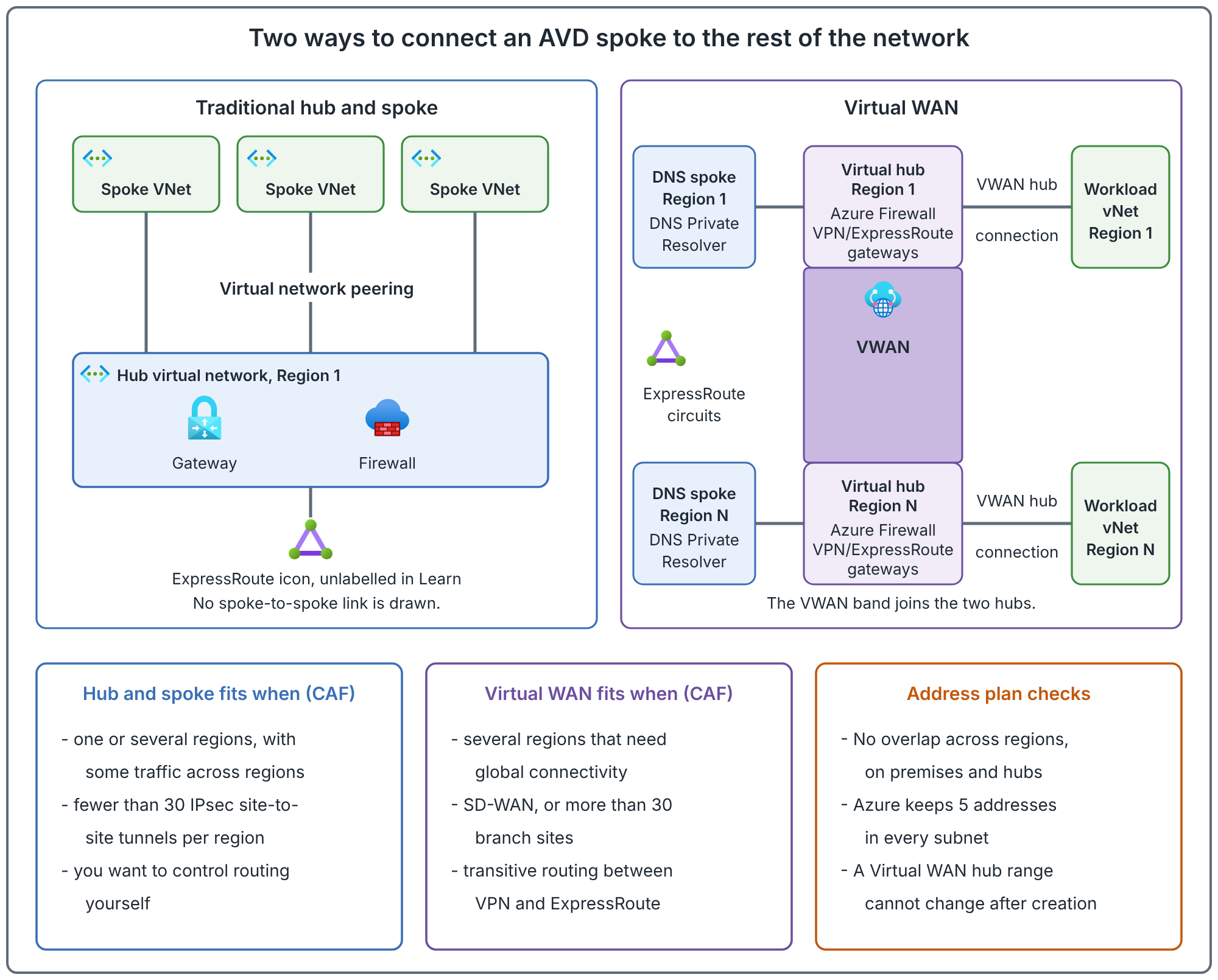
Points that change the AVD design:
- Peering is not transitive. To get transit through a hub you need user-defined routes and network virtual appliances. That is how a hub firewall sees spoke-to-spoke traffic.
- Shared services live differently. In traditional hub and spoke, the hub may hold domain controllers and DNS servers. In Virtual WAN, customer-deployed resources cannot be deployed inside the virtual hub. The documentation says to put shared services such as DNS servers in a dedicated spoke. It does not name domain controllers, but they are customer-deployed servers too, so by extension (the author's reading) they also go in a spoke.
- Virtual WAN hubs hold Microsoft-managed resources. That means gateways, Azure Firewall through Firewall Manager, route tables and certain NVAs for SD-WAN.
- Hub-to-hub across regions. With two regions in hub and spoke, the documentation says to connect the hubs with global virtual network peering. Beyond two regions it recommends Virtual WAN, or hubs that connect to the same ExpressRoute circuits. When the hubs are joined through ExpressRoute, spokes in different regions can reach each other directly and bypass the hub firewalls. If the firewalls must inspect that traffic, add more specific routes in the spoke route tables or disable BGP route propagation on them.
- Limits apply to both. Check the maximum number of peerings per virtual network and the route limits on ExpressRoute private peering against your spoke count.
Recommendation (judgement): do not choose Virtual WAN for AVD alone. The topology is decided by the whole estate. If the platform team already runs one, place AVD in it. If you choose, use the conditions above and test the routing for the three AVD paths: session host to the AVD service (outbound, see the connectivity article), session host to identity, and session host to profile storage. The user's client path runs through the client's own network, not yours.
Address planning rules
The planning page gives these rules. They are documented.
- Plan non-overlapping address space across Azure regions and on-premises locations before you build.
- Use private (RFC 1918) addresses.
- Do not use these ranges:
224.0.0.0/4,255.255.255.255/32,127.0.0.0/8,169.254.0.0/16and168.63.129.16/32. The last two are the platform addresses AVD hosts must reach. - Do not create large virtual networks such as
/16, so that address space is not wasted. The author's note: treat any/16in a worked example as a placeholder. The smallest IPv4 subnet Azure supports is/29. - Do not create virtual networks without planning the address space.
- Azure reserves five addresses in each subnet, so a
/24has 251 usable addresses. - Some services need their own subnets, such as Azure Firewall and VPN Gateway.
- You can add address space to a virtual network later. If it is peered, each remote peering needs a resync.
- An overlapping on-premises site can be reached through NAT on VPN Gateway or Virtual WAN. Treat that as a workaround, not a plan (judgement).
- An IP address management tool, even a spreadsheet, helps prevent overlap. The documentation suggests T-shirt sizes such as
/24,/22and/20for workload requests, and an API so address requests fit into subscription creation.
For the Virtual WAN hub:
- The minimum hub address space is
/24, and the documentation recommends/23or larger. - If you use Azure Firewall in the hub, the minimum is
/22. - The hub address space cannot be changed after the hub is created.
- It must not overlap with other hubs in the same Virtual WAN, on-premises networks, or any virtual network connected to the hub.
Three ways address plans fail
These are the author's reasoning from the documented rules. They are illustrations, not case histories.
- An overlap discovered after a merger. Two companies each used
10.0.0.0/16. AVD hosts need to reach the other company's file servers. The fix is renumbering or NAT, both expensive. Check for overlap before you assign ranges, including partner and acquired networks that are not yet connected. - A subnet that cannot hold a rolling update. When you replace hosts with new ones from a new image before removing the old, the subnet holds both sets of network interfaces. The networking article shows the arithmetic. Size for the overlap, with Azure's five reserved addresses taken off.
- A hub range that is too small. A virtual hub's range cannot change. If you later want Azure Firewall in a
/24hub, the range is already below the/22minimum and cannot be changed, so you would be looking at a new hub. Choose the size for what the hub will hold, not what it holds on day one.
Another trap: Private Link needs addresses too. The Private Link documentation says IP address allocations are subject to change as demand rises, and to leave headroom for private endpoints. It also points to an Architecture Center decision tree for placing private endpoints in a hub or a spoke.
Cost drivers
This article gives no prices. Prices change and are on the pricing pages. The documentation names these cost drivers, so ask about them in the design:
- Global virtual network peering generates traffic fees.
- A Virtual WAN virtual hub has pricing from the moment it is created, even without gateways.
- An Azure DDoS Protection plan includes protection for 100 public IP addresses. More cost more. It covers only resources that have public IP addresses.
- Routing through ExpressRoute between regions can add latency, and the gateway SKU limits throughput.
Ask the network team which of these your AVD spoke will add to the bill, and who pays.
Common mistakes
- Treating the address plan as an AVD decision. The estate decides it, and the network team often owns it.
- Using
/16for a spoke "to be safe". The guidance is not to waste address space. - Forgetting that a spoke needs reachable DNS and domain controllers. In Virtual WAN, they live in a spoke.
- Sizing the host subnet for today's host count. Size for replacement overlap and growth.
- Choosing the Virtual WAN hub range casually. It cannot be changed.
- Relying on NAT to hide an overlap. It is a workaround.
How to validate your plan
These are recommended checks on paper before you build anything.
- List every address range in use or planned: on-premises, other regions, hubs, partner networks, other clouds. Check for overlap.
- For each AVD host subnet, calculate peak host interfaces plus replacement overlap, then subtract five addresses and compare with the subnet size.
- For each hub, list what it will hold and check the range against the minimums above.
- Draw the path from a session host to the AVD service, to the domain controllers and to profile storage. Mark the route and the control at each hop.
- Write down who owns the address plan and how a request for a new range is made.
Related book chapter, labs and project
Chapter 12 of the book covers topologies and IP planning. Lab 3 builds a single-region network and Lab 11 builds a multi-region foundation. The labs walk through those steps. Neither has been run end to end in Azure. Project 13 is a fictional case study.
Next: Back to the series index.
Sources
Traditional Azure networking topology, Plan for IP addressing and About virtual hub settings.