"Open the firewall for AVD" is not a complete instruction. The service has no list of IP addresses to allow. It has names, tags, two special platform addresses and a few ports. A team that treats it like an ordinary application can end up with hosts that look healthy and never take a connection, or with a proxy that works for web browsing and breaks long-running sessions.
This article explains what is required and where each control sits. The networking article walks through one worked example with firewall rules and routes. This one covers the rules behind it, proxies, DNS and Private Link.
Key terms
| Term | Meaning |
|---|---|
| Outbound | Traffic that starts on the session host or client and goes out. AVD needs no inbound ports. |
| FQDN | Fully qualified domain name, such as a full web address without the path. |
| Wildcard | A name with * in it, such as *.wvd.microsoft.com, that matches many names. |
| Service tag | A named group of IP address prefixes for an Azure service. Microsoft keeps it up to date. You use it in network security group rules, Azure Firewall and routes. |
| FQDN tag | An Azure Firewall name for a group of domain names for a Microsoft service. |
| Network security group (NSG) | Rules that allow or deny traffic to and from a subnet or network interface. |
| UDR | User-defined route. A route you write to change where traffic goes. |
| Proxy | A server that sits between a device and the internet and may inspect or filter traffic. |
| Private Link | Azure's way to reach a service through a private IP address in your network. |
| Private endpoint | The network interface with a private IP that connects you to the service through Private Link. |
| Private DNS zone | A DNS zone that is visible only inside your network. It maps service names to private endpoint addresses. |
| Sub-resource | The part of a service that a private endpoint attaches to. For AVD the three are global, feed and connection. |
| DNS | The system that turns a name into an IP address. Azure-provided DNS is the resolver Azure gives every virtual network. Custom DNS is a resolver you run or choose. |
| Session host and host pool | A session host is a virtual machine that runs users' desktops and apps. A host pool is a group of session hosts managed together. |
| Workspace and feed | A workspace is the AVD object that lists the desktops and apps a user can open. The feed is that list as the client downloads it. |
| AVD agent | Software on each session host that registers it with the service and keeps a connection to it. |
| Reverse connect | Both the client and the session host open outbound connections to the service, which joins them. No inbound port is opened on the host. |
| Gateway | The Microsoft-run part of the AVD service that joins the client's connection to the session host's connection. |
| Azure Front Door | A Microsoft global entry service. In the public cloud, client connections to AVD reach a gateway through it. |
| RDP Shortpath and TURN | RDP Shortpath adds a UDP path for the remote session. TURN is a relay method that carries that UDP traffic through a Microsoft server when no direct path works. |
| TCP and UDP | Two ways to send data over a network. TCP checks that data arrives. UDP sends data without checking that each piece arrives. |
| WebSocket | A long-lived connection that stays open so both sides can send data at any time. |
| SSL termination (SSL inspection) | A proxy opens encrypted traffic, reads it and re-encrypts it with its own certificate. |
| PAC file and WPAD | A PAC file is a small script that tells a device which proxy to use for which address. WPAD is a way for a device to find that script automatically through DNS. |
| Azure Firewall | Azure's managed firewall service. It can allow traffic by name, FQDN tag or service tag. |
| AD DS | Active Directory Domain Services: a Windows domain run on domain controllers. |
There is no IP list
The documentation is direct: AVD has no list of IP address ranges that you can allow instead of names. The exceptions in the tables below are the relay range for RDP Shortpath (51.5.0.0/16) and the two Azure platform addresses, which are listed separately and are not a substitute for the names. For a next-generation firewall (a non-Microsoft firewall that filters by application or name, not only by address and port) it says to use a dynamic list built for Azure addresses. It recommends service tags and FQDN tags where you can, because they are kept current for you. This is documented fact.
It also says Microsoft does not support AVD deployments where the listed FQDNs and endpoints are blocked. That does not mean "it may be slow". It means "not supported".
What the session host needs
All entries are outbound. The documentation lists them in a table with the address, protocol, port, purpose and service tag. The list changes, so treat any copy, including this one, as a snapshot and read the current page. These rows show the shape of the list, are not the full list, and use the Azure public cloud names. Azure for US Government has its own names and relay range, so use the tab for your cloud.
| Need | Example | Port |
|---|---|---|
| Sign in to Microsoft Entra ID | login.microsoftonline.com |
TCP 443 |
| Service traffic, including TCP-based RDP | *.wvd.microsoft.com and the newer *.service.windows.cloud.microsoft, *.windows.cloud.microsoft and *.windows.static.microsoft families |
TCP 443 |
| Relayed RDP (RDP Shortpath through TURN) | 51.5.0.0/16 |
UDP 3478 |
| Agent and monitoring traffic | *.prod.warm.ingest.monitor.core.windows.net, gcs.prod.monitoring.core.windows.net |
TCP 443 |
| Agent and stack updates | mrsglobalsteus2prod.blob.core.windows.net |
TCP 443 |
| Windows activation | azkms.core.windows.net |
TCP 1688 |
| Certificates | Several names, including ctldl.windowsupdate.com and www.microsoft.com |
TCP 80 |
The documentation says the wildcard form is required for service traffic. For agent traffic, if you prefer not to use a wildcard, you can find the exact names yourself. On a registered session host, open the Event Viewer, go to Windows logs, then Application, then WVD-Agent, and read event ID 3701. Those names are region-specific, so repeat it for each region you deploy to. The Agent URL Tool checks that a host can reach the required names.
The list does not cover every name for Microsoft Entra ID, Office 365, custom DNS providers or time services. For restricted networks the documentation points to the Office 365 URL and address ranges list (entries 46, 56, 59 and 125) for the Microsoft Entra names. If users need Microsoft 365 apps inside the session, the session hosts must reach the Microsoft 365 endpoints as well. The page also lists optional names, for example for Windows Update, OneDrive updates and diagnostic settings, and a separate list if you use Intune Remote Help.
The two platform addresses
Two addresses behave differently from everything above.
| Address | Port | Purpose |
|---|---|---|
169.254.169.254 |
TCP 80 | Azure Instance Metadata Service |
168.63.129.16 |
TCP 80 and 32526, TCP and UDP 53 | Azure platform services: health signals, and DNS when you use Azure-provided DNS |
The documentation says traffic to these addresses must not be intercepted, proxied or redirected. Doing so causes provisioning failures, health monitoring problems and connection problems. The platform routes this traffic at the fabric layer, so ordinary NSG rules and routes do not affect it by default. The risk is a configuration you add that does. Port 53 is only needed with Azure-provided DNS. With custom DNS, queries go to your servers, so make sure they are reachable.
What clients need
Any device that uses one of the clients must reach a separate list of names, mostly on TCP 443. It includes the sign-in, service and troubleshooting names, and 51.5.0.0/16 on UDP 3478 for relayed connections. Blocking these is not supported either. The documentation also notes that authentication does not work unless the local machine can reach the required URLs for the clients.
Where each control sits
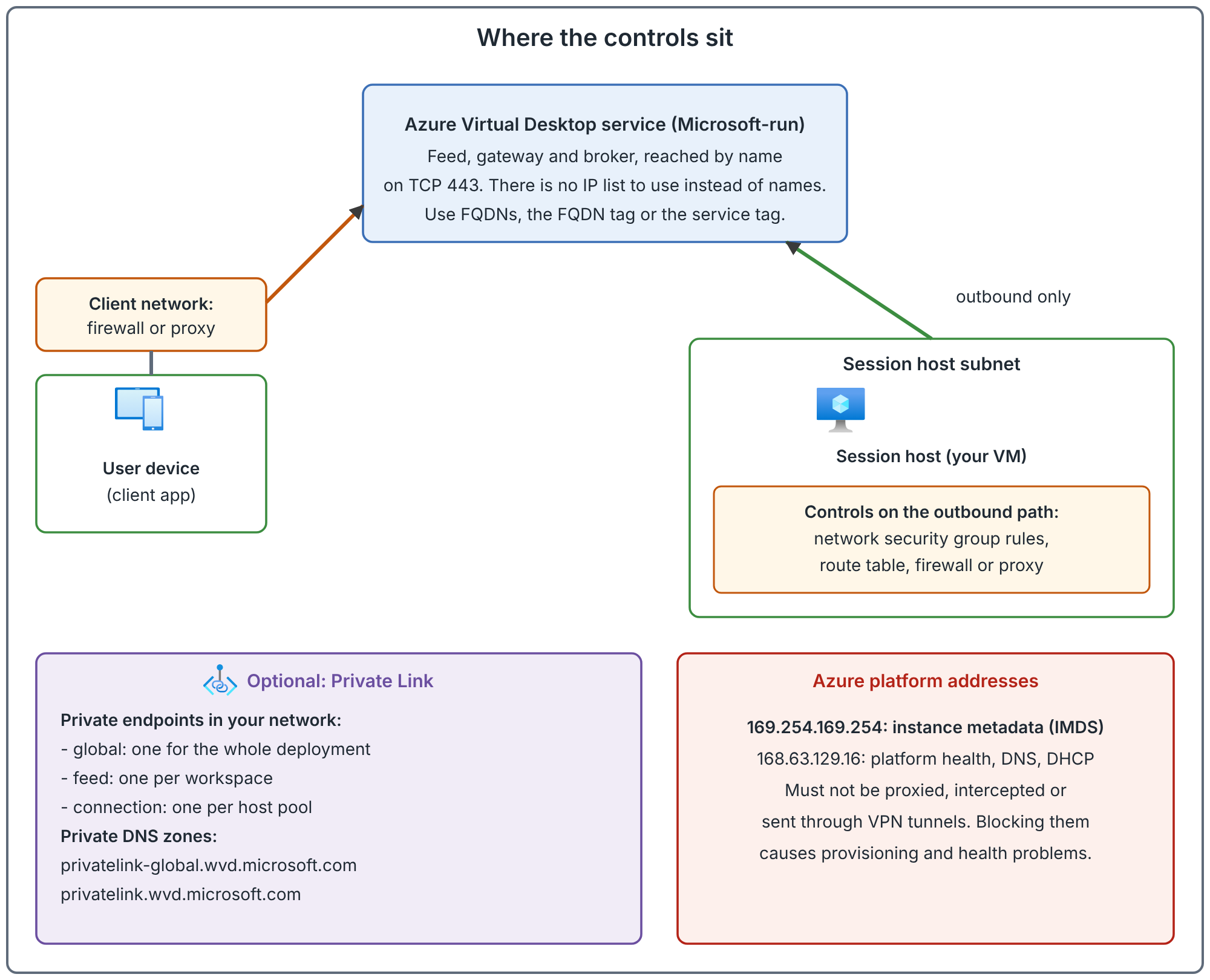
Three places can block a connection, and they are checked by different people: the client network, the session host subnet and the platform addresses. When a user cannot connect, find out which side is failing before you open any rule.
Proxies
The documentation recommends bypassing proxies for AVD traffic. Its reasons:
- The traffic is already encrypted, so a proxy does not make it more secure.
- Most proxies are not built for long-running WebSocket connections, and AVD uses several long-lived connections per user, so proxy scale and stability matter.
- A distant proxy adds latency and makes the geographic routing less accurate.
- If the proxy is the only path, RDP data is forced over TCP instead of UDP, which lowers visual quality and responsiveness.
If you must use one, the documentation recommends:
- Keep it in the same Azure geography as the AVD agent and client.
- Use RDP Shortpath for managed networks so the RDP data can bypass the proxy where possible. Brokering, orchestration and diagnostics still go through it.
- Do not terminate SSL on the proxy. Replacing certificates adds sign-in time and can stop the agent working by interfering with its trusted connection to the service. The documentation says to turn inspection off and test again before opening a support case.
- Do not use a proxy that needs authentication. The agent components run in the operating system's own context, so they do not support a proxy that asks for credentials, and the connection fails.
- Plan its capacity. RDP traffic is long-running and chatty.
- Do not use a proxy with Microsoft Teams media optimization. It is not supported.
For bypass, the documentation lists Azure Firewall with service tags, proxy auto-configuration (PAC) files, a bypass list and per-user configuration. On session hosts the agent tries to find a proxy with WPAD: it looks in DNS for a name of the form wpad.<your domain suffix>, and if it finds one it downloads the proxy script from it. So a stray WPAD record in your DNS can change how the agent connects. For a manual system-wide proxy, at a minimum set a proxy for the RDAgent and Remote Desktop Services Windows services, and the documentation shows the bitsadmin command for it.
Client support for proxies, per the documentation: yes for the Remote Desktop client, the web client, iOS, macOS and Windows App on Windows. No for Android.
The documentation says support is limited for connections through a proxy. It recommends configuring a bypass and reproducing the issue before you open a support case.
DNS
The prerequisites and endpoint pages give the DNS requirements you need to plan for:
- If session hosts are joined to AD DS or Microsoft Entra Domain Services, the virtual network must reach the domain controllers and the relevant DNS servers.
- With Azure-provided DNS, hosts use
168.63.129.16on port 53. With custom DNS, make sure the hosts can reach your servers. - With Private Link, names for the service resolve to private addresses through private DNS zones. The next section lists the zones.
What Private Link changes
Private Link lets traffic to the AVD service use private IP addresses in your network instead of public routes. The documentation describes three workflows, each with its own private endpoint.
| Purpose | Target | Quantity |
|---|---|---|
| Initial feed discovery | Workspace, global sub-resource |
One for your whole AVD deployment |
| Feed download | Workspace, feed sub-resource |
One per workspace |
| Connection to a host pool | Host pool, connection sub-resource |
One per host pool |
You can use Private Link for all three, for the feed and connections only (initial discovery stays public), for connections only, or not at all. Which one you choose is a design decision.
Documented rules and limits:
- For the initial feed discovery endpoint, the documentation says you should use a separate workspace that is used only for that purpose and has no application groups. Deleting that workspace stops feed discovery. Access control on that workspace is ignored: it is always reachable on public routes.
- With reverse connect there are two connections to the gateway: the client's and the session host's. You can allow public access for clients and private only for session hosts. Remote sessions are denied if the session host uses a public route in that case.
- If you restrict ports to the connection endpoint, you must allow the whole TCP range 1 to 65535 to it. Azure private networking maps those ports to the gateway chosen during connection. Restricting them can stop users connecting.
- UDP over Private Link is blocked unless you opt in on the host pool networking page. The opt-in is required for RDP Shortpath for managed networks. After you opt in, you must turn off Shortpath for public networks (STUN and TURN), or the portal refuses to save.
- Enable Private Link on each subscription before you use it. After you change a host pool's private endpoint or network configuration, restart the Remote Desktop Agent Loader service on each session host, or restart the hosts.
- Use the zone
privatelink-global.wvd.microsoft.comfor the global endpoint andprivatelink.wvd.microsoft.comfor the others. Sharing the older single zone is no longer supported. - Private endpoints use IP addresses and demand can grow, so plan address headroom.
- Azure PowerShell cmdlets for Azure Virtual Desktop that support Private Link are described as being in preview.
Open conflict: which clients support Private Link. The setup page lists the Remote Desktop app on any platform (Windows version 1.2.4066 or later) and Windows App on macOS and iOS/iPadOS. The overview page says all Remote Desktop clients can be used. The Windows App feature comparison marks Private Link as supported on Windows, macOS, iOS/iPadOS and Android, but not in a web browser, while the Remote Desktop client comparison marks every listed client. Another page states that the Remote Desktop client for Windows (MSI) is out of support from March 27, 2026. So whether Windows App on Windows works with Private Link is not confirmed by the documentation. This article does not settle it. Test your client against a Private Link host pool before you commit.
Common mistakes
- Writing an IP allow list. There is none. Use names, tags and FQDN tags.
- Blocking the platform addresses with a catch-all rule or proxy. The result is failures that look like unrelated problems.
- Sending all traffic through a proxy that terminates SSL. It can stop the agent working.
- Restricting ports to the connection private endpoint. Allow the whole TCP range.
- Forgetting to restart the agent loader after changing the private endpoint.
- Opting in to UDP over Private Link and leaving public Shortpath on. The save fails.
- Treating the client network as someone else's problem. Clients need their own endpoint list.
How to validate your network design
These are recommended checks to run in a test environment.
- Run the Agent URL Tool on a session host and read the result against the current endpoint page.
- Read event ID 3701 on the host and compare the names with your firewall's allow list.
- From a client on a restricted network, connect and check the transport shown in the client.
- Check the effective routes on a session host's network interface and confirm nothing redirects the two platform addresses. Check the host's own proxy settings too.
- For Private Link, resolve each service name from a client and from a session host, and confirm you get private addresses.
Related book chapter, lab and project
Chapter 11 of the book covers network fundamentals and required connectivity. Lab 3 builds the network. The lab walks through those steps. This has not been run end to end in Azure. Project 11 is a fictional case study.
Next: Choose a Network Topology and Plan IP Addresses for Azure Virtual Desktop.
Sources
Required FQDNs and endpoints, proxy server guidelines and Private Link with Azure Virtual Desktop.