In one sentence: This article helps you decide the address space, subnets, DNS, outbound path and profile-storage path for Azure Virtual Desktop session hosts in a hub-and-spoke network, and how to check them before any session host is created.
In the previous post, we chose how our session hosts would join Microsoft Entra ID or a domain. Now we need to design the network those hosts will use. We will plan a 500-user enterprise deployment, consider growth toward 5,000 users, and turn those requirements into network decisions before configuration. We will follow one design throughout: AVD session hosts in a workload spoke, connected to shared hub services. Each decision is explained before its configuration steps.
Key terms
| Term | Plain meaning |
|---|---|
| VNet | A private network in Azure that your virtual machines and other resources connect to. |
| Subnet | A smaller address range inside a VNet. Each VM network interface gets its address from one subnet. |
| CIDR | A way to write an address block as an address plus a prefix length, such as 10.40.1.0/24. A smaller number after the slash means a larger block. |
| NSG | Network security group: a list of allow and deny rules, each with a priority number, applied to a subnet or a network interface. |
| UDR | User-defined route: a route you create that tells Azure which next hop to use for traffic to an address range. It overrides Azure's default route for that range. |
| Next hop | The place Azure sends matching traffic next, such as the internet, a gateway or a firewall's private IP address. |
| BGP | Border Gateway Protocol: a standard way for two gateways to tell each other which address ranges they can reach, so routes are learned automatically. |
| DNS | The system that turns a name into an IP address. |
| DNS proxy | A firewall setting where the firewall listens for DNS queries from hosts and forwards them to the DNS server you chose. |
| Private endpoint | A network interface with a private IP address in your VNet that connects to an Azure service, such as a storage account. |
| Peering | A link between two VNets that lets resources in them talk over Azure's backbone network using private addresses. |
| Gateway transit | A peering setting that lets a spoke use the VPN or ExpressRoute gateway in the hub instead of having its own. |
| Hub and spoke | A layout with one central hub VNet for shared services and several spoke VNets for workloads, each peered to the hub. |
| FQDN | Fully qualified domain name: the complete name of a host, such as login.microsoftonline.com. |
| Service tag | A name that stands for a group of IP address ranges of one Azure service. Microsoft keeps the ranges up to date. |
| FQDN tag | An Azure Firewall name for a group of domain names that belong to one Microsoft service, used in application rules. |
| NAT | Network address translation: replacing the address of a connection's sender or receiver with another address. |
| SNAT | Source NAT: replacing the sender's private address with a public one, so a host with a private address can reach the internet. |
| NAT Gateway | An Azure service that gives a subnet an explicit outbound path to the internet, with SNAT using its own public IP addresses. |
| Default outbound access | Implicit internet access that Azure gave to VMs with no explicit outbound method. New private subnets no longer get it (see the outbound section). |
| STUN/TURN | Two methods RDP Shortpath uses over public networks. STUN helps the client and host find a direct UDP path. TURN relays the UDP traffic when no direct path works. |
| FSLogix | The profile container technology that stores a user's profile in a file on a share and attaches it at sign-in. |
| SMB | The file-sharing protocol Azure Files uses. It connects on TCP port 445. |
| ExpressRoute | A private connection between your datacenter and Azure through a connectivity provider, not over the public internet. |
| VPN | An encrypted tunnel over the internet between your network and an Azure VPN gateway. |
1. What are we actually planning?
A session host is an Azure VM where the user's desktop and applications run. The user's device displays that remote desktop. An application running inside the desktop makes its network connections from the session host, not from the user's home laptop.
That difference explains why opening a desktop successfully does not mean its applications and profile storage will work.
| Connection | Why we need it | What we must plan |
|---|---|---|
| User device to AVD services | Sign in, find the desktop and establish the session | Client-side service access and connection quality |
| Session host to Microsoft services | Host registration, authentication and the AVD connection | Host DNS and permitted outbound access |
| Session host to applications | Use business applications, databases and file services | Application names, routes and ports |
| Session host to profile storage | Load and save the user's FSLogix profile | Storage location, DNS, SMB access and network policy |
For the base AVD connection, the client and host connect outward to the service. You do not publish each host on the internet with TCP 3389. A VPN is not required merely to open an AVD desktop through this public-service connection.
However, the host may need a private network connection to an application in your datacenter. The user-to-desktop connection and the desktop-to-application connection are different paths.
2. Collect requirements before choosing an IP range
Begin with the people and systems the desktops will serve. Ask the application, identity, storage and network owners for the information below. Each answer should produce a design decision.
| Ask this question | Record this answer | Decision it supports |
|---|---|---|
| Where will people connect from? | Offices, home locations and countries | Host region and client connectivity tests |
| What work will each user group do? | Departmental business apps, displays, video, printing and file transfers | Desktop model, bandwidth and representative tests |
| How many will use AVD at the same time? | Assigned users, peak sessions and shift/sign-in patterns per group | Host capacity and peak network/profile demand |
| Where are the application servers? | Azure VNet/region or datacenter; destination names and ports | Peering, VPN/ExpressRoute, routing and firewall rules |
| Which identity model was chosen? | Entra join, AD DS join or Entra Domain Services join | Public authentication or required domain DNS/connectivity |
| Where will profiles be stored? | Storage service, region and access policy | Public/service-endpoint or private-endpoint path |
| What already exists? | Landing zone, hub, allocated ranges, DNS, firewall and hybrid links | Services to reuse and teams to involve |
| What growth must the network support? | Peak hosts, extra hosts during image replacement and future regions | Subnet capacity and reserved address space |
| What must be inspected or isolated? | Approved internet, application, storage and administrative access | Firewall, NSG, routes and subnet boundaries |
Do not accept "the application uses the network" as a completed requirement. Obtain its destination, protocol and port. Do not choose a new range until existing and planned connected networks have been checked for overlap.
Your output is a dependency list and a first traffic matrix. Configuration starts after that list is understood.
3. Understand the desktop and network choices
A host pool groups session-host VMs. A backend is the application service or database that the desktop application connects to. The network terms (VNet, subnet, hub, spoke) are in Key terms.
Start with an application inventory for each user group. The examples below are questions to investigate, not fixed deployment choices for those departments.
| User group | Business application needs | Network questions |
|---|---|---|
| Finance | Accounting/ERP client, reporting and shared documents | Where are its backend and files? Which names, ports and permissions does it need? |
| Operations or customer service | Order-processing or CRM applications, browser services and possibly calls | Which services are internal or SaaS? What happens at shift change and during calls? |
| Engineering or design | Development tools, CAD or other specialist applications | Are dedicated/GPU hosts required? Where are repositories, licence services and large files? |
Confirm multi-session compatibility and licensing with the application owner/vendor. A department name alone does not choose the desktop model. Groups can share a pool when their image, applications, capacity and security needs fit; separate them when those requirements differ. Application-group access controls which resources users see; it does not replace application permissions or network controls.
Pooled: sessions use an available host from a shared pool. Windows Enterprise multi-session can serve multiple users on one VM. FSLogix can retain the user's profile when the next sign-in uses another host.
Personal: a session host is assigned to an individual user. Evaluate this when a dedicated desktop is required. Use the term personal, rather than treating "persistent" as a third pool type. Profile persistence and dedicated host assignment are separate decisions.
A full desktop is available with either type. RemoteApp publishes individual applications from pooled pools. Those applications still run on session hosts and need their backend connections.
For each group, record the chosen model, region, image, application destinations and peak sessions. Measure representative workloads to establish host capacity. Convert that host count into IP demand, including replacement overlap; use measured application/profile traffic to check firewall and hybrid capacity. Confirm DNS, routes and permitted ports to every dependency. Do not allow a whole datacenter range simply because one application needs access.
4. Work through a company example
Consider a company moving 500 employees to AVD, with growth toward 5,000 users. It already has a hub containing a firewall, shared DNS and a VPN or ExpressRoute connection to its datacenter. People work from offices and home. Before choosing subnets, the architect meets the department and application owners.
For this example, assume the following requirements have been confirmed. These numbers and application details describe our example company; they are not Microsoft sizing recommendations.
| Users | Confirmed business requirement | Starting desktop decision |
|---|---|---|
| 300 operations staff | Same order-processing client and Microsoft 365; applications approved for multi-session use | Pooled desktop with a common image |
| 150 finance staff | Accounting client, reporting and restricted finance data; applications approved for multi-session use | Separate pooled desktop with a finance image |
| 50 engineering staff | Specialist Windows tools; each user requires an assigned dedicated desktop | Personal desktop; assess GPU needs separately |
First, keep users and hosts separate. These are 500 users, not 500 session-host VMs. Record peak sessions and simultaneous sign-ins for each group. Measure how many operations or finance sessions the chosen VM can support. Engineering needs assigned hosts; pooled capacity depends on the measured workload. Only then calculate subnet addresses, including extra hosts during replacement and recovery.
Next, map each application to its destination. The operations client reaches an order-processing service in the datacenter. Finance reaches its accounting backend and finance file share there. Engineering reaches a repository in an Azure application spoke. Microsoft 365 needs its approved service access. Obtain the actual DNS names, ports and access requirements from each owner; do not guess them from the application name.
Now place the workload. Use separate production spokes for the three isolated pools, connected to the existing hub. Put development and test in their own environment subscriptions and VNets. Finance hosts receive only the approved finance paths; an operations host does not gain finance access simply because both spokes share a hub. Application permissions enforce the user's data access as well.
Then trace the complete paths. Hosts query the hub firewall DNS proxy, which forwards to the shared resolver. Approved datacenter traffic follows the hybrid connection with a valid return route. Repository traffic needs an explicit inter-spoke route and policy; hub peering alone does not make spokes transitively connected. Profile containers use regional storage with the planned private DNS and storage access. Internet-bound traffic follows the hub firewall policy, with the AVD connection exception explained later.
Finally, prove the design with each group. Test office and home sessions, application transactions, profile loading and a busy sign-in period. When growth approaches 5,000 users, repeat these checks by workload and location; reconsider host, address, firewall, hybrid and storage capacity before adding users.
5. Separate environments before choosing the spokes
A subscription is a management, permissions and billing boundary. A host pool groups AVD session hosts; it does not create network isolation by itself.
For this company, use the following starting layout. Names identify their purpose; replace them with the approved naming standard.
| Environment | Workload subscription and network | Purpose |
|---|---|---|
| Production | AVD production subscription; dedicated production spoke for each isolated host pool | Desktops used by employees for their daily work |
| Development | AVD development subscription; development spoke | Image, application and configuration development |
| Test | AVD test subscription; test spoke | Validate planned changes before production rollout |
Connect these spokes to the approved shared hub. Give every VNet a non-overlapping range. Permit only the shared services and application paths that environment needs. Sharing a hub does not authorize development hosts to reach production hosts or production data.
The landing-zone guidance for VM-based workloads recommends separate subscriptions and virtual networks (VNets) per application environment, and the AVD Zero Trust guidance recommends isolating different host pools on separate VNets. This example follows those isolation recommendations.
A smaller environment can technically place host pools in one VNet, but that is a different design requiring explicit subnet/NSG controls and review. Separate resource groups or host-pool names alone do not provide equivalent network isolation. A separate VNet per pool is a security recommendation here, not an AVD deployment prerequisite.
Keep applicable baseline policies consistent across development, test and production so testing finds configuration problems before promotion. Use environment-scoped permissions and deployment identities. Confirm the shared hub's change process because a shared-service change can affect several spokes.
6. Choose the region and check network quality
Choose a host region by testing where users connect from and considering where their application data lives. Do not select a region only because it was used in a tutorial.
Session hosts and their VNet must share a region and a subscription. A VM's network interface can only connect to a VNet in the same region and subscription, and the host pool's virtual machine location must match its VNet's region. Peering can link VNets in different regions, but each host's own VNet must be in the host's region.
There are two different distances to check: user-to-session-host region, and session-host-to-application/storage. A responsive remote desktop can still contain a slow application when its backend is far away.
Keep client-to-host-region round-trip latency below 150 ms. Round-trip time is how long a network exchange takes to travel out and back. Use representative office and home connections; one result from your own laptop is not a test of every user location.
Bandwidth is the amount of data the link can carry. It is different from latency. RDP usage changes with the workload, display resolution, video, printing and transfers. There is no single fixed Mbps-per-user value that fits every desktop.
For the 500-user starting deployment, first record peak concurrent users at each site and what they actually do. Run a pilot with representative workloads and measure demand. Use those measurements to check site internet capacity and shared network devices. Separately measure application and profile traffic on hybrid and Azure paths.
Before approval, record the tested locations, selected region, measured connection quality and workload assumptions. Keep Azure Files profile storage in the session-host region as the FSLogix guidance specifies.
7. Choose a topology that meets those requirements
Session-host network interfaces receive addresses from the selected subnet.
This article follows a traditional hub-and-spoke design. The hub supplies shared connectivity services. Each AVD environment has its own workload spokes containing its hosts and workload-specific resources. Peering connects the two VNets over Azure's backbone.
| Network area | What belongs there | What to confirm before deployment |
|---|---|---|
| Hub | Shared firewall, hybrid gateway and approved DNS services | Ownership, availability, capacity and access to the services |
| AVD environment spokes | Production, development and test host networks | Environment boundaries, approved ranges and regional placement |
| Identity/application networks | Required domain or application services | DNS, permitted ports, routes and return paths |
Peering does not automatically send internet traffic through the hub firewall. A route selects that path. It also does not automatically provide transit between every pair of spokes.
For 500 or 5,000 users, choose the number of regional spokes and host subnets from location, isolation, routing and capacity requirements. For this example, follow the Zero Trust recommendation to isolate host pools in separate VNets. AVD itself does not require that topology to register hosts; the choice implements the isolation policy.
If the enterprise already uses Virtual WAN, follow its approved virtual-hub connection and routing model. Do not build a competing traditional hub just to copy this walkthrough.
8. Read the hub-and-spoke diagrams for AVD
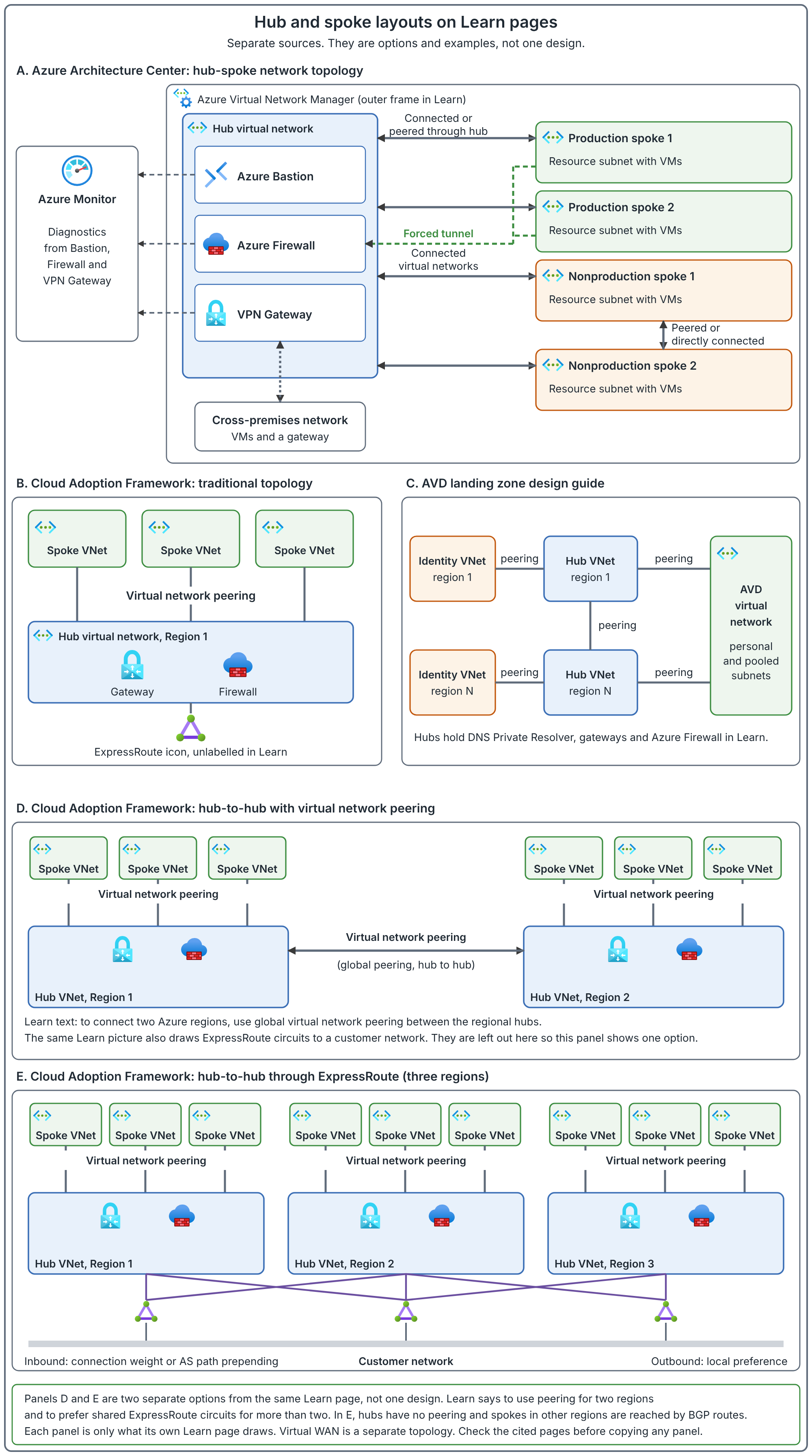
The figure shows the layouts Learn draws, not this article's example. The example in this article puts the firewall, the hybrid gateway and the DNS Private Resolver in the hub, with five spokes for the production, development and test networks from the environment layout earlier, each peered to the hub. That is the author's design choice for this walkthrough. Learn presents other layouts, including directly peered spokes in panel A, so check the pages in the caption before you copy any of them.
Panels D and E are alternatives, not steps. For two regions, Learn says to use global virtual network peering between the hubs. For more than two regions, it recommends connecting the hubs to the same ExpressRoute circuits, and it notes that spokes in different regions then communicate directly and bypass the hub firewall unless you add more specific routes in the spoke route tables or disable BGP propagation on them. Learn also lists Virtual WAN for more than two regions with global transit needs, which is a different topology.
For an AVD deployment, place session hosts in the workload spoke's resource subnet. The hub's VPN gateway supplies a hybrid path when the design uses VPN; ExpressRoute is another hybrid option. The firewall provides the selected traffic-control path. Shared DNS may also sit in the hub or a connected identity network.
The arrows are connections to design, not permission to allow all traffic. For every required application path, confirm routing and security rules. A firewall appears in the hub, but peering alone does not force all spoke traffic through it; routes determine that.
In an existing Azure Landing Zone, identify which of these shared services are already available. The earlier landing-zone foundation can provide them; this AVD post explains the workload's requirements and configuration sequence.
9. Plan address space and subnet capacity
An address prefix such as 10.40.1.0/24 describes a block of IP addresses. A smaller prefix number describes a larger block. The VNet range contains its subnets; those subnets must not overlap one another.
Before reserving a VNet range, compare it with the hub, other spokes, datacenter ranges, connected partners and planned recovery networks. Peered VNets cannot have overlapping address spaces. The ranges in this article are RFC 1918 private placeholders, so none of them is safe to use until that check is complete. Replace them with your approved ranges.
The Cloud Adoption Framework addressing guidance says not to create large virtual networks such as /16, so that address space is not wasted, and notes that you can add address space to a virtual network after you create it. The virtual network FAQ adds that a subnet can be expanded or shrunk only while no VMs or services are deployed in it. So size host subnets up front and leave unallocated space in the reserved block.
For host-subnet sizing, count simultaneously allocated host interfaces, not users. Multi-session users share a host's interface. Count every host NIC that exists, whether its VM is running or stopped. A Resource Manager network interface keeps its private address, dynamic or static, until you change the address or delete the interface, so a stopped VM's interface still holds its address.
Azure reserves five IPv4 addresses in each subnet: the first four and the last. A /24 has 251 usable addresses, a /25 has 123, a /26 has 59, a /27 has 27 and a /28 has 11.
Author's recommendation, not a documented rule. I found no AVD-specific subnet sizing formula, so this is my judgement. Take the peak number of hosts, double it so a full set of replacement hosts can exist beside the old ones during image replacement, then add 50 percent for growth and recovery. Pick the smallest subnet whose usable addresses cover the result.
The estate below reserves 10.40.0.0/21 (10.40.0.0 to 10.40.7.255) for the hub and five spokes. The peak host counts are illustrative planning inputs, not a recommendation that this many hosts serve these users.
| Network | Range | Subnet | Peak hosts | Needed (peak x 2 x 1.5) | Usable |
|---|---|---|---|---|---|
| Hub | 10.40.0.0/24 | Firewall 10.40.0.0/26, gateway 10.40.0.64/26, resolver 10.40.0.128/28 and 10.40.0.144/28 | Not applicable | Not applicable | Service subnets |
| Production: operations (pooled) | 10.40.1.0/24 | Hosts 10.40.1.0/25 | 40 | 120 | 123 |
| Production: engineering (personal) | 10.40.2.0/23 | Hosts 10.40.2.0/24 | 50 | 150 | 251 |
| Production: finance (pooled) | 10.40.4.0/25 | Hosts 10.40.4.0/26 | 18 | 54 | 59 |
| Development | 10.40.5.0/26 | Hosts 10.40.5.0/27 | 8 | 24 | 27 |
| Test | 10.40.5.64/26 | Hosts 10.40.5.64/27 | 8 | 24 | 27 |
Each spoke also has a /28 private-endpoint subnet for the Azure Files endpoint (11 usable addresses, far more than one endpoint needs): 10.40.1.128/28, 10.40.3.0/28, 10.40.4.64/28, 10.40.5.32/28 and 10.40.5.96/28. The on-premises datacenter in the diagram uses 10.10.0.0/16, which does not overlap 10.40.0.0/21.
Engineering gets a /24 because a /25 (123 usable) is less than the 150 needed. Operations just fits in a /25 at 120 of 123. The hub resolver subnets are /28 each: a resolver endpoint subnet must be between /28 and /24, so /28 is the minimum, and each endpoint needs its own subnet delegated to Microsoft.Network/dnsResolvers. Addresses from 10.40.0.160 to 10.40.0.255 and from 10.40.5.128 to 10.40.7.255 are left unallocated for growth, a second region or a new pool.
AzureFirewallSubnet must be named exactly that and be at least /26. The gateway subnet must be named GatewaySubnet; a VPN gateway needs /27 or larger (/29 only for the Basic SKU), and the hub-and-spoke reference guidance suggests /26 or larger, which the /26 in this plan meets. Reserve separate service subnets when the selected services require them, such as a gateway, firewall, Bastion or DNS Private Resolver endpoint. Do not create domain-controller subnets merely because an enterprise picture includes them.
10. Plan growth from 500 to 5,000 users
User count sets the business scope. Concurrency, workload and the chosen desktop model determine host capacity. The network must support the resulting hosts and their traffic, including maintenance and recovery.
| Planning area | Starting with 500 users | Expanding toward 5,000 users |
|---|---|---|
| Users and workloads | Record peak simultaneous sessions, locations and application needs | Reassess concurrency and workload groups per region/site |
| Hosts and IPs | Use measured host capacity; reserve replacement overlap and growth | Check each subnet's NIC demand and reserved regional ranges |
| Network boundaries | Choose subnets from policy, routing and isolation needs | Add boundaries only where scale or requirements justify them |
| Shared services | Check DNS, firewall and hybrid capacity against the pilot | Recheck aggregate traffic, connections and shared-service limits |
| Profiles and applications | Validate login, profile and application paths | Measure simultaneous sign-in and application/profile demand |
| Operations | Establish monitoring, ownership and change records | Automate repeatable deployments and keep policies/routes consistent |
Keep development and test separate as production grows. Add production pool/region spokes from isolation and capacity requirements. Do not multiply the first environment's subnet by ten and assume the design is complete. New locations, application groups and availability requirements can change topology. Conversely, 5,000 users do not automatically require ten spokes.
First establish representative workload capacity. Then calculate peak host interfaces plus hosts retained during replacement, recovery or scaling. Check the resulting address demand per subnet. Separately check measured traffic and concurrent connections against the chosen firewall and hybrid-service capacity.
11. Plan DNS before changing the VNet setting
DNS translates a name into an IP address. The host must resolve public Microsoft service names, application names and the profile-storage name. The chosen resolver must answer all the namespaces the workload needs.
Azure-provided DNS can be a starting point for public names. AD DS joined hosts need domain resolution and connectivity. Entra joined hosts do not need a domain controller simply to join Windows, but an internal application or profile-management operation can still create a domain-service dependency.
For a cloud-only Azure Files private endpoint, prepare privatelink.file.core.windows.net and the appropriate VNet link. The host continues to use account.file.core.windows.net; private DNS makes that normal name resolve to the intended private IP.
In the enterprise example, ask the DNS owner how hosts will resolve both datacenter names and Azure private endpoints. A VPN gives a network path; it does not create DNS forwarding.
Forwarding means sending a query for a particular name suffix to a DNS server that can answer it. For example, private application names go to the company's DNS; Azure private-endpoint names must reach the appropriate Azure private records.
The hub DNS Private Resolver can resolve Azure private zones and forward datacenter queries through its outbound endpoint and rules. Link private zones to the resolver VNet. On-premises DNS can forward relevant Azure namespaces to the inbound endpoint. Avoid forwarding loops.
For this design's FQDN-based firewall network rules, hosts query the hub firewall's DNS proxy. Configure that proxy to use the approved hub resolver. The sequence is host, firewall DNS proxy, then shared resolver. This keeps the host and firewall DNS answers consistent.
Record the resolver addresses, zones, VNet links, forwarding targets and required network access. Test the resolver before applying it to hosts. Existing VMs pick up a VNet DNS change when they are restarted or renew their DHCP lease (ipconfig /renew). Also check for NIC-level overrides.
12. Decide outbound access and security together
Outbound means a connection started by the host toward another destination. A session host with a private address still needs an approved path to the public Microsoft services it uses.
For general internet traffic, the selected design is: session host in the AVD spoke, then the subnet's route to the hub firewall, then permitted outbound access. Azure Firewall can filter destinations and provide source-address translation for public outbound traffic. A separate gateway is not a prerequisite for this firewall path.
Keep the jobs clear: peering connects networks, the route selects the next hop, an NSG permits or denies network flows, and the firewall applies its configured policy. An NSG allow rule cannot create an internet path.
| Traffic | Planned path |
|---|---|
| General internet and approved user web access | Hub firewall, with the required destination rules |
| AVD gateway/broker service path | The documented direct-access exception, with explicit outbound connectivity |
| Datacenter applications | Approved hybrid route and application rules, with a return path |
| Private Azure Files | Private endpoint and working private DNS; TCP 445 permitted |
The AVD exception matters. Sending every AVD connection through a default firewall route can cause disconnections during firewall scale-in. The direct route is covered in the configuration section; it must not silently inherit the general firewall path.
For new VNets using API versions released after 31 March 2026, subnets default to private. Existing networks can differ. A private subnet needs explicit outbound connectivity for public endpoints, including any direct Internet-next-hop exception. Agree that method with the platform team before deployment.
13. Decide the application and profile paths
Write a traffic matrix before anyone creates firewall rules. For the company example, the starting matrix is below. Replace example names and ports with values confirmed by the service owners.
SMB is the file-sharing protocol used for these Azure Files profile connections. TCP 445 is its destination port. A port identifies the service a connection is trying to reach. DNS answering an application's name does not prove its port is reachable, and a reachable port does not prove the application accepts the user's sign-in.
| Source and destination | Path to prepare | Test after creating a host |
|---|---|---|
| Host to AVD/Entra public services | Approved service path, including the gateway/broker exception | DNS and Agent URL Tool |
| Operations hosts to order-processing backend | Approved hybrid route, backend port and return route | Resolve backend name; test port and an order transaction |
| Finance hosts to accounting backend and files | Approved hybrid path; accounting ports and file-service access | Test application sign-in, reporting and authorized file access |
| Engineering hosts to Azure repository | Explicit inter-spoke route and security policy | Resolve repository name; test port and authorized repository access |
| Host to Azure Files profiles | Private endpoint and private DNS; TCP 445 | Resolve storage name; test TCP 445; later test profile mount |
| Host to domain services, if required | Domain DNS and documented service connectivity | Domain-specific tests for the chosen identity model |
| Host to updates/management services | Approved service destinations through outbound policy | Service-specific connectivity and agent health |
A public storage endpoint has a public IP, but network rules and authorization still control access. A service endpoint keeps that public destination while identifying the allowed source subnet. A private endpoint gives the service a private IP in your network.
Choose the storage access method deliberately. A file-service private endpoint does not make the AVD gateway private. AVD Private Link is a separate design. Neither private DNS nor a successful TCP 445 test grants share permissions.
For this design, private profile storage is a stated requirement, so DNS and private-endpoint configuration must be ready before users start using those profiles. Application access is a separate requirement with a separate test.
14. Plan the client path and RDP Shortpath
The user's office or home network must also permit the client's required service access. Configuring only the session-host subnet leaves half of the connection unreviewed.
The base session starts through the TCP reverse-connect path. RDP Shortpath can add UDP transport. For the managed listener model, the client needs a private route to the host, the host listener is enabled, and the chosen listener port, normally UDP 3390, is allowed by the host/network firewalls.
Public-network Shortpath uses direct or relayed UDP. Direct connectivity uses negotiated ports; the default ephemeral range is 49152-65535 within the documented 1024-65535 range. STUN/TURN uses UDP 3478, with the Azure public-cloud relay range 51.5.0.0/16. Review both client and host policies for the selected model.
Do not tell a network team that UDP 3478 alone guarantees every direct UDP connection. Do not add public TCP 3389 as a workaround. Where UDP cannot be established, the connection can fall back to the TCP reverse-connect path.
Choose the intended transport during design, then validate the actual transport during a user pilot. DNS/TCP tests and the Agent URL Tool do not prove Shortpath was used.
15. Plan failure, growth and ownership
Before approval, ask what happens if a shared dependency is unavailable. AVD hosts can be healthy while their resolver, firewall, hybrid link or profile path is unavailable.
Record who owns each service, its chosen availability design, capacity limits and escalation route. Check that network services can support the planned hosts and connections, including replacement periods. Do not assume that adding hosts automatically increases firewall or hybrid-link capacity.
For recovery in another region, reserve non-overlapping ranges and decide how the recovered hosts will reach DNS, identity, applications and storage. A second VNet alone is not a recovery design. Detailed storage and host recovery belong in their own later posts, but their network dependencies must be identified now.
Shared gateways, firewalls and outbound resources also have costs separate from the session-host VM. Include them in the design budget and include retained networking resources in ongoing cost ownership.
Agree how changes are reviewed and deployed. For repeatable environments, keep the approved network values in IaC and verify the resulting associations. Confirm applicable landing-zone policies before deployment: they may control regions, public IP usage or other network settings.
Also decide which evidence operations needs: effective routes, effective security rules, DNS results, firewall decisions and connection-quality measurements. Give each check an owner. This prevents the deployment team handing over a working desktop without a way to diagnose the next failure.
For new flow logging, plan Virtual Network flow logs. New NSG flow logs can no longer be created; existing NSG flow logs are scheduled to retire on 30 September 2027. Include retention and monitoring costs in the operational design.
16. Turn the requirements into a deployment plan
Before opening Create, you should be able to fill in this record for your environment. An unanswered row is a decision still to make.
| Design item | What the approved plan must say |
|---|---|
| Region | Selected region, tested user locations and application/storage considerations |
| Placement | Environment subscription, isolated host-pool VNet/subnet, hub connection and owners |
| Addresses | Approved non-overlapping prefixes; peak/replacement host capacity |
| DNS | Firewall DNS-proxy IP; approved upstream resolver, private zones and forwarding |
| Microsoft service path | Hub firewall policy; AVD route exception and its explicit outbound method |
| Applications | Destination names, protocols/ports, routes and return paths |
| Profiles | Host-region storage, file-service private endpoint, private DNS and TCP 445 |
| Security | NSG associations; inspection choices; firewall policy and route exceptions |
| User transport | Client service access; intended TCP/Shortpath model and pilot checks |
| Operations | Availability, monitoring, cost ownership, IaC and change responsibility |
Before configuration begins, the company must approve the pool-specific spokes, shared DNS and hybrid paths, firewall policy, AVD route exception and private profile-storage design. This record describes the intended configuration; it does not prove that those services have been deployed or tested. Complete it separately for production, development and test, and for each regional network boundary.
Now configuration has a purpose: every resource and setting implements a recorded requirement. The remaining sections show the connection diagram, configuration sequence and validation checks.
Build order: approve ranges and placement; create or reuse the VNet/subnets; establish required peering/hybrid connectivity; prepare DNS; associate security policies and routes; establish explicit outbound; prepare storage/private-service paths; review the saved settings. Then create the first host and test from it before assigning users.
The steps below implement this enterprise design. Confirm that the shared platform services are ready first; creating a host pool cannot supply missing DNS, firewall or hybrid connectivity.
The lab uses one development spoke and its shared-services hub in East US. The lab's saved network configuration is recorded here, not the deployment of the example company's 500-user production estate. Host-side checks are explained separately and must be completed before user rollout. Production and test use their own approved ranges and boundaries.
| Component | Address used in the lab | Purpose |
|---|---|---|
| Hub VNet | 10.30.0.0/16 | Shared firewall and DNS |
| AzureFirewallSubnet | 10.30.0.0/26 | Dedicated firewall subnet |
| Firewall private IP | 10.30.0.4 | Host DNS proxy and general internet next hop |
| Resolver inbound subnet | 10.30.1.0/28 | Dedicated, delegated resolver endpoint subnet |
| Resolver inbound IP | 10.30.1.4 | Firewall's upstream DNS resolver |
| Development spoke | 10.20.0.0/16 | Representative AVD workload network |
| Session-host subnet | 10.20.1.0/24 | Hosts; NSG and route table applied here |
| Private-endpoint subnet | 10.20.2.0/27 | Azure Files private endpoint |
These addresses were checked against the connected VNets in this environment. They are recorded lab values, not a sizing recommendation: the /16 ranges are not the sizing approach described in the address-planning section. Replace them with your approved IP plan.
17. Understand the connection before opening ports
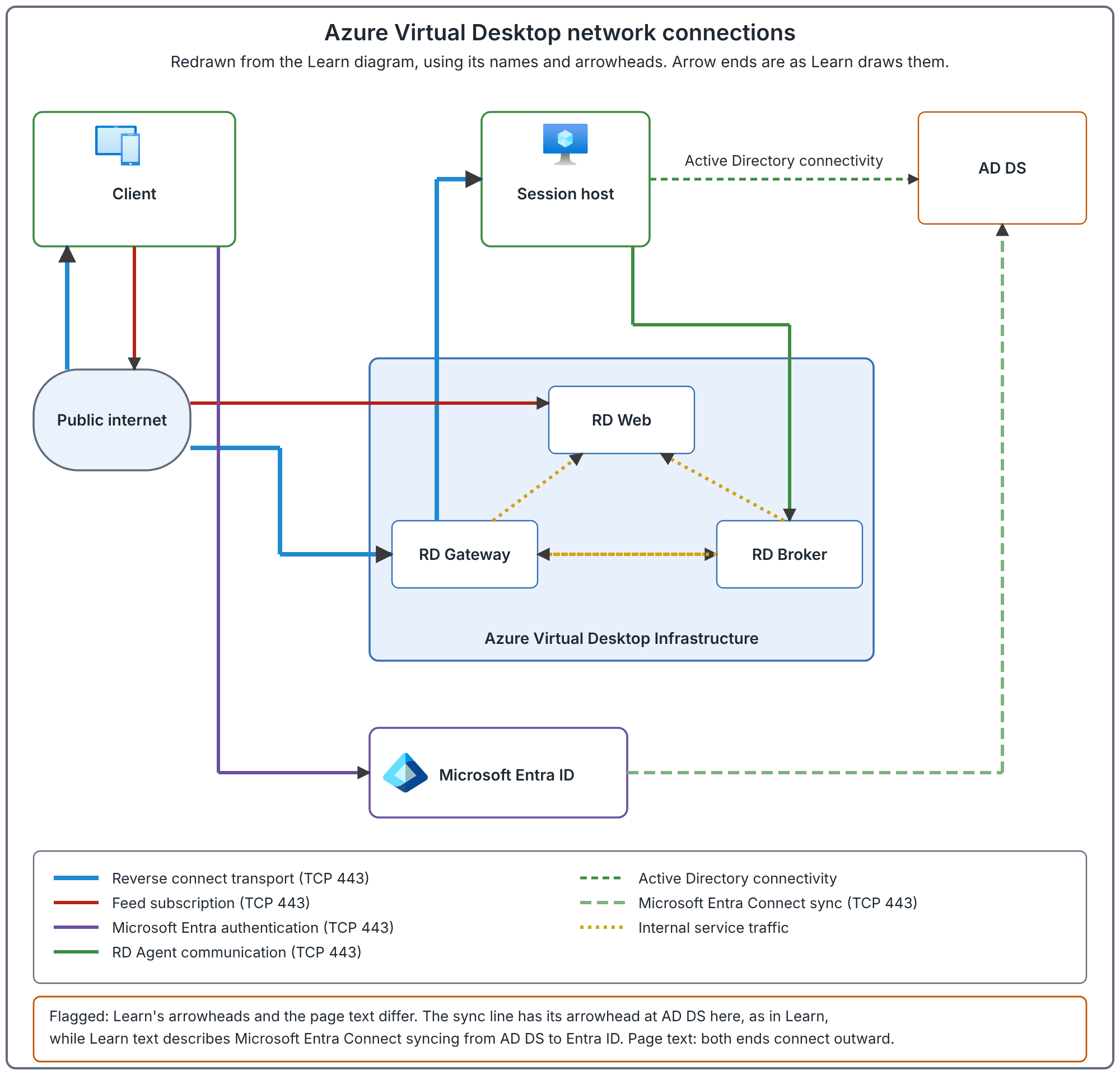
For the base connection, the client and host connect outbound to AVD. Reverse connect joins the session through the gateway. You do not need internet-facing TCP 3389 or a public IP on every host.
Read the authentication, resource-discovery, agent and session paths separately. Application and profile-storage traffic require additional paths.
Microsoft Entra ID handles sign-in. The AD DS and synchronization paths apply to identity designs that use them. Our Entra joined host does not need AD DS simply to join Windows.
18. Create the VNet and host subnet
Have the subscription/resource group, region and approved ranges ready. If the landing zone already provides the required VNet/subnet, validate and reuse it instead of creating a duplicate.
- Open Virtual networks in the portal and select Create.
- On Basics, choose the subscription/resource group. Enter your approved spoke name and region. The screenshot shows the existing development VNet, vnet-avd-dev in East US; production uses its own approved spoke.
- On IP addresses, enter that environment's approved non-overlapping range. The displayed development VNet uses 10.20.0.0/16; do not reuse it for connected production or test VNets.
- Configure the host subnet using its approved prefix. The development example uses snet-sessionhosts at 10.20.1.0/24 (the screenshot below shows the VNet overview, not the subnet list); repeat with distinct ranges for the other environments.
- For this new deployment, keep the private-subnet setting enabled. Prepare the approved firewall and service-exception outbound paths before creating hosts.
- Review and create. Reopen Subnets and confirm the saved prefix.
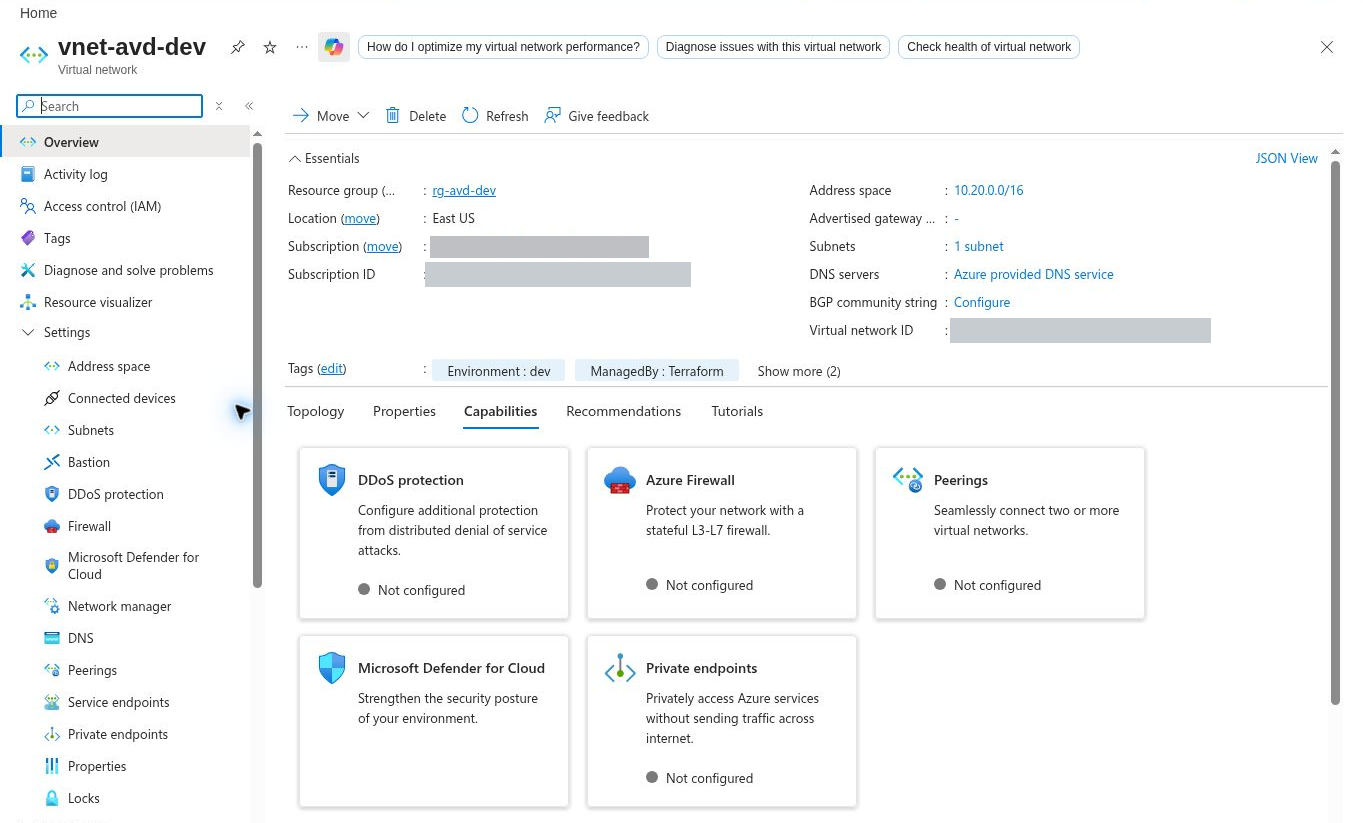
This screenshot shows the VNet and address settings only. The hub peering, central DNS, route table and firewall policy must be configured and verified separately.
19. Connect an enterprise spoke to its approved hub
Agree the hub's resource ID, address ranges, DNS, gateway and firewall arrangement with its owner before creating the peering.
- Open the AVD spoke VNet > Peerings > Add.
- Enter clear names for the two directions, such as avd-to-hub and hub-to-avd. Select the approved remote hub VNet; provide its resource ID if the portal cannot list it.
- Allow virtual-network access where required by the design. Ensure you have the required permissions on both networks to create both links.
- Turn on Allow forwarded traffic on the peering link that receives traffic sent through the firewall. Do this on both links if traffic flows both ways. The setting permits that traffic; it does not create the appliance's routes. A hub gateway arrangement (next step) also needs it.
- If the spoke consumes the hub's VPN/ExpressRoute gateway, configure gateway transit on the hub and remote-gateway use on the spoke as appropriate. The spoke must not have its own gateway for this arrangement. In this arrangement, also allow forwarded traffic on all the peering connections.
- Save and verify both peering links show Connected. Then configure the intended routes and security policies; Connected alone does not prove the datacenter application is reachable.
For the company example, the application's datacenter prefix must be reachable through the shared hybrid path, with a return route to the AVD host prefix. The DNS server must also be reachable and able to answer the application's private name.
A Virtual WAN environment uses its virtual-hub connection and routing model instead of this traditional hub peering walkthrough. Follow the existing platform design rather than attach a second, competing hub.
Record both peering names, their Connected state and the hub owner in the deployment record. Test actual service reachability after the first host is created.
20. Configure the DNS choice
The design uses shared DNS that can resolve public Microsoft names, datacenter applications and Azure private endpoints. Obtain the firewall DNS-proxy address and its approved upstream resolver addresses from the platform/DNS owners. Do not copy addresses from another deployment.
If the platform already provides this resolver, reuse it. If you are creating the shared resolver, first open DNS Private Resolvers > Create. Select the hub resource group, hub region and hub VNet. Add an inbound endpoint in its dedicated, delegated subnet; record its allocated private IP. The lab resolver is named dnsr-avd-hub-eus and its inbound endpoint is 10.30.1.4; no screenshot shows the resolver itself. The subnet is for resolver endpoints, not session hosts.
Link the Azure Files private zone to the resolver's hub VNet. For datacenter application names, also prepare a dedicated outbound-endpoint subnet and a DNS forwarding ruleset with the confirmed name suffixes and reachable corporate DNS targets. The lab resolver has an inbound endpoint for public and Azure private-name resolution; it does not demonstrate corporate DNS forwarding or a hybrid connection.
- Prepare the hub resolver's private zones and forwarding. In the firewall policy DNS settings, enable DNS proxy and select the approved resolver as its upstream DNS server.
- Open the AVD spoke VNet > DNS servers and select Custom.
- Enter the hub firewall's private IP as the custom DNS address for this DNS-proxy design and save.
- Check whether individual NICs override the VNet setting. Restart existing VMs, or renew their DHCP lease with
ipconfig /renew, after a VNet DNS change so they receive the updated settings. - From the first host, resolve a public Microsoft name, the internal application name and the normal Azure Files name. The storage name must return the intended private endpoint IP.
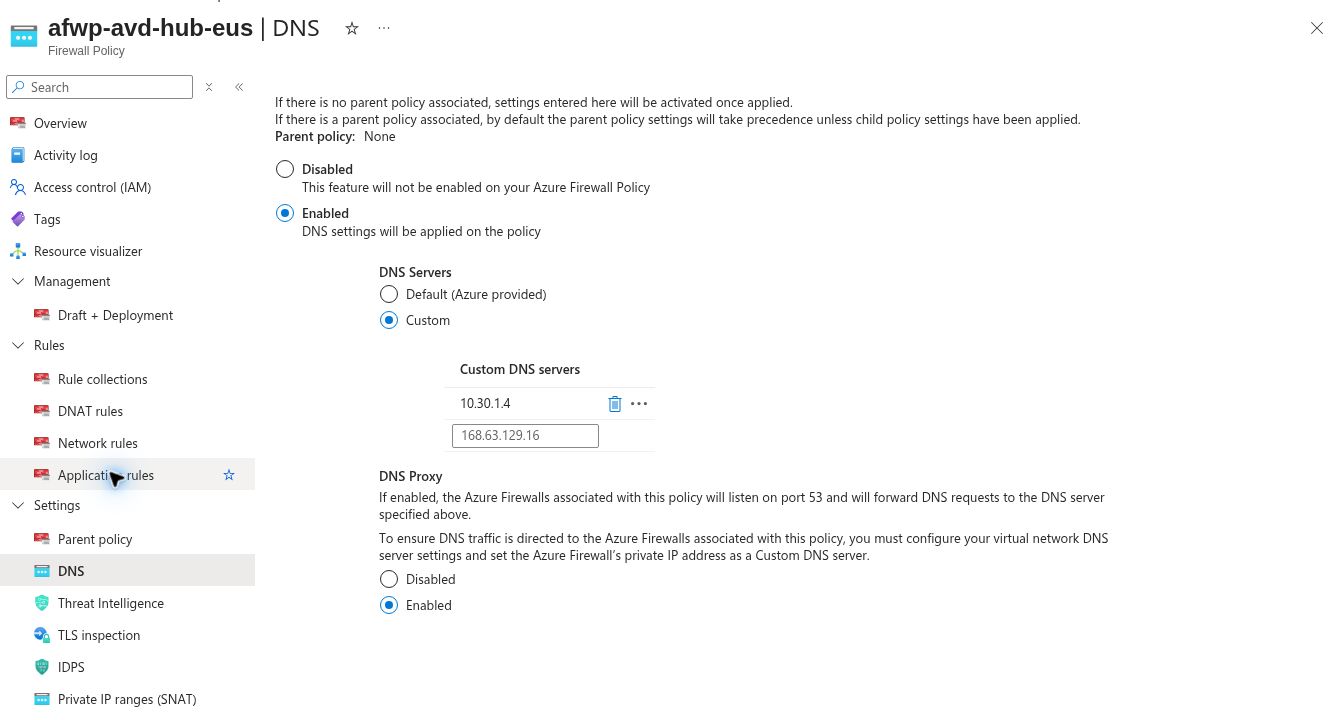
Hosts send DNS queries to the firewall proxy; the firewall forwards them to the shared resolver. The resolver's rules handle datacenter names and its linked zones handle Azure private names. Permit the necessary DNS traffic on this path. A platform that uses direct shared DNS must review its firewall rule model separately rather than mix the two arrangements.
A DNS server's IP address being reachable does not prove its forwarding or private records are correct. Test the names users and applications will actually use.
21. Create and associate the NSG
An NSG permits or denies traffic. A route selects the path. The hub firewall enforces its configured policy. Keep their jobs separate.
- Open Network security groups and select Create in the correct environment subscription/resource group. Use an environment-specific name; the displayed development example is nsg-sessionhosts-avd-dev.
- In the NSG, open Subnets > Associate and choose that environment's VNet and host subnet. The development example uses vnet-avd-dev and snet-sessionhosts.
- Review inbound rules. The base AVD connection needs no public RDP allow rule.
- Review outbound rules and preserve required service and workload access.
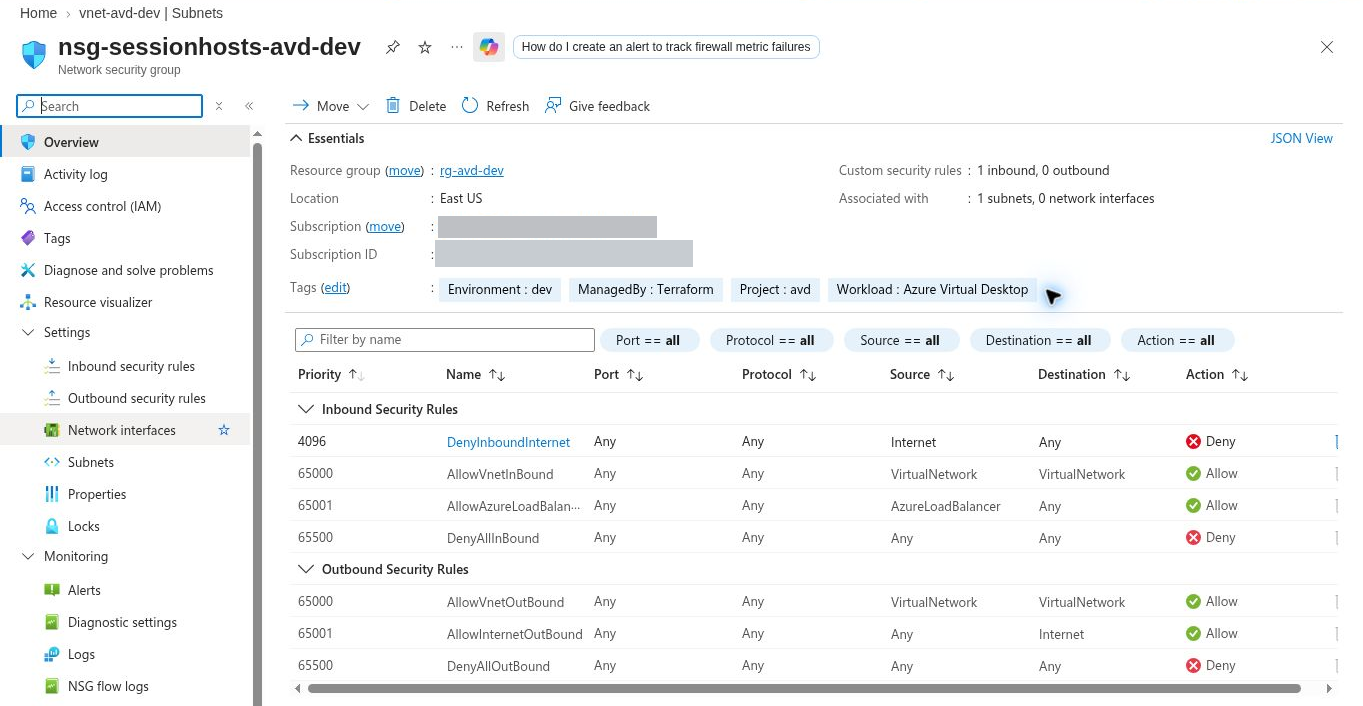
The default outbound allowances shown here are not a destination-restricted enterprise policy. Lower priority numbers take precedence. Where subnet and NIC NSGs both apply, both must allow the flow. Review the VirtualNetwork tag's connected-network scope too.
Before introducing a deny policy, configure and validate the destination allowances in the required-services section.
22. Allow required services before restricting egress
Allow the AVD destinations plus workload dependencies. This is the Azure public-cloud host summary.
| Destination | Protocol and port |
|---|---|
| login.microsoftonline.com; *.wvd.microsoft.com | TCP 443 |
| *.service.windows.cloud.microsoft; *.windows.cloud.microsoft; *.windows.static.microsoft | TCP 443 |
| catalogartifact.azureedge.net; *.prod.warm.ingest.monitor.core.windows.net; gcs.prod.monitoring.core.windows.net | TCP 443 |
| mrsglobalsteus2prod.blob.core.windows.net; wvdportalstorageblob.blob.core.windows.net | TCP 443 |
| azkms.core.windows.net | TCP 1688 |
| oneocsp.microsoft.com; www.microsoft.com; *.aikcertaia.microsoft.com; azcsprodeusaikpublish.blob.core.windows.net; *.microsoftaik.azure.net; ctldl.windowsupdate.com | TCP 80 |
| 51.5.0.0/16, for relayed RDP | UDP 3478 |
Azure Local deployment also uses aka.ms on TCP 443. Clients have a separate endpoint list. Include Entra ID, Microsoft 365, Intune, updates and applications as applicable. Service tags represent IP prefixes; they cannot express every FQDN requirement.
Preserve Azure platform communication: 169.254.169.254 on TCP 80; 168.63.129.16 on TCP 80 and 32526, plus TCP and UDP 53 (port 53 is needed only when you use Azure-provided DNS). Azure uses these two addresses for platform services. Azure platform routing protects this traffic, so standard NSG rules and user-defined routes do not affect it by default. Do not block, intercept, proxy or redirect it.
RDP Shortpath adds UDP after the base TCP session. Managed listener connectivity defaults to UDP 3390 from intended private client networks. Public direct and relayed paths differ; UDP 3478 alone does not prove all direct UDP connectivity. Do not open public TCP 3389 to solve this.
23. Prepare the hub firewall policy
The platform team owns the shared hub firewall. The AVD team supplies the workload source ranges, required destinations and tests. Agree the policy changes before switching traffic onto the firewall path.
- Open the firewall policy associated with the hub firewall and review its rule collection groups.
- Use the approved host subnet prefixes or managed IP Groups as rule sources. Update these when new subnets or regions are added.
- Create the required application and network rule collections. The WindowsVirtualDesktop FQDN tag simplifies applicable AVD application rules; additional required endpoints still need review.
- Add the confirmed Microsoft 365, management, update and application requirements for the users' actual workloads. Do not replace this inventory with an unrestricted allow rule.
- Enable the required DNS/DNS proxy configuration when using FQDNs in network rules. Do not use TLS inspection for AVD traffic.
- Validate allowed and denied flows and examine firewall logs for traffic that actually takes this path. Separately validate the direct gateway/broker exception.
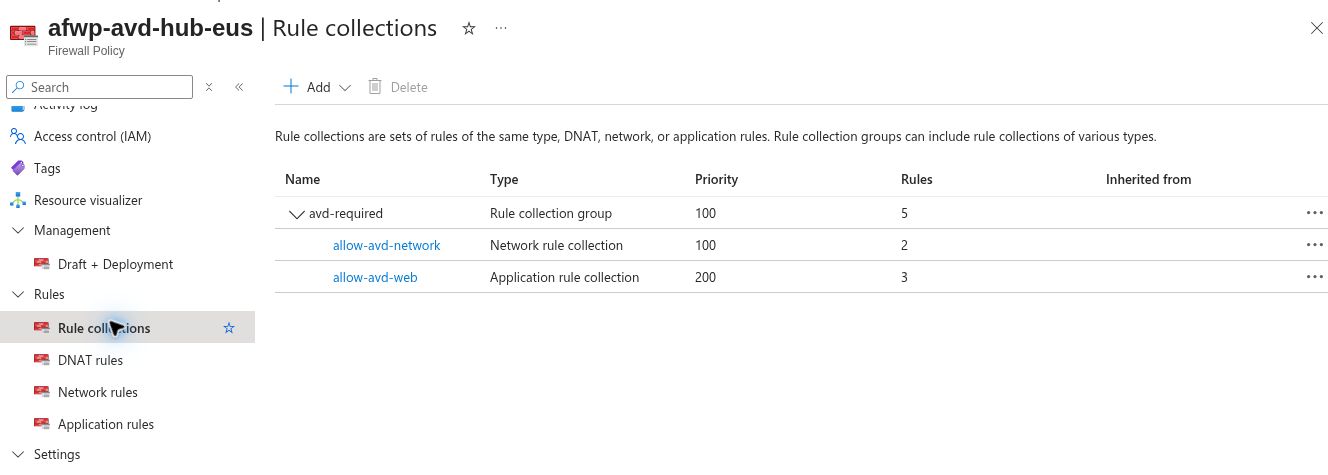
A route can deliver a packet to the firewall while the policy still denies it. Conversely, an allow rule has no effect if the packet takes another path. Check both the route and the policy when diagnosing a failure.
Private application traffic also needs its selected routes and return paths. Public internet filtering does not automatically prove private storage, identity or datacenter access.
24. Configure the host subnet route to the hub firewall
In this design, the host subnet's general internet route (a UDR, see Key terms) points to the hub firewall's private IP. The firewall's public IP is not the next-hop address.
Configure the policy first, then apply routing during an approved change window:
- Obtain the hub firewall's private IP and the platform team's approved route plan.
- Open Route tables > Create, or reuse the approved workload route table. Choose the correct subscription, resource group and region.
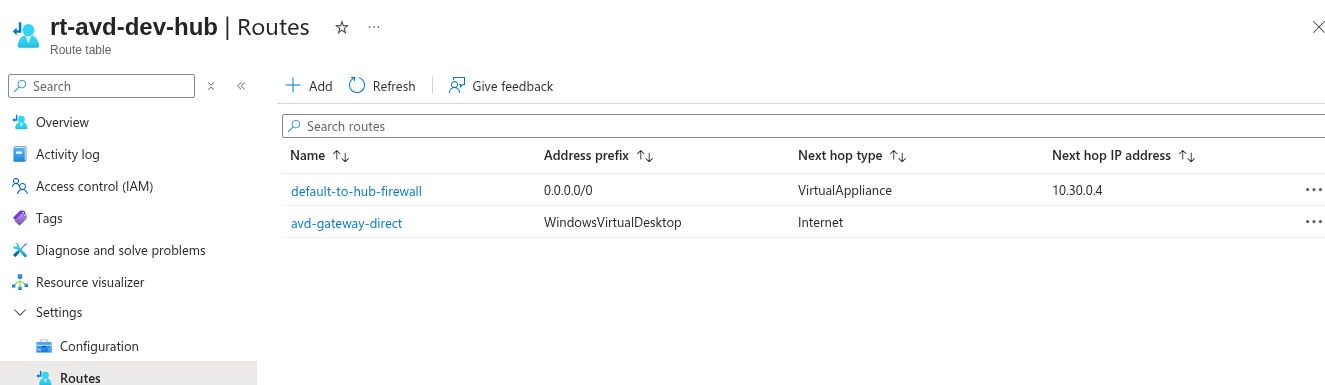
- Open Routes > Add. Name the route clearly, select IP Addresses as the destination type, enter 0.0.0.0/0, choose Virtual appliance and enter the firewall's private IP.
- Open Subnets > Associate and select the AVD spoke VNet and host subnet.
- Review more-specific routes and any propagated VPN/ExpressRoute routes. Configure the gateway-route propagation setting from the approved design rather than disabling it by habit.
- After creating the first host, inspect its NIC's effective routes and verify the selected next hop for representative destinations.
The prefix 0.0.0.0/0 is a default route: it applies when a more-specific route does not match. Datacenter, private-endpoint and AVD service traffic may follow different paths. Route priority and the return path still matter.
When 0.0.0.0/0 points to a virtual appliance, Azure sends all traffic that no more specific route matches to that appliance, including traffic to the public IP addresses of Azure services. A service endpoint adds a longer-prefix route for its service, so that traffic does not follow the default route. Windows activation uses azkms.core.windows.net on TCP 1688, one of the required endpoints, so the firewall policy must allow it.
25. Configure the AVD gateway and broker route exception
Routing all AVD traffic through Azure Firewall's default route can cause disconnections during firewall scale-in. For hub and spoke, the firewall guidance adds a WindowsVirtualDesktop service-tag route with next hop Internet for direct gateway/broker access.
This is an exception to the general hub firewall path, not permission to bypass the firewall for every website.
- Open the route table associated with the AVD host subnet > Routes > Add.
- Select Service tag as the destination type and WindowsVirtualDesktop as the destination service.
- Set the next hop to Internet and save.
- Configure and record the explicit outbound method for this direct path. On a private subnet, an Internet-next-hop route alone does not provide public outbound connectivity. General internet traffic still follows the hub firewall route.
- Verify that the chosen outbound resource is associated with the host subnet and provides source translation for the direct Internet route. Check its capacity for the planned connections.
- After creating the first host, inspect its effective routes and run the required endpoint checks.
The service tag used in routing represents IP prefixes. The WindowsVirtualDesktop FQDN tag used in a firewall application rule is a different feature; it does not create this route.
In the lab, the host subnet already has an explicit outbound resource: nat-avd-dev. It is retained for this narrow direct-service path. The 0.0.0.0/0 route to the firewall overrides that resource for general internet traffic; the WindowsVirtualDesktop Internet route uses it for source translation. It is attached to the spoke subnet, not connected to the hub firewall. This does not make the company's normal internet path a direct path.
The route precedence is: a route to a virtual appliance overrides NAT Gateway; an Internet-next-hop route can use NAT Gateway. A Standard public Load Balancer outbound rule is another supported explicit-outbound method, with its own backend and capacity requirements. Select the method with the platform owner; do not rely on implicit VM internet access or change it without validating the replacement.
26. Prepare profiles and application connectivity
Azure Files SMB profiles need host-to-storage connectivity on TCP 445. A user's AVD gateway connection does not prove this separate path.
For public access, configure the intended storage network policy. A selected-VNet design requires the Microsoft.Storage service endpoint and a storage network rule. Storage IP rules have limitations for same-region Azure-to-storage traffic; validate the selected storage network policy separately.
The lab storage is a classic Azure Files SMB share in a Microsoft.Storage storage account. Its private-endpoint target is the account's file service. Do not use the newer Microsoft.FileShares resource type for FSLogix profiles here: it currently supports only NFS, and FSLogix on Windows needs an SMB share.
For this account-based private Azure Files path:
- In the approved resource group, choose Create and search for Private Endpoint. On Basics, select its name, resource group and the spoke VNet's region.
- On Resource, choose Microsoft.Storage/storageAccounts, select the profile-storage account and choose file as the target sub-resource.
- On Virtual Network, select the approved spoke and private-endpoint subnet. The lab endpoint uses vnet-avd-dev and snet-private-endpoints at 10.20.2.0/27.
- On DNS, integrate with the approved privatelink.file.core.windows.net zone. In this DNS-proxy design, confirm that the zone is linked to the hub resolver VNet, and that the account's A record matches the endpoint IP. Do not create an unrelated duplicate zone in each spoke.
- Review and create. Verify the private connection is Approved and inspect the assigned IP. Approval records the connection; it does not prove the host resolves or reaches it.
- From the host, resolve the normal account.file.core.windows.net name. It must return the intended private endpoint IP, then TCP 445 must succeed.
- Apply the approved public-network policy separately. For private-only access, disable the public endpoint after checking all legitimate clients and management dependencies. A private endpoint does not automatically disable public access.
AVD Private Link is a separate service-connectivity design. An Azure Files private endpoint does not make the AVD gateway path private.
Work through the application list from the planning worksheet. Confirm name resolution, routes and application ports. Where identity/applications depend on domain services, include their documented connectivity requirements.
A successful TCP 445 test proves reachability at that time. Share permissions, file permissions and actual FSLogix mounting still need validation.
27. Apply a deployment readiness gate
Before creating hosts, complete the configuration checks. Keep this decision record with the deployment.
| Check | Ready means |
|---|---|
| Region/addresses | User and application locations considered; range approved; no connected-network overlap |
| Host subnet | Saved prefix, adequate capacity and correct deployment subnet selected |
| DNS | Resolver configured; private zones/forwarding prepared where needed |
| Outbound | Hub firewall route and policy ready; gateway/broker direct exception has explicit outbound connectivity |
| Security/routes | NSG association correct; destinations permitted; intended routes and return paths prepared |
| Dependencies | Required domain, hybrid and private-endpoint configuration completed |
Status of the lab configuration
The screenshots cover only the VNet, NSG, firewall DNS settings, rule collections and routes. The table records the saved status of every item, including those no screenshot shows. The checks after the table remain necessary before this environment can be used as a working reference deployment.
| Configuration | Recorded status |
|---|---|
| Hub and spoke | Peering recorded as Connected |
| Firewall | DNS proxy, upstream resolver and AVD rule collections saved |
| Workload routes | Both routes saved; host-subnet association still pending |
| Spoke DNS | Custom DNS assignment to the firewall proxy still pending |
| Azure Files | Private connection Approved; private DNS record created; public network access still enabled |
| Host validation | DNS, effective routes, endpoint reachability and firewall traffic evidence still pending |
Do not interpret the private endpoint as a private-only storage boundary while public network access remains enabled. Complete the approved storage policy and validate its clients separately. The commands below describe the checks to run; they are not recorded results for the new hub path.
At this gate, retain the saved settings: peering status, DNS values, route-table association, outbound resources, firewall policy and private-zone links. If an existing representative host is available, also test reachability now. Otherwise, DNS responses, effective routes and endpoint results are checked after the first host is created in the next section. A screenshot of a VNet or NSG does not prove the whole hub path works.
For a new deployment, complete the network dependencies before creating hosts. For an existing environment, stage and validate the replacement path before removing the old one.
Use the portal to understand each setting. For repeatable deployments, put the approved values in IaC, review the plan and verify the deployed result. Change Terraform-managed resources through their definition so the code and configuration stay aligned.
28. Test after creating the first host
Before user assignment, test from the first host. An existing representative host can be used to validate a network change. Open Run command, choose RunPowerShellScript and run:
Get-DnsClientServerAddress -AddressFamily IPv4
Resolve-DnsName login.microsoftonline.com
Resolve-DnsName avddevprofiles00001.file.core.windows.net
Test-NetConnection login.microsoftonline.com -Port 443
Test-NetConnection avddevprofiles00001.file.core.windows.net -Port 445
Replace the storage name. Check the returned IP as well as TcpTestSucceeded. A private-endpoint design must resolve to its intended private IP.
Run the Agent URL Tool with its configuration beside it:
$tool = Get-ChildItem 'C:\Program Files\Microsoft RDInfra' `
  -Filter WVDAgentUrlTool.exe -Recurse |
  Sort-Object LastWriteTime -Descending | Select-Object -First 1
if (-not $tool) { throw 'AVD Agent URL Tool not found' }
Set-Location $tool.DirectoryName
& $tool.FullName
The tool tests specific endpoints, not entire wildcard namespaces. Repeat for different regions/paths. Also test application ports and the client's separate service path.
If DNS fails, investigate resolution first. If DNS works but TCP fails, inspect routes, NSGs, firewall and destination restrictions. If TCP 445 works but profiles fail, investigate identity and permissions. After sign-in, validate profile mounting and session transport too.
29. Validate the design before user rollout
Before assigning the desktop to users, validate the four paths introduced at the start of this article.
| Path | Evidence to keep |
|---|---|
| User device to AVD | Client service access, successful sign-in and connection-quality results from representative locations |
| Host to Microsoft services | Approved resolver, effective service routes, required endpoint checks and Agent URL Tool output |
| Host to applications | Correct DNS answer, selected route, permitted port, return path and a successful application test |
| Host to private profiles | Normal storage name resolves to the intended private IP; TCP 445 succeeds; profile mounting and persistence work |
For general internet traffic, confirm the effective route points to the hub firewall and that the policy/logs match the tested destination. Confirm the AVD gateway/broker exception separately. For Shortpath, inspect the actual session transport; the Agent URL Tool does not prove UDP transport.
Test from each environment, region, subnet, DNS path and policy boundary. Confirm that development/test cannot access production hosts or data except through explicitly approved paths. During the user pilot, include representative offices, home connections, workloads and simultaneous demand. One successful session cannot validate a 500-user rollout or a future 5,000-user service.
Record the results and unresolved dependencies. Proceed to host-pool deployment when the network foundation is ready, then complete the host and user tests as those components become available.
Next: Plan Your AVD Host Pools: Users, Applications, VM Sizing and Images. It uses the approved subnet and identity model to size and shape the host pools. Keep these network decisions with the deployment so future growth follows the same approved design.
For hybrid connectivity, egress control and Shortpath tuning in more depth, see the book chapters on hybrid connectivity and egress control and protocol optimisation. Those chapters are still under review.
Go deeper: Required Connectivity for Azure Virtual Desktop, Choose a Network Topology and Plan IP Addresses for Azure Virtual Desktop.
Sources
Required URLs, Azure Firewall for AVD and plan for IP addressing.