In the networking post, we planned the network for AVD. Now we need to decide what the desktops will provide. A call-center agent taking a customer call, a developer compiling code and a mobile employee working in finance applications place different demands on the service. We will follow those differences through the design.
Our example company has 5,000 users: call-center agents, standard business and mobile staff, developers, and specialist users. We will move from the business-owner discussion to application tests, image choices and host counts. The output is a plan that another engineer can understand and build from. The company, its teams and every number in the worked example are made up for illustration. Nothing here is a real customer or a measured result.
Key terms
| Term | Meaning |
|---|---|
| Host pool | A group of Azure virtual machines registered to Azure Virtual Desktop as session hosts and managed together. |
| Session host | A virtual machine that runs Windows and the applications users connect to. |
| Pooled | A host pool where users connect to any available host, so several users can share one virtual machine. |
| Personal | A host pool where each host is assigned to one user. |
| Multi-session | A Windows edition that lets several users sign in to the same virtual machine at the same time. |
| Application group | The part that publishes a desktop or a set of apps from a host pool and controls who can access them. |
| RemoteApp | Publishing selected applications instead of a full desktop; available with pooled host pools. |
| vCPU | A virtual processor, the unit used to count a virtual machine's processing power. |
| Load balancing | The rule that picks which session host receives a new session in a pooled host pool. Breadth-first spreads new sessions across hosts, choosing among those with the fewest sessions, so the spread is not always even. Depth-first fills one host up to its limit before using the next. |
| Maximum session limit | The most sessions one session host accepts. A pool created with breadth-first starts at 999999, which means no real limit. |
| Autoscale | An AVD feature that starts and stops session hosts on a schedule to match demand. |
| Scaling plan | The schedule and thresholds that autoscale follows. |
| Image | The Windows configuration, with its applications, from which session hosts are created. |
| Golden image | The one approved, tested image version from which a pool's hosts are built. |
| Azure Compute Gallery | An Azure service that stores image definitions and their versions and copies them to other regions. |
| FSLogix | Software that keeps a user's profile in a container file on shared storage and attaches it at sign-in, so the profile follows the user between hosts. |
| Validation environment | A host pool setting that receives AVD service updates before other pools. It is for testing only. |
| Deployment scope | A choice made when a host pool is created: whether its metadata is stored regionally or geographically. It cannot be changed later. |
| User input delay | How long a user's input waits in a queue before the application handles it. |
| Persona | My planning term for a group of users with similar application, performance and operating needs. It is not an AVD setting. |
| Session density | The number of simultaneous sessions per host that still meets the agreed user experience. |
| Disconnected session | A session that is still running after the user closed the window without signing out. |
1. Begin with a business-owner questionnaire
Invite the business owner, application owner, representative users and the teams responsible for identity, network, storage and support. Business owners explain the work and its busiest periods. Application owners confirm supported configurations. Users show the tasks that must remain usable when the environment is busy.
Complete one questionnaire per proposed user group. Where an answer is uncertain, record who will supply it and what test will settle it.
| Discuss this question | Record the answer | Decision it supports |
|---|---|---|
| Who will use the service, and from where? | User count, departments, locations, devices and access groups | Personas, host placement and client tests |
| How does the working day run? | Shifts, overlap, busiest sign-ins, seasonal peaks and support hours | Concurrent sessions and running capacity |
| Which business applications are used together? | Names, versions, plugins, integrations and common task sequences | Application compatibility and image content |
| What does each application vendor support? | Windows version, multi-session use, licensing and any dedicated-machine requirement | Pooled or personal; OS selection |
| Where are the application data and services? | Servers, databases, file services, names, ports and owners | Network and storage dependencies |
| How do the applications authenticate? | Sign-in method, domain/Kerberos dependencies and service accounts | Check the identity choice against the actual apps |
| What must remain after sign-out or host replacement? | User settings, working files, application state and machine-specific changes | Profile, data and desktop persistence |
| Do users customize their machines? | Toolchains, installation needs and approved elevation process | Desktop model and management controls |
| Do they need calls, graphics or peripherals? | Softphone, Teams, monitors, printing, scanners, USB devices or GPU requirements | Image components, client support and test workload |
| What performance will the business accept? | Targets for sign-in, application launch and important business transactions | Test acceptance criteria |
| What interruption can the business tolerate? | Maintenance windows, recovery objectives and agreed startup delays | Spare capacity and rollout plan |
| What isolation and access rules apply? | Data restrictions, application permissions and environment boundaries | Pool, subscription and network separation |
| What growth and budget should we plan for? | New users, applications, regions and expected operating schedule | Capacity forecast and cost review |
Make the answers specific enough to test
For the call-center persona in our illustrative company, the application inventory should describe a complete working sequence: sign in, open the CRM and approved softphone, find a customer, consult the knowledge application, update the case and save the result. Record the versions, supporting servers and the endpoint/headset used for that sequence.
The shift schedule must describe arrivals and overlap, not just the total number of agents. Ask whether the next shift arrives before the previous shift signs out and whether disconnected sessions remain. These answers affect profile attachment and simultaneous session demand.
The workshop produces a requirements record, an application inventory and a list of unresolved questions. Review existing usage data where available, then validate new assumptions through testing.
2. Group users by their work: create personas
A persona is a group of users with similar application, performance and operating needs. A department can contain several personas, and a persona can span several departments.
| Persona | Work to investigate | Questions that change the design |
|---|---|---|
| Call-center agents | CRM, order processing, knowledge tools, softphone and shift changes | Can the apps share hosts? How many agents sign in together? What happens to call quality under load? |
| Standard business users | Office applications, finance/HR clients, reporting and departmental services | Can approved versions coexist? Are reporting peaks or large spreadsheets significant? |
| Mobile or roaming staff | Work from different offices, homes or client sites using approved devices | Is a standard desktop enough? Which client features, profiles and backend access must follow them? |
| Developers | IDEs, SDKs, builds, repositories, test tools and local working data | Are tools standardized? Is dedicated compute or machine-specific customization actually required? |
| Specialist users | CAD, graphics, engineering, analytics or other demanding applications | Does the vendor require a GPU or dedicated machine? What dataset and display configuration must be tested? |
These are starting points for discovery. A developer can use a pooled desktop when the toolchain and working data fit that model. A mobile worker can need a personal desktop if their workload justifies it. The role label does not decide the architecture by itself.
For each persona, record assigned users, expected peak sessions, applications, OS, desktop experience, image needs and acceptance criteria. Confirm the grouping with the business owner before creating pools.
3. Decide the desktop experience and persistence
A session host is the VM running Windows and applications. A host pool groups these hosts.
Pooled: users connect to available hosts. A supported multi-session OS lets several users share a VM. This is a candidate for standardized business desktops, call-center workloads and app-only access when compatibility tests support it.
Personal: a host is assigned to an individual user. Consider it for an established dedicated-machine, customization, performance or isolation requirement. Record the reason rather than assigning personal desktops to every developer automatically.
What does “non-persistent” mean here?
Separate three decisions: whether the user returns to an assigned host, whether their profile survives, and how the host's Windows configuration is maintained or replaced. A pooled host pool does not reset a VM when someone signs out. A VM keeps its own Windows changes until you replace it from an updated image, so plan that image process separately. FSLogix can retain a pooled user's profile when a later session lands on another host.
A full desktop gives users Windows and their applications. RemoteApp, available with pooled pools, publishes selected applications. Choose the experience that fits the tasks: a call-center group working across several tools may need a desktop; a narrowly defined application workflow may fit RemoteApp.
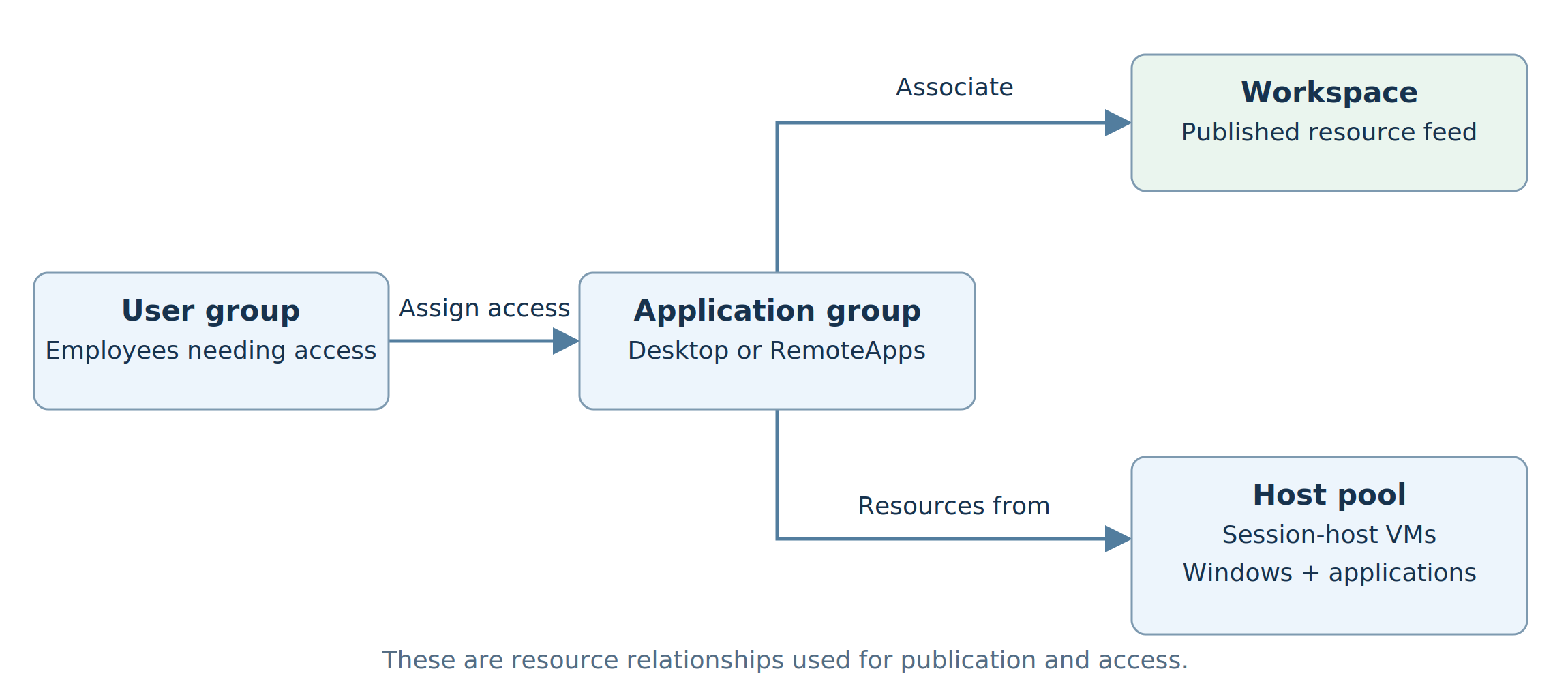
The application group publishes the desktop or apps and controls user access. Its association with a workspace makes the resources available in the user's feed. Record the user group, publication type and preferred application group type. For users assigned desktop and RemoteApp groups from the same pooled pool, the preference determines which type they see.
4. Decide whether to use a common image or workload images
An image is the Windows configuration from which hosts are created. A common image can contain several approved applications. Workload-specific images maintain distinct application sets or configurations. There is no fixed rule that 5,000 users require one image, or that every department requires its own.
Sit with the application owners and test the proposed combinations. Record:
| Check | Example of a decision it can change |
|---|---|
| Supported OS, architecture and multi-session behavior | An application may need a separate OS configuration or dedicated desktop |
| Conflicting versions, drivers, plugins or runtimes | Two workloads may need separate images |
| Application load when used together | A compatible combination can still need a lower session density |
| Release schedule and ownership | A frequently changing development toolchain may need its own image lifecycle |
| Security and application permissions | A shared image does not authorize every user to access every app or backend |
| Installation and delivery method | Decide which apps belong in the image and which use approved separate delivery |
A multi-purpose image means a tested combination of applications. It does not mean installing everything used anywhere in the company. Hosts within a pool should provide a consistent image and configuration.
For our example, call-center, shared business, developer and specialist configurations will be assessed separately. If two configurations later prove compatible and meet the same operating requirements, review whether they can share an image or pool.
How the answers change the image design
Use the application tests to choose the boundary. The following are conditional design examples, not test results.
| Finding in the assessment | Proposed design response | Evidence before accepting it |
|---|---|---|
| Several departments use compatible apps and the same release cycle | Evaluate one common business image and pool | Test the applications together at the intended density; retain department-specific application permissions |
| A required plugin conflicts with another workload's version | Evaluate a separate image and pool for that workload | Confirm the conflict, vendor support and the complete business task on the separate configuration |
| Developers need an approved per-user toolchain and dedicated resources | Evaluate personal desktops with a managed developer baseline | Record the dedicated requirement, build performance, permitted customization and working-data recovery |
| A call-center needs a different voice configuration and release window | Evaluate a call-center image/pool | Test the supported softphone/client combination, real calls and the shift-arrival pattern |
A new image adds build, testing and support work. Name its owner and release process when you decide to create it. A common image also needs an owner who can approve the shared application combination.
Select and release the Windows baseline
Choose an AVD-supported OS and confirm application compatibility. Windows 11 Enterprise multi-session is a supported option for the example's pooled desktops. Select an approved single-session OS for its personal desktops.
A suitable Marketplace image can start the compatibility assessment. A custom image can make approved applications and configuration repeatable. AVD custom image templates use Azure Image Builder. App Attach is another application-delivery option to evaluate where its requirements fit; its suitability still needs application testing.
Release an approved image version
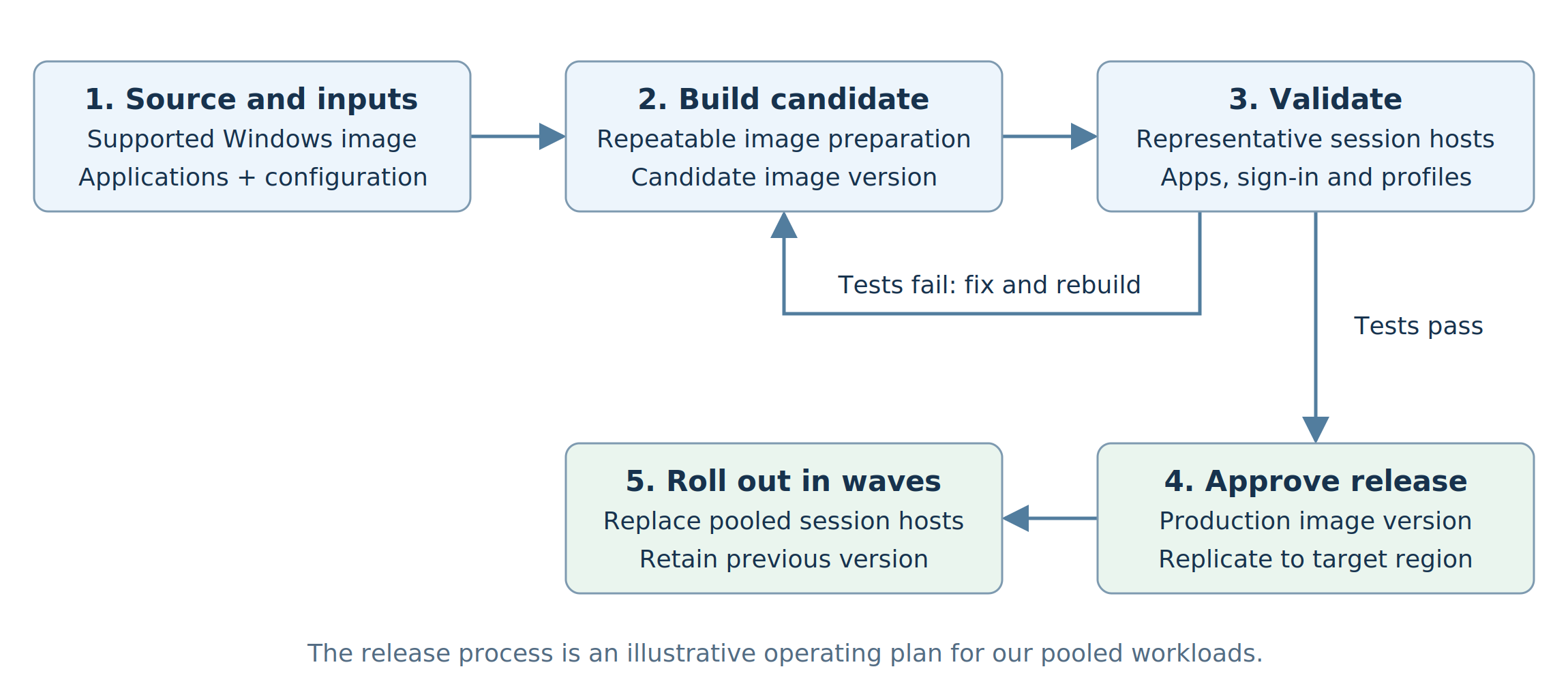
Azure Compute Gallery organizes image definitions and versions. A definition names one image; each version under it is one release of that image. Record the exact approved version (the golden image), build inputs, target-region replication and permissions. Keep production and test images in separate galleries, and plan replicas for the number of VMs created concurrently.
Test new versions before rollout. For pooled replacement, allow temporary old/new hosts, drain the hosts being retired and agree session completion or sign-out arrangements. Drain mode stops new sessions only. A user who already has an active or disconnected session on a draining host is still sent back to it, so sign those sessions out, with notice, before you replace the host. Keep the previous approved image available for redeployment. Image rollback and restoration of user data are separate plans.
5. Choose candidate compute and storage for each persona
A vCPU is a virtual processor. Memory specifications use GiB. Choose candidate VMs from the application's resource needs and the published sizing guidance, then test the intended workload. Also check region availability, VM-generation/security compatibility, graphics requirements and disk performance.
For example, Standard_D8s_v5 has 8 vCPUs and 32 GiB of memory. It is a candidate to evaluate for the example's pooled workloads, not a guarantee of a particular session count. Compare other supported candidates when measurements show a CPU, memory or storage bottleneck. Size developers and specialists from their own build, data or graphics requirements.
Separate host disks, profiles and business data
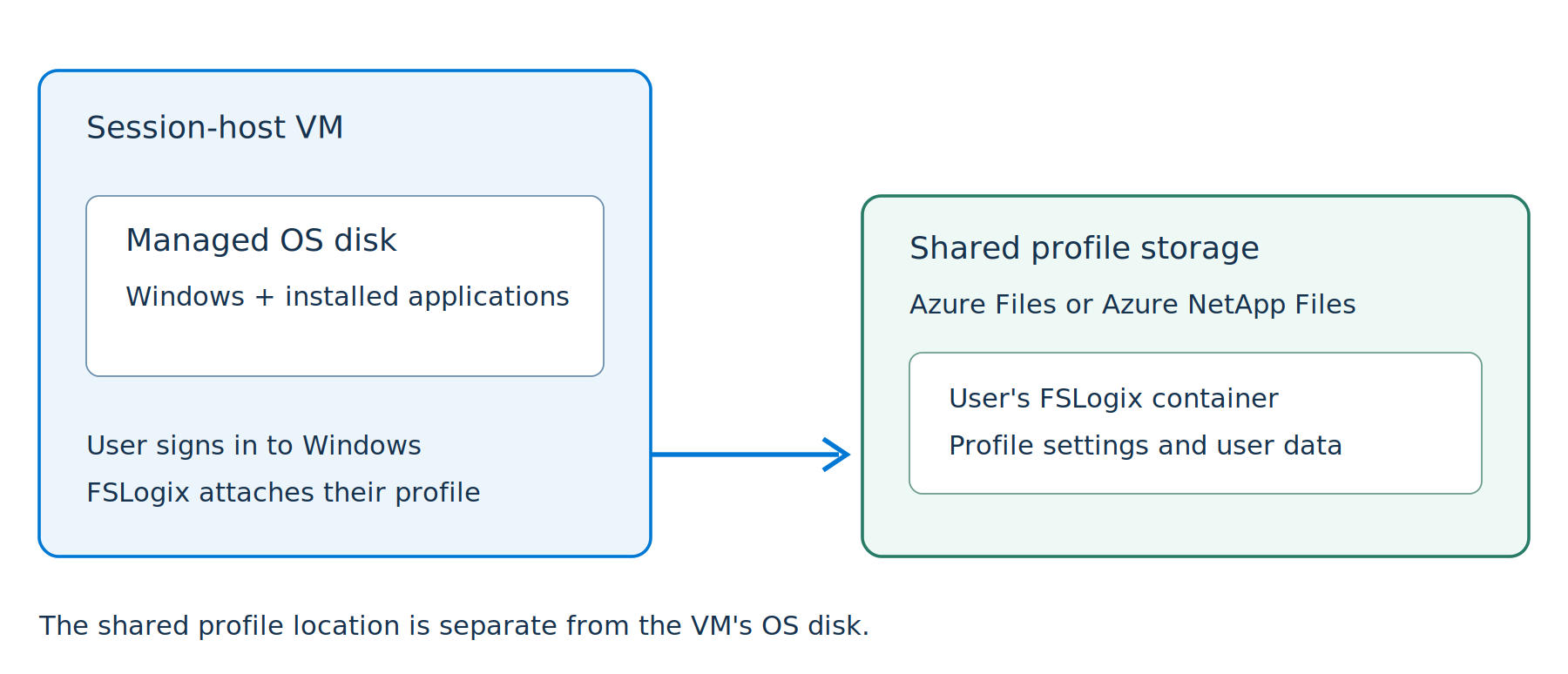
The VM's OS disk holds Windows and applications installed on that host. Record disk type, capacity for applications and updates, and performance requirements. FSLogix profile storage is separate: it holds the user's profile container so their settings can follow them across pooled hosts. Azure Files and Azure NetApp Files are supported options.
Application databases, source repositories, project files and departmental services need their own approved data locations and recovery arrangements. Decide which working data is in the profile and which is elsewhere. Dedicated assignment alone does not protect a personal desktop's data.
6. Test application workloads before deciding host counts
Test two things in sequence: can the application work in the proposed configuration, and how does that configuration behave when many users do real work together? An app that opens for one administrator has not passed a capacity assessment.
Two approaches are documented: pilot and simulation. A pilot increases representative user load while collecting measurements and feedback. Simulation repeats scripted user work and can help assess larger deployments. The sizing tables are initial estimates (the capacity example later shows the multi-session one); application behavior and the busy sign-in period must be measured. Session density here means the number of simultaneous Windows sessions per host that meets the agreed experience.
Which tools can we use?
| Tool or method | Use it for | What the result tells us |
|---|---|---|
| Login Enterprise by Login VSI (third party, unverified here) | Automated application workflows and simulated session load | How logins and business tasks behave as session load increases |
| AVD Insights | Observe session-host resources, connections and user experience during tests | Where demand, host constraints or connection problems appear |
| Windows Performance Monitor | Inspect CPU, memory, disk and supported User Input Delay counters | Which resource or process needs investigation |
| Representative user pilot | Confirm actual working tasks, peripherals, voice/video and usability | Whether the experience meets the business requirement |
| Azure Load Testing with JMeter or Locust | Load-test application/backend endpoints where appropriate | Backend performance under load; a separate test from desktop session density |
Login VSI is one tool people use to simulate users, and Windows Server network guidance names it as an example. Login Enterprise is a third-party product. I could not read its vendor documentation while writing this post, so treat anything about its components, AVD support or limits as an unverified vendor claim. Confirm the licensed version, AVD support and test infrastructure with the vendor before planning a run.
AVD Insights requires a configured deployment and sessions to analyze. Use it alongside application timings and user feedback. User Input Delay measures queued input before the application handles it; it is not an end-to-end network-latency measurement. One sizing page describes user input delay as end-to-end response time, while the counter's own page defines it as time in a queue. This post uses the counter definition.
Azure Load Testing can test endpoints using JMeter or Locust. A web/API test does not establish how many Windows desktop sessions a host can sustain. If the application's backend is slow, test and investigate it separately rather than assuming a larger session host will fix it.
A practical load-test plan
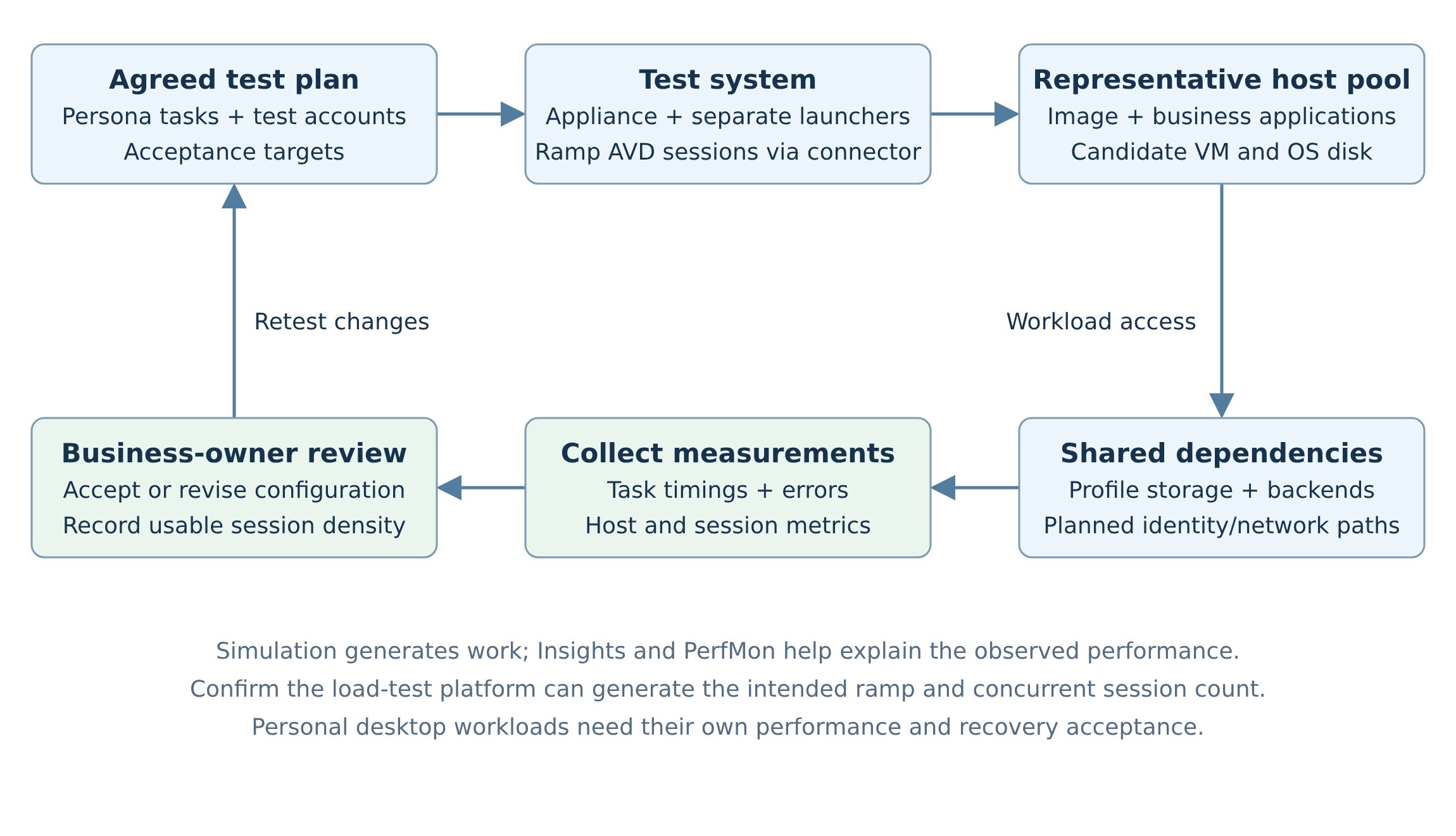
Start with the proposed image and representative identity, profile-storage, network and backend paths. Include production-representative security and management components; the measured configuration must match the intended deployment.
- Agree the business tasks and acceptance targets with the owner. For call-center work, use CRM search, record update, knowledge lookup and the other tasks agents perform together.
- Establish that each task works with one test user. Validate application compatibility and access before increasing sessions.
- Prepare the chosen test platform. Typically this means test accounts, workload scripts, the machines that generate the test sessions and a supported way for the tool to connect to AVD. Confirm the tool's authentication requirements against the intended access policies.
- Record or script the agreed tasks, including realistic pauses and datasets. Confirm that the scripts complete the actual business operation and capture its duration or errors.
- Configure a load test: target connection, test accounts, load-generator capacity, workloads, ramp-up and duration. Begin with a low count and raise load in defined stages while collecting application and host measurements.
- Run both the working-session load and the busiest arrival pattern. Include shift overlap, profile attachment and retained disconnected sessions where they occur.
- Compare results with the agreed targets. Repeat to check consistency; investigate the bottleneck and retest after changing one relevant configuration.
- Obtain business-owner acceptance. Record the chosen VM/image configuration and the session density that remains acceptable. Validate a representative pool as well as individual-host capacity before rollout.
These are planning steps, not results from a real test. The exact installation and authentication procedure follows the vendor's guide for the selected version.
For an illustrative single-host call-center test, we could evaluate 6, 12, 18 and 24 sessions using the same workload. If 18 meets the owner's targets and 24 does not, investigate the cause and evaluate a design at the acceptable density. Those counts are example test stages. They are not published sizing figures and not measured results.
| Measurement | Question it answers |
|---|---|
| Sign-in and profile time | Can the busiest arrival period be handled? |
| Application/task duration and errors | Can users finish the business work within the agreed target? |
| CPU, memory, disk and network | What resource or dependency is limiting the workload? |
| Session count and input responsiveness | What happens as active and retained sessions accumulate? |
| Client, calls and peripherals | Does the actual endpoint experience work for this persona? |
For call-center and meeting workloads, test real calls, headsets and supported client devices as well. Desktop scripts alone do not establish voice quality. Teams media optimization can redirect calls and meetings to supported local clients, so endpoint and optimization configuration are part of the test.
Read the results before changing the VM
Review the same test interval across application timings, host metrics and shared services. Averages across the whole day can hide the arrival burst that causes the complaints.
| Observation during the test | Investigate next | Decision it may change |
|---|---|---|
| Application tasks and input responsiveness degrade as host load rises | Per-host/process CPU, memory and session demand | VM candidate, workload grouping or acceptable density |
| Sign-in slows mainly during the arrival burst | Profile attachment, storage performance, identity and host resources | Storage requirements, arrival capacity or image configuration |
| A business transaction is slow while other desktop tasks remain usable | Its backend, network path and application behavior | Backend/network remediation before deciding whether hosts need resizing |
| Calls fail or sound poor despite acceptable desktop task timings | Real endpoint/client, media optimization and network conditions | Supported client configuration and voice acceptance |
These observations guide investigation; they do not prove a root cause by themselves. Compare changes using the same image, workload and arrival pattern. Keep the selected configuration and acceptance evidence beside the density figure.
Size the test system as well
Ensure the load generator does not become the bottleneck. Check the selected tool's documented limits for concurrent test users and confirm the planned topology with the vendor before a large test. A 5,000-user service does not automatically require one 5,000-session test: assess per-persona demand, then the combined peaks and shared dependencies.
7. Worked example: turn 5,000 users into a proposed design
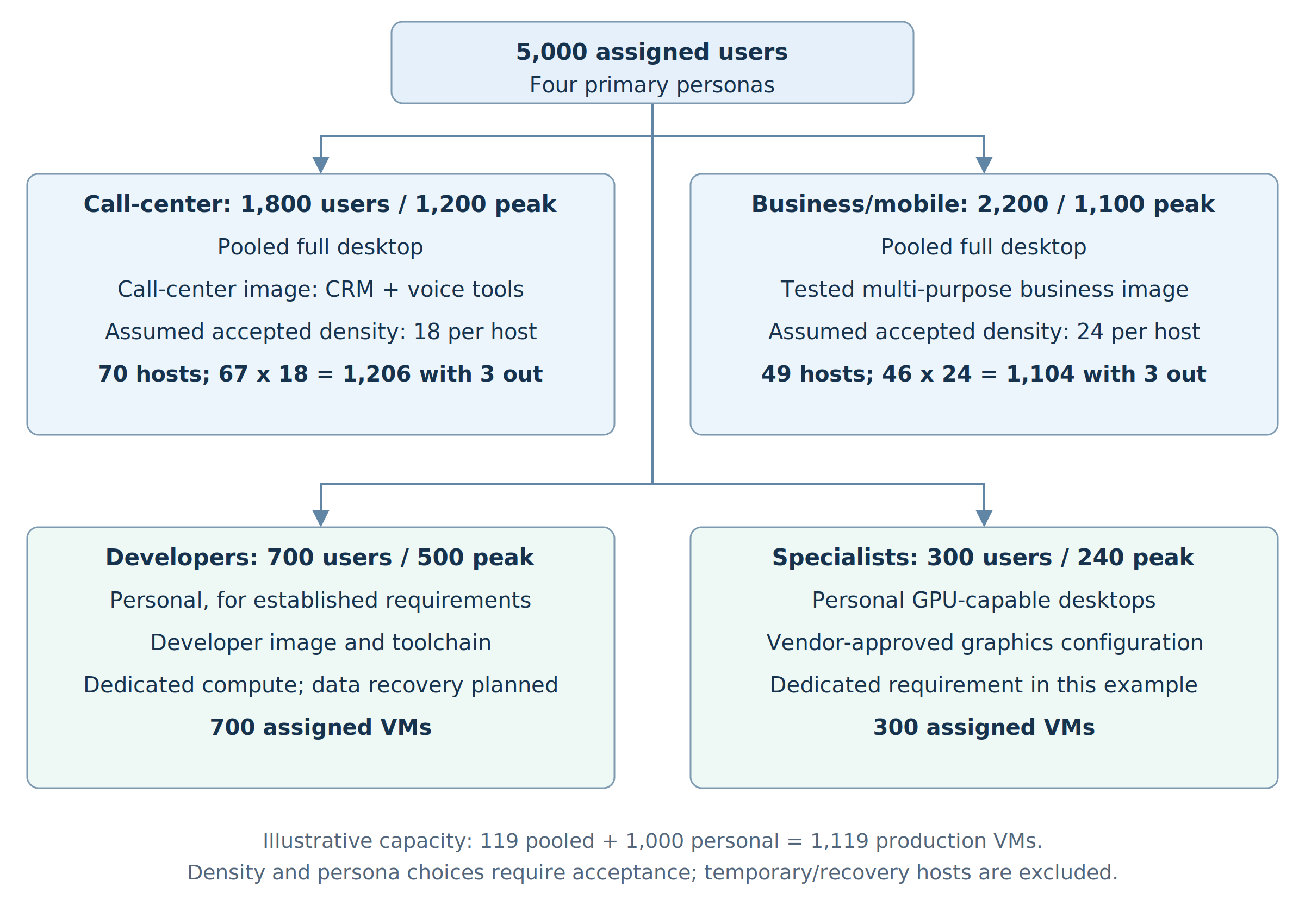
Our illustrative company has four personas in this calculation. Mobile staff share the business pool here, even though the persona table earlier lists them separately. Each person is counted once. The following requirements are assumptions made up for this example. The numbers and acceptance outcomes used for the calculation are assumptions, not results from a real company.
| Persona | Assigned users | Assumed peak sessions |
|---|---|---|
| Call-center agents | 1,800 | 1,200 |
| Standard business and mobile staff | 2,200 | 1,100 |
| Developers | 700 | 500 |
| Specialist design users | 300 | 240 |
| Total | 5,000 | 3,040 |
Assigned users need entitlement and an access plan. Peak sessions drive pooled capacity alongside the working load. Include active and retained disconnected sessions in the session-demand model. Closing a desktop window can leave a session running; agree the relevant sign-out policy.
Step 1: record why each persona gets its desktop
For call-center agents, assume the CRM, knowledge tools and approved softphone support the selected multi-session configuration. The owner needs a full desktop across these tools and a predictable shift-change experience. Propose a pooled call-center pool with a dedicated call-center image and tested density.
For standard business and mobile staff, assume the approved Office and departmental clients coexist. Their working data is in approved services and their profile should follow them. Propose a pooled full desktop using a tested multi-purpose business image. Users needing only selected apps can be assessed for RemoteApp; mobility alone does not require a different pool.
For developers, assume the discovery work established approved per-user toolchains, dedicated compute and machine-specific working configuration. Propose personal desktops with a developer image. If those requirements disappear or a standardized shared toolchain proves suitable, reconsider pooled desktops rather than retaining this decision by habit.
For specialist design users, assume the application vendor and acceptance tests establish a dedicated GPU-capable desktop requirement. Propose a personal specialist pool with an approved graphics image. This is the requirement for this example, not a rule that every specialist needs a GPU.
Step 2: make the image and pool plan explicit
| Proposed pool | Desktop and image plan | Required evidence |
|---|---|---|
hp-callcenter-prod |
Pooled full desktop; call-center image | Multi-session compatibility, shift-arrival test and real call/peripheral acceptance |
hp-business-prod |
Pooled full desktop; common multi-purpose business image | Coexistence tests and representative departmental workload load |
hp-developer-prod |
Personal desktop; developer image | Dedicated requirement, toolchain/build performance and working-data recovery plan |
hp-specialist-prod |
Personal GPU-capable desktop; specialist image | Vendor support, graphics/data/display tests and recovery plan |
The names are illustrative. Record the supported Windows release, exact image version, application list, candidate VM size and access group for each pool. A shared image does not grant access to every installed application or its backend.
Step 3: use acceptable density to calculate pooled hosts
Suppose the call-center test supports a planning target of 18 sessions per host, and the shared business test supports 24. These are hypothetical accepted densities for the worked calculation. They are not claims about D8s_v5 performance.
For context, the sizing guidance lists the maximum suggested users per vCPU for multi-session hosts by workload type:
| Workload type | Maximum users per vCPU | On an 8-vCPU host |
|---|---|---|
| Light | 6 | 48 |
| Medium | 4 | 32 |
| Heavy | 2 | 16 |
| Power | 1 | 8 |
The 18 and 24 sessions per host are my own planning assumptions, not figures from that table. On an 8-vCPU host, 18 sessions is 2.25 per vCPU and 24 is 3 per vCPU. Both are above the heavy ceiling of 16 per host and below the medium ceiling of 32. Which type a persona belongs to is a judgment that testing must confirm, and the table is only an initial estimate.
Divide each pool's peak session demand by its acceptable density and round up. Then apply the agreed maintenance and failure allowance. Do not average the two densities across unrelated workloads.
| Pooled workload | Base calculation | Base hosts |
|---|---|---|
| Call-center | 1,200 / 18 = 66.67; round up | 67 |
| Standard business/mobile | 1,100 / 24 = 45.83; round up | 46 |
Assume each pool must serve its stated peak while two hosts are unavailable for maintenance and one more is unavailable unexpectedly.
| Pooled workload | Planned hosts | Capacity with three hosts unavailable |
|---|---|---|
| Call-center | 70 | 67 x 18 = 1,206 sessions |
| Standard business/mobile | 49 | 46 x 24 = 1,104 sessions |
At peak, plan healthy running capacity for that requirement. If spare hosts are off, record the startup delay and the capacity available while they start. This three-host allowance is specific to the example; zone or regional recovery requires a separate design.
Check sensitivity before approval. If the call-center's acceptable density were only 14, its base requirement would be 86 hosts, or 89 with the same three-host allowance. This is why the application tests come before the production host count.
For the personal workloads, provision for 700 developer assignments and 300 specialist assignments under the stated one-desktop-per-user requirement. Their assumed 500 and 240 peak sessions influence running schedules, but do not reduce the required assigned fleet to those numbers.
The example therefore proposes 119 pooled hosts plus 1,000 personal hosts: 1,119 production VMs. This excludes acceptance-test hosts, temporary image-replacement hosts and additional recovery capacity.
Step 4: check the shared foundation and full cost
If all 119 pooled hosts used the 8-vCPU candidate, they would require 952 vCPUs, before the personal fleet and temporary capacity. Submit quota requirements by region and VM family using the candidate configuration; quota approval does not guarantee a successful VM allocation.
Check subnet capacity, approved hub/spoke routes, DNS, outbound service access and application connectivity from the networking post. Subnet size matters here. With one network interface per VM, the 1,119 production VMs plus up to 119 temporary replacement pooled hosts need about 1,238 addresses (1,119 + 119). A single /24 holds 251 usable addresses, as the networking post explains, so plan several host subnets or a larger prefix.
Keep development and acceptance resources out of the production subscription and network. This is my planning advice. A host pool is only a grouping of VMs and does not isolate them.
The two pooled peaks total 2,300 sessions, and all four persona peaks total 3,040. Check the intended combined test against the test-platform limits described earlier. Per-persona tests establish workload behavior; also validate simultaneous demand on shared profiles, databases and network paths with an appropriately sized test topology.
Send profile/storage owners the persona counts, growth, attachment peaks and performance/recovery requirements. Include image distribution, VM/disks, profile storage, networking, monitoring, required licenses and testing-tool costs in the budget. Review powered-on schedules as well as provisioned resources.
Check current AVD, compute, storage and network limits independently. Repeat the assessment by location if users or application data need additional regions. Serving users locally and recovering from a regional outage are separate requirements.
8. Agree management, validation and rollout
Choose the host management approach before creation. Standard management uses your processes to create, update and scale hosts. Session host configuration, available for pooled pools, uses native AVD lifecycle features. The approach cannot be changed later; tools designed for standard host management must not manage hosts belonging to a pool with session host configuration. Deployment scope is also fixed at creation: you choose regional or geographical (the default) when you create the host pool and cannot change it afterwards. Microsoft's pages disagree on whether regional host pools are generally available or still in preview, so check their current status before you choose.
This series uses standard management for its portal walkthrough and later infrastructure code. Compare approaches against your production operating model before selecting one.
For pooled hosts, breadth-first distributes new sessions; depth-first concentrates sessions toward the configured maximum session limit and requires that limit. A pool created with breadth-first starts with a limit of 999999, so switching to depth-first without changing it leaves no real cap. Autoscale on a pooled pool also needs a real limit rather than the default. Use a limit justified by testing. Load balancing places sessions; autoscale controls available compute according to its configuration. The algorithm you choose in the scaling plan schedule overrides the host pool's setting while autoscale runs. Record minimum running capacity, shift schedules and peak preparation.
Plan a working day, not just a fleet total
For the call-center pool, the shift-arrival requirement drives the running-capacity plan. Before arrivals, allow the measured time needed for hosts to start and become healthy. During shift overlap, retain capacity for the agreed session peak. After users finish, apply the approved sign-out and scaling policy without assuming that a closed window means the session ended.
Record three counts separately: VMs provisioned, VMs powered on, and hosts healthy and accepting the intended sessions. The 1,119-VM example is a fleet count. The running count at a particular time depends on the accepted schedule and availability requirement.
Native scaling plans can express schedules and capacity thresholds. Choose the values after the arrival and startup tests. The later autoscale post will configure them; this planning record supplies their requirements.
An application/image acceptance deployment is different from AVD's Validation environment setting, which receives service updates ahead of non-validation pools. A validation pool is for testing service updates, not for production users, so keep it separate from the four production pools in this example. Plan it deliberately; it does not certify application compatibility or sizing.
Release each accepted persona to an agreed first group. Check actual use, support feedback and measurements, then expand in controlled waves. Define who approves the next wave and the conditions that stop it. Rerun the relevant tests when application versions, images, security components or working patterns change.
9. Finish with a decision record, then prepare storage
For each persona, the planning record should contain the business-owner answers, desktop model and reason, application compatibility, image/version plan, tested VM/disk configuration, accepted density or dedicated requirement, initial fleet, running schedule, maintenance allowance and unresolved dependencies.
For the call-center example, it would record:
| Item | Proposed decision and required acceptance |
|---|---|
| Users and work | 1,800 assigned; 1,200 peak sessions; CRM, knowledge tools and approved softphone |
| Desktop and image | Pooled full desktop; call-center image; supported Windows release and exact version recorded |
| Performance | Candidate compute/disk configuration; 18 sessions per host conditional on the agreed tests |
| Capacity | 70 hosts for the stated peak and three-host allowance; peak running policy recorded |
| Placement and access | Approved subscription/RGs, region, spoke/subnet, identity model and user/application permissions |
| Data and ownership | Profile/backend dependencies, working-data recovery and named business/application/platform owners |
Next: Decide Whether Azure Virtual Desktop Fits. It steps back to the fundamentals this series builds on and checks whether AVD fits the workload. Later articles on Azure Files profile storage, host deployment and FSLogix are not published yet.
Before host deployment, validate that the subnet can reach the required URLs and run the Agent URL Tool on the first host. Keep the assumptions visible until the relevant acceptance tests and connectivity checks are complete.
The book covers these decisions in host pool design decisions and session host sizing. Those chapters are still under review.
Go deeper: Choose the Session Host Operating System and Licensing.
Sources
Terminology, session host sizing guidelines and host pool management approaches.