A business asks for remote Windows desktops. Before anyone designs a host pool, someone has to answer a smaller question: is Azure Virtual Desktop (AVD) the right tool, or would something simpler or different do the job?
This article gives you a way to answer that. It compares AVD with Windows 365 and the other options Microsoft documents, lists the licensing questions to settle first, and describes the situations where AVD is a poor fit. If you do not yet know what AVD delivers, read what Azure Virtual Desktop is first.
Key terms
| Term | Meaning |
|---|---|
| Azure Virtual Desktop (AVD) | A service that runs on Azure and delivers Windows desktops and apps from virtual machines that you manage. |
| Session host | A virtual machine that runs the desktops or apps that users connect to. |
| Multi-session | A Windows edition that lets several users each have a separate sign-in on one virtual machine at the same time. |
| Windows 365 | A Microsoft cloud service that creates a personal Windows virtual machine, called a Cloud PC, for each licensed user. |
| Cloud PC | The virtual machine that Windows 365 creates. It is assigned to one user as their own Windows device in the cloud. |
| Software as a service (SaaS) | A service where the provider runs the software and the customer only uses it. |
| Remote Desktop Services (RDS) | The older Windows Server way of hosting remote desktops, where the organization runs the supporting servers itself. |
| Eligible license | A Windows, Microsoft 365 or Remote Desktop Services license that gives a user the right to use AVD. |
| Per-user access pricing | A pay-as-you-go way to buy AVD access rights for external customers, not for your own staff. |
| Azure Local | A Microsoft platform that runs on hardware in your own datacenter and can host AVD session hosts. |
| Azure Arc | An Azure service that registers machines outside Azure with Azure, so Azure can manage them. AVD Hybrid uses it to register on-premises machines. |
| Reverse connect | The session host opens its connection outward to the service, so users do not need an inbound connection to the host. |
| Host pool | A group of session hosts that serve the same kind of desktop or app. |
| RemoteApp | A way to publish a single application to users instead of a full desktop. |
| Image | A template of a Windows installation, with its settings and apps, that new virtual machines are created from. |
| Autoscale | An AVD feature that adds or removes running session hosts on a schedule or as demand changes. |
| Start VM on Connect | An AVD feature that turns on a stopped session host when a user connects to it. |
| Session host configuration | A way of creating a host pool where AVD itself creates, updates and scales the session hosts from a stored configuration. |
| Microsoft Entra ID | Microsoft's cloud identity service. It always signs in AVD users. |
| Microsoft Intune | A Microsoft cloud service that manages devices and apps. |
| Client access license (CAL) | A license that lets a person or device use a Windows Server remote desktop service. Software Assurance is a Microsoft program that adds upgrade and other rights to a license. |
| Round-trip time | How long a signal takes to travel from the user's network to the Azure region and back. |
| Windows App | The Microsoft app that users run to connect to AVD and Windows 365. |
Start with what you must hand to users
Start from the user's need, not from the product. Four questions about the need narrow the field quickly.
- Do users need Windows desktops or Windows apps that run on a central machine rather than on their own device?
- Is each user fine with one dedicated Windows machine, or should several users share a machine to reduce the number of machines you pay for?
- Who will build, patch and monitor the Windows machines: Microsoft or your team?
- Must the machines stay in your own datacenter, or can they run in Azure?
As a rule of thumb (my judgement, not a Microsoft rule): AVD fits when users share machines or you want control over images and capacity, and your team can run Azure resources. Windows 365 fits when each user is fine with one dedicated machine and you want Microsoft to create it. The sections below give the documented facts behind those two sentences.
What each option is
| Option | What the documentation says it is |
|---|---|
| Azure Virtual Desktop | A desktop and app virtualization service that runs on Azure. It provides multi-session Windows desktops and published apps, with simplified management and scaling. |
| Windows 365 | A cloud-based SaaS that automatically creates Cloud PCs. Each Cloud PC is assigned to one user as their dedicated Windows device. |
| Azure Virtual Desktop Hybrid | The AVD service stays in Azure while apps and desktops are hosted on premises. Session hosts must be registered through Azure Arc. Multi-session Windows, power management, autoscale, Start VM on Connect and session host configuration are not supported. |
| Azure Virtual Desktop for Azure Local | AVD session hosts that run on Azure Local in your datacenter, for example to meet data locality needs or to serve users with poor connectivity to Azure. Host pools, workspaces and application groups stay in Azure, and a host pool cannot mix Azure and Azure Local session hosts. |
| Citrix DaaS | A desktop and app virtualization service from Citrix that you can use to provision Windows desktops and apps on Azure with Citrix and AVD. |
| Omnissa Horizon Cloud on Azure | An Omnissa service that simplifies delivery of virtual desktops and apps on Azure by extending AVD. |
Hosting session hosts on premises changes what you can use. The Hybrid option does not support multi-session Windows or autoscale, and AVD for Azure Local needs a connection to the AVD service in Azure to broker connections. Citrix DaaS and Omnissa are products from other companies. This series covers AVD only, so it does not go further into those two.
The main differences between AVD and Windows 365
Both services give a user a Windows desktop that runs in the cloud. They differ in who creates the machine, how machines map to users and how you pay.
| Question | Azure Virtual Desktop | Windows 365 |
|---|---|---|
| Who creates the machines? | You or your tools create session hosts in your Azure subscription and register them in host pools. | The service creates a Cloud PC automatically when you assign a Windows 365 license to a user in the right Microsoft Entra group. Admins do not create Cloud PCs manually. |
| How do machines map to users? | Pooled host pools can share a multi-session host between users. Personal host pools assign a host to one user. | In the Enterprise, Business and Government editions, each user has a one-to-one relationship with a Cloud PC. The Flex edition has two modes: in shared mode several users use one Cloud PC, one at a time, and in dedicated mode each user has their own Cloud PC but only one is active per license. |
| Which Windows editions? | Windows 11 or Windows 10 Enterprise, with single-session or multi-session, or Windows Server. Enterprise multi-session is documented as exclusive to AVD. | Windows 10 or Windows 11. |
| How do you pay? | You pay for the Azure resources you use (virtual machines, disks, storage and network). Users also need an eligible license. Autoscale can start and stop hosts as demand changes. | A separate license per user for a fixed monthly fee. Additional costs may apply based on network usage. |
| What do you manage? | The image, the virtual machines and the resources around them. You do not manage the gateway and broker. | Microsoft runs Windows 365 as a SaaS service and creates the Cloud PC. The Enterprise edition lets you create Cloud PCs from device images you create, and integrates fully with Microsoft Intune. |
Windows 365 Business is described as made for companies of up to 300 seats. Windows 365 Enterprise is for larger companies and has unlimited seats.
Two points to take from the table.
- Shared machines and autoscale are AVD features. If many users work in shifts and a machine can serve several of them, AVD can reduce the number of virtual machines you run. Windows 365 gives each user their own Cloud PC for a fixed fee.
- Windows 365 removes work. If you do not want to design host pools, images and scaling, a service that creates one machine per licensed user can be simpler. The trade-off is that you choose from what the service offers.
Which of these is cheaper depends on how many people use how much capacity, and on the prices for your agreement. The documentation does not give a single answer, and neither does this article.
Questions to ask, in order
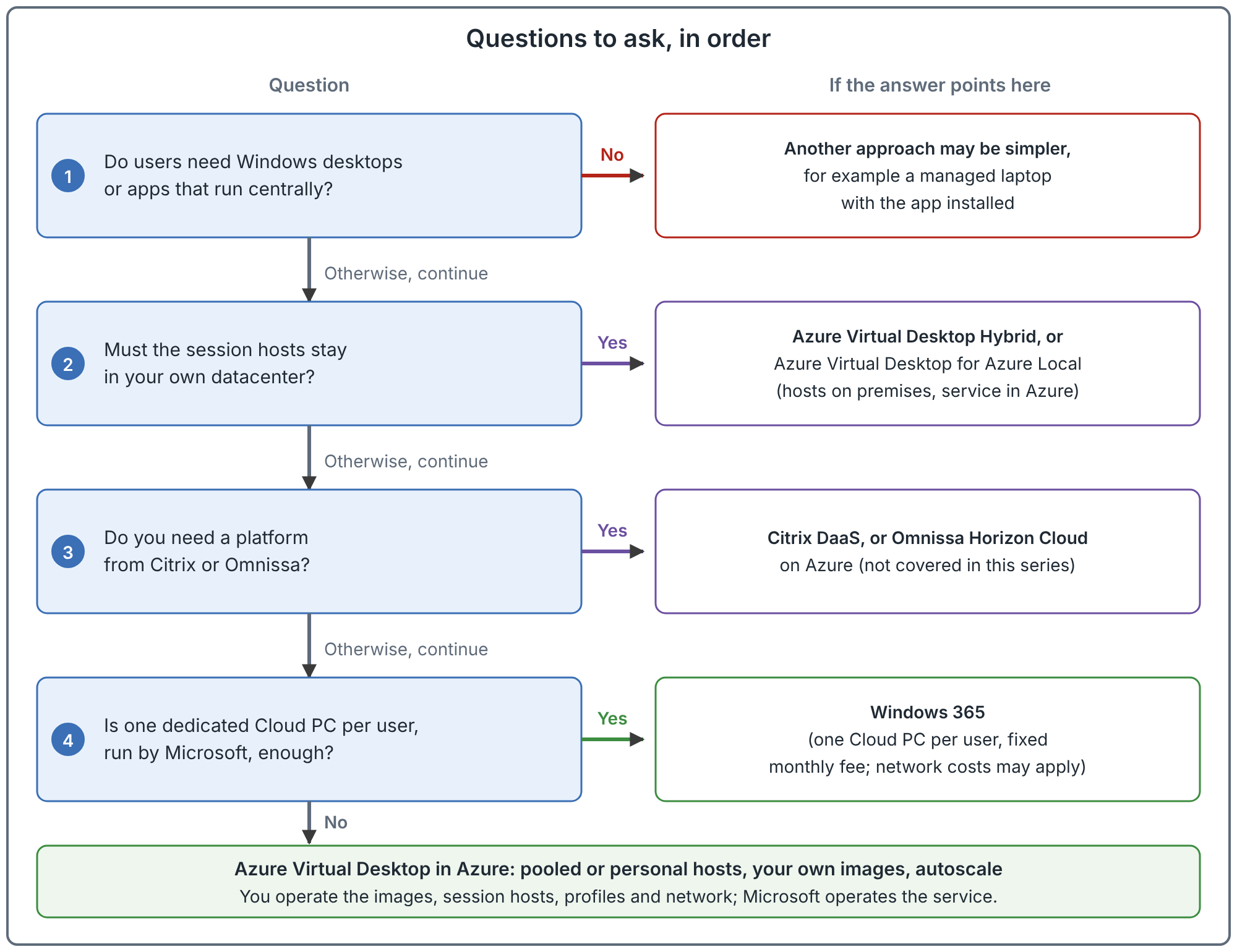
Read the questions from top to bottom and stop at the first match. The order is a recommendation, not a rule from the documentation. Real projects also have constraints the diagram does not show, such as existing contracts and skills.
Settle the licensing questions first
Licensing decides whether a design is allowed, so ask these three questions before you ask about cost.
1. Who are the users? For your own staff, including contractors who work for you, you buy one of the eligible licenses for each user. Per-user access pricing does not apply to contractors. For your own customers, for example when a software company sells remote access to its app, you enroll in per-user access pricing. That option is for external commercial purposes only, not for your own employees.
2. Which operating system will the session hosts run?
| Session host operating system | Licensing method for internal users |
|---|---|
| Windows 11 or Windows 10 Enterprise, multi-session or single-session | Microsoft 365 E3, E5, A3, A5, F3, Business Premium or Student Use Benefit; Windows Enterprise E3 or E5; Windows Education A3 or A5; or Windows VDA per user. |
| Windows Server 2025, 2022, 2019 or 2016 | A Remote Desktop Services client access license (CAL) with Software Assurance (per-user or per-device), or Remote Desktop Services user subscription licenses. |
Per-user access pricing is not available for Windows Server session hosts, so a design for external customers cannot use Windows Server.
3. Do contractors and guests bring their own license? A license assigned to a person in their own home tenant generally does not give them rights in your tenant. The documentation recommends buying the same kind of license that you buy for employees and assigning it to the contractor's identity in your Microsoft Entra tenant.
Licenses for AVD access rights are one line in the bill. The virtual machines, disks, profile storage, network and monitoring are separate Azure charges. The operating system and licensing article goes into the operating system choice in detail.
Situations where AVD is a poor fit
These are scenario-dependent judgements for you to test against your own case. They are not rules from the documentation, except where a source is named.
| Situation | Why AVD may not fit |
|---|---|
| Users need something other than Windows | AVD delivers Windows 11, Windows 10 or Windows Server. The documented list of supported operating systems does not include other desktop systems. |
| The app is sensitive to distance from the user's device | The remote desktop adds a network path between the user and the machine. The prerequisites recommend a round-trip time of under 150 ms from the client network to the Azure region that holds the host pool. If the app needs response times that a remote session cannot deliver, test early. |
| The population is small and uniform | When each user needs one always-on desktop and there is nothing to share, Windows 365 may need less design and operating work. Compare both options with real prices. |
| Nobody owns identity | Microsoft Entra ID always authenticates AVD users, and session hosts must join either the same Microsoft Entra tenant as the users or an Active Directory domain. If the copy of on-premises accounts to Entra ID (directory sync) or the domain is broken or unowned, fix that first. |
| The network is not ready | Session hosts need outbound access to AVD services and to the apps and data users need. A poor path gives users a poor desktop. |
| Nobody can run the platform | With AVD you manage the image and the session hosts. If nobody will own images, updates and monitoring, a service that manages more of the machine may fit better. |
| A required operating system edition is not supported | N, KN and LTSC editions of Windows, 32-bit operating systems and Arm64-based Azure virtual machines are not supported for session hosts. |
| The real need is one application | If users already have managed laptops and need one or two apps, publishing them as RemoteApp or fixing the app may be a smaller step than a full desktop estate. RemoteApp is part of AVD, so this is a scope question, not a reason to avoid AVD altogether. |
What AVD takes off your plate, and what it does not
With AVD, Microsoft runs the web, broker and gateway services. You do not deploy gateway or broker servers the way you do with Remote Desktop Services. You still own the session hosts, the images, the applications, the network, profile storage and recovery. A business case that counts only the removed servers and ignores those items is incomplete. The architecture article shows where the line falls.
AVD also does not need inbound ports. Users and session hosts connect outward to the service (reverse connect). The documentation recommends that you do not open inbound port 3389 on session hosts and do not give them public IP addresses.
Check these requirements before you commit
The prerequisites page lists six things you need:
| Requirement | What to check |
|---|---|
| Azure subscription | An active subscription, and permission to register the Microsoft.DesktopVirtualization resource provider. |
| Identity | User accounts in Microsoft Entra ID, and session hosts joined to the same tenant or to an Active Directory domain. Personal Microsoft accounts are not supported. |
| Operating system | A supported 64-bit operating system and edition. |
| Licenses | An eligible license for every user, or per-user access pricing for external customers. |
| Network | A virtual network in the same region as the session hosts, and outbound access to the AVD service on TCP port 443. |
| Client | Windows App or the Remote Desktop client, on a supported platform or in a web browser. |
A notice on the overview page says Azure Virtual Desktop classic (the older, non-Azure Resource Manager version) retires on 30 September 2026 and that connections to classic resources are blocked after retirement. That date has now passed. This series covers the current Azure Resource Manager-based service.
Common mistakes
- Choosing by headline price. A fixed per-user fee and a pay-for-what-you-use bill are not comparable until you know the number of users, hours of use and size of machines.
- Treating AVD as just virtual machines. The images, profiles, scaling and monitoring are part of the service you operate.
- Leaving licensing until deployment. Windows Server session hosts and external customers each need a different licensing route.
- Counting only compute. Storage, networking, monitoring and non-production environments are real costs.
- Planning around old guidance. Names and capabilities have changed, for example Windows App replacing the Remote Desktop client as the recommended client. Check the date of any source.
How to validate your decision
These steps are a recommendation.
- Write down the user groups, and for each: the apps, the working hours and whether users can share a machine.
- Check licensing for each group using the three questions above.
- Price both a shared AVD design and a one-machine-per-user design with your own numbers.
- Run a small pilot with real apps and real network paths. Judge the experience of the people who will use it.
- Record the decision and its assumptions, so you can see later which assumption was wrong.
Related book chapter and projects
Chapter 1 of the book covers this decision. It has no lab. Project 01 and Project 12 are fictional case studies that apply the decision to a small business and a migration from another platform. Neither is a record of real customer work.
Next: How Azure Virtual Desktop Fails: The Control, Management and Data Planes.
Sources
What is Azure Virtual Desktop?, licensing Azure Virtual Desktop and What is Windows 365?.