The operating system you pick for session hosts decides three things at once: how many users can share a virtual machine, which license covers them, and which tools can manage the host. A common risk (the author's judgement) is choosing the image first and finding the license and management limits later. This article puts the three in the right order.
The fit article introduced licensing as a decision. This one goes through the supported operating systems, the license routes, multi-session behaviour and the limits that surprise people.
Key terms
| Term | Meaning |
|---|---|
| Session host | A virtual machine that runs user desktops or apps. |
| Single-session | One user is signed in to the virtual machine at a time. |
| Multi-session | Several users are signed in to the same virtual machine at the same time. |
| Windows Enterprise multi-session | A Windows 10 or Windows 11 edition that allows many interactive sessions. Microsoft does not allow it in production outside AVD. |
| Windows Server | The server edition of Windows. It also allows many sessions, and uses a different license model. |
| Eligible license | A Microsoft 365, Windows or RDS license that gives a user the right to use AVD for internal purposes. |
| RDS CAL | Remote Desktop Services Client Access License. Windows Server session hosts need one, with Software Assurance, or RDS user subscription licenses. |
| Software Assurance | A Microsoft licensing program add-on. For Windows Server session hosts, the RDS CAL must be covered by it. |
| RDS license server | A server that holds and issues Remote Desktop Services licenses. Windows Server session hosts must be able to reach one. |
| Per-user access pricing | A pay-as-you-go model for external commercial use only. You enroll an Azure subscription and pay for each user who connects. |
| Internal and external commercial purposes | Internal means your own organization, including contractors working for you. External means your own customers, for example when you sell access to a software product. |
| Activation | Proving to Windows that the copy is licensed. |
| Key Management Service (KMS) | A service some organizations run inside their own network to activate Windows. |
| Azure Hybrid Benefit | An Azure setting on a virtual machine that says it uses a Windows license you already own. The license type value on the VM records it. |
| Microsoft Intune | Microsoft's cloud service for managing devices with policies. |
| Group Policy | A Windows way to apply settings to many computers, usually from an Active Directory domain. |
| AD DS | Active Directory Domain Services, the on-premises directory that computers can join. |
| Microsoft Entra Domain Services | A Microsoft-run, managed domain that computers can join without running your own domain controllers. |
| Microsoft Entra hybrid join | A computer joined to AD DS that is also registered in Microsoft Entra ID. It needs Microsoft Entra Connect, which synchronizes accounts from AD DS to Microsoft Entra ID. |
| Azure Local | Microsoft's product for running Azure services, including AVD session hosts, on your own hardware. |
| AVD Hybrid | AVD with the service in Azure and session hosts on premises, registered through Azure Arc. |
| LTSC | Long-Term Servicing Channel, a Windows edition for fixed-function devices. Not supported for session hosts. |
| Azure Compute Gallery | An Azure service for storing and sharing custom VM images. |
Supported operating systems
The documentation lists the supported systems, all 64-bit. This is documented fact.
| Family | Supported |
|---|---|
| Windows client | Windows 11 Enterprise multi-session, Windows 11 Enterprise, Windows 10 Enterprise multi-session, Windows 10 Enterprise |
| Windows Server | Windows Server 2025, 2022, 2019 and 2016 |
Versions must be within the Microsoft lifecycle dates, so check the dates for the exact version you plan to deploy. The documentation also lists what is not supported for session hosts:
- 32-bit operating systems.
- N, KN, LTSC and other Windows editions that are not in the table.
- Ultra disks as the OS disk.
- Ephemeral OS disks. The documentation is not consistent here: the prerequisites page lists them as unsupported, while a separate page on ephemeral OS disks describes support for some pooled host pools. Check the current pages before relying on either.
- Virtual Machine Scale Sets.
- Arm64-based Azure virtual machines.
You can use different operating systems in different host pools. The images can come from the Azure Marketplace (Microsoft's catalog of ready-made images) or from your own images in an Azure Compute Gallery or as a managed image (a saved copy of a generalized VM).
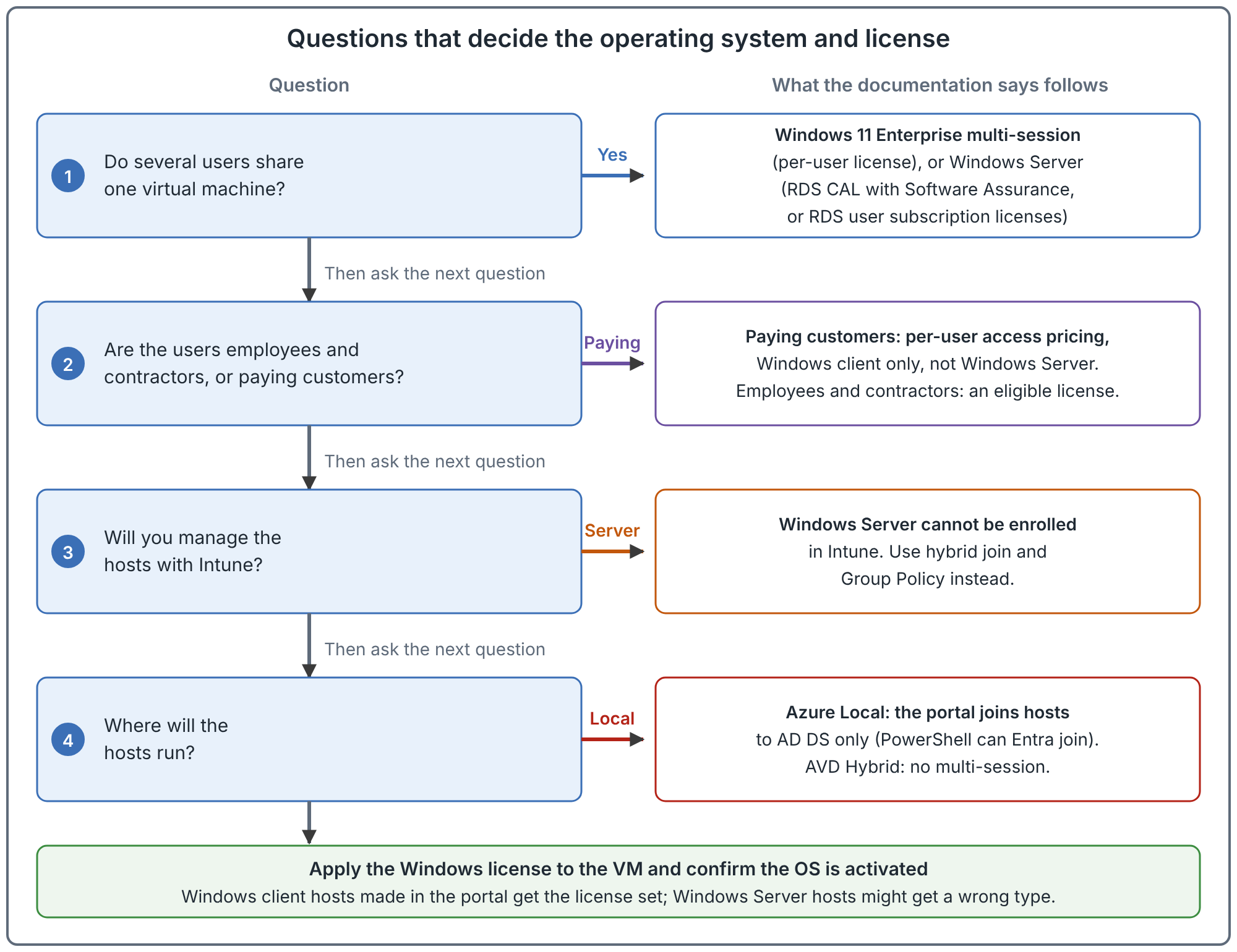
Multi-session or single-session
Windows Enterprise multi-session allows several users in one virtual machine. The documentation says you can use existing per-user Windows licensing for it, instead of RDS CALs. Windows Server also allows several users, but uses RDS licensing.
Documented details that affect design:
- How many users fit on one host depends on vCPU, memory, disk and graphics, and on what users do. The documentation says to validate performance rather than rely on a fixed number. The host pool article covers sizing.
- Multi-session reports itself to applications as a server operating system (the Windows product type value 3, the same as Windows Server). Some installers refuse to run on it. The documentation says to ask the application vendor for an updated version.
- You cannot upgrade an existing Windows Professional or Enterprise virtual machine to multi-session. If you change the product key of a multi-session virtual machine to another edition, you cannot switch it back and must redeploy.
- An in-place upgrade of Windows, for example from Windows 10 to Windows 11, is not supported on session hosts in a pooled host pool.
- Windows multi-session cannot be run in production outside AVD, and it does not activate against an on-premises Key Management Service.
- Remote Desktop IP Virtualization is not supported on the supported images.
- FSLogix is pre-installed on the Marketplace multi-session images. You still configure it.
Recommendation: use multi-session for pooled desktops where users have similar needs and the applications install on it. Use single-session personal hosts when an application will not run on multi-session, or when a user needs a dedicated machine. This is judgement.
The license routes
You must provide an eligible license for each user who accesses AVD. The route depends on the operating system and on whether the use is internal or external. This table is documented fact.
| Session host OS | Internal commercial purposes | External commercial purposes |
|---|---|---|
| Windows client (including multi-session) | Microsoft 365 E3, E5, A3, A5, F3, Business Premium or Student Use Benefit. Windows Enterprise E3 or E5. Windows Education A3 or A5. Windows VDA per user. | Per-user access pricing |
| Windows Server | RDS CAL with Software Assurance (per user or per device), or RDS user subscription licenses | Not supported |
Points that cause mistakes:
- Contractors are internal. A contractor who works for you needs an eligible license. Per-user access pricing does not apply to them. It is also not a way to enable guest accounts.
- Do not confuse external users with external identities. External identities (guest or B2B accounts) are a way to sign in. External users, for licensing, are your customers.
- A license from another tenant does not carry over. For a guest in your tenant, the documentation recommends buying and assigning the same kind of license in your tenant. In a multitenant organization, a license in one tenant generally does not give AVD rights in another, and the documentation recommends a license for each user in each tenant where access is needed.
- Per-user access pricing is separate. You pay through the Azure subscription that you enroll, each billing cycle, for users who connected at least once in that month. There are two tiers, apps only and desktops plus apps. A user is charged at most once per billing period.
- Do not enroll a subscription twice over. The documentation warns that a user with an eligible license in a subscription that is enrolled for per-user pricing is effectively paid for twice. It recommends a separate subscription that is not enrolled for internal users.
- A per-user license is not a full Windows or Microsoft 365 license. It gives access rights to AVD and FSLogix only. It does not include Office or Defender. Other products need their own license.
Dev/Test caveat. The prerequisites page says that, to simplify user access rights during initial development and testing, AVD supports Azure Dev/Test pricing, and that end users in a Dev/Test subscription may connect without a separate license entitlement in order to perform acceptance tests or provide feedback. The page does not name offer types, and this article has not confirmed whether any specific Azure offer qualifies (for example, whether the Dev/Test offer your organization holds is covered). Check the current terms with your licensing contact before relying on it, and do not treat Dev/Test as a way to license production users.
Apply the license and check activation
Having the right entitlement is separate from marking the virtual machine as licensed. Documented points:
- If you create the host pool and session hosts in the Azure portal or with the GitHub Azure Resource Manager template, the license is applied for you.
- For a Windows client session host created another way, you set the license type to
Windows_Clienton the virtual machine. The documentation shows how to read it back, and the value is empty if the license was not applied. - Windows Server session hosts need a Remote Desktop Services license server that they can reach. It can be on premises or in Azure.
- The documentation lists a known limitation: if you create a Windows Server session host through the host pool process, it might assign an incorrect license type. You change it afterwards with the Azure Hybrid Benefit steps for Windows Server that the documentation links.
- On Azure Local, you must license and activate the virtual machines yourself before use. Azure verification for virtual machines is used for multi-session images and Windows Server 2022 Datacenter: Azure Edition. Other images use existing activation methods.
What the operating system changes for management
These limits come from the same prerequisites page and apply to the host, not the user.
| Situation | What the documentation says |
|---|---|
| Hosts joined to AD DS, managed with Intune | You need Microsoft Entra Connect and Microsoft Entra hybrid join. |
| Hosts joined to Microsoft Entra Domain Services | You cannot manage them with Intune. |
| Windows Server joined to Microsoft Entra ID | You cannot enroll it in Intune, because Intune does not support Windows Server. Use Microsoft Entra hybrid join and Group Policy, or local Group Policy. |
| Hosts on Azure Local | You can join them only to an AD DS domain. Microsoft Entra hybrid join is allowed. |
| Policies that disable Windows Installer | Do not set them. The service cannot install agent updates, and the hosts stop working properly. |
The fit article covers AVD Hybrid, which does not support multi-session at all.
Common mistakes
- Choosing Windows Server and then wanting Intune. Server cannot be enrolled. You will manage it with Group Policy.
- Using per-user access pricing for employees. It is for external commercial purposes only.
- Forgetting the RDS license server. Windows Server session hosts need one the hosts can reach.
- Cloning a Windows Professional machine and expecting multi-session. You cannot convert it. Deploy from a multi-session image.
- Building the image on LTSC or N editions. They are not supported for session hosts.
- Assuming the license is applied because the user is licensed. The user license and the VM license setting are two separate things.
How to validate your choice
These are recommended checks to run before you build the pool.
- Write down, for each group of users, whether they are internal or external, and which license they hold.
- Confirm the license type on a test host. For Windows client hosts, the license type should read
Windows_Client. - For Windows Server, confirm the host can reach the RDS license server.
- Install your two most awkward applications on a multi-session image. If an installer refuses, record it before you commit to multi-session.
- Confirm how you will manage hosts (Intune, Group Policy or both) and that the join method supports it.
Related book chapter, labs and projects
Chapter 5 of the book covers operating systems, multi-session and licensing. Lab 8 deploys session hosts with an image and a license type. The lab has not been run end to end in Azure. Project 07 and Project 08 are fictional case studies.
Next: Choose the Client: Windows App, Remote Desktop and the Web.
Sources
Prerequisites for Azure Virtual Desktop, Licensing Azure Virtual Desktop and Windows Enterprise multi-session FAQ.