A user says "it will not connect". That sentence covers at least five different failures. The user may not be able to sign in. The feed may be empty. The desktop may be listed but never start. The session may open and then drop. Or it may open and be slow. Each one points at a different stage of the connection.
This article walks through the documented sequence, explains what reverse connect and RDP Shortpath change, and ends with a table that maps a symptom to a stage and a first check. The architecture article gave the short version. Here each step gets its own explanation.
Key terms
| Term | Meaning |
|---|---|
| Feed | The list of desktops and apps a user is allowed to open. The client downloads it after sign-in. |
| Token | Proof from Microsoft Entra ID that the user signed in. The client passes it to AVD services. |
| .rdp file | A small connection file the client saves for each desktop or app in the feed. |
| TLS | The encryption used on a TCP connection. For connections from clients and session hosts to AVD service components, TLS 1.2 is the minimum. |
| Gateway | A Microsoft-run AVD service. The client and the session host both connect out to it. |
| Azure Front Door | A Microsoft network entry service. In the public cloud, the client reaches an AVD gateway through it. |
| Broker | A Microsoft-run AVD service that decides which session host a connection goes to. |
| Remote Desktop Agent Loader | A service on the session host that starts when the host starts and sets up the persistent channel. |
| Persistent channel | A connection the session host keeps open to AVD so the broker can reach it. |
| Reverse connect | The session host opens the connection to the service. Nothing connects inbound to the host. |
| TCP and UDP | The two ways data crosses the network here. TCP is a reliable, ordered connection and is the base transport through the gateway. UDP sends data without confirming each piece. RDP Shortpath uses UDP. |
| Transport | The network path that carries the RDP session: TCP through the gateway, or UDP. |
| RDP Shortpath | An optional direct UDP path between the client and the session host. The gateway is not on that path. |
| STUN | A service that tells a device its public address, so two devices can try to connect directly. |
| TURN | A relay service used when a direct UDP path is not possible. |
| ICE | A method that tries the possible network paths between two devices, using STUN and TURN, and picks one that works. |
| Conditional Access | Microsoft Entra rules that decide whether a sign-in is allowed, for example by requiring multifactor authentication. |
| Log Analytics | An Azure service that stores monitoring data and lets you query it. |
| NAT | Network address translation. A device translates private addresses to a public one. Double NAT and carrier-grade NAT are configurations to avoid for RDP Shortpath on public networks. |
Before anyone connects
One thing has already happened before a user clicks anything. When the session host starts, the Remote Desktop Agent Loader on the host sets up a persistent communication channel to the AVD service. This is how the broker can later tell a host that a user is coming without ever opening a port on that host. This is documented behaviour.
It also means that a session host that cannot reach the service looks fine in Azure (the VM is running) but cannot take a connection. The failure article covers the host status values that show this.
The twelve documented steps
The documentation describes the connection as twelve numbered steps. The table follows those steps. The third column is the author's judgement about what usually goes wrong at that point. It is not part of the documented sequence.
| Step | What happens (documented) | What can go wrong (judgement) |
|---|---|---|
| 1 to 2 | The client signs the user in to Microsoft Entra ID and receives a token. | Sign-in is blocked or interrupted: wrong account, Conditional Access, or a blocked sign-in endpoint. |
| 3 to 6 | The client passes the token to the feed service, which validates it and returns a signed connection configuration. The client stores that configuration in .rdp files. | An empty or partial feed. Often an assignment, workspace or application group type problem. |
| 7 | The client opens a TLS connection to a gateway. In the public cloud the entry point is Azure Front Door, and the gateways are grouped by response time. | A proxy, firewall or inspection device on the client side breaks or rewrites the TLS connection. |
| 8 | The gateway asks the broker to orchestrate the connection. | No available session host, or a host in the wrong status. |
| 9 | The broker uses the persistent channel to tell the session host a connection is coming. | The host is running but its agent has no channel. The status in the portal usually shows this. |
| 10 to 11 | The session host opens its own outbound TLS connection to the same gateway, and the gateway relays between the two. | The host's outbound path is blocked. The user waits and then gets a generic error. |
| 12 | The RDP handshake starts. | Connection opens but sign-in to Windows is slow or fails, which is a Windows or profile problem and not a connection problem. |
The diagram shows the same sequence with the step numbers from the documentation. The panel at the bottom is the author's reading of the steps.
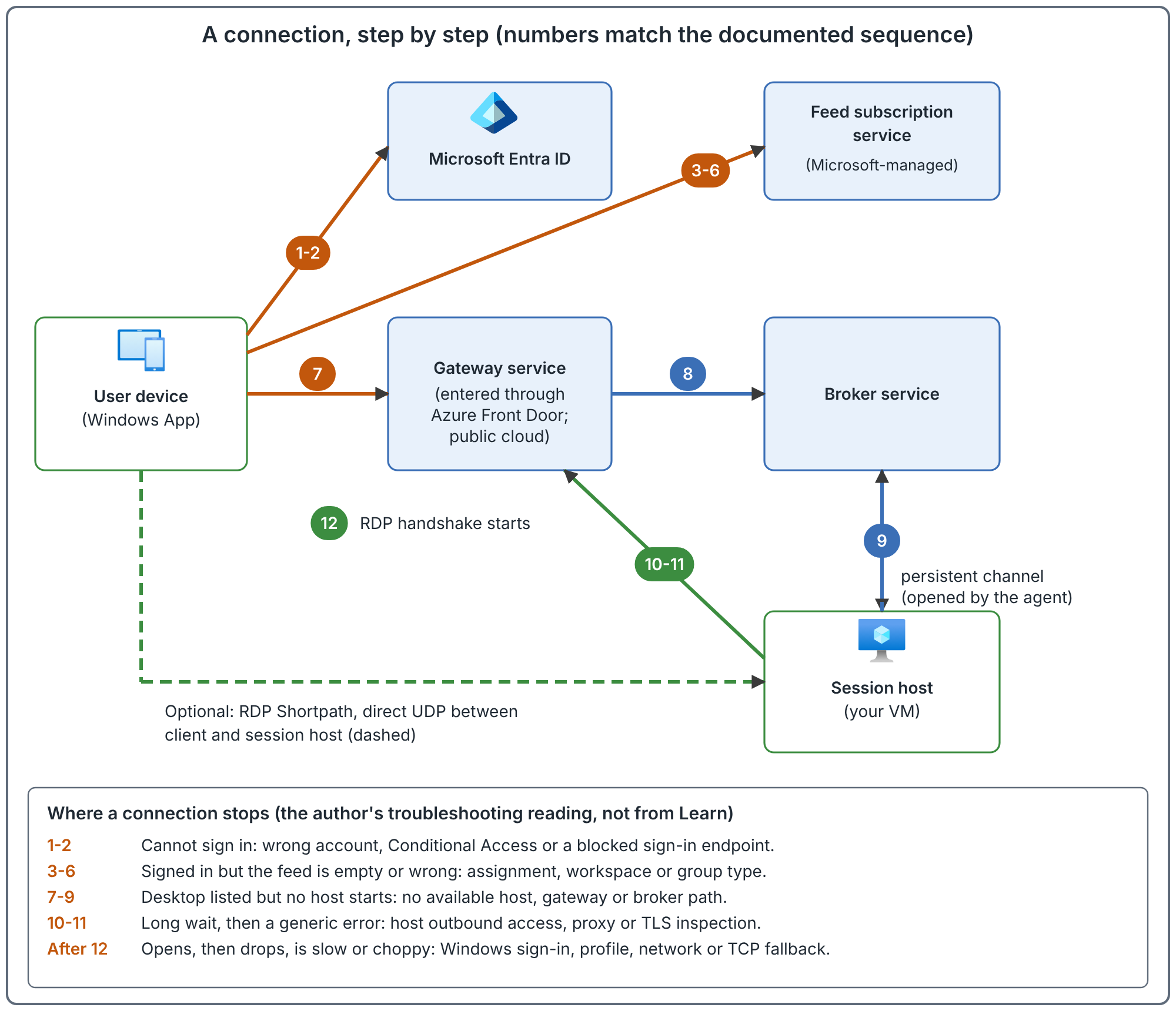
What reverse connect gives and what it costs
The documentation describes reverse connect as the base transport. The session host connects out, so the host needs no inbound port open to the internet for this path.
Documented gain: reverse connect uses no TCP listener for incoming RDP connections, and the required-endpoint list says all session host entries are outbound and no inbound ports need opening for AVD.
Consequence you plan for (judgement): the host's outbound access becomes a hard requirement. If a firewall, proxy or route table blocks the endpoints the host needs, the host cannot hold its channel or open its connection, and no inbound rule will fix it. The connectivity article shows a worked example of the required endpoints.
Two further documented details help with troubleshooting. By default the RDP certificate on the session host is self-generated by the operating system, and certificates from a certification authority are not supported at this time. And the connection uses TLS 1.2 as a minimum and can use TLS 1.3. A device that rewrites TLS in the middle could therefore break step 7 or steps 10 to 11 in ways that look like a service problem (judgement, not a documented result).
RDP Shortpath: the optional direct path
RDP Shortpath adds a UDP path. When it is available, the session moves from the gateway relay to a direct or relayed UDP connection. The documentation describes four ways to get one.
| Option | What it needs | Notes |
|---|---|---|
| Managed networks, direct | A private route between client and host. A listener on the session host, UDP port 3390 by default. | The listener is turned on with Intune or Group Policy. An inbound rule on that port is needed. |
| Managed networks, with ICE and STUN | A private route. The listener is not enabled. | ICE and STUN find usable addresses and a dynamic port, so no inbound port is required on the host. |
| Public networks, STUN | Outbound UDP from client and host so they can find each other's public address. | Works with no extra configuration if the networks allow it. |
| Public networks, TURN | Outbound UDP to the relay range, 51.5.0.0/16 on UDP 3478 (public cloud). | Used when a direct path is not possible. The relay can drop briefly during relay updates, and the client reconnects. |
Other documented details:
- The session host subnet needs outbound UDP from 1024 to 65535. The default range used is 49152 to 65535.
- Both the client and the host must have UDP enabled, which is the default.
- The host pool network setting can allow or disallow each option (managed private, direct, public, relay). When settings disagree, the most restrictive one wins.
- When both a managed and a public path are available, the client uses whichever is established first. This is called the first-found algorithm.
- If UDP is blocked, the connection falls back to TCP through the gateway. The user still connects.
That last point is the one that surprises people. Blocking UDP does not stop the connection. The session stays on TCP through the gateway, so nothing visibly fails and Shortpath is simply absent (judgement: this is easy to miss). The documentation says UDP gives better reliability and more consistent latency, so the cost is a less consistent session, not an outage. For Shortpath on public networks, the documentation recommends avoiding force tunneling, double NAT or carrier-grade NAT, cloud-based packet inspection and TCP-based VPNs, and recommends enabling IPv6 or Teredo. The documentation says some network configurations lower the success rate of the direct connection; which of these will affect yours depends on your network.
Open conflicts that remain. The documentation is not consistent on two points. The RDP Shortpath page says STUN and TURN for Azure Government are in public preview, with the address range 20.140.236.0/22. The configure page says STUN is available in the public cloud and Azure Government but TURN only in the public cloud. This article does not settle that, so check both pages if you use Azure Government. The next section describes a second conflict, in a field name.
How to tell which transport is in use
Do not guess. There are three documented ways to look.
- In the client. The Connection Information dialog shows the transport. It reads "UDP (Private Network)" for a managed path, "UDP" for a STUN path and "UDP (Relay)" for a TURN path. If it shows none of these, the session is probably not using UDP (inference from the other two checks, not a documented statement).
- On the session host, in the event log. Event ID 135 in the
RemoteDesktopServices-RdpCoreCDV/Operationallog records the UDP transport. - In Log Analytics. The connection data records the transport for each connection. The documentation names the field two different ways:
UdpUsewith values 1, 2 and 4 on the configuration page, andTransportTypeon the table reference page. This article does not say which is current. Check the column names in your own workspace before you build a query.
If the transport is TCP when you expected UDP, the documentation lists checks for the Windows client (the fClientDisableUDP setting), for the session host (a transport selection check) and a command-line tool, avdnettest.exe, that checks whether a client can reach the STUN and TURN servers and what type of NAT it is behind. Follow the steps on the configuration page for each.
Where connections break
This table is the author's judgement, built on the documented steps. Use it as a first-check list, not a proof of cause.
| Symptom | Stage | First check |
|---|---|---|
| User cannot sign in | Steps 1 to 2 | Sign-in logs in Microsoft Entra ID. Look for a Conditional Access result. |
| Signed in, feed empty | Steps 3 to 6 | The user's assignment on the application group, and that group is in a workspace. The rules article has the order of checks. |
| Desktop listed, spinner, then error | Steps 7 to 9 | Session host status and health checks in the portal. Is any host available? |
| Fails after a long wait | Steps 10 to 11 | Outbound access from the session host. Check the host against the required endpoints. |
| Opens, then drops after a while | After step 12 | Network quality, an inspection device, or TURN relay updates. Look at the transport in use. |
| Opens, but slow to reach the desktop | After step 12 | Windows sign-in time and profile loading, before blaming the network. |
| Opens, but laggy or choppy | After step 12 | Which transport. TCP through the gateway is the fallback when UDP is blocked. |
For host-side endpoint checks, the documentation offers two tools. The Agent URL Tool, WVDAgentUrlTool.exe, checks the agent's required addresses from the host. It needs .NET 4.6.2 and a recent agent version, the tool and its configuration file must be in the same folder, and it does not verify wildcard entries. Event ID 3701 in the WVD-Agent log under Application lists the region-specific addresses the agent tried to reach.
Common mistakes
- Opening inbound ports on the session host for the base connection. Reverse connect does not need them. They add exposure and fix nothing.
- Blocking UDP and calling it secure. The session still works over TCP, and the documentation says Shortpath offers the same security as the TCP path. You have only removed the direct path and the more consistent latency.
- Putting a TLS-inspecting proxy in front of the AVD endpoints. Connections to AVD use TLS 1.2 as a minimum and, by default, a self-generated certificate on the host. Inspection could break this (judgement).
- Testing from one location and generalising. Shortpath depends on the client's network. A home user behind carrier-grade NAT can behave differently from an office user.
- Reading "VM running" as "host ready". A running VM with no persistent channel cannot take a connection.
How to validate your understanding of the path
These are recommended checks to run in a test environment.
- Connect from a managed network and from a home network. Note the transport shown in Connection Information for each.
- Block outbound UDP for a test client. Confirm the user still connects and note what changed.
- Stop the agent on a test host. Note what the host status shows and what the user sees.
- Run the Agent URL Tool on a host and compare its output with the event 3701 list.
Related book chapter, labs and project
Chapter 4 of the book covers the connection flow. The book numbers the same sequence as thirteen steps of its own, so its step numbers differ from the twelve used here. Lab 3 builds the network the sessions run on. The lab has not been run end to end in Azure. Runbook 01 covers a session host that cannot register, and Project 15 is a fictional troubleshooting case. Neither has been run against a real environment.
Next: Choose the Session Host Operating System and Licensing.
Sources
Understanding Azure Virtual Desktop network connectivity, RDP Shortpath and configure RDP Shortpath.